resume intelligence
1.0.0

استئناف البحث باستخدام الاستعلامات الطبيعية. التطبيق التجريبي باستخدام Openai Rag API و OpenSource VLM نموذج لإجراء التحليل المقارن.
هذا من شأنه أن يساعد شركاء المواهب ومديري الهندسة على الحصول على معلومات محددة من السيرة الذاتية.
الهدف من استئناف الذكاء هو دعم الاستعلام اللغوي الطبيعي على مجموعة من السير الذاتية. يمكن استخدامه لإجراء تحليل مقارن للسير الذاتية. دعنا نقول ، أن لدينا 4 أو 5 سير الذاتية لمهندسي البرمجيات المحتملين بعض الاستعلام ، والتي يجب أن تسمح لك بالفريق
في هذه التجربة ، تحتاج إلى السير الذاتية.
بدلاً من البحث عن بيانات من الإنترنت ، استخدمت API Chagpt لإنشاء سيرة ذاتية.
لقد استخدمت استدعاء وظيفة Openai وإخراج الاستجابة المنظم للحصول على إخراج JSON.
بمجرد أن يكون لديك JSON ، يمكنك تحويله إلى مستند استئناف PDF.
OPENAI_KEY=<substitute your key>
   # Install python packages locally.
   pip install -r requirements.txt
python ui_gen_resume.py يمكن تشغيل هذا المثال على جهاز Windows/الكمبيوتر المحمول المحلي. ليس لديها متطلبات خاصة من حيث GPU ، تحتاج إلى تحديد استئناف 2 من تطبيق واجهة المستخدم ، اكتب في الاستعلام في مربع المطالبة.
وضرب إرسال.
يحتاج المستخدم إلى المفتاح في مفتاح Openai في ملف .env الموجود في جذر المجلد.
. env ملف مثال
   OPENAI_KEY= <openai key>
   vector_store_resume=resume_compare
   MODEL=gpt-4o-2024-11-20
   # individual file is put into vector store if value is FALSE
   CONCAT_PDF=False
   # instruction for assistant is chosen based on this. Possible values ( individual_pdf|concat_pdf)
   INSTRUCTION_ID=individual_pdf
   # Path where generated pdf resumes are stored.
   RESUME_PATH=.\resumes
python ui_resume_compare_multi.py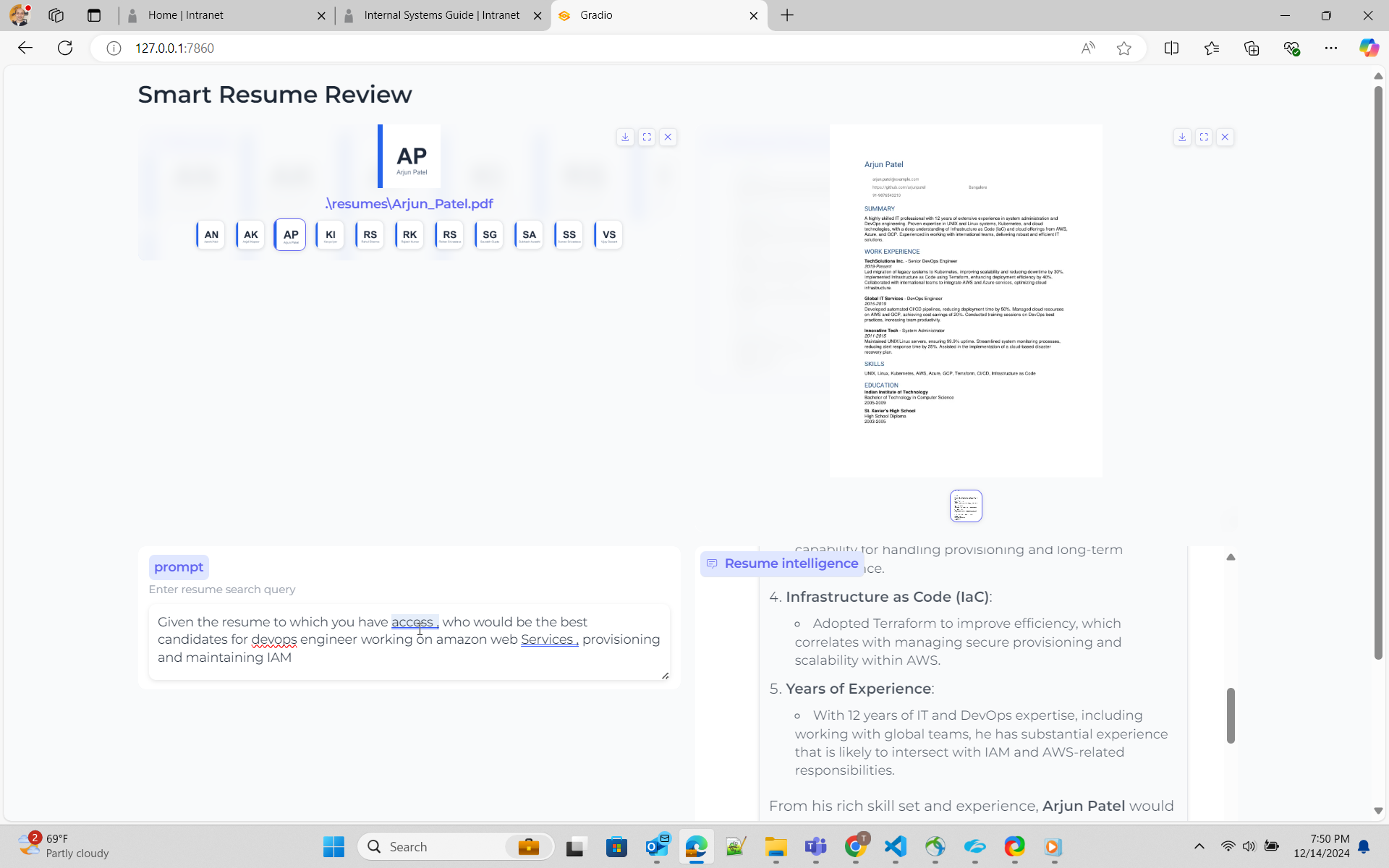
هنا أستخدم أساليب الخرقة
Rag - مع Openai Openai لديه Assant API ، الذي لديه خيار لتخزين تمثيل المتجه للوثيقة والبحث ضد نفسه. ارجع هنا إلى البحث عن ملفات الوثائق حول كيفية استخدام ملفات API للبحث عن الملفات ، لقد أشرت إلى مدونة Simon Wilson الممتازة و GIST قام بعمل رمز عينة
خرقة - مع OpenSource Colpali هذا هو نهج استخدام VLM. أخطط لاستخدام Byaldi الذي يستخدم داخليًا يشير إلى Colpali إلى دفتر الملاحظات ، والذي يحتوي على دردشة رمز عينة مع PDF باستخدام Byaldi ، لم أكن بعد ذلك.
هذا نهج مباشر. استخدم APIs Openai لإنشاء متجر متجه وإضافة جميع مستندات PDF إلى متجر Vector. انشر هذا إنشاء مساعد وإرفاق متجر المتجهات للمساعد
يبدو أن بحث ملف Openai ، لا يعمل بشكل جيد في التجارب السابقة ، للاستعلامات التي تلمس مستندات متعددة. يبدو أن الحل الأولي يتسلل إلى الملفات والتحميل في متجر Vector. ومع ذلك ، كان هذا فهمًا غير صحيح حول كيفية تقديم التعليمات للنموذج
لتحسين الاستجابة ، يعني ذلك أنه يجب تعديل التعليمات أو موجه النظام بحيث تحصل على نتائج صحيحة. هنا هو لي وأنا أطرح النموذج للقيام بالبحث الصحيح.
 You are dilligent assistant specializing in analyzing resume for technology industry . Your goal is to find the a individual resume closely matched per the requirement from user
1. ** location of resume ** - Vector store has resume of individual candidates . Name of the vector store is resume_compare .
2  ** format of resume ** - Vector store has resume of individual candidates in pdf format. Name of the pdf would be firstname followed by underscore last name . E.g Rajesh_Kumar.pdf
3  ** vector store** - Vector store resume_compare belongs to the user/owner, whose is calling the api
4  ** role descriptions** - For job role description such as engineering manager , devops engineer , software engineer , use your knowledge based gained from pre-training.
5  ** Resume Search Strategy** - Search across ALL documents in vector store .Consider partial matches across multiple documents .Use multiple search queries for different aspects (skills, experience, etc.)
6  ** Search Depth ** - Perform multiple searches with varied keywords. Use both exact and semantic matching.
7  ** Result Aggregation ** - Combine result from multiple searches . Cross-reference finding across documents.
8  ** key qualitifications ** - For finding key qualifications or experiences for role/work , use your knowledge base and pre-training.
9  ** resume search** - For Candidates's resume and their capability ,skills , experience for a role/work , you must use file_search tool and attached vector store. Resume will always be present in vector store.
10  ** resume presence** - Resume will always present in vector store attached to assistant . Do not prompt to ask user on resume.
11  ** Dillgence ** - Please search dilligently . you seem to miss the fact that resume files are present in vectore store resume_compare.
12  ** Technical Skills** -  In the resume take a deep look at work experience section .Focus on relevant programming languages, frameworks, tools, and certifications (e.g., Python, Java, AWS, Docker). Highlight these clearly.
13.  ** Job Match** - Compare the resume with provided job descriptions. Focus on matching key technologies ,business and opetational knowledge and job experience, and note areas where the candidate doesn’t meet the requirements.
14.  ** Projects & Experience** - Prioritize large-scale projects or leadership roles in tech teams. Identify open-source contributions or significant technical achievements.





