resume intelligence
1.0.0

자연스러운 쿼리를 사용하여 검색을 재개하십시오. OpenAi Rag API 및 OpenSource VLM 모델을 사용한 데모 응용 프로그램을 재개하여 비교 분석을 재개합니다.
이를 통해 인재 파트너 및 엔지니어링 관리자가 이력서에서 특정 정보를 얻는 데 도움이됩니다.
이력서 인텔리전스의 목적은 일련의 이력서에서 자연어 쿼리를 지원하는 것입니다. 이력서의 비교 분석을 수행하는 데 사용할 수 있습니다. 우리는 4 ~ 5 개의 예비 소프트웨어 엔지니어의 4 ~ 5 개의 이력서가 일부 쿼리를 가지고 있다고 말합시다.
이 실험에서는 이력서가 필요합니다.
인터넷에서 데이터를 검색하는 대신 Chagpt API를 사용하여 이력서를 생성했습니다.
OpenAI 기능 호출 및 구조화 된 응답 출력을 사용하여 JSON 출력을 얻었습니다.
JSON이 있으면 PDF 이력서 문서로 변환 할 수 있습니다.
OPENAI_KEY=<substitute your key>
   # Install python packages locally.
   pip install -r requirements.txt
python ui_gen_resume.py 이 예제는 로컬 Windows 머신/노트북에서 실행할 수 있습니다. GPU 측면에서 특별한 요구 사항이 없습니다. UI 애플리케이션에서 2 개의 이력서를 선택하고 프롬프트 상자에 쿼리를 입력해야합니다.
그리고 제출.
사용자는 폴더의 루트에있는 .env 파일의 Openai 키에서 키가 필요합니다.
.env 파일 예제
   OPENAI_KEY= <openai key>
   vector_store_resume=resume_compare
   MODEL=gpt-4o-2024-11-20
   # individual file is put into vector store if value is FALSE
   CONCAT_PDF=False
   # instruction for assistant is chosen based on this. Possible values ( individual_pdf|concat_pdf)
   INSTRUCTION_ID=individual_pdf
   # Path where generated pdf resumes are stored.
   RESUME_PATH=.\resumes
python ui_resume_compare_multi.py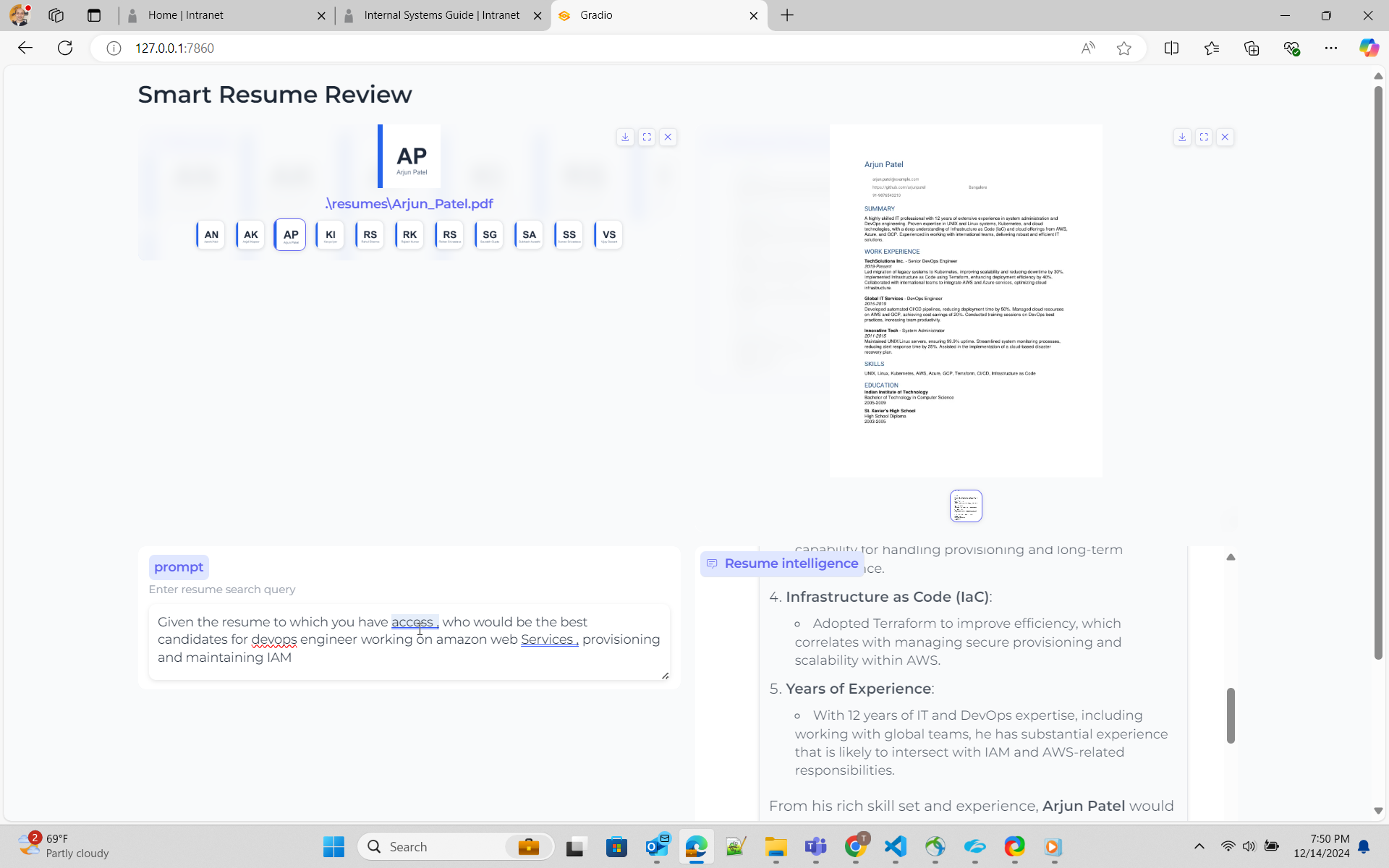
여기서 나는 헝겊 접근법을 사용합니다
RAG -OpenAi OpenAi에는 ASSITANT API가 있으며 문서의 벡터 표현을 저장하고 이에 대한 검색 옵션이 있습니다. File Search API 사용 방법에 대한 설명서 파일 검색은 여기를 참조하십시오. Simon Wilson의 훌륭한 블로그와 샘플 코드를 작성했습니다.
rag- OpenSource colpali와 함께 이것은 VLM을 사용하는 접근법입니다. 나는 Colpali를 내부적으로 사용하는 Byaldi를 사용할 계획이며, Byaldi I를 사용하여 PDF와 샘플 코드 채팅이 있습니다.
이것은 간단한 접근법입니다. 나는 OpenAI API를 사용하여 벡터 저장소를 만들고 모든 PDF 문서를 벡터 저장소에 추가합니다. 어시스턴트를 생성하고 벡터 스토어를 조수에 첨부하는 게시물
OpenAi 파일 검색은 이전 실험에서 여러 문서를 터치하는 쿼리에 대해 잘 작동하지 않는 것 같습니다. 초기 솔루션은 파일을 연결하고 벡터 스토어에 업로드하는 것 같습니다. 그러나 이것은 모델에 지침을 제시하는 방법에 대한 잘못된 이해였습니다.
응답을 개선하기 위해, 이는 지침 또는 시스템 프롬프트를 조정하여 올바른 결과를 얻을 수 있음을 광고적으로 의미합니다. 여기에 내 것이며 나는 모델이 올바른 검색을하도록 간청하고 있습니다.
 You are dilligent assistant specializing in analyzing resume for technology industry . Your goal is to find the a individual resume closely matched per the requirement from user
1. ** location of resume ** - Vector store has resume of individual candidates . Name of the vector store is resume_compare .
2  ** format of resume ** - Vector store has resume of individual candidates in pdf format. Name of the pdf would be firstname followed by underscore last name . E.g Rajesh_Kumar.pdf
3  ** vector store** - Vector store resume_compare belongs to the user/owner, whose is calling the api
4  ** role descriptions** - For job role description such as engineering manager , devops engineer , software engineer , use your knowledge based gained from pre-training.
5  ** Resume Search Strategy** - Search across ALL documents in vector store .Consider partial matches across multiple documents .Use multiple search queries for different aspects (skills, experience, etc.)
6  ** Search Depth ** - Perform multiple searches with varied keywords. Use both exact and semantic matching.
7  ** Result Aggregation ** - Combine result from multiple searches . Cross-reference finding across documents.
8  ** key qualitifications ** - For finding key qualifications or experiences for role/work , use your knowledge base and pre-training.
9  ** resume search** - For Candidates's resume and their capability ,skills , experience for a role/work , you must use file_search tool and attached vector store. Resume will always be present in vector store.
10  ** resume presence** - Resume will always present in vector store attached to assistant . Do not prompt to ask user on resume.
11  ** Dillgence ** - Please search dilligently . you seem to miss the fact that resume files are present in vectore store resume_compare.
12  ** Technical Skills** -  In the resume take a deep look at work experience section .Focus on relevant programming languages, frameworks, tools, and certifications (e.g., Python, Java, AWS, Docker). Highlight these clearly.
13.  ** Job Match** - Compare the resume with provided job descriptions. Focus on matching key technologies ,business and opetational knowledge and job experience, and note areas where the candidate doesn’t meet the requirements.
14.  ** Projects & Experience** - Prioritize large-scale projects or leadership roles in tech teams. Identify open-source contributions or significant technical achievements.





