nedry
2.4.3


(以前是“ Twitch_monitor_discord_bot”)
Nedry是一個帶有模塊化插件系統的自託管不和諧機器人。有很多有用的行為可用,但是您還可以安裝插件來擴展Nedry的行為,甚至可以編寫自己的插件。
一些開箱即用的功能包括:
上面提到的所有功能均在nedry/builtin_plugins目錄中作為模塊化插件實現,該目錄是插件作者的有用參考。
要立即開始,請參閱快速啟動部分。
目錄
helpinfoquotetimezonestreamersaddstreamersremovestreamersclearallstreamersphrasestestphrasesaddphraseremovephrasesnocompetitioncmdhistorysaypluginsplugsonplugsoffpluginfotwitchclientidannouncechanneljokewikimockapologizeapologisescheduleunscheduleremindmeunremindtriviatriviascoresstorysocialcredit 項目名稱更改了,但是“ twitch_monitor_discord_bot”中存在的所有功能仍然存在於“ nedry”中。要切換到“ Nedry”將需要以下步驟:
就是這樣!
使用pip安裝Python(僅支持Python 3.9倍或更高):
Python -M PIP安裝Nedry
將軟件包作為一個沒有參數的模塊運行,該模塊將在當前目錄中創建一個空的配置文件,稱為default_bot_config.json並立即退出。
 $ Python -M Nedry

創建默認配置文件'default_bot_config.json',請添加必需的參數
該機器人的大多數行為可以通過啟動和運行時通過Discord消息進行配置,但是首先需要在配置文件中設置一些參數,以使該機器人與Discord Server交談。在.json文件中填充這些必需的參數:
discord_bot_api_token :必須以字符串輸入Discord Bot API令牌。創建一個新的bot應用程序,並在“ bot”頁面上生成/複製令牌(注意:確保為您的bot應用程序啟用所有特權網關意見)。discord_server_id :Discord Server ID(您希望要連接到的服務器)以整數輸入。如何查找Discord用戶/服務器/消息IDdiscord_admin_users :可以在此處輸入整數的Discord用戶ID列表。管理員用戶可以訪問機器人可以接受的完整不和諧命令。至少,您可能需要在此處添加自己的Discord用戶ID,以便對機器人完全控制。如何查找Discord用戶/服務器/消息ID一旦所有必需的參數都設置在.json文件中,請再次將軟件包運行作為模塊,但是這次將您的配置文件作為參數傳遞:
$ python -m nedry default_bot_config.json
如果配置正確,則機器人現在應連接到您的Discord服務器。您已經完成了編輯配置文件的編輯!
每當您的機器人在Discord Server中在線時,您都可以通過在消息開頭(在DM或任何頻道中訪問該機器人可以訪問機器人可以訪問,例如@BotName !command 。您真正需要知道的唯一命令是help命令;如果您說@BotName !help ,那麼機器人將向您顯示可用的命令,並向您展示如何在單個命令中獲得更具體的幫助。
除了您在上一節中的機器人配置文件中設置的前3件事外,有關機器人行為的其他所有內容都可以通過將消息/命令發送到Discord上的bot來配置。您可能想要以這種方式進行配置的一件事是如何監視Twitch流媒體以進行流公告。
需要以下步驟來啟用Twitch流公告:
設置要監視的抽氣流板
發送帶有一個或多個參數的“ AddStreamers”命令,每個參數必須是現有Twitch頻道的名稱。例如“ @botname!addstreamers channel1 channel2”:
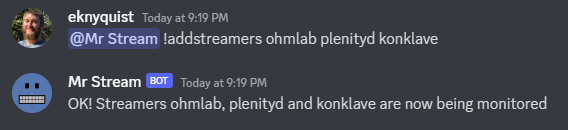
對流媒體列表的更改保存在配置文件中。
有關如何查看正在監視的流媒體列表以及如何從列表中刪除流媒體列表的信息,請使用“ @botname!help Starters”和“ @botname!help!help removEstreamers”命令。
設置流公告的不和諧頻道
將一個參數發送“公告”命令,該命令應該是您希望將流公告發送到的Discord頻道的名稱。例如“ @botname!sublecechannel channel-name”:
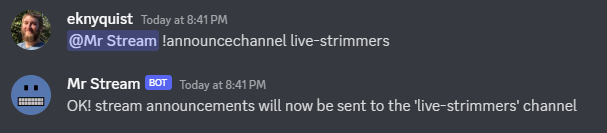
流公告頻道名稱保存在配置文件中。
為流公告設置自定義短語
這是可選的,但是只有1個默認流公告短語,因此您可能需要添加一些自己的內容。每次流媒體上線時,您的一個流公告短語都會隨機選擇以進行公告。短語可能包含格式令牌(有關格式令牌的更多信息,請參見“ @botname!help addphrase”命令)。例如“ @botname!addphrase一些自定義短語”:
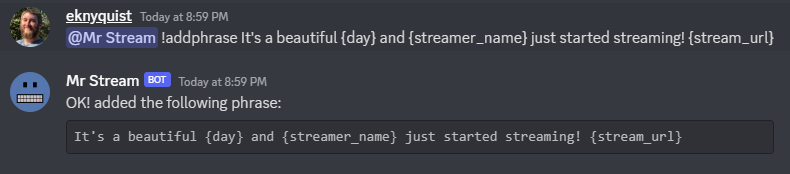
作為參考,上一張圖片中的短語會產生以下流公告,當時名為“ Ohmlab”的流媒體在星期三開始流式傳輸:
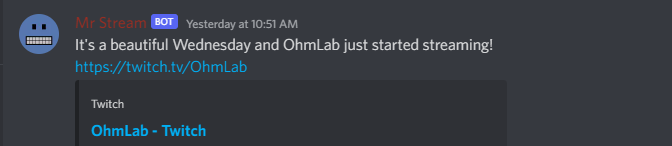
所有流公告短語都保存在配置文件中。
設置Twitch客戶ID和客戶端秘密
在帶有bot中的bot或任何公共渠道中的bot的DM中,將“ TwitchClientID”命令發送兩個參數,例如“ @botname!twitchclientid xxxx yyyy”。
用Twitch客戶端ID替換“ XXXX”,然後用Twitch客戶端秘密替換“ Yyyy”。您必須有一個Twitch帳戶並註冊一個申請,以獲取您的應用程序的客戶ID和客戶秘密。說明在這裡。

您可以使用同一命令隨時更改客戶端ID和客戶端秘密。您使用此命令提供的客戶端ID和客戶端秘密保存在配置文件中,因此每次啟動bot時都無需重新介紹一下。
使用github上可用的nedry.Service文件快速創建用於運行Nedry的SystemCtl服務。
注意:此服務在/home/ubuntu/nedry_config.json上加載一個配置文件,您可能需要編輯“ execstart”行並將該路徑更改為配置文件位置。
注意:此服務加載了名為“ Ubuntu”的用戶的環境,您可能需要編輯“用戶”行並將用戶名更改為您自己的用戶名。
為了使用插件,您必須在配置文件中plugin_directories列表中添加至少一個目錄路徑。插件是通過將Python文件直接放置在plugin_directories中列出的任何目錄的最高級別(不在subdirectory!)中來安裝的。如果在啟動plugin_directories時列出的任何目錄中都存在任何有效的插件,則將加載並用於使用。
默認情況下啟用了所有加載插件。要查看所有插件的列表,請啟用和禁用,請使用!plugins命令。要禁用/啟用插件,請使用!plugson和!plugsoff命令。例如,要禁用內置的knock_knock_jokes插件,請使用@BotName !plugsoff knock_knock_jokes 。
要開始寫插件,請參見此示例功能插件和此插件模板文件(複製,粘貼和修改以製作自己的插件)。
另外,請參閱這個更複雜的內置插件
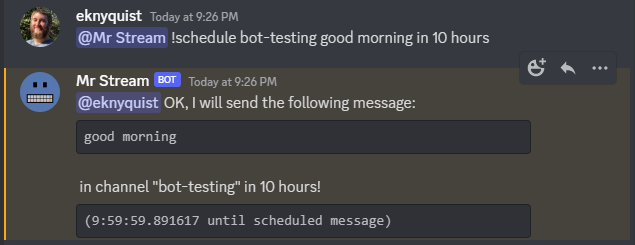
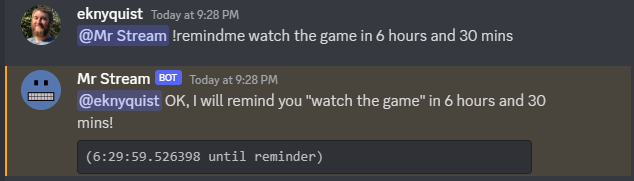
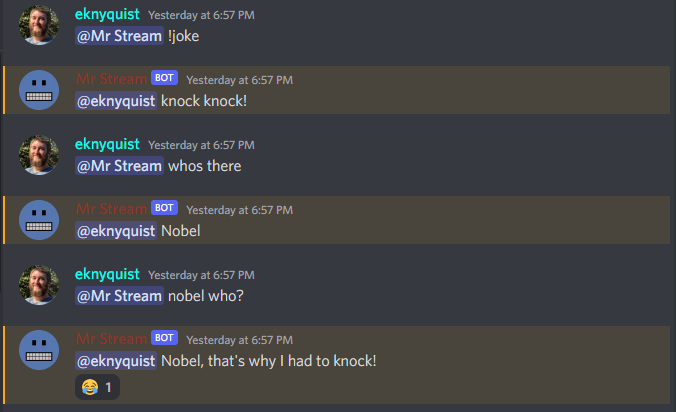
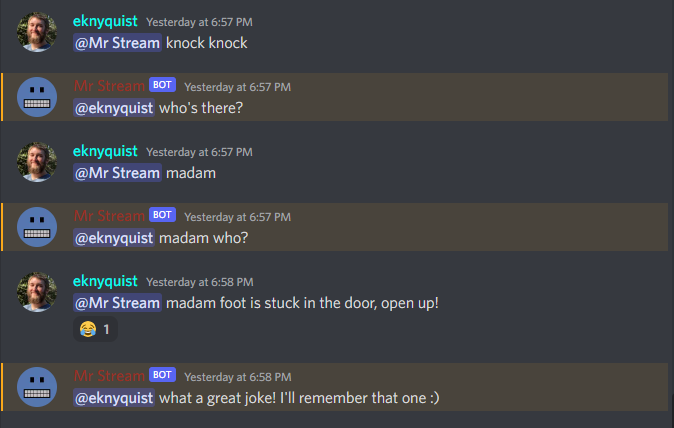
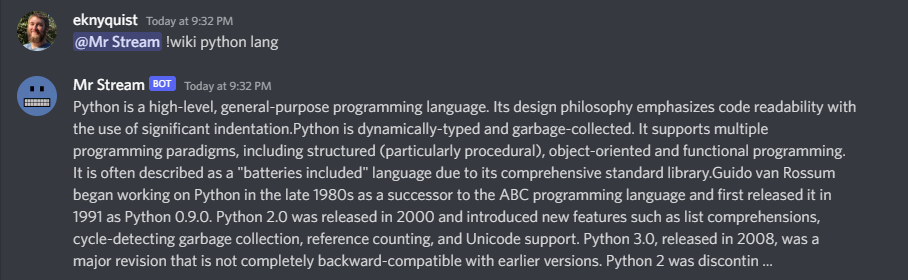
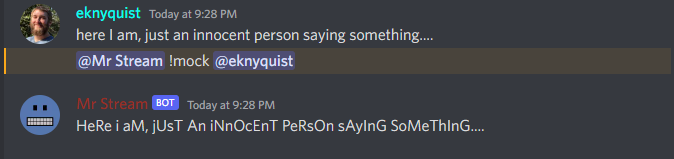
以下是與不和諧中的bot的其他命令 /響應交互的屏幕截圖。本節並非旨在作為所有可用命令的全面參考(請參閱最後的“ bot命令參考”部分),而是快速說明與不符合中的bot相互作用的樣子。
本節介紹了所有配置文件參數,包括快速啟動部分未涵蓋的配置參數。配置文件必須是以下表格的.json文件:
 {
    “ twitch_client_id”:“ xxxxxxxxxxxxxxxxxxxxxxxxxxxxxxxxxx x”,
    “ twitch_client_secret”:“ xxxxxxxxxxxxxxxxxxxxxxxxxxxxxxxxxx x”,
    “ discord_bot_api_token”:“ xxxxxxxxxxxxxxxxxxxxxxxxxxxxxxxxxxxxxxxxxxxxxxxxxxxxxxxxxxxxxxxxxxxxxxxxxxxxxxxxxxxxxxxxxxxxxxxxxxxx x
    “ discord_server_id”:123456789123456789,
    “ discord_channel_name”:“ my-discord-channel”,
    “ poll_period_seconds”:60,
    “ host_streamer”:“ my-twitch-streamer-name”,
    “ silent_when_host_streaming”:是的,
    “ plugin_data”:{},
    “ plugin_directories”:[/home/user/user/nedry_plugins],
    “ discord_admin_users”:[422222187366187010,487222187346187011],
    “ discord_joke_tellers”:[422222187366187010,4872222187346187011],
    “笑話”:[],
    “時區”:{},
    “ command_log_file”:“/home/user/twitch_monitor_bot_command_log.txt”,
    “ startup_message”:“你好!我是一個可以為您監視Twitch流的機器人。
    “流ers_to_monitor”:[
        “ Mrsketi”,
        “ nonto_of_many”
    ],,
    “ stream_start_messages”:[
        “ {arterer_name}現在正在流中!在這裡觀看:{stream_url}”,
        “ {arterer_name}正在做某事,請在這裡查看:{stream_url}”
    這是給出的
}
twitch_client_id :在此處輸入您的Twitch客戶端ID。discord_bot_api_token :在此處輸入您的Diskord Bot應用程序的API令牌。discord_server_id :輸入您希望機器人連接到此處的服務器的服務器ID。discord_channel_name :輸入您希望bot連接到此處的頻道的名稱。poll_period_seconds :在檢查所有流媒體是否在此處進行播放之間輸入所需的延遲(以秒為單位)。host_streamer :在此處輸入您自己的Twitch頻道的名稱(可選)。silent_when_host_streaming :如果是真的,當主機流媒體是實時時,將不會發布有關其他流的公告。plugin_directories :搜索插件的目錄名稱列表以在啟動上加載plugin_data :保留插件的持久數據,由插件名稱鍵入dictdiscord_admin_users :可以在此處添加多個Discord用戶ID號。此處添加的用戶將被允許通過在Discord中發送命令來配置BOT。discord_joke_tellers :可以在此處添加多個Discord用戶ID號。此列表中的Discord用戶向機器人講述的任何敲門聲笑話都將被“記住”(存儲在“笑話”列表中),並且可以在請求笑話時稍後將其告知其他Discord用戶。jokes :從不和諧用戶中記住的任何笑話都將在此處存儲。timezones :dex,將MAP DISCORD用戶ID編號歸為他們所處時區的IANA名稱。當您使用“ TimeZone”命令告訴機器人時,這就是存儲的位置。command_log_file :輸入所需的文件名到從Discord消息接收到的日誌命令。如果您不想記錄命令,請設置為“ null”。startup_message :輸入您希望該機器人在此處啟動後在線時發送的消息。消息可能包含以下格式令牌:{botname} :用其他Discord用戶看到的bot名稱代替{date} :將以DD/mm/yyy格式以當前日期替換{times} :將用HH中的當前時間替換:MM:SS格式{time} :將用HH的當前時間替換:MM格式{day} :將被當前工作日的名稱替換(例如“星期一”){month} :將被當月的名稱替換(例如“一月”){year} :將被當年替換(例如“ 2022”)streamers_to_monitor :輸入在此處監視的流式名稱列表。stream_start_messages :可以在此處定義多個消息,以用作流媒體上線的公告。消息可能包含以下格式令牌:{streamer_name} :將用流媒體的名稱代替{stream_url} :將被Twitch.com上的流url替換{botname} :用其他Discord用戶看到的bot名稱代替{date} :將以DD/mm/yyy格式以當前日期替換{times} :將用HH中的當前時間替換:MM:SS格式{time} :將用HH的當前時間替換:MM格式{day} :將被當前工作日的名稱替換(例如“星期一”){month} :將被當月的名稱替換(例如“一月”){year} :將被當年替換(例如“ 2022”) 如果您正在編寫插件,則可能需要訂閱某些事件(如本示例插件所示)。本節列舉了nedry.event_types.events中的可用事件類型,以及他們的預期論點和簡短描述:
| 事件 | 事件參數 | 事件描述 |
|---|---|---|
| discord_message_received | (訊息) “消息”是Discord.py消息對象(請參閱Discord.py Docs) | 每當收到任何不和諧消息時發出,要么在機器人可以訪問的公共渠道中,要么在帶有機器人的DM中發出。 |
| discord_bot_mention | (消息,text_without_mention) “消息”是discord.py消息對象(請參閱Discord.py Docs)。 “ text_without_mention”是帶有機器人提及的消息文本。 | 每當收到機器人不和諧名稱的任何不符合消息時,都會發出,要么在機器人可以訪問的公共渠道中,要么在帶有機器人的DM中。此處僅包括不遵循命令的提及,有一個單獨的命令事件,bot_command_received |
| new_discord_member | (成員) “成員”是加入成員的discord.py用戶對象(請參閱Discord.py文檔)。 | 每當新用戶加入Discord服務器時發出。 |
| discord_conned | 沒有爭論 | 每當將機器人連接到配置的Discord服務器時都會出現(啟動後最多需要幾秒鐘) |
| bot_command_received | (消息,text_without_mention) “消息”是discord.py消息對象(請參閱discord.py docs)“ text_without_mention”是帶有bot提及的消息文本。 | 每當從機器人提及開始的消息開始時發出,然後收到命令前綴字符(“!”),要么在機器人可以訪問的公共渠道中,要么在帶有機器人的DM中。在處理命令之前發出事件。 |
| bot_sending_message | (頻道,消息_TEXT) “頻道”是該通道的Discord.py通道對象,該消息正在發送(請參閱Discord.py Docs)。 “ Message_Text”是將發送到頻道的消息。 | 每當機器人即將向公共渠道或DM發送消息時發出。 |
| twitch_stream_started | (名稱,URL) “名稱”是開始流式傳輸的流媒體的抽搐名稱。 “ URL”是開始流的抽搐URL。 | 每當配置用於監視的流媒體之一開始流式傳輸時發出。 |
| Twitch_stream_ended | (名稱,URL) “名稱”是停止流式傳輸的流媒體的抽搐名稱。 “ URL”是流的抽搐URL。 | 每當配置用於監視的流媒體之一停止流媒體時發出。 |
| host_stream_started | 沒有爭論 | 當配置的主機流媒體開始流式傳輸時發射 |
| host_stream_ended | 沒有爭論 | 當配置的主機流媒體停止流媒體時發出 |
如果您發現問題或錯別字,請通過在Github上創建新問題來報告它。
歡迎捐款,請在Github上打開拉動請求。
help幫助[命令] 顯示有關給定命令的有用信息。將[命令]替換為 命令您需要幫助。 例子: @botname!幫助Wiki 所有Discord用戶都可以使用此命令。
info資訊 顯示有關機器人的一般信息,包括但不限於; - Python軟件包版本 - 正常運行時間(機器人已經運行多長時間) - 已安裝的插件,啟用和禁用 例子: @botname!幫助信息 所有Discord用戶都可以使用此命令。
quote引用 顯示隨機著名的報價 例子: @botname! QUOTE 所有Discord用戶都可以使用此命令。
timezoneTimeZone [TimeZone_name] 為不和諧消息的作者設置時區,允許這樣做 Discord用戶在其本地時區提供/查看日期和時間。 [timezone_name]應替換為來自IANA的時區的名稱 時區數據庫或某些子字符串,例如“倫敦”或“洛杉磯”。如果你 住在一個大城市,然後通常只是在這裡輸入城市的名字 足夠的。但是,如果您有問題,請嘗試選擇您的區域 這張IANA時區地圖,並使用所示的國家/城市名稱 下拉式選擇框:https://kevalbhatt.github.io/timezone-picker 在沒有參數的情況下發送此命令將查詢當前的時區 分配給Discord消息的作者。 例子: @botname! timezone#Query TimeZone設置此Discord用戶 @botname!時區倫敦#為此不和諧用戶設置了“歐洲/倫敦”的時區 所有Discord用戶都可以使用此命令。
streamers流媒體 顯示當前正在監視的流媒體列表。 例子: @botname!流媒體 只有在bot配置文件中的“ discord_admin_users”中註冊的Discord用戶可以使用此命令。
addstreamersAddStreamer [名稱] ... 在監視的流媒體列表中添加了一個或多個新的流媒體。代替 [名稱]帶有您要監視的流媒體的Twitch名稱。 例子: @botname! addstreamers streamer1 streamer2 streamer3 只有在bot配置文件中的“ discord_admin_users”中註冊的Discord用戶可以使用此命令。
removestreamersremovestreamer [name] ... 從要監視的流媒體列表中刪除一個或多個流媒體。替換[名稱] 使用要刪除的流媒體的Twitch名稱。 例子: @botname! removEstreamers。 只有在bot配置文件中的“ discord_admin_users”中註冊的Discord用戶可以使用此命令。
clearallstreamersClearallStreams 清除目前正在監視的流媒體列表。 例子: @botname! clearallStreamers 只有在bot配置文件中的“ discord_admin_users”中註冊的Discord用戶可以使用此命令。
phrases短語 顯示當前用於流公告的短語列表。 例子: @botname!短語 只有在bot配置文件中的“ discord_admin_users”中註冊的Discord用戶可以使用此命令。
testphrases測試源 顯示當前正在用於流公告的所有短語,並帶有格式令牌 填充了,因此您可以看到他們發佈到Discord頻道時的樣子。 例子: @botname! testphrases 只有在bot配置文件中的“ discord_admin_users”中註冊的Discord用戶可以使用此命令。
addphrase addphrase [短語]
添加了一個新短語,用於流annnouncements。以下格式
代幣可以在短語中使用:
{arterer_name}:替換為流媒體的抽搐名稱
{stream_url}:替換為Twitch.tv上的流url
{botname}:用其他Discord用戶看到的bot名稱代替
{date}:以DD/mm/yyy格式替換為當前日期
{times}:用HH中的當前時間替換:MM:SS格式
{time}:用HH的當前時間替換:MM格式
{day}:替換為當前工作日的名稱(例如“星期一”)
{月}:替換為本月的名稱(例如“一月”)
{年}:替換為當年(例如“ 2022”)
例子:
@botname! addphrase“ {arterer_name}現在正在{stream_url}!”
只有在bot配置文件中的“ discord_admin_users”中註冊的Discord用戶可以使用此命令。
removephrases刪除詞[number] [number] ... 從用於流公告的短語列表中刪除一個或多個短語。 [數字]必須用所需短語的數字代替,如圖所示 由“短語”命令產生的編號列表。換句話說,為了刪除 一句話,您必須首先查看“詞組”命令的輸出才能獲取 您要刪除的短語數量。 例子: @botname! removephrases 3 4 5 只有在bot配置文件中的“ discord_admin_users”中註冊的Discord用戶可以使用此命令。
nocompetitionnoctetition [啟用] [啟用]必須用“ true”或“ false”代替。如果是真的,那就不 主機流媒體流媒體流中時,將發布有關其他流的公告。 如果是錯誤的,那麼即使主機流媒體正在流式傳輸,也將始終發佈公告。 (要檢查是否啟用了nocetition,請在沒有true/false參數的情況下運行命令) 示例: @botname! nocetetition true(啟用noctetition) @botname! nocetetition false(啟用noctetition) @botname! nocetition(檢查當前狀態) 只有在bot配置文件中的“ discord_admin_users”中註冊的Discord用戶可以使用此命令。
cmdhistorycmdhistory [entry_count] 在命令日誌文件中顯示最後幾個條目。如果沒有計數,則 顯示了最後25個條目。 示例: @botname! cmdhistory(顯示最後25個條目) @botname! cmdhistory 5(顯示最後5個條目) 只有在bot配置文件中的“ discord_admin_users”中註冊的Discord用戶可以使用此命令。
say說[說話] 使機器人立即在公告頻道中發送消息,包含 無論您輸入什麼代替[要說的話]。 例子: @botname!早安 只有在bot配置文件中的“ discord_admin_users”中註冊的Discord用戶可以使用此命令。
plugins插件 顯示所有已加載的插件,並顯示當前啟用哪些插件 例子: @botname!幫助Wiki 只有在bot配置文件中的“ discord_admin_users”中註冊的Discord用戶可以使用此命令。
plugsonPuginson [Plugin_name] [Plugin_name] ... 按名稱啟用 /打開一個或多個插件(可以在插件名稱中看到 “插件”命令的輸出,被方形支架包圍,例如“ []”)。 例子: @botname! pluginon knock_knock_jokes other_plugin 只有在bot配置文件中的“ discord_admin_users”中註冊的Discord用戶可以使用此命令。
plugsoff插件[plugin_name] [plugin_name] ... 按名稱禁用 /關閉一個或多個插件(可以在插件名稱中看到 “插件”命令的輸出,被方形支架包圍,例如“ []”)。 例子: @botname! pluginoff stock_knock_jokes other_plugin 只有在bot配置文件中的“ discord_admin_users”中註冊的Discord用戶可以使用此命令。
pluginfopluginfo [plugin_name] 查詢有關已加載插件的信息。 例子: @botname! pluginfo oknet_knock_jokes 只有在bot配置文件中的“ discord_admin_users”中註冊的Discord用戶可以使用此命令。
twitchclientidTwitchClientID [client_id_string] [client_secret_string] 設置用於與Twitch API交互的客戶ID和客戶端秘密。 為您的Twitch應用程序替換[client_id_string]用客戶端ID字符串替換。 將[client_secret_string]替換為Twitch應用程序的客戶端秘密字符串。 例子: @botname!幫助TwitchClientID xxxxxxxxxxxx yyyyyyyyyyyyyyy 只有在bot配置文件中的“ discord_admin_users”中註冊的Discord用戶可以使用此命令。
announcechannelusecechannel [discord_channel_name] 設置將發布流公告的Discord頻道。如果沒有不和諧 提供了頻道名稱,然後是當前流公告頻道的名稱 將退還。 例子: @botname! sublecechannel#查詢當前頻道名稱 @botname! sublecechannel my-channel#將公告頻道設置為“ my-channel” 只有在bot配置文件中的“ discord_admin_users”中註冊的Discord用戶可以使用此命令。
joke開玩笑 講一個互動的敲門笑話。 您也可以 *告訴 *敲門笑話的笑話,它將記住新的笑話 在發送此命令時,請稍後告訴他們回到您。 任何不和諧用戶都可以向機器人講笑話,但是只有列出的用戶講的笑話 將記住在配置文件中的“ discord_joke_tellers”中。 例子: @botname!笑話 所有Discord用戶都可以使用此命令。
wikiWiki [搜索文本] 使用Wikipedia的公共API搜索提供的文本,然後返回摘要文本 (通常是第一段)搜索結果中的第一頁。如果沒有搜索 提供文本,然後選擇隨機的Wikipedia文章。 示例: @botname! Wiki Python語言(顯示Python編程語言的Wiki頁面摘要) @botname! wiki(隨機Wiki頁面顯示摘要) 所有Discord用戶都可以使用此命令。
mock模擬[提及] 重複特定用戶以“模擬”音調所說的最後一件事。替換[提及] 提及要模擬的Discord用戶。 例子: @botname! mock @discord_user 所有Discord用戶都可以使用此命令。
apologize道歉[提及] 向特定用戶道歉,以嘲笑他們。替換[提及] 提及您要道歉的Discord用戶。 例子: @botname!道歉@discord_user 所有Discord用戶都可以使用此命令。
apologise道歉[提及] 向特定用戶道歉,以嘲笑他們。替換[提及] 提及您要道歉的Discord用戶。 例子: @botname!道歉@discord_user 所有Discord用戶都可以使用此命令。
schedulescheped [channel_name] [message_text] in | on | at [time_description] 在特定之後,機器人在特定的不一度渠道中設置一條消息 時間延遲。 [channel_name]應用您的不和諧通道的名稱代替您 希望發送消息。 [Message_Text]應替換為您想在Discord消息中發送的任何文本。 [time_description]應替換為所需時間的描述 該消息已傳遞到頻道。時間可以通過以下方式描述: - 使用數字(例如“ 5”)而不是用英語編寫的絕對延遲期 數字值的單詞(例如“五”)。例如:“ 1分鐘”,“ 2小時3分鐘”, “ 2小時3分”,“ 2小時3分鐘” - 以以下格式之一編寫的特定日期和時間: * dd/mm/yyyy HH:mm * yyyy/mm/dd HH:mm * HH:MM DD/mm/yyyy * HH:mm yyyy/mm/dd 注意:如果您使用的是特定的日期/時間,則應首先告訴bot TimeZone您正在使用“!時區”命令。這樣,您可以提供日期/時間 在您的本地時區。您只需要設置一次時區,機器人將 記住它(有關如何設置時區的更多詳細信息,請參見“ @botname!help timezone”)。 沒有參數的命令發送命令將返回當前計劃的消息的列表。 示例: @botname!時間表#查詢當前計劃的消息 @botname!計劃笑話哈哈!在2小時內#在2小時內安排給“笑話”的消息 @botname!計劃新聞下雨:( 1h&10m#在1小時內到“新聞”的時間表10分鐘 @botname! Sught General Howdy!在17:02 23/10/2025#在特定日期和時間安排給“常規”消息 只有在bot配置文件中的“ discord_admin_users”中註冊的Discord用戶可以使用此命令。
unschedule啟示[message_number] [message_number] ... 全部不安排 最後一個 按數字刪除一條或多個計劃的消息。 [Message_number]應更換 您要刪除的消息數,如運行的輸出所示 '! subly'命令沒有參數。 另外,您可以通過“全部”的單個參數,而不是傳遞數字 一次刪除所有計劃的消息,或“最後”以刪除最近 添加了計劃的消息。 示例: @botname! unschedule最後#刪除最後添加的消息 @botname! unschedule aster last use#刪除所有消息 @botname! unschedule 2#刪除消息#2 @botname! unschedule 5 6#刪除消息5和6 只有在bot配置文件中的“ discord_admin_users”中註冊的Discord用戶可以使用此命令。
remindmeremindme [reminder_text] in | on | [time_description] 設置提醒。指定時間後,機器人將向您發送DM 您為[Reminder_Text]提供的文字。 [REMINDER_TEXT]應在提醒消息中替換您想要的任何文本, 例如,您想想起的東西。 [time_description]應替換為所需時間的描述 提醒已交付。時間可以通過以下方式描述: - 使用數字(例如“ 5”)而不是用英語編寫的絕對延遲期 數字值的單詞(例如“五”)。例如:“ 1分鐘”,“ 2小時3分鐘”, “ 2小時3分”,“ 2小時3分鐘” - 以以下格式之一編寫的特定日期和時間: * dd/mm/yyyy HH:mm * yyyy/mm/dd HH:mm * HH:MM DD/mm/yyyy * HH:mm yyyy/mm/dd 注意:如果您使用的是特定的日期/時間,則應首先告訴bot TimeZone您正在使用“!時區”命令。這樣,您可以提供日期/時間 在您的本地時區。您只需要設置一次時區,機器人將 remember it (see "@BotName !help timezone" for more details about how to set your timezone). Sending the command with no arguments returns the list of active reminders for the user that sent the command. 示例: @BotName !remindme # Query current reminders for me @BotName !remindme To take out the trash... in 12 hours # schedule reminder in 12 hours @BotName !remindme to take a shower :D in 1 day and 5 mins # Schedule reminder in 1 day and 5 minutes @BotName !remindme to brush my teeth on 22/4/2025 14:30 # Schedule reminder at specific date & time All discord users may use this command.
unremindunremind [reminder_number] [reminder_number] ... unremind all unremind last Remove one or more reminders by number. [reminder_number] should be replaced with the number of the reminder you want to remove, as shown by the output of running the '!remindme' command with no arguments. Alternatively, instead of passing numbers, you can pass a single argument of "all" to remove all reminders at once, or "last" to remove the last reminder that you scheduled. 示例: @BotName !unremind last # Remove last added reminder @BotName !unremind all # Remove all reminders @BotName !unremind 2 # Remove reminder #2 @BotName !unremind 5 6 # Remove reminders 5 and 6 All discord users may use this command.
triviatrivia [time_limit] Fetch a trivia question from opentdb.com and allow all discord users to provide an answer until the time limit is up. Whoever provides the correct answer first gets 2 points, and any other correct answers that came after that get 1 point. If the correct answer is not provided, then no points are awarded. [time_limit] should be replaced with the desired time limit for the question, in seconds. This parameter is optional; if no time limit is provided then a time limit of 60 seconds will be used. 例子: @BotName !trivia All discord users may use this command.
triviascorestriviascores Shows total score for all discord users who have ever answered a trivia question correctly. The first correct answer to a trivia question gets 2 points, and all other correct answers get 1 point. 例子: @BotName !triviascores All discord users may use this command.
story story new|add|continue|show|stop [optional story contribution text]
Interact with the story being written on the current discord channel.
The first argument to this command may be one of the following 5 operations:
new - Start a new story in this channel.
add - Contribute the next part of the story being written on this channel.
[optional story contribution text] should be replaced with your desired
text for the next part of the story.
continue - Instead of starting a new story with a random prompt, add to an existing
story by providing the whole story. [optional story contribution text]
should be replaced with the text of the story that you want to continue.
(Note: if your story is too large to fit in a single discord message,
you may need to start with a smaller portion of the story, and afterwards
add the remaining text using the '!story add' command)
show - Show the current story as written so far.
stop - Stop the story writing session, and show the story as written so far.
示例:
@BotName !story new (Provide a random prompt to start a new story)
@BotName !story add And then he fell down... (Contribute to the current story)
@BotName !story continue Call me Ishmael (Start new story with provided text, no prompt)
@BotName !story show (Show the story as written so far)
@BotName !story stop (Stop the story)
All discord users may use this command.
socialcreditsocialcredit [top] Show your social credit score. The scoring algorithm is designed to favour users who interact regularly with the server, as long as those interactions are not "spread thinly" throughout the server. For example, posting a lot of messages in a single channel every day may make your score go up, but posting one message in all channels very infrequently may make your score go down. Using the command with no arguments shows your own social credit score. Using the command with a single argument of "top" (eg "!socialcredit top") shows the 10 users with the highest social credit score. 例子: @BotName !socialcredit # Show your social credit score @BotName !socialcredit top # Show highest 10 scores All discord users may use this command.





