BERTopic
v0.16.4


伯托是一種利用的主題建模技術?變形金剛和C-TF-IDF創建密集的簇,可以易於解釋的主題,同時在主題描述中保留重要的單詞。
伯托支持各種主題建模技術:
| 指導 | 監督 | 半監督 |
| 手動的 | 多主題分佈 | 分層 |
| 基於班級 | 動態的 | 在線/增量 |
| 多模式 | 多樣性 | 文本生成/法學碩士 |
| 零射(新!) | 合併模型(新!) | 種子單詞(新!) |
相應的中等帖子可以在此處,此處和此處找到。有關更詳細的概述,您可以閱讀本文或查看簡要概述。
可以使用PYPI進行安裝,並帶有句子轉換器:
pip install bertopic如果要與其他嵌入式模型安裝伯托po,可以選擇以下一項:
 # Choose an embedding backend
pip install bertopic[flair,gensim,spacy,use]

# Topic modeling with images
pip install bertopic[vision]要深入概述Bertopic的功能,您可以檢查完整的文檔,也可以跟隨以下示例之一:
| 姓名 | 關聯 |
|---|---|
| 從這裡開始 -伯託的最佳實踐 | |
| ?新的! - 大數據的主題建模(GPU加速) | |
| ?新的! - 使用Llama 2的主題建模? | |
| ?新的! - 量化LLM的主題建模 | |
| 主題建模與伯托 | |
| (自定義)嵌入模型 | |
| 伯託的高級定制 | |
| (半)主管主題建模 | |
| 特朗普的推文動態主題建模 | |
| 主題建模arxiv摘要 |
我們首先從著名的20個新聞組數據集中提取主題,其中包含英語文檔:
 from bertopic import BERTopic
from sklearn . datasets import fetch_20newsgroups

docs = fetch_20newsgroups ( subset = 'all' ,  remove = ( 'headers' , 'footers' , 'quotes' ))[ 'data' ]

topic_model = BERTopic ()
topics , probs = topic_model . fit_transform ( docs )
在產生主題及其概率之後,我們可以訪問所有主題以及其主題表示:
 > >> topic_model . get_topic_info ()

Topic	Count	Name
- 1	4630	- 1_ can_your_will_any
0	693	49_ windows_drive_dos_file
1	466	32_j esus_bible_christian_faith
2	441	2_ space_launch_orbit_lunar
3	381	22_ key_encryption_keys_encrypted
... -1主題是指所有離群文檔,通常被忽略。主題中的每個單詞都描述了該主題的基本主題,可用於解釋該主題。接下來,讓我們看一下生成的最常見的主題:
 > >> topic_model . get_topic ( 0 )

[( 'windows' , 0.006152228076250982 ),
 ( 'drive' , 0.004982897610645755 ),
 ( 'dos' , 0.004845038866360651 ),
 ( 'file' , 0.004140142872194834 ),
 ( 'disk' , 0.004131678774810884 ),
 ( 'mac' , 0.003624848635985097 ),
 ( 'memory' , 0.0034840976976789903 ),
 ( 'software' , 0.0034415334250699077 ),
 ( 'email' , 0.0034239554442333257 ),
( 'pc' , 0.003047105930670237 )]使用.get_document_info ,我們還可以在文檔級別上提取信息,例如其相應的主題,概率,它們是否是主題的代表文檔等。
 > >> topic_model . get_document_info ( docs )

Document                               Topic	Name	                        Top_n_words                     Probability    ...
I am sure some bashers of Pens ...	0	0_ game_team_games_season	game - team - games ...	        0.200010       ...
My brother is in the market for ...      - 1     - 1_ can_your_will_any	        can - your - will ...	        0.420668       ...
Finally you said what you dream ...	- 1     - 1_ can_your_will_any	        can - your - will ...            0.807259       ...
Think ! It ' s the SCSI card doing ...	49     49_ windows_drive_dos_file	windows - drive - docs ...	0.071746       ...
1 ) I have an old Jasmine drive ...	49     49_ windows_drive_dos_file	windows - drive - docs ...	0.038983       ...
Tip :使用BERTopic(language="multilingual")選擇支持50多種語言的模型。
在Bertopic中,我們可以選擇許多不同的主題表示。它們彼此之間都大不相同,並提供了有趣的觀點和主題表示形式的變化。一個很好的開始是KeyBERTInspired開始,對於許多用戶而言,它提高了連貫性並減少了由此產生的主題表示形式:
 from bertopic . representation import KeyBERTInspired

# Fine-tune your topic representations
representation_model = KeyBERTInspired ()
topic_model = BERTopic ( representation_model = representation_model )
但是,您可能想使用更強大的東西來描述您的群集。您甚至可以使用openai的chatgpt或其他模型來生成標籤,摘要,短語,關鍵字等:
 import openai
from bertopic . representation import OpenAI

# Fine-tune topic representations with GPT
client = openai . OpenAI ( api_key = "sk-..." )
representation_model = OpenAI ( client , model = "gpt-3.5-turbo" , chat = True )
topic_model = BERTopic ( representation_model = representation_model )
Tip :您可以通過伯托式中的多個主題表示,而不是對所有這些不同的主題表示形式進行迭代,而是可以同時建模它們。
在訓練了我們的競爭模型之後,我們可以迭代地經過數百個主題,以充分了解提取的主題。但是,這需要相當長的時間,並且缺乏全球代表。相反,我們可以在伯托式中使用眾多可視化選項之一。例如,我們可以以與Ldavis非常相似的方式可視化生成的主題:
topic_model . visualize_topics ()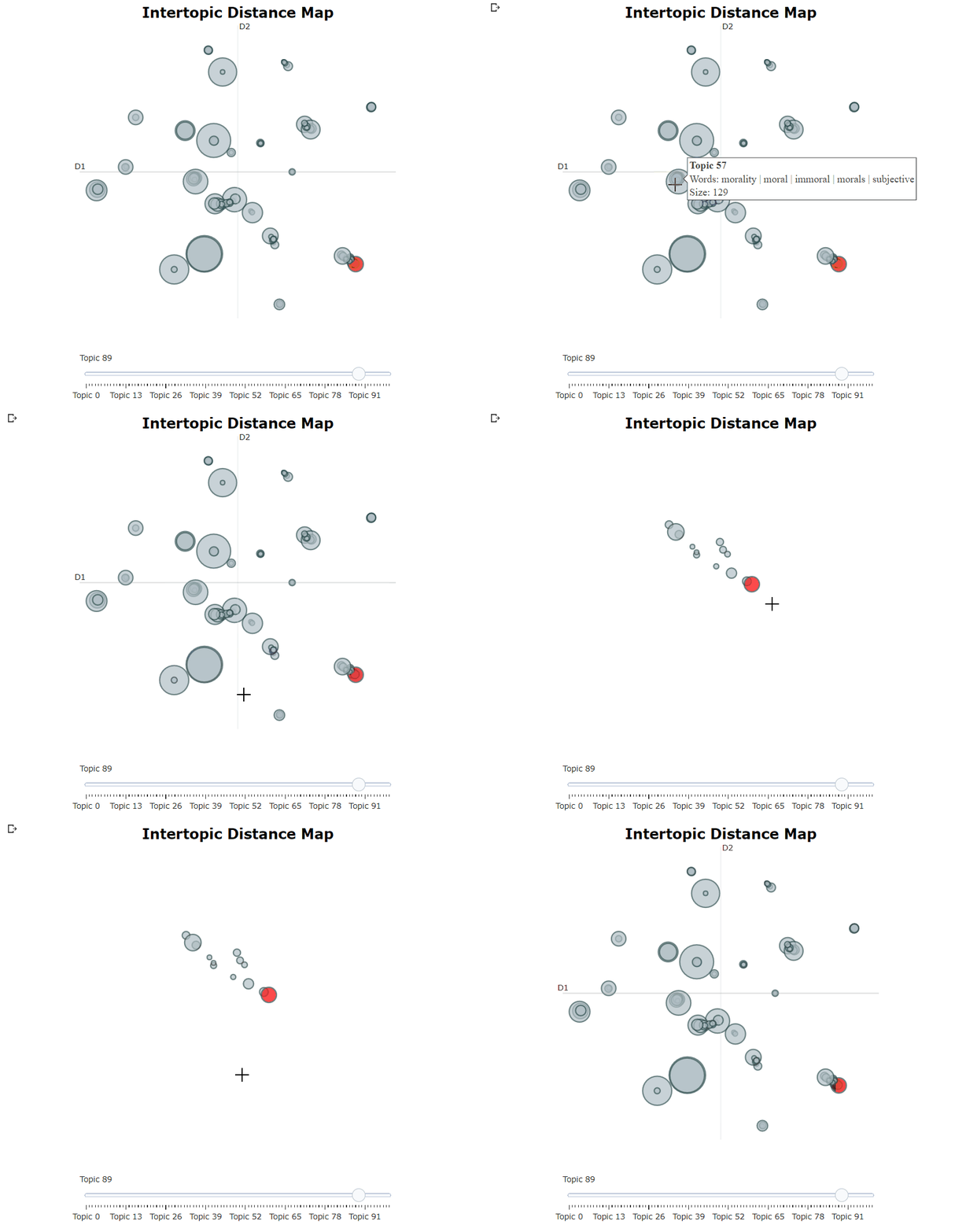
默認情況下,使用伯託的主題建模的主要步驟是句子轉換器,UMAP,HDBSCAN和C-TF-IDF按順序運行。但是,它在這些步驟之間假定了一定的獨立性,這使得伯托很模塊化。換句話說,Bertopic不僅允許您構建自己的主題模型,而且可以在定制主題模型之上探索幾種主題建模技術:
您可以換掉這些模型中的任何一個,甚至可以完全刪除它們。以下步驟是完全模塊化的:
伯託的功能許多功能很快就會變得壓倒性。為了減輕此問題,您將找到所有方法的概述及其目的的簡短描述。
在下面,您將在伯托概述中找到一個常見功能的概述。
| 方法 | 代碼 |
|---|---|
| 適合模型 | .fit(docs) |
| 適合模型並預測文檔 | .fit_transform(docs) |
| 預測新文檔 | .transform([new_doc]) |
| 訪問單主題 | .get_topic(topic=12) |
| 訪問所有主題 | .get_topics() |
| 獲取主題freq | .get_topic_freq() |
| 獲取所有主題信息 | .get_topic_info() |
| 獲取所有文檔信息 | .get_document_info(docs) |
| 每個主題獲取代表文檔 | .get_representative_docs() |
| 更新主題表示 | .update_topics(docs, n_gram_range=(1, 3)) |
| 生成主題標籤 | .generate_topic_labels() |
| 設置主題標籤 | .set_topic_labels(my_custom_labels) |
| 合併主題 | .merge_topics(docs, topics_to_merge) |
| 減少主題的NR | .reduce_topics(docs, nr_topics=30) |
| 減少異常值 | .reduce_outliers(docs, topics) |
| 查找主題 | .find_topics("vehicle") |
| 保存模型 | .save("my_model", serialization="safetensors") |
| 負載模型 | BERTopic.load("my_model") |
| 獲取參數 | .get_params() |
在訓練了您的伯托模型之後,您的模型中保存了幾個屬性。這些屬性部分是指在擬合過程中如何將模型信息存儲在估算器上。您在下面看到的所有屬性以_結束,並且是可用於訪問模型信息的公共屬性。
| 屬性 | 描述 |
|---|---|
.topics_ | 培訓或更新主題模型後,為每個文檔生成的主題。 |
.probabilities_ | 如果使用HDBSCAN,則為每個文檔生成的概率。 |
.topic_sizes_ | 每個主題的大小 |
.topic_mapper_ | 隨時合併/減少時,用於跟踪主題及其映射的課程。 |
.topic_representations_ | 每個主題及其各自的C-TF-IDF值的最高術語。 |
.c_tf_idf_ | 通過C-TF-IDF計算的主題 - 期矩陣。 |
.topic_aspects_ | 每個主題的不同方面或表示。 |
.topic_labels_ | 每個主題的默認標籤。 |
.custom_labels_ | 通過.set_topic_labels生成的每個主題的自定義標籤。 |
.topic_embeddings_ | 如果使用embedding_model則每個主題的嵌入式。 |
.representative_docs_ | 如果使用HDBSCAN,則每個主題的代表性文檔。 |
在許多不同的用例中,可以使用主題建模。因此,已經開發出多種偏腹變體,以便可以在許多用例中使用一個軟件包。
| 方法 | 代碼 |
|---|---|
| 主題分佈近似 | .approximate_distribution(docs) |
| 在線主題建模 | .partial_fit(doc) |
| 半監督主題建模 | .fit(docs, y=y) |
| 監督主題建模 | .fit(docs, y=y) |
| 手動主題建模 | .fit(docs, y=y) |
| 多模式主題建模 | .fit(docs, images=images) |
| 每個課程的主題建模 | .topics_per_class(docs, classes) |
| 動態主題建模 | .topics_over_time(docs, timestamps) |
| 分層主題建模 | .hierarchical_topics(docs) |
| 引導主題建模 | BERTopic(seed_topic_list=seed_topic_list) |
| 零射門主題建模 | BERTopic(zeroshot_topic_list=zeroshot_topic_list) |
| 合併多個模型 | BERTopic.merge_models([topic_model_1, topic_model_2]) |
由於評估的主觀性質,評估主題模型可能很困難。可視化主題模型的各個方面有助於理解模型,並使您更容易根據自己的喜好調整模型。
| 方法 | 代碼 |
|---|---|
| 可視化主題 | .visualize_topics() |
| 可視化文檔 | .visualize_documents() |
| 可視化文檔層次結構 | .visualize_hierarchical_documents() |
| 可視化主題層次結構 | .visualize_hierarchy() |
| 可視化主題樹 | .get_topic_tree(hierarchical_topics) |
| 可視化主題術語 | .visualize_barchart() |
| 可視化主題相似性 | .visualize_heatmap() |
| 可視化學期得分下降 | .visualize_term_rank() |
| 可視化主題概率分佈 | .visualize_distribution(probs[0]) |
| 隨著時間的推移可視化主題 | .visualize_topics_over_time(topics_over_time) |
| 可視化每個課程的主題 | .visualize_topics_per_class(topics_per_class) |
為了引用伯托紙,請使用以下bibtex參考:
 @article{grootendorst2022bertopic,
  title={BERTopic: Neural topic modeling with a class-based TF-IDF procedure},
  author={Grootendorst, Maarten},
  journal={arXiv preprint arXiv:2203.05794},
  year={2022}
}





