better attributes legacy
v3.1.10

警告
包裹不弃用并替换为 - 更好的属性
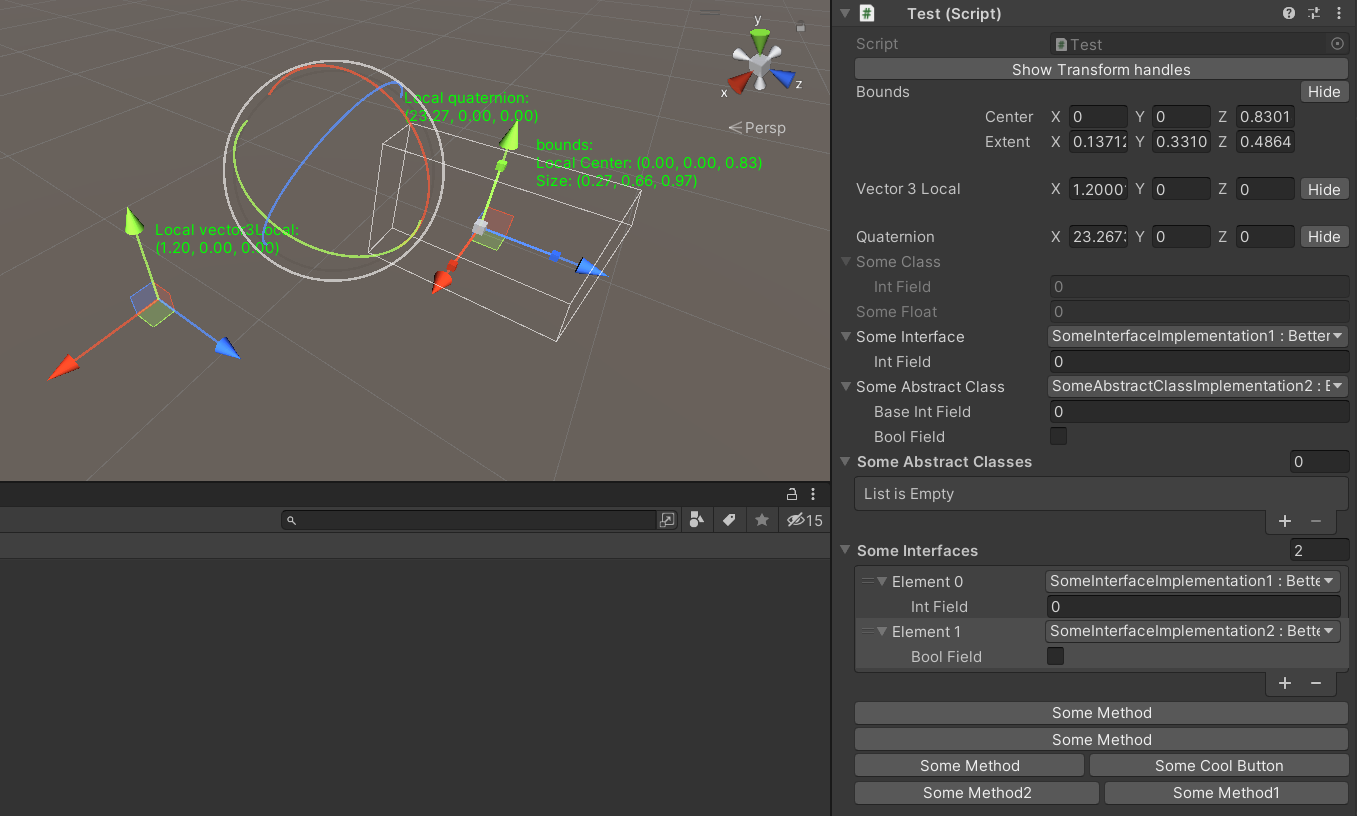
该软件包提供以下功能:
该软件包包含用于抽屉的基类,并具有更好的下拉。
更好的下拉包含:
提供了选择接口实现的可能性,枚举值,而Unity Inspector的下拉列表更好。
还支持标志枚举。
用法:
 [ Select ] [ SerializeReference ]
private ISomeInterface someInterface ;

[ Select ] [ SerializeReference ]
private SomeAbstractClass someAbstractClass ;

[ Select ( typeof ( SomeAbstractClass ) ) ] [ SerializeReference ]
private List < SomeAbstractClass > someAbstractClasses ;

[ Select ( typeof ( ISomeInterface ) ) ] [ SerializeReference ]
private List < ISomeInterface > someInterfaces ;

[ Select ] [ SerializeField ]
private KeyCode keyCode ; 类似于选择属性,但允许定义自己的选择集合。
用法:
 [ Dropdown ( "Method()" ) ] [ SerializeField ]
private List < int > someInts ;

[ Dropdown ( "Method()" ) ] [ SerializeField ]
private List < int > someInts ;支持从其他类中检索信息,以使用此selectorName使用r:
用法:
 [ Dropdown ( "r:OtherClass.StaticFieldOrProperty" ) ] [ SerializeField ]
private List < int > someInts ;

[ Dropdown ( "r:OtherClass.StaticMethod()" ) ] [ SerializeField ]
private List < int > someInts ;

[ Dropdown ( "r:Singleton.Instance.Method()" ) ] [ SerializeField ]
private List < int > someInts ;

[ Dropdown ( "r:Singleton.Instance.Method()" ) ] [ SerializeField ]
private List < int > someInts ; 通过单击Unity Inspector中的字段来查看对象预览的可能性。
支持场景对象和预制对象以及纹理和精灵的预览。
用法:
 [ Preview ] [ SerializeField ]
private Sprite sprite ;

[ Preview ] [ SerializeField ]
private SomeMonobehaviour someMonobehaviour ; 提供了禁用Unity Inspector中字段修改但保持显示的可能性。
用法:
 [ ReadOnlyField ] [ SerializeField ]
private SomeClass someClass ;

[ ReadOnlyField ] [ SerializeField ]
private float someFloat ;

[ ReadOnlyField ] [ TextArea ( 5 , 10 ) ] [ SerializeField ]
private string someString ; 提供了在Unity Inspector中绘制有关字段的完整纹理的可能性。要获取纹理指南打开纹理式窗口和正确的打开上下文菜单 - >转换为iConheaderattribute。
用法:
 [ IconHeader ( "TEXTURE_GUID" ) ] [ SerializeField ]
private string oldName ; 提供了从UnityEngine.Object的type sharthetex下方绘制全尺寸检查器的可能性。
用法:
 [ DrawInspector ] [ SerializeField ]
private SomeScriptable scriptable ; 提供了重命名Unity Inspector标签的可能性。
用法:
 [ RenameField ( "New Name" ) ] [ SerializeField ]
private string oldName ; 通过拖动手柄从场景视图中设置Vector3/vector2/Quaternion/bounds的值的可能性。
[GizmoLocal]仅用于MonoBehaviour Unity Inspector。
用法:
 [ Gizmo ]
[ SerializeField ] private Bounds bounds ;

[ Gizmo ]
[ SerializeField ] private Vector3 vector3 ;

[ Gizmo ]
[ SerializeField ] private Quaternion quaternion ;

[ GizmoLocal ]
[ SerializeField ] private Bounds boundsLocal ;

[ GizmoLocal ]
[ SerializeField ] private Vector3 vector3Local ;

[ GizmoLocal ]
[ SerializeField ] private Quaternion quaternionLocal ; 提供了在Unity Inspector中显示方法显示按钮的可能性。
用法:
 ///Default usage of attribute.
[ EditorButton ]
private void SomeMethod ( )
{
//Some code.
}

///This button will call method with predefined parameters.
///When invokeParams not specified will call with null.
[ EditorButton ( invokeParams : 10f ) ]
private void SomeMethod ( float floatValue )
{
//Some code.
}

///This button will call method with predefined parameters.
///When invokeParams not specified will call with null.
[ EditorButton ( invokeParams : new object [ ] { 10f , 10 } ) ]
private void SomeMethod ( float floatValue , int intValue )
{
//Some code.
}

/// This button will be in the same row with button for SomeMethod2.
/// But will be in the second position.
/// When captureGroup not specified each button placed in separate row.
/// When priority not specified buttons in one row sorted by order in code.
[ EditorButton ( captureGroup : 1 , priority : 2 ) ]
private void SomeMethod1 ( )
{
//Some code.
}

[ EditorButton ( captureGroup : 1 , priority : 1 ) ]
private void SomeMethod2 ( )
{
//Some code.
}

/// This button will have name "Some Cool Button".
/// When displayName not specified or null/empty/whitespace button
/// will have name same as method.
[ EditorButton ( displayName : "Some Cool Button" ) ]
private void SomeMethod ( )
{
//Some code
}您可以检查构造EditorButtonAttribute是否有更多特定的选项。
如何安装






