better attributes legacy
v3.1.10

คำเตือน
แพ็คเกจเลิกใช้แล้วและแทนที่ด้วย - คุณลักษณะที่ดีกว่า
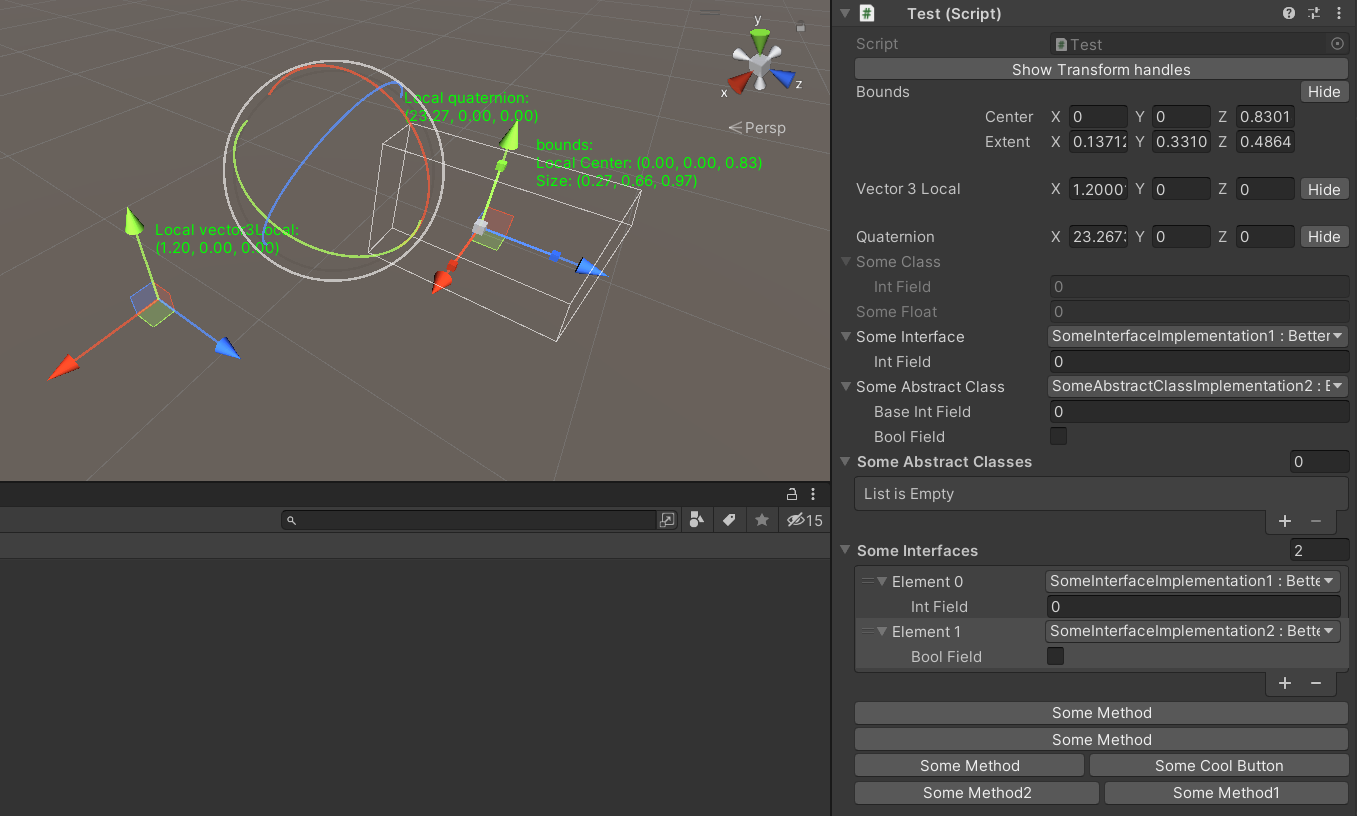
แพ็คเกจนี้มีคุณสมบัติต่อไปนี้:
แพ็คเกจนี้มีคลาสฐานสำหรับลิ้นชักที่มีดรอปดาวน์ที่ดีกว่า
แบบเลื่อนลงที่ดีกว่าประกอบด้วย:
ให้ความเป็นไปได้ในการเลือกการใช้งานอินเทอร์เฟซค่า enum พร้อมดรอปดาวน์ที่ดีขึ้นใน Unity Inspector
ยังรองรับ enums ธง
การใช้งาน:
 [ Select ] [ SerializeReference ]
private ISomeInterface someInterface ;

[ Select ] [ SerializeReference ]
private SomeAbstractClass someAbstractClass ;

[ Select ( typeof ( SomeAbstractClass ) ) ] [ SerializeReference ]
private List < SomeAbstractClass > someAbstractClasses ;

[ Select ( typeof ( ISomeInterface ) ) ] [ SerializeReference ]
private List < ISomeInterface > someInterfaces ;

[ Select ] [ SerializeField ]
private KeyCode keyCode ; คล้ายกับแอตทริบิวต์ที่เลือก แต่อนุญาตให้กำหนดคอลเลกชันของคุณเองในการเลือก
การใช้งาน:
 [ Dropdown ( "Method()" ) ] [ SerializeField ]
private List < int > someInts ;

[ Dropdown ( "Method()" ) ] [ SerializeField ]
private List < int > someInts ;
รองรับการดึงข้อมูลจากคลาสอื่น ๆ เพื่อใช้ตัวเลือกนี้เริ่มเลือก selectorName ด้วย r:
การใช้งาน:
 [ Dropdown ( "r:OtherClass.StaticFieldOrProperty" ) ] [ SerializeField ]
private List < int > someInts ;

[ Dropdown ( "r:OtherClass.StaticMethod()" ) ] [ SerializeField ]
private List < int > someInts ;

[ Dropdown ( "r:Singleton.Instance.Method()" ) ] [ SerializeField ]
private List < int > someInts ;

[ Dropdown ( "r:Singleton.Instance.Method()" ) ] [ SerializeField ]
private List < int > someInts ; ให้ความเป็นไปได้ที่จะดูตัวอย่างวัตถุโดยคลิกที่ฟิลด์ใน Unity Inspector
รองรับตัวอย่างสำหรับ วัตถุฉาก และวัตถุ สำเร็จรูป รวมถึง พื้นผิว และ สไปรต์
การใช้งาน:
 [ Preview ] [ SerializeField ]
private Sprite sprite ;

[ Preview ] [ SerializeField ]
private SomeMonobehaviour someMonobehaviour ; ให้ความเป็นไปได้ในการปิดใช้งานการปรับเปลี่ยนฟิลด์ใน Unity Inspector แต่ให้มันปรากฏขึ้น
การใช้งาน:
 [ ReadOnlyField ] [ SerializeField ]
private SomeClass someClass ;

[ ReadOnlyField ] [ SerializeField ]
private float someFloat ;

[ ReadOnlyField ] [ TextArea ( 5 , 10 ) ] [ SerializeField ]
private string someString ; ให้ความเป็นไปได้ที่จะวาดพื้นผิวที่มีขนาดใหญ่เกี่ยวกับฟิลด์ใน Unity Inspector ในการรับ Texture GUID เปิดหน้าต่าง TextureImport และเมนูเปิดบริบทที่เหมาะสม -> แปลงเป็น IconHeaderAttribute
การใช้งาน:
 [ IconHeader ( "TEXTURE_GUID" ) ] [ SerializeField ]
private string oldName ; ให้ความเป็นไปได้ที่จะวาดผู้ตรวจสอบที่มีขนาดเต็มด้านล่างด้วยประเภท interfatex จาก UnityEngine.Object
การใช้งาน:
 [ DrawInspector ] [ SerializeField ]
private SomeScriptable scriptable ; ให้ความเป็นไปได้ในการเปลี่ยนชื่อฉลากใน Unity Inspector
การใช้งาน:
 [ RenameField ( "New Name" ) ] [ SerializeField ]
private string oldName ; ให้ความเป็นไปได้ในการตั้งค่าสำหรับ vector3/vector2/quaternion/bounds จากมุมมองฉากโดยการลากที่จับ
[GizmoLocal] ทำงานเป็นผู้ตรวจการ Unity MonoBehaviour เท่านั้น
การใช้งาน:
 [ Gizmo ]
[ SerializeField ] private Bounds bounds ;

[ Gizmo ]
[ SerializeField ] private Vector3 vector3 ;

[ Gizmo ]
[ SerializeField ] private Quaternion quaternion ;

[ GizmoLocal ]
[ SerializeField ] private Bounds boundsLocal ;

[ GizmoLocal ]
[ SerializeField ] private Vector3 vector3Local ;

[ GizmoLocal ]
[ SerializeField ] private Quaternion quaternionLocal ; ให้ความเป็นไปได้ในการแสดงปุ่มสำหรับวิธีการใน Unity Inspector
การใช้งาน:
 ///Default usage of attribute.
[ EditorButton ]
private void SomeMethod ( )
{
//Some code.
}

///This button will call method with predefined parameters.
///When invokeParams not specified will call with null.
[ EditorButton ( invokeParams : 10f ) ]
private void SomeMethod ( float floatValue )
{
//Some code.
}

///This button will call method with predefined parameters.
///When invokeParams not specified will call with null.
[ EditorButton ( invokeParams : new object [ ] { 10f , 10 } ) ]
private void SomeMethod ( float floatValue , int intValue )
{
//Some code.
}

/// This button will be in the same row with button for SomeMethod2.
/// But will be in the second position.
/// When captureGroup not specified each button placed in separate row.
/// When priority not specified buttons in one row sorted by order in code.
[ EditorButton ( captureGroup : 1 , priority : 2 ) ]
private void SomeMethod1 ( )
{
//Some code.
}

[ EditorButton ( captureGroup : 1 , priority : 1 ) ]
private void SomeMethod2 ( )
{
//Some code.
}

/// This button will have name "Some Cool Button".
/// When displayName not specified or null/empty/whitespace button
/// will have name same as method.
[ EditorButton ( displayName : "Some Cool Button" ) ]
private void SomeMethod ( )
{
//Some code
}
คุณสามารถตรวจสอบตัวสร้างสำหรับ EditorButtonAttribute มีตัวเลือกที่เฉพาะเจาะจงมากขึ้น
วิธีการติดตั้ง






