better attributes legacy
v3.1.10

حذر
حزمة إهمال واستبدالها - سمات أفضل
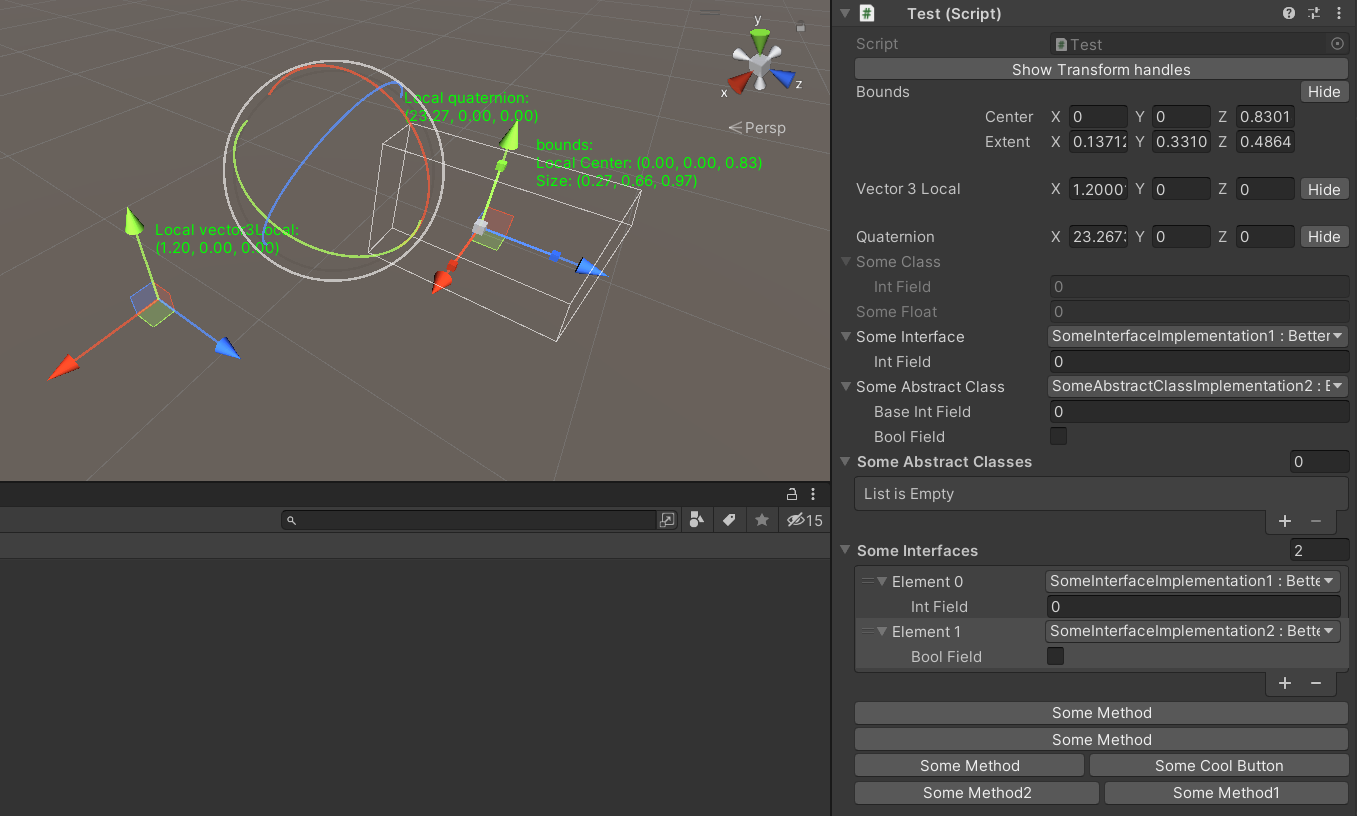
توفر هذه الحزمة الميزات التالية:
تحتوي هذه الحزمة على فئة أساسية للدرج مع منسدلة أفضل.
يحتوي المنسدلة الأفضل على:
يوفر إمكانية تحديد تنفيذ الواجهة ، وقيمة التعداد مع منسدلة أفضل في مفتش الوحدة.
يدعم أيضا العلم التعداد.
الاستخدام:
 [ Select ] [ SerializeReference ]
private ISomeInterface someInterface ;

[ Select ] [ SerializeReference ]
private SomeAbstractClass someAbstractClass ;

[ Select ( typeof ( SomeAbstractClass ) ) ] [ SerializeReference ]
private List < SomeAbstractClass > someAbstractClasses ;

[ Select ( typeof ( ISomeInterface ) ) ] [ SerializeReference ]
private List < ISomeInterface > someInterfaces ;

[ Select ] [ SerializeField ]
private KeyCode keyCode ; على غرار SELECT ATTRIBUTE ، ولكنه يسمح بتحديد مجموعتك الخاصة من الاختيار.
الاستخدام:
 [ Dropdown ( "Method()" ) ] [ SerializeField ]
private List < int > someInts ;

[ Dropdown ( "Method()" ) ] [ SerializeField ]
private List < int > someInts ;
يدعم استرداد المعلومات من فئات أخرى ، لاستخدام هذا الخيار بدء selectorName مع r: .
الاستخدام:
 [ Dropdown ( "r:OtherClass.StaticFieldOrProperty" ) ] [ SerializeField ]
private List < int > someInts ;

[ Dropdown ( "r:OtherClass.StaticMethod()" ) ] [ SerializeField ]
private List < int > someInts ;

[ Dropdown ( "r:Singleton.Instance.Method()" ) ] [ SerializeField ]
private List < int > someInts ;

[ Dropdown ( "r:Singleton.Instance.Method()" ) ] [ SerializeField ]
private List < int > someInts ; يوفر إمكانية رؤية معاينة الكائن من خلال النقر في الحقل في مفتش الوحدة.
يدعم معاينة كائنات المشهد وكائن الجرف وكذلك القوام والعفاريت .
الاستخدام:
 [ Preview ] [ SerializeField ]
private Sprite sprite ;

[ Preview ] [ SerializeField ]
private SomeMonobehaviour someMonobehaviour ; يوفر إمكانية تعطيل تعديل الحقول في مفتش الوحدة ولكن احتفظ بها معروضة.
الاستخدام:
 [ ReadOnlyField ] [ SerializeField ]
private SomeClass someClass ;

[ ReadOnlyField ] [ SerializeField ]
private float someFloat ;

[ ReadOnlyField ] [ TextArea ( 5 , 10 ) ] [ SerializeField ]
private string someString ; يوفر إمكانية رسم نسيج كامل عن الحقل في مفتش الوحدة. للحصول على نافذة GUID Open Open OpenImport وقائمة السياق المفتوح بشكل صحيح -> تحويل إلى IconHeaderAttribute.
الاستخدام:
 [ IconHeader ( "TEXTURE_GUID" ) ] [ SerializeField ]
private string oldName ; يوفر إمكانية لرسم المفتش الكامل أسفل الحقل مع type thinketex من UnityEngine.Object.
الاستخدام:
 [ DrawInspector ] [ SerializeField ]
private SomeScriptable scriptable ; يوفر إمكانية إعادة تسمية التسمية في مفتش الوحدة.
الاستخدام:
 [ RenameField ( "New Name" ) ] [ SerializeField ]
private string oldName ; يوفر إمكانية تعيين قيمة لـ Vector3/Vector2/Quaternion/الحدود من عرض المشهد عن طريق سحب المقابض.
[GizmoLocal] لا يعمل إلا في مفتش الوحدة MonoBehaviour .
الاستخدام:
 [ Gizmo ]
[ SerializeField ] private Bounds bounds ;

[ Gizmo ]
[ SerializeField ] private Vector3 vector3 ;

[ Gizmo ]
[ SerializeField ] private Quaternion quaternion ;

[ GizmoLocal ]
[ SerializeField ] private Bounds boundsLocal ;

[ GizmoLocal ]
[ SerializeField ] private Vector3 vector3Local ;

[ GizmoLocal ]
[ SerializeField ] private Quaternion quaternionLocal ; يوفر إمكانية عرض الزر للطريقة في مفتش الوحدة.
الاستخدامات:
 ///Default usage of attribute.
[ EditorButton ]
private void SomeMethod ( )
{
//Some code.
}

///This button will call method with predefined parameters.
///When invokeParams not specified will call with null.
[ EditorButton ( invokeParams : 10f ) ]
private void SomeMethod ( float floatValue )
{
//Some code.
}

///This button will call method with predefined parameters.
///When invokeParams not specified will call with null.
[ EditorButton ( invokeParams : new object [ ] { 10f , 10 } ) ]
private void SomeMethod ( float floatValue , int intValue )
{
//Some code.
}

/// This button will be in the same row with button for SomeMethod2.
/// But will be in the second position.
/// When captureGroup not specified each button placed in separate row.
/// When priority not specified buttons in one row sorted by order in code.
[ EditorButton ( captureGroup : 1 , priority : 2 ) ]
private void SomeMethod1 ( )
{
//Some code.
}

[ EditorButton ( captureGroup : 1 , priority : 1 ) ]
private void SomeMethod2 ( )
{
//Some code.
}

/// This button will have name "Some Cool Button".
/// When displayName not specified or null/empty/whitespace button
/// will have name same as method.
[ EditorButton ( displayName : "Some Cool Button" ) ]
private void SomeMethod ( )
{
//Some code
}
يمكنك التحقق من مُنشئات EditorButtonAttribute هناك خيارات أكثر تحديدًا.
كيفية التثبيت






