better attributes legacy
v3.1.10

注意
パッケージは廃止され、より良い属性に置き換えられました
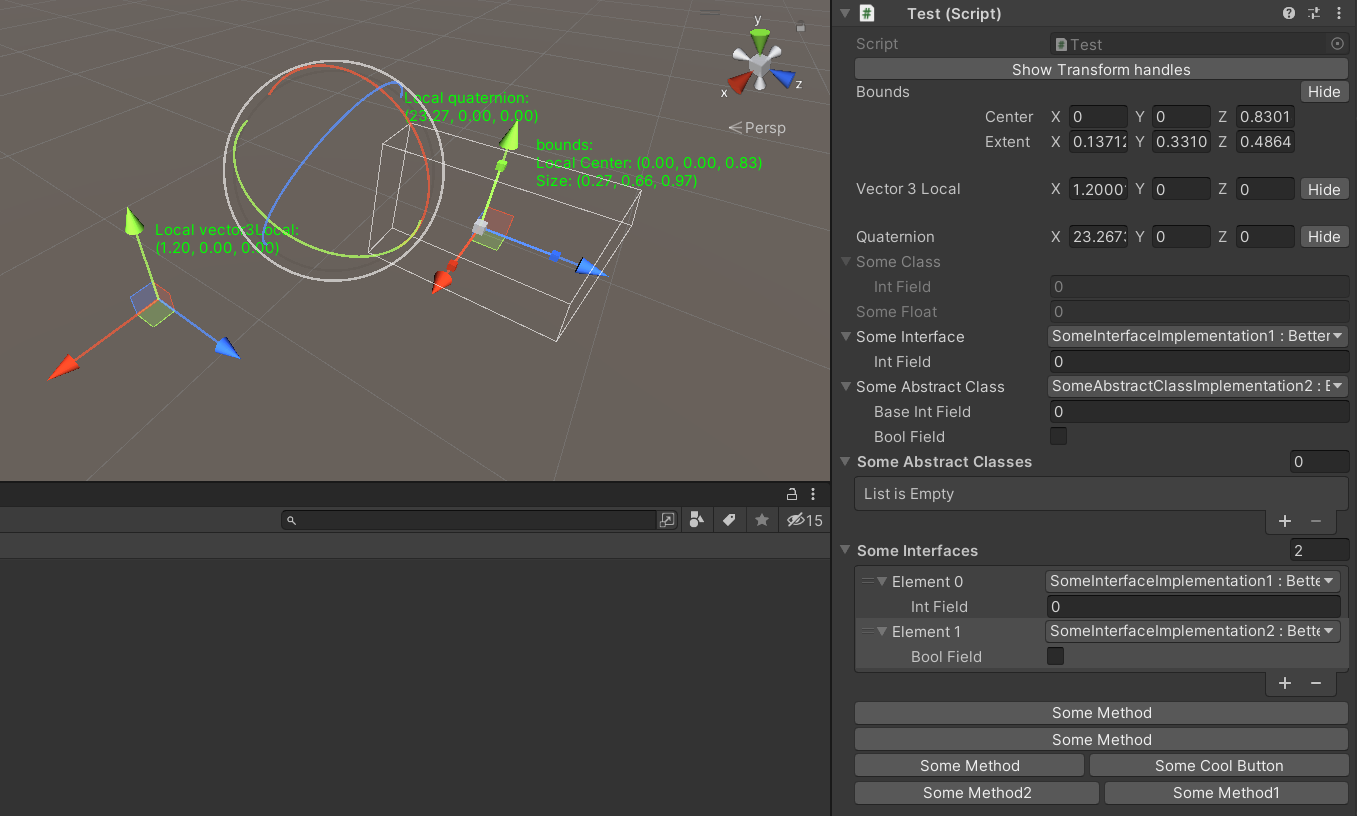
このパッケージは次の機能を提供します。
このパッケージには、より良いドロップダウンを備えた引き出し用のベースクラスが含まれています。
より良いドロップダウンが含まれます:
Unity Inspectorのより良いドロップダウンでインターフェイスの実装、列挙値を選択する可能性を提供します。
また、フラグの列挙をサポートします。
使用法:
 [ Select ] [ SerializeReference ]
private ISomeInterface someInterface ;

[ Select ] [ SerializeReference ]
private SomeAbstractClass someAbstractClass ;

[ Select ( typeof ( SomeAbstractClass ) ) ] [ SerializeReference ]
private List < SomeAbstractClass > someAbstractClasses ;

[ Select ( typeof ( ISomeInterface ) ) ] [ SerializeReference ]
private List < ISomeInterface > someInterfaces ;

[ Select ] [ SerializeField ]
private KeyCode keyCode ; 選択属性と同様ですが、選択の独自のコレクションを定義できます。
使用法:
 [ Dropdown ( "Method()" ) ] [ SerializeField ]
private List < int > someInts ;

[ Dropdown ( "Method()" ) ] [ SerializeField ]
private List < int > someInts ;他のクラスから情報の取得をサポートします。このselectorNameを使用して、 r:
使用法:
 [ Dropdown ( "r:OtherClass.StaticFieldOrProperty" ) ] [ SerializeField ]
private List < int > someInts ;

[ Dropdown ( "r:OtherClass.StaticMethod()" ) ] [ SerializeField ]
private List < int > someInts ;

[ Dropdown ( "r:Singleton.Instance.Method()" ) ] [ SerializeField ]
private List < int > someInts ;

[ Dropdown ( "r:Singleton.Instance.Method()" ) ] [ SerializeField ]
private List < int > someInts ; Unity Inspectorのフィールドにクリックして、オブジェクトのプレビューを表示する可能性を提供します。
シーンオブジェクトとプレハブオブジェクトのプレビュー、テクスチャとスプライトをサポートします。
使用法:
 [ Preview ] [ SerializeField ]
private Sprite sprite ;

[ Preview ] [ SerializeField ]
private SomeMonobehaviour someMonobehaviour ; Unity Inspectorのフィールドの変更を無効にする可能性を提供しますが、表示し続けます。
使用法:
 [ ReadOnlyField ] [ SerializeField ]
private SomeClass someClass ;

[ ReadOnlyField ] [ SerializeField ]
private float someFloat ;

[ ReadOnlyField ] [ TextArea ( 5 , 10 ) ] [ SerializeField ]
private string someString ; Unity Inspectorのフィールドについてフルサイズのテクスチャを描く可能性を提供します。テクスチャを取得するには、[テクスチャインポート]ウィンドウと正しいオープンコンテキストメニュー - > ICONHEADERATTRIBUTEにコンバージングされます。
使用法:
 [ IconHeader ( "TEXTURE_GUID" ) ] [ SerializeField ]
private string oldName ; UnityEngine.ObjectのType EnerseTexを使用して、フィールドの下に本格的な検査官を描く可能性を提供します。
使用法:
 [ DrawInspector ] [ SerializeField ]
private SomeScriptable scriptable ; Unity Inspectorでラベルを変更する可能性を提供します。
使用法:
 [ RenameField ( "New Name" ) ] [ SerializeField ]
private string oldName ; ハンドルをドラッグして、シーンビューからVector3/Vector2/Quaternion/Boundsの値を設定する可能性を提供します。
[GizmoLocal] 、 MonoBehaviour Unity Inspectorにのみ機能します。
使用法:
 [ Gizmo ]
[ SerializeField ] private Bounds bounds ;

[ Gizmo ]
[ SerializeField ] private Vector3 vector3 ;

[ Gizmo ]
[ SerializeField ] private Quaternion quaternion ;

[ GizmoLocal ]
[ SerializeField ] private Bounds boundsLocal ;

[ GizmoLocal ]
[ SerializeField ] private Vector3 vector3Local ;

[ GizmoLocal ]
[ SerializeField ] private Quaternion quaternionLocal ; Unity Inspectorでメソッドのボタンを表示する可能性を提供します。
使用法:
 ///Default usage of attribute.
[ EditorButton ]
private void SomeMethod ( )
{
//Some code.
}

///This button will call method with predefined parameters.
///When invokeParams not specified will call with null.
[ EditorButton ( invokeParams : 10f ) ]
private void SomeMethod ( float floatValue )
{
//Some code.
}

///This button will call method with predefined parameters.
///When invokeParams not specified will call with null.
[ EditorButton ( invokeParams : new object [ ] { 10f , 10 } ) ]
private void SomeMethod ( float floatValue , int intValue )
{
//Some code.
}

/// This button will be in the same row with button for SomeMethod2.
/// But will be in the second position.
/// When captureGroup not specified each button placed in separate row.
/// When priority not specified buttons in one row sorted by order in code.
[ EditorButton ( captureGroup : 1 , priority : 2 ) ]
private void SomeMethod1 ( )
{
//Some code.
}

[ EditorButton ( captureGroup : 1 , priority : 1 ) ]
private void SomeMethod2 ( )
{
//Some code.
}

/// This button will have name "Some Cool Button".
/// When displayName not specified or null/empty/whitespace button
/// will have name same as method.
[ EditorButton ( displayName : "Some Cool Button" ) ]
private void SomeMethod ( )
{
//Some code
} EditorButtonAttributeのコンストラクターを確認できます。
インストール方法






