RSKImageCropper
5.0.1

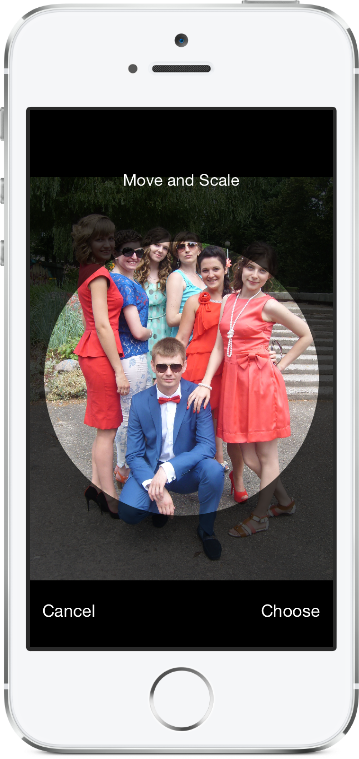
iOS的图像农作物类似于Contacts App中的iOS,并支持景观取向。
rskimagecropper需要iOS 12.0或更高版本。
要将RSKImageCropper软件包添加到您的Xcode项目中,请选择“文件> swift软件包”>“添加软件包依赖关系”并输入存储库URL。
https://github.com/ruslanskorb/RSKImageCropper.git
将POD RSKImageCropper添加到您的podfile中。
pod 'RSKImageCropper'
从终端运行pod install ,然后打开您的应用程序的.xcworkspace文件以启动Xcode。
导入RSKImageCropper.h头。通常,这应该写为#import <RSKImageCropper/RSKImageCropper.h>
将ruslanskorb/RSKImageCropper项目添加到您的卡特文件中。
github "ruslanskorb/RSKImageCropper"
运行carthage update ,然后按照将iOS和/或MAC框架添加到项目中所需的其他步骤。
导入RSKIMAGECROPPER框架/模块。
@import RSKImageCropper#import <RSKImageCropper/RSKImageCropper.h> 导入类标题。
# import < RSKImageCropper/RSKImageCropper.h >只需创建一个用于图像裁剪的视图控制器并设置委托。
- ( IBAction )onButtonTouch:(UIButton *)sender
{
    UIImage *image = [UIImage imageNamed: @" image " ];
    RSKImageCropViewController *imageCropViewController = [[RSKImageCropViewController alloc ] initWithImage: image];
    imageCropViewController. delegate = self;
    [ self .navigationController pushViewController: imageCropViewController animated: YES ];
}RSKImageCropViewControllerDelegate提供了三种代表方法。要使用它们,请在视图控制器中实现代表。
@interface ViewController () <RSKImageCropViewControllerDelegate>然后实现委托功能。
 // Crop image has been canceled.
- ( void )imageCropViewControllerDidCancelCrop:(RSKImageCropViewController *)controller
{
    [ self .navigationController popViewControllerAnimated: YES ];
}

// The original image has been cropped. Additionally provides a rotation angle used to produce image.
- ( void )imageCropViewController:(RSKImageCropViewController *)controller
                   didCropImage:(UIImage *)croppedImage
                  usingCropRect:( CGRect )cropRect
                  rotationAngle:( CGFloat )rotationAngle
{
    self. imageView . image = croppedImage;
    [ self .navigationController popViewControllerAnimated: YES ];
}

// The original image will be cropped.
- ( void )imageCropViewController:(RSKImageCropViewController *)controller
                  willCropImage:(UIImage *)originalImage
{
    // Use when `applyMaskToCroppedImage` set to YES.
    [SVProgressHUD show ];
}RSKImageCropViewControllerDataSource提供了三种数据源方法。方法imageCropViewControllerCustomMaskRect:向掩模的自定义RECT询问数据源。方法imageCropViewControllerCustomMaskPath:向数据源询问掩码的自定义路径。方法imageCropViewControllerCustomMovementRect:向数据源询问可以移动图像的自定义RECT。要使用它们,请在视图控制器中实现数据源。
@interface ViewController () <RSKImageCropViewControllerDataSource>然后实现数据源功能。
 // Returns a custom rect for the mask.
- ( CGRect )imageCropViewControllerCustomMaskRect:(RSKImageCropViewController *)controller
{
    CGSize aspectRatio = CGSizeMake ( 16 . 0f , 9 . 0f );

    CGFloat viewWidth = CGRectGetWidth (controller. view . frame );
    CGFloat viewHeight = CGRectGetHeight (controller. view . frame );

    CGFloat maskWidth;
    if ([controller isPortraitInterfaceOrientation ]) {
        maskWidth = viewWidth;
    } else {
        maskWidth = viewHeight;
    }

    CGFloat maskHeight;
    do {
        maskHeight = maskWidth * aspectRatio. height / aspectRatio. width ;
        maskWidth -= 1 . 0f ;
    } while (maskHeight != floor (maskHeight));
    maskWidth += 1 . 0f ;

    CGSize maskSize = CGSizeMake (maskWidth, maskHeight);

    CGRect maskRect = CGRectMake ((viewWidth - maskSize. width ) * 0 . 5f ,
                                 (viewHeight - maskSize. height ) * 0 . 5f ,
                                 maskSize. width ,
                                 maskSize. height );

    return maskRect;
}

// Returns a custom path for the mask.
- (UIBezierPath *)imageCropViewControllerCustomMaskPath:(RSKImageCropViewController *)controller
{
    CGRect rect = controller. maskRect ;
    CGPoint point1 = CGPointMake ( CGRectGetMinX (rect), CGRectGetMaxY (rect));
    CGPoint point2 = CGPointMake ( CGRectGetMaxX (rect), CGRectGetMaxY (rect));
    CGPoint point3 = CGPointMake ( CGRectGetMaxX (rect), CGRectGetMinY (rect));
    CGPoint point4 = CGPointMake ( CGRectGetMinX (rect), CGRectGetMinY (rect));

    UIBezierPath *rectangle = [UIBezierPath bezierPath ];
    [rectangle moveToPoint: point1];
    [rectangle addLineToPoint: point2];
    [rectangle addLineToPoint: point3];
    [rectangle addLineToPoint: point4];
    [rectangle closePath ];

    return rectangle;
}

// Returns a custom rect in which the image can be moved.
- ( CGRect )imageCropViewControllerCustomMovementRect:(RSKImageCropViewController *)controller
{
    if (controller. rotationAngle == 0 ) {
        return controller. maskRect ;
    } else {
        CGRect maskRect = controller. maskRect ;
        CGFloat rotationAngle = controller. rotationAngle ;

        CGRect movementRect = CGRectZero ;

        movementRect. size . width = CGRectGetWidth (maskRect) * fabs ( cos (rotationAngle)) + CGRectGetHeight (maskRect) * fabs ( sin (rotationAngle));
        movementRect. size . height = CGRectGetHeight (maskRect) * fabs ( cos (rotationAngle)) + CGRectGetWidth (maskRect) * fabs ( sin (rotationAngle));

        movementRect. origin . x = CGRectGetMinX (maskRect) + ( CGRectGetWidth (maskRect) - CGRectGetWidth (movementRect)) * 0 . 5f ;
        movementRect. origin . y = CGRectGetMinY (maskRect) + ( CGRectGetHeight (maskRect) - CGRectGetHeight (movementRect)) * 0 . 5f ;

        movementRect. origin . x = floor ( CGRectGetMinX (movementRect));
        movementRect. origin . y = floor ( CGRectGetMinY (movementRect));
        movementRect = CGRectIntegral (movementRect);

        return movementRect;
    }
}在Xcode中构建并运行RSKImageCropperExample项目,以查看RSKImageCropper的作用。玩得开心。分叉并发送拉请请求。找出自定义的钩子。
RSKImageCropper不需要隐私清单。根据苹果收到的信息,我们应该避免在我们的框架中添加空的隐私清单。
Ruslan Skorb
该项目可根据麻省理工学院许可获得。有关更多信息,请参见许可证文件。通过链接到项目页面来归因。






