RSKImageCropper
5.0.1

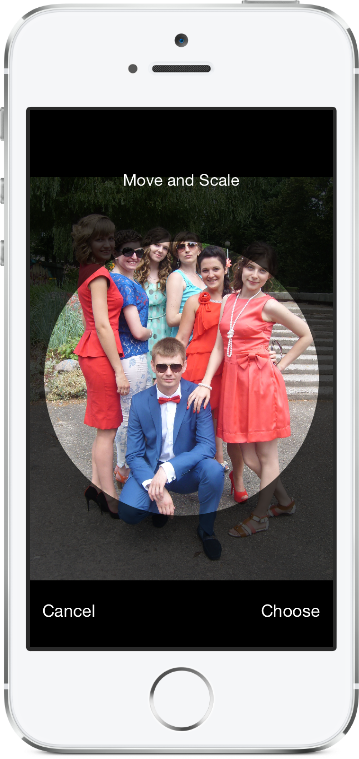
Copropper gambar untuk iOS seperti di aplikasi kontak dengan dukungan untuk orientasi lanskap.
RSKIMAGECROPPER membutuhkan iOS 12.0 atau lebih baru.
Untuk menambahkan paket RSKImageCropper ke proyek XCODE Anda, pilih File> Swift Packages> Tambahkan ketergantungan paket dan masukkan URL repositori.
https://github.com/ruslanskorb/RSKImageCropper.git
Tambahkan pod RSKImageCropper ke podfile Anda.
pod 'RSKImageCropper'
Jalankan pod install dari Terminal, lalu buka file .xcworkspace aplikasi Anda untuk meluncurkan XCODE.
Impor header RSKImageCropper.h . Biasanya, ini harus ditulis sebagai #import <RSKImageCropper/RSKImageCropper.h>
Tambahkan Proyek ruslanskorb/RSKImageCropper ke CartFile Anda.
github "ruslanskorb/RSKImageCropper"
Jalankan carthage update , lalu ikuti langkah -langkah tambahan yang diperlukan untuk menambahkan kerangka kerja iOS dan/atau Mac ke dalam proyek Anda.
Impor kerangka/modul RSKIMAGECROPPER.
@import RSKImageCropper#import <RSKImageCropper/RSKImageCropper.h> Impor header kelas.
# import < RSKImageCropper/RSKImageCropper.h >Cukup buat pengontrol tampilan untuk penanaman gambar dan atur delegasi.
- ( IBAction )onButtonTouch:(UIButton *)sender
{
    UIImage *image = [UIImage imageNamed: @" image " ];
    RSKImageCropViewController *imageCropViewController = [[RSKImageCropViewController alloc ] initWithImage: image];
    imageCropViewController. delegate = self;
    [ self .navigationController pushViewController: imageCropViewController animated: YES ];
} RSKImageCropViewControllerDelegate menyediakan tiga metode delegasi. Untuk menggunakannya, terapkan delegasi di pengontrol tampilan Anda.
@interface ViewController () <RSKImageCropViewControllerDelegate>Kemudian terapkan fungsi delegasi.
 // Crop image has been canceled.
- ( void )imageCropViewControllerDidCancelCrop:(RSKImageCropViewController *)controller
{
    [ self .navigationController popViewControllerAnimated: YES ];
}

// The original image has been cropped. Additionally provides a rotation angle used to produce image.
- ( void )imageCropViewController:(RSKImageCropViewController *)controller
                   didCropImage:(UIImage *)croppedImage
                  usingCropRect:( CGRect )cropRect
                  rotationAngle:( CGFloat )rotationAngle
{
    self. imageView . image = croppedImage;
    [ self .navigationController popViewControllerAnimated: YES ];
}

// The original image will be cropped.
- ( void )imageCropViewController:(RSKImageCropViewController *)controller
                  willCropImage:(UIImage *)originalImage
{
    // Use when `applyMaskToCroppedImage` set to YES.
    [SVProgressHUD show ];
} RSKImageCropViewControllerDataSource menyediakan tiga metode sumber data. Metode imageCropViewControllerCustomMaskRect: meminta sumber data untuk rect khusus untuk mask. Metode imageCropViewControllerCustomMaskPath: meminta sumber data untuk jalur khusus untuk mask. Metode imageCropViewControllerCustomMovementRect: meminta sumber data untuk rect khusus di mana gambar dapat dipindahkan. Untuk menggunakannya, terapkan sumber data di pengontrol tampilan Anda.
@interface ViewController () <RSKImageCropViewControllerDataSource>Kemudian terapkan fungsi sumber data.
 // Returns a custom rect for the mask.
- ( CGRect )imageCropViewControllerCustomMaskRect:(RSKImageCropViewController *)controller
{
    CGSize aspectRatio = CGSizeMake ( 16 . 0f , 9 . 0f );

    CGFloat viewWidth = CGRectGetWidth (controller. view . frame );
    CGFloat viewHeight = CGRectGetHeight (controller. view . frame );

    CGFloat maskWidth;
    if ([controller isPortraitInterfaceOrientation ]) {
        maskWidth = viewWidth;
    } else {
        maskWidth = viewHeight;
    }

    CGFloat maskHeight;
    do {
        maskHeight = maskWidth * aspectRatio. height / aspectRatio. width ;
        maskWidth -= 1 . 0f ;
    } while (maskHeight != floor (maskHeight));
    maskWidth += 1 . 0f ;

    CGSize maskSize = CGSizeMake (maskWidth, maskHeight);

    CGRect maskRect = CGRectMake ((viewWidth - maskSize. width ) * 0 . 5f ,
                                 (viewHeight - maskSize. height ) * 0 . 5f ,
                                 maskSize. width ,
                                 maskSize. height );

    return maskRect;
}

// Returns a custom path for the mask.
- (UIBezierPath *)imageCropViewControllerCustomMaskPath:(RSKImageCropViewController *)controller
{
    CGRect rect = controller. maskRect ;
    CGPoint point1 = CGPointMake ( CGRectGetMinX (rect), CGRectGetMaxY (rect));
    CGPoint point2 = CGPointMake ( CGRectGetMaxX (rect), CGRectGetMaxY (rect));
    CGPoint point3 = CGPointMake ( CGRectGetMaxX (rect), CGRectGetMinY (rect));
    CGPoint point4 = CGPointMake ( CGRectGetMinX (rect), CGRectGetMinY (rect));

    UIBezierPath *rectangle = [UIBezierPath bezierPath ];
    [rectangle moveToPoint: point1];
    [rectangle addLineToPoint: point2];
    [rectangle addLineToPoint: point3];
    [rectangle addLineToPoint: point4];
    [rectangle closePath ];

    return rectangle;
}

// Returns a custom rect in which the image can be moved.
- ( CGRect )imageCropViewControllerCustomMovementRect:(RSKImageCropViewController *)controller
{
    if (controller. rotationAngle == 0 ) {
        return controller. maskRect ;
    } else {
        CGRect maskRect = controller. maskRect ;
        CGFloat rotationAngle = controller. rotationAngle ;

        CGRect movementRect = CGRectZero ;

        movementRect. size . width = CGRectGetWidth (maskRect) * fabs ( cos (rotationAngle)) + CGRectGetHeight (maskRect) * fabs ( sin (rotationAngle));
        movementRect. size . height = CGRectGetHeight (maskRect) * fabs ( cos (rotationAngle)) + CGRectGetWidth (maskRect) * fabs ( sin (rotationAngle));

        movementRect. origin . x = CGRectGetMinX (maskRect) + ( CGRectGetWidth (maskRect) - CGRectGetWidth (movementRect)) * 0 . 5f ;
        movementRect. origin . y = CGRectGetMinY (maskRect) + ( CGRectGetHeight (maskRect) - CGRectGetHeight (movementRect)) * 0 . 5f ;

        movementRect. origin . x = floor ( CGRectGetMinX (movementRect));
        movementRect. origin . y = floor ( CGRectGetMinY (movementRect));
        movementRect = CGRectIntegral (movementRect);

        return movementRect;
    }
} Bangun dan jalankan proyek RSKImageCropperExample di Xcode untuk melihat RSKImageCropper beraksi. Selamat bersenang-senang. Garpu dan kirim permintaan tarik. Cari tahu kait untuk kustomisasi.
RSKImageCropper tidak memerlukan manifes privasi. Menurut informasi yang diterima dari Apple, kita harus menghindari penambahan privasi kosong yang dimanifestasikan ke kerangka kerja kita.
Ruslan Skorb
Proyek ini tersedia di bawah lisensi MIT. Lihat file lisensi untuk info lebih lanjut. Atribusi dengan menautkan ke halaman proyek dihargai.






