RSKImageCropper
5.0.1

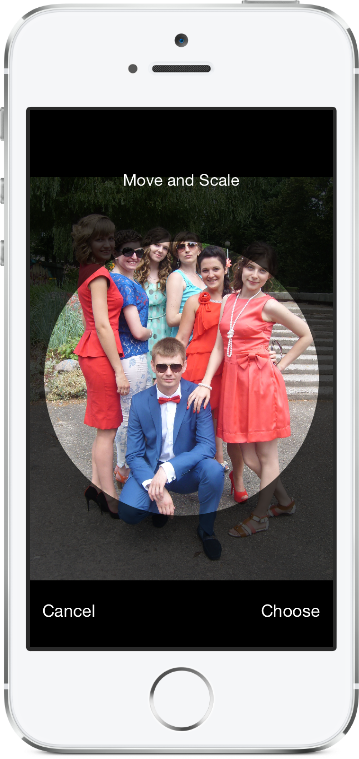
صورة مصورة لنظام التشغيل iOS كما هو الحال في تطبيق جهات الاتصال مع دعم اتجاه المناظر الطبيعية.
يتطلب RSkimagecropper iOS 12.0 أو أحدث.
لإضافة حزمة RSKImageCropper إلى مشروع XCode الخاص بك ، حدد ملف> حزم سويفت> إضافة تبعية الحزمة وأدخل عنوان URL للمستودع.
https://github.com/ruslanskorb/RSKImageCropper.git
أضف pod RSKImageCropper إلى podfile الخاص بك.
pod 'RSKImageCropper'
قم بتشغيل pod install من Terminal ، ثم افتح ملف .xcworkspace الخاص بالتطبيق الخاص بك لإطلاق XCode.
استيراد RSKImageCropper.h رأس. عادة ، يجب كتابة هذا على أنه #import <RSKImageCropper/RSKImageCropper.h>
أضف مشروع ruslanskorb/RSKImageCropper إلى Cartfile.
github "ruslanskorb/RSKImageCropper"
قم بتشغيل carthage update ، ثم اتبع الخطوات الإضافية المطلوبة لإضافة أطر iOS و/أو Mac في مشروعك.
استيراد إطار/وحدة RSKIMAGECROPPER.
@import RSKImageCropper#import <RSKImageCropper/RSKImageCropper.h> استيراد رأس الفصل.
# import < RSKImageCropper/RSKImageCropper.h >فقط قم بإنشاء وحدة تحكم عرض لزراعة الصورة وضبط المندوب.
- ( IBAction )onButtonTouch:(UIButton *)sender
{
    UIImage *image = [UIImage imageNamed: @" image " ];
    RSKImageCropViewController *imageCropViewController = [[RSKImageCropViewController alloc ] initWithImage: image];
    imageCropViewController. delegate = self;
    [ self .navigationController pushViewController: imageCropViewController animated: YES ];
} يوفر RSKImageCropViewControllerDelegate ثلاث طرق مندوبة. لاستخدامها ، قم بتنفيذ المندوب في وحدة تحكم العرض الخاصة بك.
@interface ViewController () <RSKImageCropViewControllerDelegate>ثم تنفيذ وظائف المندوب.
 // Crop image has been canceled.
- ( void )imageCropViewControllerDidCancelCrop:(RSKImageCropViewController *)controller
{
    [ self .navigationController popViewControllerAnimated: YES ];
}

// The original image has been cropped. Additionally provides a rotation angle used to produce image.
- ( void )imageCropViewController:(RSKImageCropViewController *)controller
                   didCropImage:(UIImage *)croppedImage
                  usingCropRect:( CGRect )cropRect
                  rotationAngle:( CGFloat )rotationAngle
{
    self. imageView . image = croppedImage;
    [ self .navigationController popViewControllerAnimated: YES ];
}

// The original image will be cropped.
- ( void )imageCropViewController:(RSKImageCropViewController *)controller
                  willCropImage:(UIImage *)originalImage
{
    // Use when `applyMaskToCroppedImage` set to YES.
    [SVProgressHUD show ];
} يوفر RSKImageCropViewControllerDataSource ثلاث طرق مصدر بيانات. طريقة imageCropViewControllerCustomMaskRect: يسأل مصدر البيانات لمستقيم مخصص للقناع. طريقة imageCropViewControllerCustomMaskPath: تسأل مصدر البيانات لمسار مخصص للقناع. طريقة imageCropViewControllerCustomMovementRect: يسأل مصدر البيانات لمستقيم مخصص يمكن نقل الصورة فيه. لاستخدامها ، قم بتنفيذ مصدر البيانات في وحدة التحكم في العرض.
@interface ViewController () <RSKImageCropViewControllerDataSource>ثم تنفيذ وظائف مصدر البيانات.
 // Returns a custom rect for the mask.
- ( CGRect )imageCropViewControllerCustomMaskRect:(RSKImageCropViewController *)controller
{
    CGSize aspectRatio = CGSizeMake ( 16 . 0f , 9 . 0f );

    CGFloat viewWidth = CGRectGetWidth (controller. view . frame );
    CGFloat viewHeight = CGRectGetHeight (controller. view . frame );

    CGFloat maskWidth;
    if ([controller isPortraitInterfaceOrientation ]) {
        maskWidth = viewWidth;
    } else {
        maskWidth = viewHeight;
    }

    CGFloat maskHeight;
    do {
        maskHeight = maskWidth * aspectRatio. height / aspectRatio. width ;
        maskWidth -= 1 . 0f ;
    } while (maskHeight != floor (maskHeight));
    maskWidth += 1 . 0f ;

    CGSize maskSize = CGSizeMake (maskWidth, maskHeight);

    CGRect maskRect = CGRectMake ((viewWidth - maskSize. width ) * 0 . 5f ,
                                 (viewHeight - maskSize. height ) * 0 . 5f ,
                                 maskSize. width ,
                                 maskSize. height );

    return maskRect;
}

// Returns a custom path for the mask.
- (UIBezierPath *)imageCropViewControllerCustomMaskPath:(RSKImageCropViewController *)controller
{
    CGRect rect = controller. maskRect ;
    CGPoint point1 = CGPointMake ( CGRectGetMinX (rect), CGRectGetMaxY (rect));
    CGPoint point2 = CGPointMake ( CGRectGetMaxX (rect), CGRectGetMaxY (rect));
    CGPoint point3 = CGPointMake ( CGRectGetMaxX (rect), CGRectGetMinY (rect));
    CGPoint point4 = CGPointMake ( CGRectGetMinX (rect), CGRectGetMinY (rect));

    UIBezierPath *rectangle = [UIBezierPath bezierPath ];
    [rectangle moveToPoint: point1];
    [rectangle addLineToPoint: point2];
    [rectangle addLineToPoint: point3];
    [rectangle addLineToPoint: point4];
    [rectangle closePath ];

    return rectangle;
}

// Returns a custom rect in which the image can be moved.
- ( CGRect )imageCropViewControllerCustomMovementRect:(RSKImageCropViewController *)controller
{
    if (controller. rotationAngle == 0 ) {
        return controller. maskRect ;
    } else {
        CGRect maskRect = controller. maskRect ;
        CGFloat rotationAngle = controller. rotationAngle ;

        CGRect movementRect = CGRectZero ;

        movementRect. size . width = CGRectGetWidth (maskRect) * fabs ( cos (rotationAngle)) + CGRectGetHeight (maskRect) * fabs ( sin (rotationAngle));
        movementRect. size . height = CGRectGetHeight (maskRect) * fabs ( cos (rotationAngle)) + CGRectGetWidth (maskRect) * fabs ( sin (rotationAngle));

        movementRect. origin . x = CGRectGetMinX (maskRect) + ( CGRectGetWidth (maskRect) - CGRectGetWidth (movementRect)) * 0 . 5f ;
        movementRect. origin . y = CGRectGetMinY (maskRect) + ( CGRectGetHeight (maskRect) - CGRectGetHeight (movementRect)) * 0 . 5f ;

        movementRect. origin . x = floor ( CGRectGetMinX (movementRect));
        movementRect. origin . y = floor ( CGRectGetMinY (movementRect));
        movementRect = CGRectIntegral (movementRect);

        return movementRect;
    }
} قم ببناء وتشغيل مشروع RSKImageCropperExample في XCode لرؤية RSKImageCropper في العمل. استمتع. شوكة وأرسل طلبات السحب. معرفة السنانير للتخصيص.
RSKImageCropper لا يتطلب بيان الخصوصية. وفقًا للمعلومات الواردة من Apple ، يجب أن نتجنب إضافة بيان خصوصية فارغ إلى أطر عملنا.
رسلان سكورب
هذا المشروع متاح بموجب ترخيص معهد ماساتشوستس للتكنولوجيا. انظر ملف الترخيص لمزيد من المعلومات. يتم تقدير الإسناد عن طريق الارتباط بصفحة المشروع.






