RSKImageCropper
5.0.1

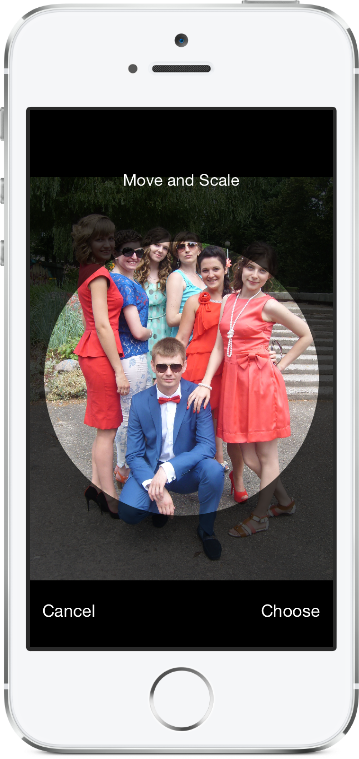
ランドスケープオリエンテーションをサポートする連絡先アプリのようなiOS用の画像クロッパー。
rskimageCropperにはiOS 12.0以降が必要です。
RSKImageCropperパッケージをXcodeプロジェクトに追加するには、[ファイル]> [Swiftパッケージ]> [パッケージの依存関係の追加]を選択し、リポジトリURLを入力します。
https://github.com/ruslanskorb/RSKImageCropper.git
pod RSKImageCropperをpodfileに追加します。
pod 'RSKImageCropper'
ターミナルからpod installを実行し、アプリの.xcworkspaceファイルを開いてxcodeを起動します。
RSKImageCropper.hヘッダーをインポートします。通常、これは#import <RSKImageCropper/RSKImageCropper.h>として記述する必要があります
ruslanskorb/RSKImageCropperプロジェクトをカートファイルに追加します。
github "ruslanskorb/RSKImageCropper"
carthage updateを実行し、IOSおよび/またはMacフレームワークをプロジェクトに追加するために必要な追加の手順に従ってください。
rskimagecropperフレームワーク/モジュールをインポートします。
@import RSKImageCropper#import <RSKImageCropper/RSKImageCropper.h> クラスヘッダーをインポートします。
# import < RSKImageCropper/RSKImageCropper.h >画像トリミングのビューコントローラーを作成し、デリゲートを設定するだけです。
- ( IBAction )onButtonTouch:(UIButton *)sender
{
    UIImage *image = [UIImage imageNamed: @" image " ];
    RSKImageCropViewController *imageCropViewController = [[RSKImageCropViewController alloc ] initWithImage: image];
    imageCropViewController. delegate = self;
    [ self .navigationController pushViewController: imageCropViewController animated: YES ];
}RSKImageCropViewControllerDelegate 、3つの代表材の方法を提供します。それらを使用するには、ビューコントローラーにデリゲートを実装します。
@interface ViewController () <RSKImageCropViewControllerDelegate>次に、デリゲート関数を実装します。
 // Crop image has been canceled.
- ( void )imageCropViewControllerDidCancelCrop:(RSKImageCropViewController *)controller
{
    [ self .navigationController popViewControllerAnimated: YES ];
}

// The original image has been cropped. Additionally provides a rotation angle used to produce image.
- ( void )imageCropViewController:(RSKImageCropViewController *)controller
                   didCropImage:(UIImage *)croppedImage
                  usingCropRect:( CGRect )cropRect
                  rotationAngle:( CGFloat )rotationAngle
{
    self. imageView . image = croppedImage;
    [ self .navigationController popViewControllerAnimated: YES ];
}

// The original image will be cropped.
- ( void )imageCropViewController:(RSKImageCropViewController *)controller
                  willCropImage:(UIImage *)originalImage
{
    // Use when `applyMaskToCroppedImage` set to YES.
    [SVProgressHUD show ];
} RSKImageCropViewControllerDataSourceは、3つのデータソースメソッドを提供します。メソッドimageCropViewControllerCustomMaskRect:マスクのカスタムrectについてデータソースに尋ねます。メソッドimageCropViewControllerCustomMaskPath:マスクのカスタムパスについてはデータソースに尋ねます。メソッドimageCropViewControllerCustomMovementRect:画像を移動できるカスタムrectについては、データソースに尋ねます。それらを使用するには、ビューコントローラーにデータソースを実装します。
@interface ViewController () <RSKImageCropViewControllerDataSource>次に、データソース機能を実装します。
 // Returns a custom rect for the mask.
- ( CGRect )imageCropViewControllerCustomMaskRect:(RSKImageCropViewController *)controller
{
    CGSize aspectRatio = CGSizeMake ( 16 . 0f , 9 . 0f );

    CGFloat viewWidth = CGRectGetWidth (controller. view . frame );
    CGFloat viewHeight = CGRectGetHeight (controller. view . frame );

    CGFloat maskWidth;
    if ([controller isPortraitInterfaceOrientation ]) {
        maskWidth = viewWidth;
    } else {
        maskWidth = viewHeight;
    }

    CGFloat maskHeight;
    do {
        maskHeight = maskWidth * aspectRatio. height / aspectRatio. width ;
        maskWidth -= 1 . 0f ;
    } while (maskHeight != floor (maskHeight));
    maskWidth += 1 . 0f ;

    CGSize maskSize = CGSizeMake (maskWidth, maskHeight);

    CGRect maskRect = CGRectMake ((viewWidth - maskSize. width ) * 0 . 5f ,
                                 (viewHeight - maskSize. height ) * 0 . 5f ,
                                 maskSize. width ,
                                 maskSize. height );

    return maskRect;
}

// Returns a custom path for the mask.
- (UIBezierPath *)imageCropViewControllerCustomMaskPath:(RSKImageCropViewController *)controller
{
    CGRect rect = controller. maskRect ;
    CGPoint point1 = CGPointMake ( CGRectGetMinX (rect), CGRectGetMaxY (rect));
    CGPoint point2 = CGPointMake ( CGRectGetMaxX (rect), CGRectGetMaxY (rect));
    CGPoint point3 = CGPointMake ( CGRectGetMaxX (rect), CGRectGetMinY (rect));
    CGPoint point4 = CGPointMake ( CGRectGetMinX (rect), CGRectGetMinY (rect));

    UIBezierPath *rectangle = [UIBezierPath bezierPath ];
    [rectangle moveToPoint: point1];
    [rectangle addLineToPoint: point2];
    [rectangle addLineToPoint: point3];
    [rectangle addLineToPoint: point4];
    [rectangle closePath ];

    return rectangle;
}

// Returns a custom rect in which the image can be moved.
- ( CGRect )imageCropViewControllerCustomMovementRect:(RSKImageCropViewController *)controller
{
    if (controller. rotationAngle == 0 ) {
        return controller. maskRect ;
    } else {
        CGRect maskRect = controller. maskRect ;
        CGFloat rotationAngle = controller. rotationAngle ;

        CGRect movementRect = CGRectZero ;

        movementRect. size . width = CGRectGetWidth (maskRect) * fabs ( cos (rotationAngle)) + CGRectGetHeight (maskRect) * fabs ( sin (rotationAngle));
        movementRect. size . height = CGRectGetHeight (maskRect) * fabs ( cos (rotationAngle)) + CGRectGetWidth (maskRect) * fabs ( sin (rotationAngle));

        movementRect. origin . x = CGRectGetMinX (maskRect) + ( CGRectGetWidth (maskRect) - CGRectGetWidth (movementRect)) * 0 . 5f ;
        movementRect. origin . y = CGRectGetMinY (maskRect) + ( CGRectGetHeight (maskRect) - CGRectGetHeight (movementRect)) * 0 . 5f ;

        movementRect. origin . x = floor ( CGRectGetMinX (movementRect));
        movementRect. origin . y = floor ( CGRectGetMinY (movementRect));
        movementRect = CGRectIntegral (movementRect);

        return movementRect;
    }
}XcodeでRSKImageCropperExampleプロジェクトを構築して実行して、 RSKImageCropperアクションを確認します。楽しむ。フォークとプルリクエストを送信します。カスタマイズのためにフックを把握します。
RSKImageCropperプライバシーマニフェストを必要としません。 Appleから受け取った情報によると、空のプライバシーマニフェストをフレームワークに追加することを避ける必要があります。
Ruslan Skorb
このプロジェクトは、MITライセンスの下で入手できます。詳細については、ライセンスファイルを参照してください。プロジェクトページにリンクすることによる帰属を大歓迎します。






