yolact
1.0.0

    ██╗   ██╗ ██████╗ ██╗      █████╗  ██████╗████████╗
    ╚██╗ ██╔╝██╔═══██╗██║     ██╔══██╗██╔════╝╚══██╔══╝
     ╚████╔╝ ██║   ██║██║     ███████║██║        ██║
      ╚██╔╝  ██║   ██║██║     ██╔══██║██║        ██║
       ██║   ╚██████╔╝███████╗██║  ██║╚██████╗   ██║
       ╚═╝    ╚═════╝ ╚══════╝╚═╝  ╚═╝ ╚═════╝   ╚═╝
实时实例分割的简单,完全卷积的模型。这是我们论文的代码:
Yolact ++的Resnet50型号在Titan XP上以33.5 fps的速度运行,并在可可的test-dev上获得34.1地图(在此处查看我们的期刊论文)。
为了使用yolact ++,请确保编译DCNV2代码。 (请参阅安装)
我们的Yolact基本模型中的一些示例(泰坦XP上的33.5 fps和可可的test-dev上的29.8 MAP):
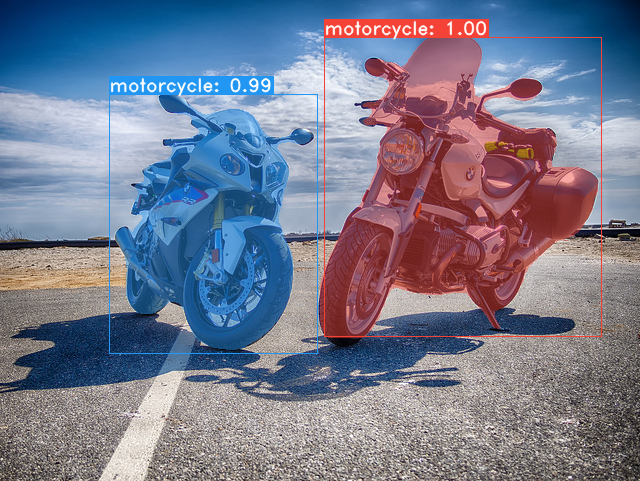
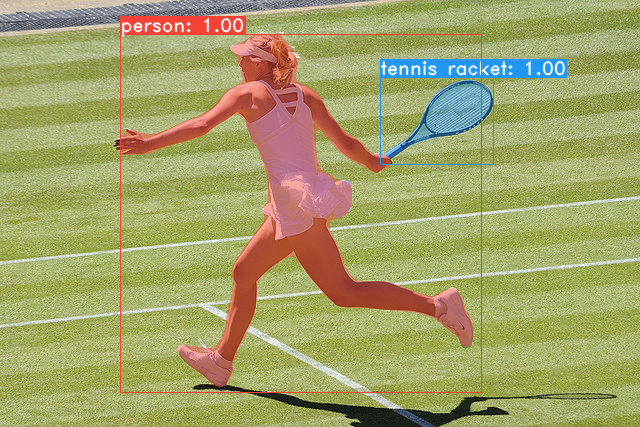
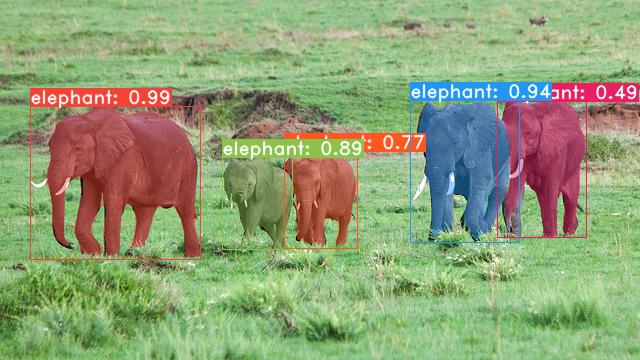
git clone https://github.com/dbolya/yolact.git
cd yolactconda env create -f environment.yml # Cython needs to be installed before pycocotools
pip install cython
pip install opencv-python pillow pycocotools matplotlib ./data/coco中。 sh data/scripts/COCO.shtest-dev上的yoLact,请使用此脚本下载test-dev 。 sh data/scripts/COCO_test.sh cd external/DCNv2
python setup.py build develop这是我们的Yolact模型(2019年4月5日发布)以及他们在Titan XP上的FPS,并在test-dev上地图:
| 图像大小 | 骨干 | FPS | 地图 | 权重 | |
|---|---|---|---|---|---|
| 550 | Resnet50-FPN | 42.5 | 28.2 | yolact_resnet50_54_800000.pth | 镜子 |
| 550 | darknet53-fpn | 40.0 | 28.7 | yolact_darknet53_54_800000.pth | 镜子 |
| 550 | resnet101-fpn | 33.5 | 29.8 | yolact_base_54_800000.pth | 镜子 |
| 700 | resnet101-fpn | 23.6 | 31.2 | yolact_im700_54_800000.pth | 镜子 |
Yolact ++模型(2019年12月16日发布):
| 图像大小 | 骨干 | FPS | 地图 | 权重 | |
|---|---|---|---|---|---|
| 550 | Resnet50-FPN | 33.5 | 34.1 | yolact_plus_resnet50_54_800000.pth | 镜子 |
| 550 | resnet101-fpn | 27.3 | 34.6 | yolact_plus_base_54_800000.pth | 镜子 |
要评估模型,请将相应的权重文件放入./weights目录中,然后运行以下命令之一。每个配置的名称是文件名中的数字之前的所有内容(例如, yolact_base_54_800000.pth的yolact_base )。
 # Quantitatively evaluate a trained model on the entire validation set. Make sure you have COCO downloaded as above.
# This should get 29.92 validation mask mAP last time I checked.
python eval.py --trained_model=weights/yolact_base_54_800000.pth

# Output a COCOEval json to submit to the website or to use the run_coco_eval.py script.
# This command will create './results/bbox_detections.json' and './results/mask_detections.json' for detection and instance segmentation respectively.
python eval.py --trained_model=weights/yolact_base_54_800000.pth --output_coco_json

# You can run COCOEval on the files created in the previous command. The performance should match my implementation in eval.py.
python run_coco_eval.py

# To output a coco json file for test-dev, make sure you have test-dev downloaded from above and go
python eval.py --trained_model=weights/yolact_base_54_800000.pth --output_coco_json --dataset=coco2017_testdev_dataset # Display qualitative results on COCO. From here on I'll use a confidence threshold of 0.15.
python eval.py --trained_model=weights/yolact_base_54_800000.pth --score_threshold=0.15 --top_k=15 --display # Run just the raw model on the first 1k images of the validation set
python eval.py --trained_model=weights/yolact_base_54_800000.pth --benchmark --max_images=1000 # Display qualitative results on the specified image.
python eval.py --trained_model=weights/yolact_base_54_800000.pth --score_threshold=0.15 --top_k=15 --image=my_image.png
# Process an image and save it to another file.
python eval.py --trained_model=weights/yolact_base_54_800000.pth --score_threshold=0.15 --top_k=15 --image=input_image.png:output_image.png
# Process a whole folder of images.
python eval.py --trained_model=weights/yolact_base_54_800000.pth --score_threshold=0.15 --top_k=15 --images=path/to/input/folder:path/to/output/folder # Display a video in real-time. "--video_multiframe" will process that many frames at once for improved performance.
# If you want, use "--display_fps" to draw the FPS directly on the frame.
python eval.py --trained_model=weights/yolact_base_54_800000.pth --score_threshold=0.15 --top_k=15 --video_multiframe=4 --video=my_video.mp4
# Display a webcam feed in real-time. If you have multiple webcams pass the index of the webcam you want instead of 0.
python eval.py --trained_model=weights/yolact_base_54_800000.pth --score_threshold=0.15 --top_k=15 --video_multiframe=4 --video=0
# Process a video and save it to another file. This uses the same pipeline as the ones above now, so it's fast!
python eval.py --trained_model=weights/yolact_base_54_800000.pth --score_threshold=0.15 --top_k=15 --video_multiframe=4 --video=input_video.mp4:output_video.mp4如您所知, eval.py可以做很多事情。运行--help命令以查看它可以做的一切。
python eval.py --help默认情况下,我们对可可进行培训。确保使用上面的命令下载整个数据集。
./weights 。resnet101_reducedfc.pth 。resnet50-19c8e357.pth 。darknet53.pth 。*_interrupt.pth文件。./weights目录中,并使用文件名<config>_<epoch>_<iter>.pth保存。 # Trains using the base config with a batch size of 8 (the default).
python train.py --config=yolact_base_config
# Trains yolact_base_config with a batch_size of 5. For the 550px models, 1 batch takes up around 1.5 gigs of VRAM, so specify accordingly.
python train.py --config=yolact_base_config --batch_size=5
# Resume training yolact_base with a specific weight file and start from the iteration specified in the weight file's name.
python train.py --config=yolact_base_config --resume=weights/yolact_base_10_32100.pth --start_iter=-1
# Use the help option to see a description of all available command line arguments
python train.py --helpYolact现在在培训期间无缝支持多个GPU:
export CUDA_VISIBLE_DEVICES=[gpus]nvidia-smi检查GPU的索引。8*num_gpus并在上面的训练命令中将批量大小设置为8*num_gpus。培训脚本将自动将超参数缩放到正确的值。--batch_alloc=[alloc] ,其中[Alloc]是一个逗号sepred列表,其中包含每个GPU上的图像数。这必须总结到batch_size 。 YOLACT现在默认情况下记录培训和验证信息。您可以使用--no_log禁用此功能。有关如何可视化这些日志的指南即将到来,但是现在您可以在utils/logger.py中查看LogVizualizer寻求帮助。
我们还包括用于培训Pascal SBD注释的配置(用于快速实验或与其他方法进行比较)。要在Pascal SBD上培训,请继续采取以下步骤:
benchmark.tgz )。dataset/img文件夹。创建Directory ./data/sbd (其中.是Yolact的根),然后将dataset/img复制为./data/sbd/img 。./data/sbd/中。--config=yolact_resnet50_pascal_config训练。检查该配置以查看如何将其扩展到其他型号。我将尽快用脚本自动化这一切,不用担心。另外,如果您想要我用来转换注释的脚本,我将其放入./scripts/convert_sbd.py中,但是您必须检查它如何工作才能使用它,因为我实际上还不记得这一点。
如果您想验证我们的结果,可以从这里下载我们的yolact_resnet50_pascal_config权重。该型号应获得72.3 Mask AP_50和56.2 Mask AP_70。请注意,“ ALL” AP与Pascal的其他论文中报告的“ Vol” AP并不相同(它们以0.1的增量为0.1 - 0.9使用阈值的平均值,而不是可可使用的阈值)。
您也可以通过以下步骤在自己的数据集上训练:
infoliscenseimage中: license, flickr_url, coco_url, date_capturedcategories (我们将自己的格式用于类别,请参见下文)data/config.py中的dataset_base下为数据集创建一个定义(有关每个字段的说明,请参见dataset_base中的注释): my_custom_dataset = dataset_base . copy ({
'name' : 'My Dataset' ,
'train_images' : 'path_to_training_images' ,
'train_info' : 'path_to_training_annotation' ,
'valid_images' : 'path_to_validation_images' ,
'valid_info' : 'path_to_validation_annotation' ,
'has_gt' : True ,
'class_names' : ( 'my_class_id_1' , 'my_class_id_2' , 'my_class_id_3' , ...)
})class_names的顺序依次增加。如果您的注释文件不是这种情况(例如在可可中),请参见dataset_base中的字段label_map 。python train.py --help ), train.py将每2个时期的数据集中的前5000张图像输出验证映射。yolact_base_config中,将'dataset'的值更改为'my_custom_dataset'或您命名上述配置对象的任何内容。然后,您可以在上一节中使用任何培训命令。 有关如何注释自定义数据集并准备与yolact一起使用的技巧,请参见 @amit12690的这篇不错的帖子。
如果您在工作中使用yolact或此代码基础,请引用
 @inproceedings{yolact-iccv2019,
  author    = {Daniel Bolya and Chong Zhou and Fanyi Xiao and Yong Jae Lee},
  title     = {YOLACT: {Real-time} Instance Segmentation},
  booktitle = {ICCV},
  year      = {2019},
}
对于yolact ++,请引用
 @article{yolact-plus-tpami2020,
  author  = {Daniel Bolya and Chong Zhou and Fanyi Xiao and Yong Jae Lee},
  journal = {IEEE Transactions on Pattern Analysis and Machine Intelligence},
  title   = {YOLACT++: Better Real-time Instance Segmentation},
  year    = {2020},
}
有关我们的纸张或代码的问题,请联系Daniel Bolya。








