oreboot
1.0.0


Oreboot是Coreboot的下游叉,IE Oreboot是没有“ C”的Coreboot。
Oreboot主要用Rust编写,需要在需要的地方组装。
Oreboot当前仅计划支持Linuxboot有效载荷。
 oreboot ?
v 13
cpu_pll fa001000
cpu_axi 5000100
cpu_axi 5000100
peri0_ctrl was: f8216300
peri0_ctrl lock en
peri0_ctrl PLLs
peri0_ctrl set: f8216300
DDR3@792MHz
test OK
512M ?
NOR flash: c2/2018
load 00018000 bytes to 40000000: ➡️.
load 00fc0000 bytes to 44000000: ➡️➡️➡️➡️➡️➡️➡️➡️➡️➡️➡️➡️➡️➡️➡️➡️.
load 00010000 bytes to 41a00000: ➡️.
{ɕ serial uart0 initialized
RISC-V vendor 5b7 arch 0 imp 0
==== platform CSRs ====
   MXSTATUS  c0408000
   MHCR      00000109
   MCOR      00000002
   MHINT     00004000
see C906 manual p581 ff
=======================
Set up extension CSRs
==== platform CSRs ====
   MXSTATUS  c0638000
   MHCR      0000017f
   MCOR      00000003
   MHINT     0000610c
see C906 manual p581 ff
=======================
timer init
reset init
ipi init
RustSBI version 0.3.1
.______       __    __      _______.___________.  _______..______   __
|   _       |  |  |  |    /       |           | /       ||   _   |  |
|  |_)  |    |  |  |  |   |   (----`---|  |----`|   (----`|  |_)  ||  |
|      /     |  |  |  |              |  |             |   _  < |  |
|  |  ----.|  `--'  |.----)   |      |  |  .----)   |   |  |_)  ||  |
| _| `._____| ______/ |_______/       |__|  |_______/    |______/ |__|
Platform Name: T-HEAD Xuantie Platform
Implementation: oreboot version 0.1.0
[rustsbi] misa: RV64ACDFIMSUVX
[rustsbi] mideleg: ssoftstimersext (0x222)
[rustsbi] medeleg: imaialmalasmasauecallipagelpagespage(0xb1f3)
[rustsbi] mie: msoft ssoft mtimer stimer mext sext (00000aaa)
PMP0     0x0 - 0x40000000 (A,R,W,X)
PMP1     0x40000000 - 0x40200000 (A,R)
PMP2     0x40200000 - 0x80000000 (A,R,W,X)
PMP3     0x80000000 - 0x80200000 (A,R)
PMP4     0x80200000 - 0xfffff800 (A,R,W,X)
PMP8     0x0 - 0x0 (A,R,W,X)
DTB looks fine, yay!
Decompress 12375521 bytes from 0x44000004 to 0x40200000, reserved 25165824 bytes
Success, decompressed 21910144 bytes :)
Payload looks like Linux Image, yay!
DTB still fine, yay!
Handing over to SBI, will continue at 0x40200000
enter supervisor at 40200000 with DTB from 41a00000
...
[    0.000000] OF: fdt: Ignoring memory range 0x40000000 - 0x40200000
[    0.000000] Machine model: Sipeed Lichee RV Dock
[    0.000000] earlycon: sbi0 at I/O port 0x0 (options '')
[    0.000000] printk: bootconsole [sbi0] enabled
[    0.000000] Zone ranges:
[    0.000000]   DMA32    [mem 0x0000000040200000-0x000000005fffffff]
[    0.000000]   Normal   empty
[    0.000000] Movable zone start for each node
[    0.000000] Early memory node ranges
[    0.000000]   node   0: [mem 0x0000000040200000-0x000000005fffffff]
[    0.000000] Initmem setup node 0 [mem 0x0000000040200000-0x000000005fffffff]
[    0.000000] riscv: SBI specification v1.0 detected
[    0.000000] riscv: SBI implementation ID=0x4 Version=0x301
[    0.000000] riscv: SBI TIME extension detected
[    0.000000] riscv: SBI IPI extension detected
[    0.000000] riscv: SBI SRST extension detected
[    0.000000] riscv: base ISA extensions acdfim
[    0.000000] riscv: ELF capabilities acdfim
[    0.000000] percpu: Embedded 17 pages/cpu s31912 r8192 d29528 u69632
[    0.000000] Built 1 zonelists, mobility grouping on.  Total pages: 128520
[    0.000000] Kernel command line: console=tty0 console=ttyS0,115200 loglevel=7 earlycon=sbi
我们以其板条箱和特征为基础,基于Rust嵌入式工作组模型的抽象作用,这些模型在他们的书中详细介绍了。
简而言之: 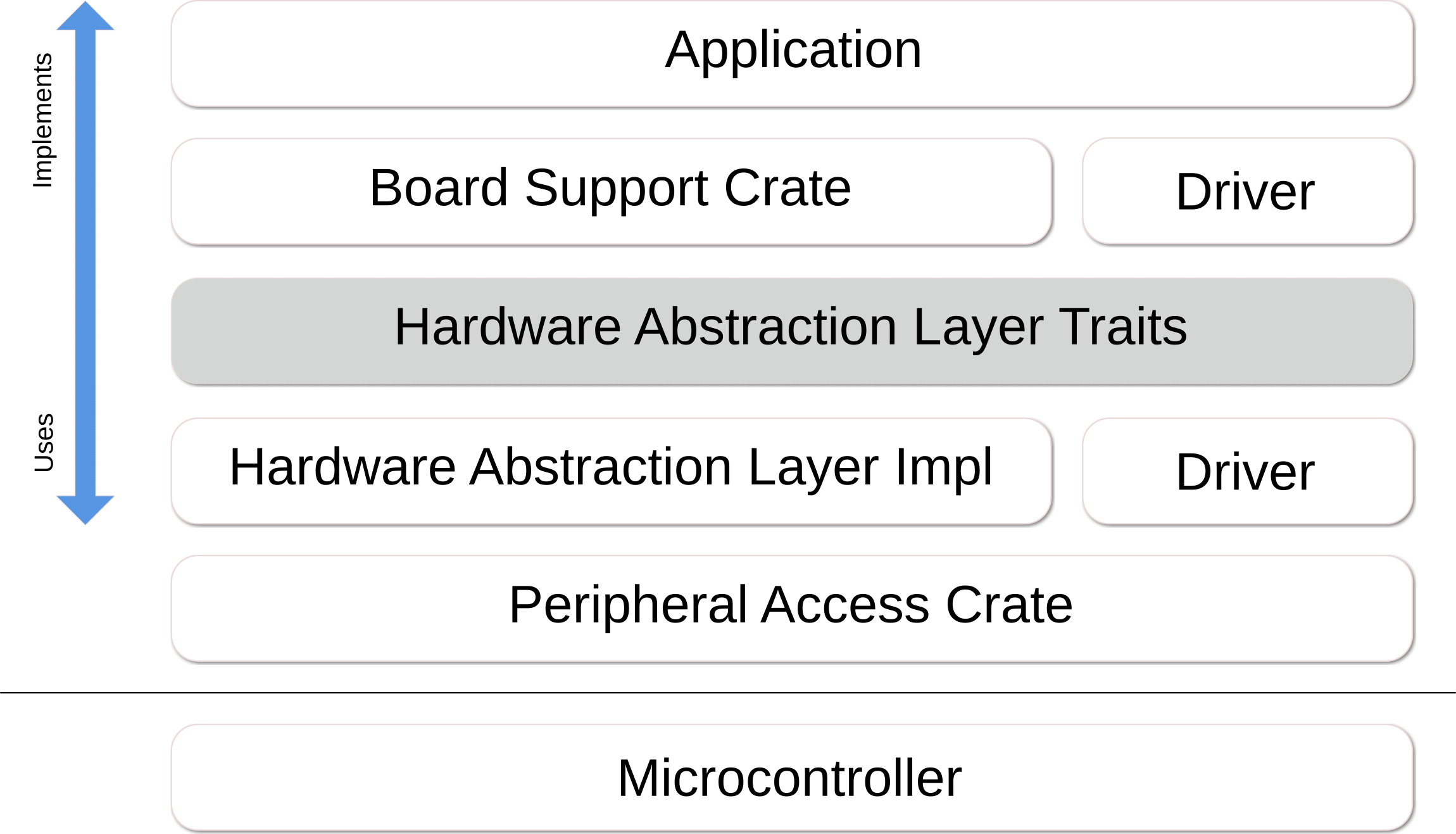
期望SOC供应商为其内核,外围设备以及其他块和/或其SVD文件提供文档,以便我们可以生成PAC和HAL Crates,或者理想情况下,供应商也应提供和维护这些文件。
Rust Embeded Book提供了设计模式和实施指南,以及词汇表,以了解结构。
为了一般了解一般工作中的矿床和固件,请查看引导流文档。它描述了如何存储固件并将其启动在平台 / SOC上。
请注意,Oreboot并非旨在变成自己的操作系统。因此,我们打算保持驱动程序低的数量和功能。但是,根据SOC的设计,我们必须实施一些东西来加载代码:
在许多情况下,无需完整的驱动程序,因为我们只需要从存储中读取,而我们不需要丰富的文件系统。为了避免与操作系统的需求和细节相撞,我们建议明确分别将存放固件和操作系统的存储零件分开。例如,将固件放入SPI闪光灯中,将操作系统放在NVME SSD上。
克隆此存储库并输入其目录,即:
git clone https://github.com/oreboot/oreboot.git
cd oreboot通常,您需要安装以下软件包:
device-tree-compilerpkg-configlibsslrustup对于基于Debian的系统,有一个可以安装这些目标的目标,该目标可以从https://sh.rustup.rs curl拉出rustup :
make debiansysprepare否则,通过系统软件包管理器安装软件包。
无论您使用哪种操作系统,您都需要为Oreboot安装工具链。此命令只需要一次完成一次,但是可以重复执行此命令。
make firsttime每次您开始与Oreboot甚至每天一起工作时:
 cd oreboot
make update
在报告任何问题之前,您绝对应该这样做。
项目中有两件事:
src/mainboards/*实际目标;这些依赖并共享板条箱,这些箱子可以是驱动程序,SOC Init代码以及类似的。对于主板,必须跟踪Cargo.lock 。src/*其他一切;这些是上述板条箱,为此,我们不跟踪Cargo.lock 。在成功构建时检查主板的Cargo.lock 。lock文件记录其依赖关系的状态,从而可重复可重复。理想情况下,锁定文件已更新,在硬件上成功启动。
有关更多信息,请参见:https://doc.rust-lang.org/cargo/faq.html#why-do-binaries-have-have-cargolock-cargolock-in-version-contion-control-control-control control but-not-libraries
创建新的主板时,查看如何为同一体系结构设置其他主板是一个良好的开始。请注意,Oreboot是针对裸金属的,因此没有标准库。
要为特定平台构建Oreboot,请执行此操作:
 # Go to the mainboard's directory
cd src/mainboard/sunxi/nezha
# Build the mainboard target
make mainboard
# View disassembly
make objdump
# Run from RAM without flashing
make run
# Flash to the board
make flash
Root Makefile允许您快速构建所有平台:
 # build all mainboards
make mainboards
# build everything in parallel
make -j mainboards
 # Install QEMU for your target platform, e.g. x86
sudo apt install qemu-system-x86

# Build release build and start with QEMU
cd src/mainboard/emulation/qemu-q35 && make run
# Quit qemu with CTRL-A X
从RISC-V来源构建QEMU:
 git clone https://github.com/qemu/qemu && cd qemu
mkdir build-riscv64 && cd build-riscv64
../configure --target-list=riscv64-softmmu
make -j$(nproc)
# QEMU binary is at riscv64-softmmu/qemu-system-riscv64
从Aarch64的来源构建QEMU:
 git clone https://github.com/qemu/qemu && cd qemu
mkdir build-aarch64 && cd build-aarch64
../configure --target-list=aarch64-softmmu
make -j$(nproc)
# QEMU binary is at aarch64-softmmu/qemu-system-aarch64
与CoreBoot类似,Oreboot中的结构是每个供应商和主板。分别支持多个体系结构和SOC,并且在董事会之间共享它们的共同代码。如果较小的偏差否则会导致代码重复过多,则董事会可能会有变化。
qemu-riscv作为参考,记录了早期的方法。看看X86和ARM平台和主板的那些。
较早的仿真目标已停放在src.broken/mainboard/emulation/ 。他们应该对Oreboot寻求支持的每种体系结构提供一般的理解:
qemu-armv7qemu-aarch64qemu-q35Makefile S必须很简单。使用xtask代替控制流,例如,将标题或校验和添加到二进制文件,sitching图像等。src/mainboard/$VENDOR/$BOARD (sub)目录中的Cargo.toml允许特定于董事会的依赖项并并行构建所有阶段。make format自动形式,没有例外。 CI检查将确定更改是否不遵守格式规则。Oreboot的版权归大量的个人开发商和公司拥有。请检查各个源文件以获取详细信息。
Oreboot已根据GNU通用公共许可证(GPL)的条款获得许可。某些文件在“ GPL(版本2或任何后期版本)”下获得许可,并且某些文件在“ GPL,版本2”下许可。对于某些来自其他项目的零件,其他(与GPL兼容的)许可可能适用。请检查各个源文件以获取详细信息。
这使得由GPL版本2下的生成的牛仔图像。





