nos
v0.3.0

网站|文档|教程|操场|博客|不和谐
NOS是在任何云或AI HW上运行的快速灵活的Pytorch推理服务器。
inf2 )运行时。我们强烈建议您访问我们的Quickstart指南以开始。要安装NOS客户端,您可以运行以下命令:
conda create -n nos python=3.8 -y
conda activate nos
pip install torch-nos
安装客户端后,您可以通过NOS serve CLI启动NOS服务器。这将自动检测您的本地环境,下载Docker Runtime Image并旋转NOS服务器:
nos serve up --http --logging-level INFO现在,您可以使用NOS运行您的第一个推理请求!您可以运行以下任何命令来尝试一下。如果您需要从服务器中获得更多详细信息,则可以将记录级别设置为DEBUG 。
NOS提供了一台具有流支持的OpenAI兼容服务器,因此您可以连接您喜欢的OpenAI兼容LLM客户端与NOS交谈。

GRPC API⚡
 from nos . client import Client

client = Client ()

model = client . Module ( "TinyLlama/TinyLlama-1.1B-Chat-v1.0" )
response = model . chat ( message = "Tell me a story of 1000 words with emojis" , _stream = True )
REST API
curl
-X POST http://localhost:8000/v1/chat/completions
-H " Content-Type: application/json "
-d ' {
    "model": "TinyLlama/TinyLlama-1.1B-Chat-v1.0",
    "messages": [{
        "role": "user",
        "content": "Tell me a story of 1000 words with emojis"
    }],
    "temperature": 0.7,
    "stream": true
} '在几秒钟内构建Midjourney Discord机器人。

GRPC API⚡
 from nos . client import Client

client = Client ()

sdxl = client . Module ( "stabilityai/stable-diffusion-xl-base-1-0" )
image , = sdxl ( prompts = [ "hippo with glasses in a library, cartoon styling" ],
              width = 1024 , height = 1024 , num_images = 1 )
REST API
curl
-X POST http://localhost:8000/v1/infer
-H ' Content-Type: application/json '
-d ' {
    "model_id": "stabilityai/stable-diffusion-xl-base-1-0",
    "inputs": {
        "prompts": ["hippo with glasses in a library, cartoon styling"],
        "width": 1024, "height": 1024,
        "num_images": 1
    }
} '在几分钟内构建图像/视频的可扩展语义搜索。
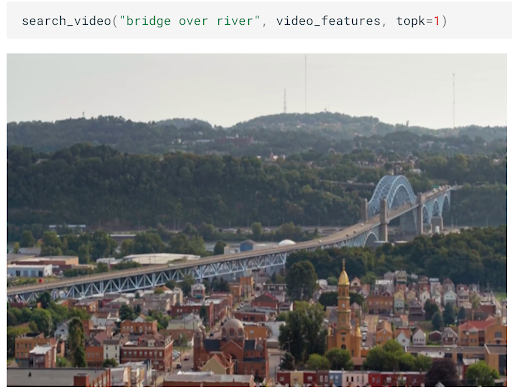
GRPC API⚡
 from nos . client import Client

client = Client ()

clip = client . Module ( "openai/clip-vit-base-patch32" )
txt_vec = clip . encode_text ( texts = [ "fox jumped over the moon" ])
REST API
curl
-X POST http://localhost:8000/v1/infer
-H ' Content-Type: application/json '
-d ' {
    "model_id": "openai/clip-vit-base-patch32",
    "method": "encode_text",
    "inputs": {
        "texts": ["fox jumped over the moon"]
    }
} '使用耳语执行实时音频转录。
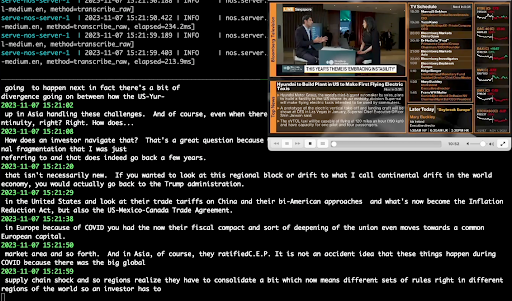
GRPC API⚡
 from pathlib import Path
from nos . client import Client

client = Client ()

model = client . Module ( "openai/whisper-small.en" )
with client . UploadFile ( Path ( "audio.wav" )) as remote_path :
  response = model ( path = remote_path )
# {"chunks": ...}
REST API
curl
-X POST http://localhost:8000/v1/infer/file
-H ' accept: application/json '
-H ' Content-Type: multipart/form-data '
-F ' model_id=openai/whisper-small.en '
-F ' [email protected] '在2行代码中运行经典的计算机视觉任务。
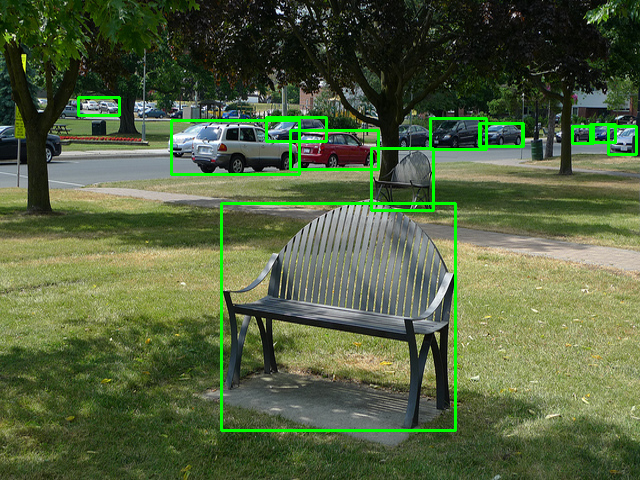
GRPC API⚡
 from pathlib import Path
from nos . client import Client

client = Client ()

model = client . Module ( "yolox/medium" )
response = model ( images = [ Image . open ( "image.jpg" )])
REST API
curl
-X POST http://localhost:8000/v1/infer/file
-H ' accept: application/json '
-H ' Content-Type: multipart/form-data '
-F ' model_id=yolox/medium '
-F ' [email protected] '想要运行NOS不支持的模型吗?您可以按照NOS操场上的示例轻松添加自己的型号。
该项目已根据APACHE-2.0许可获得许可。
NOS使用Sentry收集匿名用法数据。这用于帮助我们了解社区如何使用NOS并帮助我们确定功能的优先级。您可以通过设置NOS_TELEMETRY_ENABLED=0来选择遥测。
我们欢迎捐款!请参阅我们的贡献指南以获取更多信息。





