nos
v0.3.0

Situs web | Docs | Tutorial | Taman bermain | Blog | Perselisihan
NOS adalah server inferensi Pytorch yang cepat dan fleksibel yang berjalan pada cloud atau AI HW apa pun.
inf2 ).Kami sangat menyarankan Anda pergi ke panduan QuickStart kami untuk memulai. Untuk menginstal klien NOS, Anda dapat menjalankan perintah berikut:
conda create -n nos python=3.8 -y
conda activate nos
pip install torch-nos
Setelah klien diinstal, Anda dapat memulai server NOS melalui NOS serve CLI. Ini akan secara otomatis mendeteksi lingkungan lokal Anda, mengunduh gambar runtime Docker dan memutar server NOS:
nos serve up --http --logging-level INFO Anda sekarang siap menjalankan permintaan inferensi pertama Anda dengan NOS! Anda dapat menjalankan salah satu perintah berikut untuk mencoba segalanya. Anda dapat mengatur level logging menjadi DEBUG jika Anda ingin informasi lebih rinci dari server.
NOS menyediakan server yang kompatibel dengan openai dengan dukungan streaming sehingga Anda dapat menghubungkan klien LLM yang kompatibel dengan openai favorit Anda untuk berbicara dengan NOS.

GRPC API ⚡
 from nos . client import Client

client = Client ()

model = client . Module ( "TinyLlama/TinyLlama-1.1B-Chat-v1.0" )
response = model . chat ( message = "Tell me a story of 1000 words with emojis" , _stream = True )
API istirahat
curl
-X POST http://localhost:8000/v1/chat/completions
-H " Content-Type: application/json "
-d ' {
    "model": "TinyLlama/TinyLlama-1.1B-Chat-v1.0",
    "messages": [{
        "role": "user",
        "content": "Tell me a story of 1000 words with emojis"
    }],
    "temperature": 0.7,
    "stream": true
} 'Bangun bot Midjourney Discord dalam hitungan detik.

GRPC API ⚡
 from nos . client import Client

client = Client ()

sdxl = client . Module ( "stabilityai/stable-diffusion-xl-base-1-0" )
image , = sdxl ( prompts = [ "hippo with glasses in a library, cartoon styling" ],
              width = 1024 , height = 1024 , num_images = 1 )
API istirahat
curl
-X POST http://localhost:8000/v1/infer
-H ' Content-Type: application/json '
-d ' {
    "model_id": "stabilityai/stable-diffusion-xl-base-1-0",
    "inputs": {
        "prompts": ["hippo with glasses in a library, cartoon styling"],
        "width": 1024, "height": 1024,
        "num_images": 1
    }
} 'Bangun pencarian semantik yang dapat diskalakan dari gambar/video dalam hitungan menit.
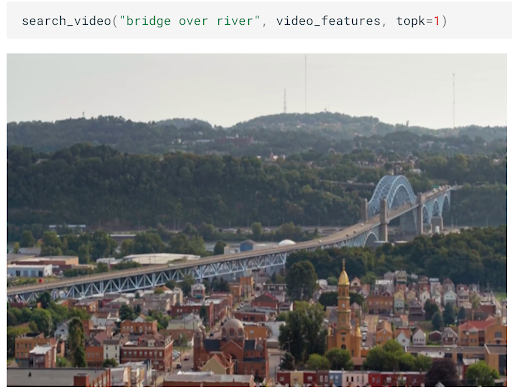
GRPC API ⚡
 from nos . client import Client

client = Client ()

clip = client . Module ( "openai/clip-vit-base-patch32" )
txt_vec = clip . encode_text ( texts = [ "fox jumped over the moon" ])
API istirahat
curl
-X POST http://localhost:8000/v1/infer
-H ' Content-Type: application/json '
-d ' {
    "model_id": "openai/clip-vit-base-patch32",
    "method": "encode_text",
    "inputs": {
        "texts": ["fox jumped over the moon"]
    }
} 'Lakukan transkripsi audio real-time menggunakan Whisper.
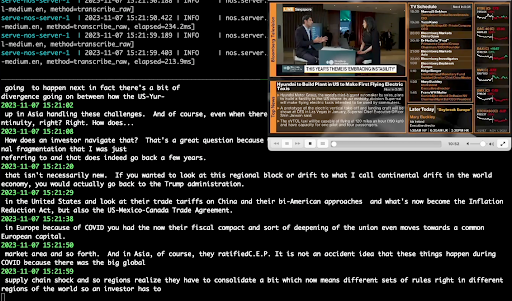
GRPC API ⚡
 from pathlib import Path
from nos . client import Client

client = Client ()

model = client . Module ( "openai/whisper-small.en" )
with client . UploadFile ( Path ( "audio.wav" )) as remote_path :
  response = model ( path = remote_path )
# {"chunks": ...}
API istirahat
curl
-X POST http://localhost:8000/v1/infer/file
-H ' accept: application/json '
-H ' Content-Type: multipart/form-data '
-F ' model_id=openai/whisper-small.en '
-F ' [email protected] 'Jalankan tugas-tugas visi komputer klasik dalam 2 baris kode.
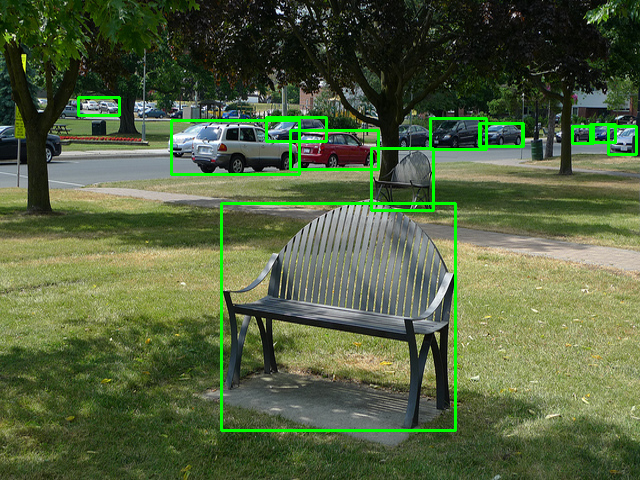
GRPC API ⚡
 from pathlib import Path
from nos . client import Client

client = Client ()

model = client . Module ( "yolox/medium" )
response = model ( images = [ Image . open ( "image.jpg" )])
API istirahat
curl
-X POST http://localhost:8000/v1/infer/file
-H ' accept: application/json '
-H ' Content-Type: multipart/form-data '
-F ' model_id=yolox/medium '
-F ' [email protected] 'Ingin menjalankan model yang tidak didukung oleh NOS? Anda dapat dengan mudah menambahkan model Anda sendiri mengikuti contoh di taman bermain NOS.
Proyek ini dilisensikan di bawah lisensi APACHE-2.0.
NOS mengumpulkan data penggunaan anonim menggunakan Sentry. Ini digunakan untuk membantu kami memahami bagaimana komunitas menggunakan NOS dan untuk membantu kami memprioritaskan fitur. Anda dapat memilih keluar dari telemetri dengan mengatur NOS_TELEMETRY_ENABLED=0 .
Kami menyambut kontribusi! Silakan lihat panduan berkontribusi kami untuk informasi lebih lanjut.





