nostr_console
vements

ไคลเอนต์คอนโซล NOSTR โดยใช้ DART
นี่คือซอฟต์แวร์ทดลองหรือ pre-alpha ที่สร้างขึ้นเพื่อแสดงหรือรู้ว่าไคลเอนต์เครือข่าย NOSTR จะเป็นอย่างไร มันทำงานได้ 90% ของเวลาทุกครั้ง น้อยลงเมื่อรีเลย์ไม่ทำงานอย่างสมบูรณ์
ก่อนอื่นตรวจสอบหรือคลายซิปรหัสไปยังไดเรกทอรี cd ไปยังไดเรกทอรีนั้นและจากนั้นพิมพ์คำสั่งต่อไปนี้: (ตรวจสอบให้แน่ใจว่า Docker Desktop กำลังทำงานอยู่ในพื้นหลัง)
docker build -t nostr_console .
จากนั้นเรียกใช้โดยใช้
docker run -it nostr_console start
Prebuilt Docker Image จากสาขาหลักของที่เก็บนี้สามารถพบได้ที่นี่
docker pull ghcr.io/vishalxl/nostr_console:main
แล้วก็
docker run -it ghcr.io/vishalxl/nostr_console:main
วิธีที่ง่ายที่สุดในการเรียกใช้ NOSTR_CONSOLE: ไปที่รุ่นและรับการดำเนินการสำหรับแพลตฟอร์มของคุณ
มิฉะนั้นจะทำตาม:
dart pub get ซึ่งได้รับการอ้างอิงทั้งหมดdart run bin/nostr_console.dart ซึ่งจะเรียกใช้ด้วยการตั้งค่าเริ่มต้นdart compile exe bin/nostr_console.dart ซึ่งจะสร้างการปฏิบัติการสำหรับแพลตฟอร์มของคุณ คุณสามารถเรียกใช้ EXE นั้นด้วยพารามิเตอร์ที่ต้องการ บน Windows คุณสามารถสร้างทางลัดด้วยอาร์กิวเมนต์บรรทัดคำสั่งที่คุณต้องการที่กล่าวถึงในนั้นการใช้งาน:
 usage: dart run bin/nostr_console.dart [OPTIONS]

  OPTIONS

      -k, --prikey  <private key>   The nsec or hex private key of user you want to 'log in' as.
      -p, --pubkey  <public key>    The npub or hex public key of user whose events and feed are shown. When given,
                                    posts/replies can't be sent because for that a private key is needed.
      -r, --relay   <relay urls>    The comma separated relay urls that are used as relays. If given, these are used
                                    rather than the default relays.
      -f, --file    <filename>      Read from given file, if it is present, and at the end of the program execution, write
                                    to it all the events (including the ones read, and any new received). Even if not given,
                                    the default is to read from and write to all_nostr_events.txt . Can be turned off by
                                    the --disable-file flag
      -d, --days    <N as num>      The latest number of days for which events are shown. Default is 1.
      --request <REQ string>        This request is sent verbatim to the default relay. It can be used to recieve all events
                                    from a relay. If not provided, then events for default or given user are shown.
      -s, --disable-file            When turned on, even the default filename is not read from.
      -t, --translate               Translate some of the recent posts using Google translate site ( and not api). Google
                                    is accessed for any translation request only if this flag is present, and not otherwise.
      -l, --lnqr                    Flag, if set any LN invoices starting with LNBC will be printed as a QR code. Will set
                                    width to 140, which can be reset if needed with the --width argument. Wider
                                    space is needed for some qr codes.
      -g, --location <location>     The given value is added as a 'location' tag with every kind 1 post made. g in shortcut
                                    standing for geographic location.
      -h, --help                    Print help/usage message and exit.
      -v, --version                 Print version and exit.

  UI Options
      -a, --align  <left>           When "left" is given as option to this argument, then the text is aligned to left. By
                                    default the posts or text is aligned to the center of the terminal.
      -w, --width  <width as num>   This specifies how wide you want the text to be, in number of columns. Default is 96.
                                    Cant be less than 60.
      -m, --maxdepth <depth as num> The maximum depth to which the threads can be displayed. Minimum is 2 and
                                    maximum allowed is 12.
      -c, --color  <color>          Color option can be green, cyan, white, black, red and blue.

  Advanced
      -y, --difficulty <number>     The difficulty number in bits, only for kind 1 messages. Tne next larger number divisible
                                    by 4 is taken as difficulty. Can't be more than 32 bits, because otherwise it typically
                                    takes too much time. Minimum and default is 0, which means no difficulty.
      -e, --overwrite               Will over write the file with all the events that were read from file, and all newly
                                    received. Is useful when the file has to be cleared of old unused events. A backup should
                                    be made just in case of original file before invoking.
ถึง 'เข้าสู่ระบบ' ในฐานะผู้ใช้ที่มีคีย์ส่วนตัว K:
nostr_console.exe --prikey=K
เพื่อรับข้อความล่าสุดทั้งหมดในรีเลย์ในช่วง 3 วันที่ผ่านมา (บน Bash Shell ซึ่งอนุญาตให้ดำเนินการ backtick) สำหรับผู้ใช้ที่มีคีย์ส่วนตัว K:
nostr_console.exe --prikey=K --request=`echo "["REQ","l",{"since":$(date -d '-3 day' +%s)}]"`
เพื่อรับข้อความที่เข้ารหัสทั้งหมด:
./nostr_console_elf64 --prikey=K --request='["REQ","cn",{"limit":20000,"kinds":[104,140,141,142],"since":1663417739}]' # run on linux/bash
ในการเรียกใช้การทดสอบหน่วยโดยใช้ DART ในไดเรกทอรีระดับหลัก/ระดับบนสุดให้เรียกใช้:
dart run test -r expanded
ในกรณีที่โปรแกรมไม่ได้ส่งเหตุการณ์:
ในกรณีที่โปรแกรมไม่ได้ดึงเหตุการณ์:
เมื่อคุณอยู่ในเครือข่ายที่บล็อก HTTPS (เช่นไฟร์วอลล์ บริษัท ) ขาออก แต่มีพร็อกซีที่คุณสามารถตั้งค่าตัวแปรสภาพแวดล้อมก่อนที่จะเรียกใช้ NOSTR_CONSOLE ตัวอย่างด้านล่างใช้การรับรองความถูกต้อง วางชื่อผู้ใช้: รหัสผ่านหากไม่จำเป็น
 $ export HTTP_PROXY=http://username:[email protected]:1234
$ export HTTPS_PROXY=http://username:[email protected]:5678
เพื่อเพิ่มถาวรให้กับโปรไฟล์เชลล์ของคุณเช่น ~/.bashrc หรือ to /etc/profile.d/
 C:setx HTTP_PROXY=http://username:[email protected]:1234
C:setx HTTPS_PROXY=http://username:[email protected]:5678
การใช้ SETX เพื่อตั้งค่าตัวแปรสภาพแวดล้อมจะเปลี่ยนค่าที่ใช้ในทั้งเซสชันพรอมต์คำสั่งปัจจุบันและเซสชันพรอมต์คำสั่งทั้งหมดที่คุณสร้างหลังจากเรียกใช้คำสั่ง มันไม่ส่งผลกระทบต่อเชลล์คำสั่งอื่น ๆ ที่ทำงานอยู่แล้วในเวลาที่คุณเรียกใช้คำสั่ง
ใช้ SET เพื่อตั้งค่าตัวแปรสภาพแวดล้อมจะเปลี่ยนค่าที่ใช้จนกว่าจะสิ้นสุดเซสชันพรอมต์คำสั่งปัจจุบันหรือจนกว่าคุณจะตั้งค่าตัวแปรเป็นค่าที่แตกต่างกัน
TOR สามารถใช้เป็นพร็อกซี HTTP ที่มี httptunnelport แทนที่จะเป็นเพียงแค่ถุงเท้า 5
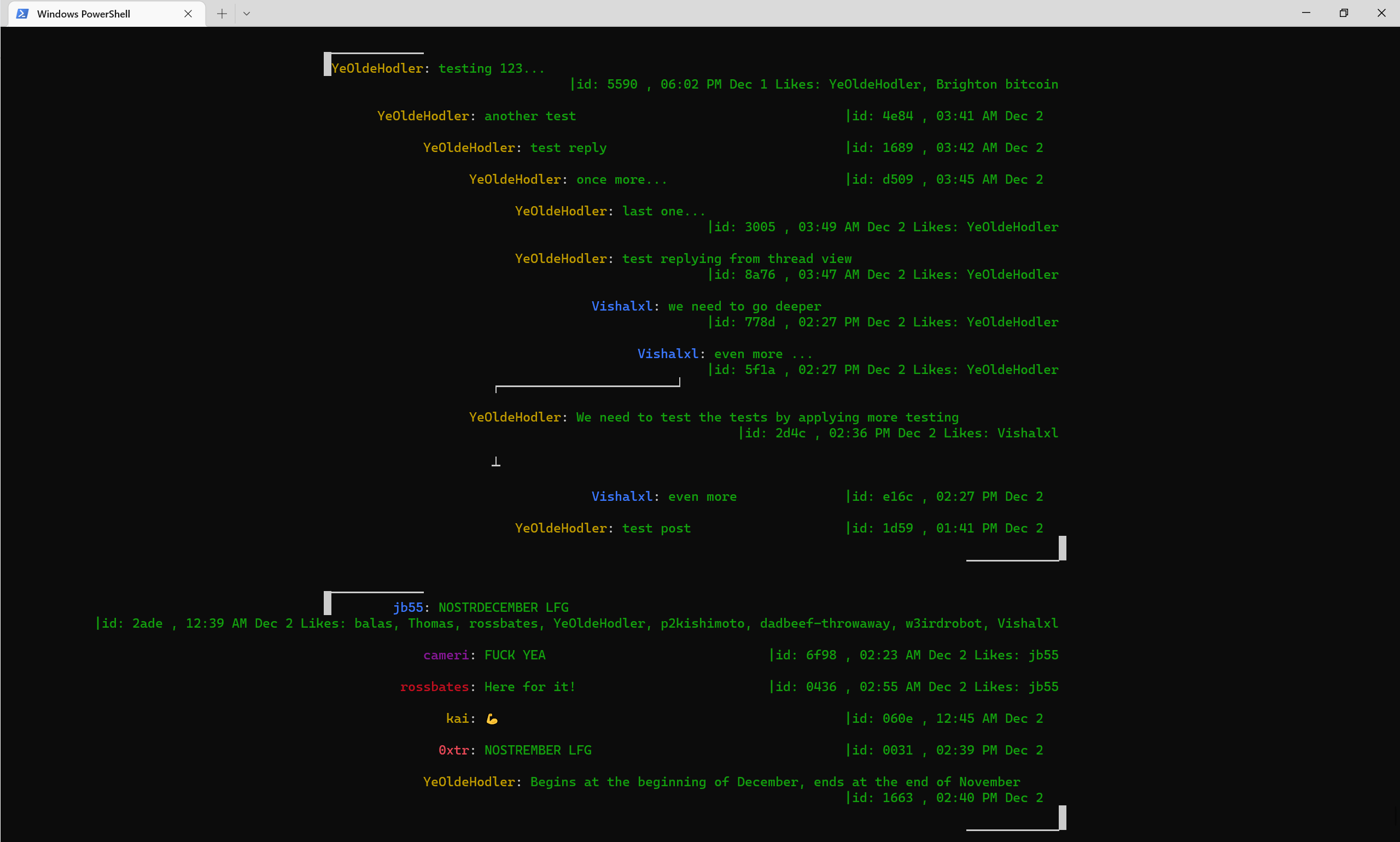
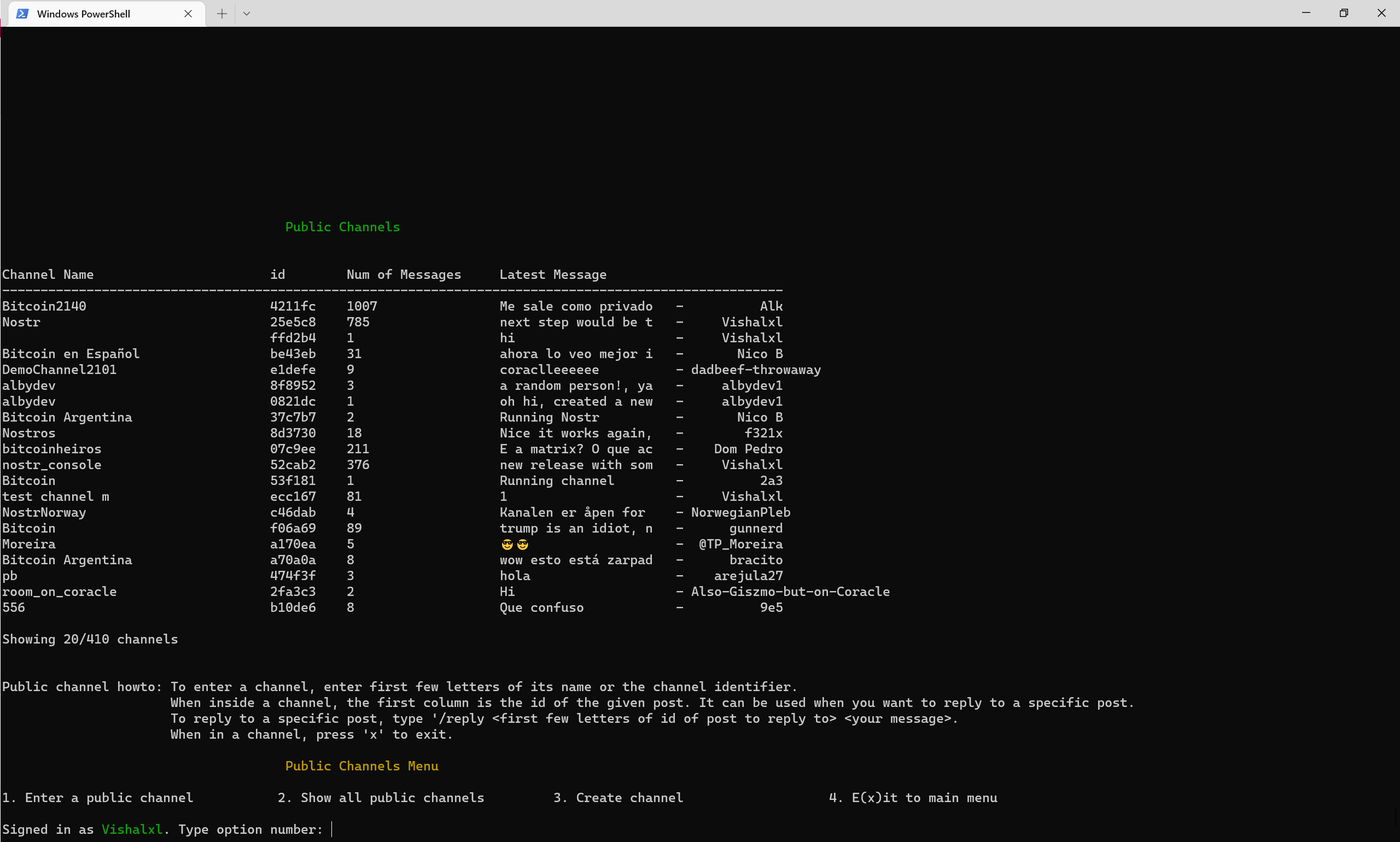
ภาพรวมช่องสาธารณะพร้อมเมนู
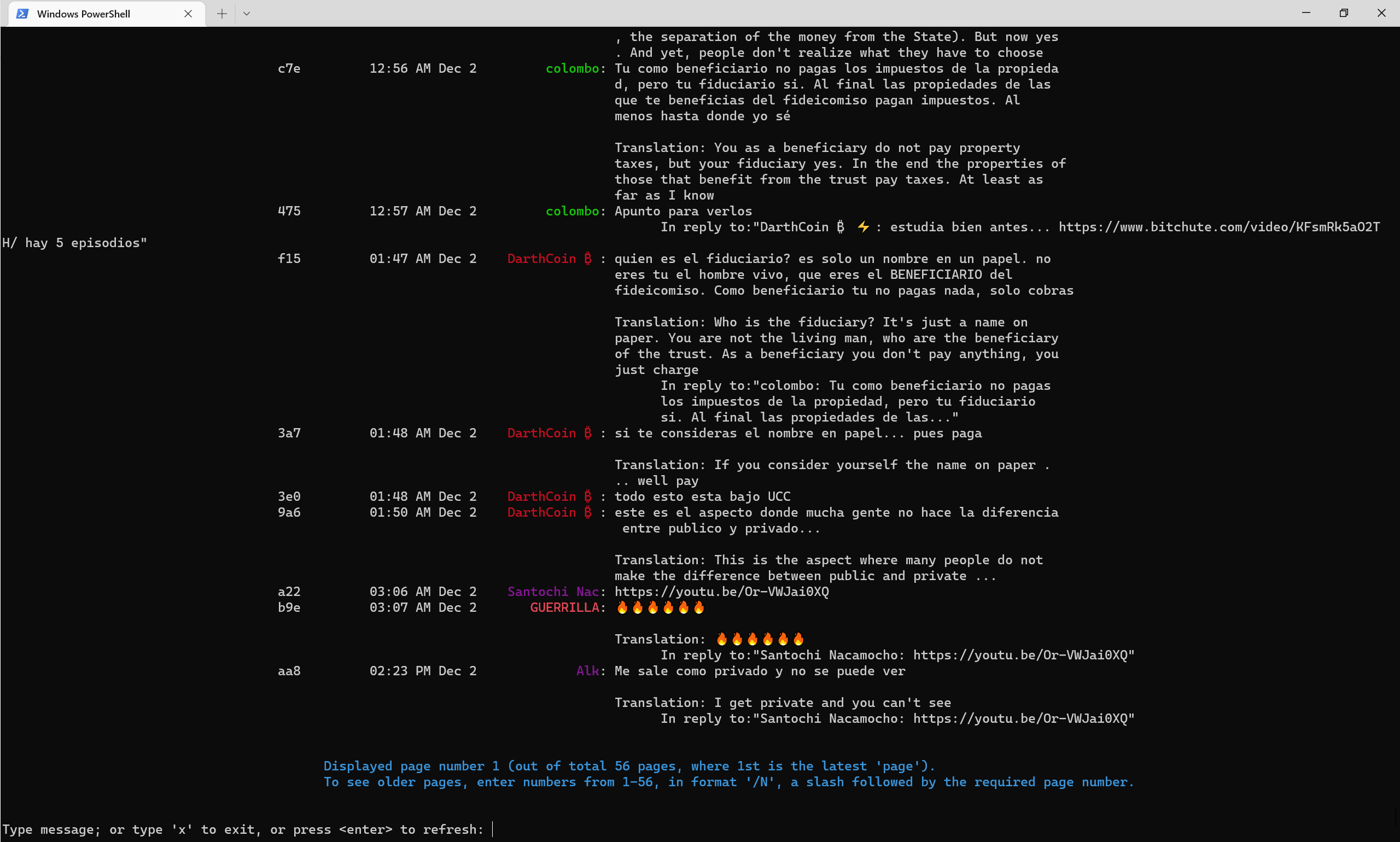
ช่องทางสาธารณะมีลักษณะอย่างไรในช่วงปลายปี 2565 ด้วย -การแปลธงแปลเป็นภาษาอังกฤษโดยอัตโนมัติ
ช่องโทรเลข NOSTR
ช่องโทรเลขคอนโซล NOSTR
NOSTR PULIC Channel 52CAB2E3E504AD6447D284B85B5CC601CA0613B151641E77FACFEC851CA816







