BotCommands
v3.0.0-alpha.22 | App emoji registry, QoL additions and fixes


กรอบการทำงานของ Kotlin-First (และ Java) ที่ทำให้การสร้างบอท Discord เป็นชิ้นส่วนของเค้กโดยใช้ห้องสมุด JDA
เฟรมเวิร์กที่ถูกสร้างขึ้นรอบ ๆ เหตุการณ์และการฉีดพึ่งพาอาศัยกันโครงการของคุณสามารถใช้ประโยชน์จากสิ่งนั้นและหลีกเลี่ยงการผ่านวัตถุรอบ ๆ ในขณะที่ยังสามารถใช้บริการที่ได้รับจากเฟรมเวิร์ก
@Command
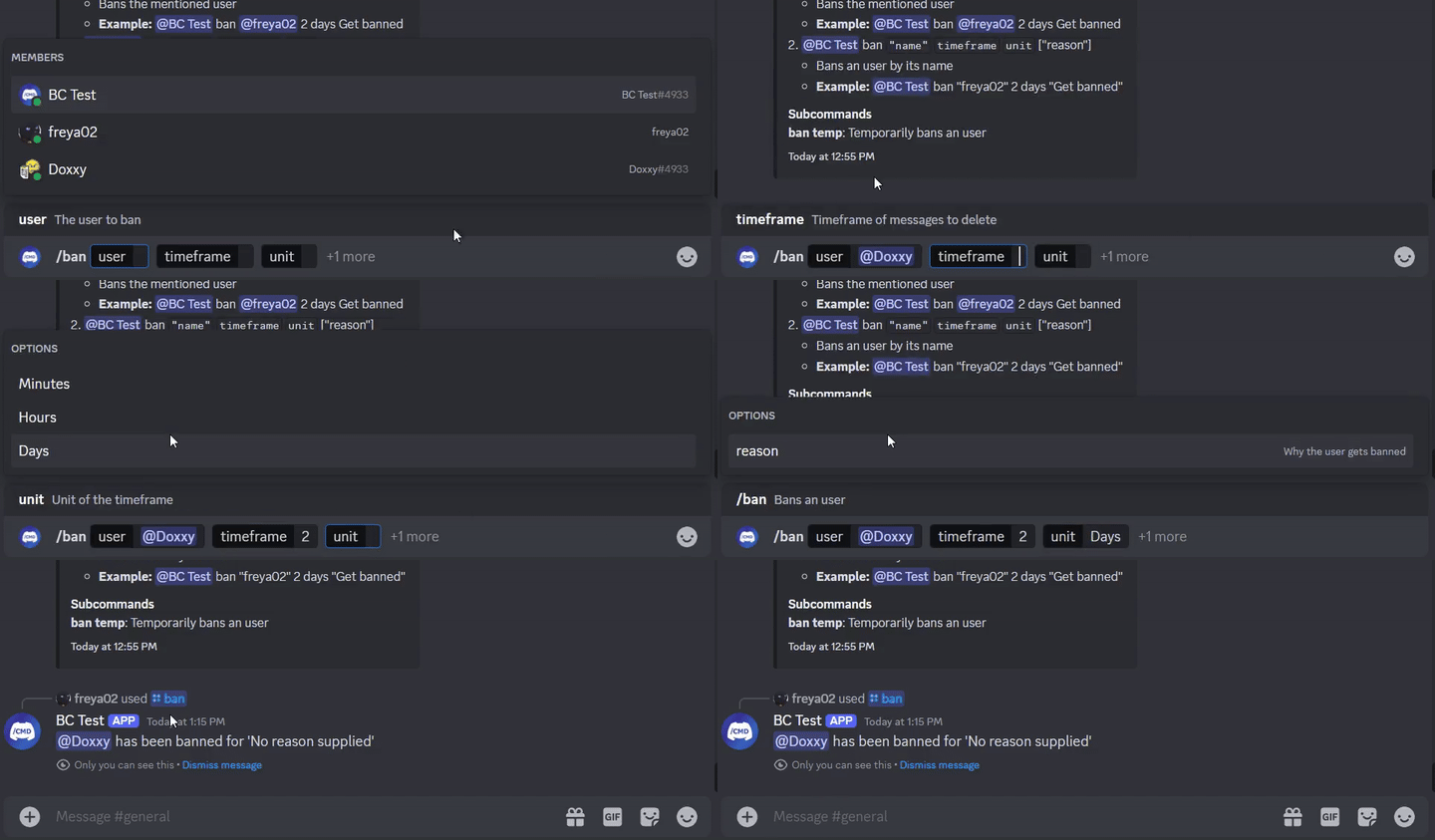
class SlashBan : ApplicationCommand () {
    @JDASlashCommand(name = " ban " , description = " Bans an user " )
    suspend fun onSlashBan (
        event : GuildSlashEvent ,
        @SlashOption(description = " The user to ban " ) user : User ,
        @SlashOption(description = " Timeframe of messages to delete " ) timeframe : Long ,
        // Use choices that come from the TimeUnit resolver
        @SlashOption(description = " Unit of the timeframe " , usePredefinedChoices = true ) unit : TimeUnit , // A resolver is used here
        @SlashOption(description = " Why the user gets banned " ) reason : String = " No reason supplied" // Optional
    ) {
        // ...
        event.reply_( " ${user.asMention} has been banned for ' $reason ' " , ephemeral = true )
          .deleteDelayed( 5 .seconds)
          .await()
    }
}
@Command
class TextBan : TextCommand () {
    @JDATextCommandVariation(path = [ " ban " ], description = " Bans the mentioned user " )
    suspend fun onTextBan (
        event : BaseCommandEvent ,
        @TextOption user : User ,
        @TextOption(example = " 2 " ) timeframe : Long ,
        @TextOption unit : TimeUnit , // A resolver is used here
        @TextOption(example = " Get banned " ) reason : String = " No reason supplied" // Optional
    ) {
        // ...
        event.reply( " ${user.asMention} has been banned " )
            .deleteDelayed( 5 .seconds)
            .await()
    }
}
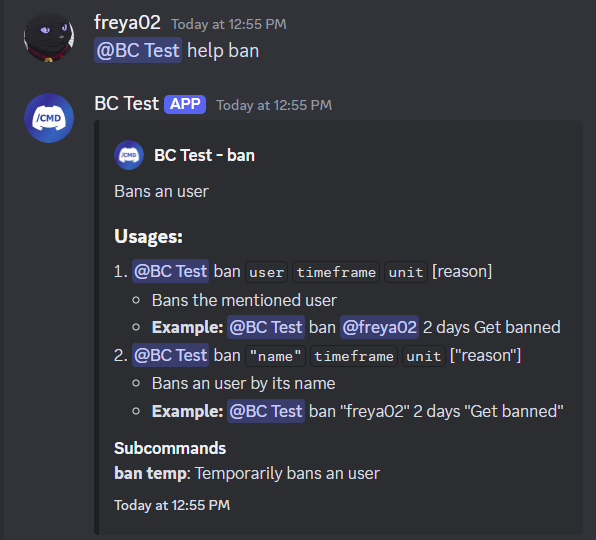
สามารถใช้เป็น @Bot ban @freya02 1 days A totally valid reason
นี่คือวิธีที่เนื้อหาความช่วยเหลือจะมีลักษณะด้วยคำสั่งย่อยและรูปแบบอื่น ๆ อีกสองสามอย่าง:
RichTextParser ) และ emoji redenters (เปลี่ยน :joy: เข้า?)และมีคุณสมบัติมากขึ้น!
คุณขอแนะนำอย่างยิ่งให้มีประสบการณ์เกี่ยวกับ Kotlin (หรือ Java), OOP, JDA และพื้นฐานการฉีดพึ่งพาก่อนที่คุณจะเริ่มใช้ห้องสมุดนี้
ตรงไปที่วิกิเพื่อเริ่มต้นคุณสามารถตรวจสอบตัวอย่างได้
< dependencies >
  < dependency >
    < groupId >io.github.freya022</ groupId >
    < artifactId >BotCommands</ artifactId >
    < version >VERSION</ version >
  </ dependency >
</ dependencies > repositories {
mavenCentral()
}
dependencies {
implementation ' io.github.freya022:BotCommands:VERSION '
}หรือคุณสามารถใช้ jitpack เพื่อใช้เวอร์ชัน สแน็ปช็อต คุณสามารถอ้างถึง JDA Wiki สำหรับข้อมูลเพิ่มเติม
นี่คือวิธีที่คุณจะสร้างคำสั่ง Slash ที่ส่งข้อความในช่องที่ระบุ
 private val wastebasket : UnicodeEmoji by lazyUnicodeEmoji { Emojis . WASTEBASKET }

@Command
@RequiresComponents // Disables the command if components are not enabled
class SlashSay ( private val buttons : Buttons ) : ApplicationCommand() {
    @JDASlashCommand(name = " say " , description = " Sends a message in a channel " )
    suspend fun onSlashSay (
        event : GuildSlashEvent ,
        @SlashOption(description = " Channel to send the message in " ) channel : TextChannel ,
        @SlashOption(description = " What to say " ) content : String
    ) {
        val deleteButton = buttons.danger(wastebasket).ephemeral {
            bindTo { buttonEvent ->
                buttonEvent.deferEdit().queue()
                buttonEvent.hook.deleteOriginal().await()
            }
        }

        event.reply_( " Done! " , ephemeral = true )
            .deleteDelayed( 5 .seconds)
            .queue()

        channel.sendMessage(content)
            .addActionRow(deleteButton)
            .await()
    }
} private val wastebasket : UnicodeEmoji by lazyUnicodeEmoji { Emojis . WASTEBASKET }
@Command
@RequiresComponents // Disables the command if components are not enabled
class SlashSay ( private val buttons : Buttons ) : GlobalApplicationCommandProvider {
suspend fun onSlashSay ( event : GuildSlashEvent , channel : TextChannel , content : String ) {
val deleteButton = buttons.danger(wastebasket).ephemeral {
bindTo { buttonEvent ->
buttonEvent.deferEdit().queue()
buttonEvent.hook.deleteOriginal().await()
}
}
event.reply_( " Done! " , ephemeral = true )
.deleteDelayed( 5 .seconds)
.queue()
channel.sendMessage(content)
.addActionRow(deleteButton)
.await()
}
// This is nice if you need to run your own code to declare commands
// For example, a loop to create commands based on an enum
// If you don't need any dynamic stuff, just stick to annotations
override fun declareGlobalApplicationCommands ( manager : GlobalApplicationCommandManager ) {
manager.slashCommand( " say " , function = ::onSlashSay) {
description = " Sends a message in a channel "
option( " channel " ) {
description = " Channel to send the message in "
}
option( " content " ) {
description = " What to say "
}
}
}
} @ Command
@ RequiresComponents // Disables the command if components are not enabled
public class SlashSay extends ApplicationCommand {
// Little trick to get the emoji lazily, this will reduce the startup impact
static class Emojis {
private static final UnicodeEmoji WASTEBASKET = EmojiUtils . asUnicodeEmoji ( net . fellbaum . jemoji . Emojis . WASTEBASKET );
}
private final Buttons buttons ;
public SlashSay ( Buttons buttons ) {
this . buttons = buttons ;
}
@ JDASlashCommand ( name = "say" , description = "Sends a message in a channel" )
public void onSlashSay (
GuildSlashEvent event ,
@ SlashOption ( description = "Channel to send the message in" ) TextChannel channel ,
@ SlashOption ( description = "What to say" ) String content
) {
final Button deleteButton = buttons . danger ( Emojis . WASTEBASKET ). ephemeral ()
. bindTo ( buttonEvent -> {
buttonEvent . deferEdit (). queue ();
buttonEvent . getHook (). deleteOriginal (). queue ();
})
. build ();
event . reply ( "Done!" )
. setEphemeral ( true )
. delay ( Duration . ofSeconds ( 5 ))
. flatMap ( InteractionHook :: deleteOriginal )
. queue ();
channel . sendMessage ( content )
. addActionRow ( deleteButton )
. queue ();
}
}ผู้ใช้ Intellij IDEA สามารถใช้เทมเพลตสดที่มีให้ในไฟล์ ZIP นี้ช่วยให้คุณทำคำสั่งและตัวจัดการอื่น ๆ ด้วยเทมเพลตที่กำหนดไว้ล่วงหน้าสำหรับทั้ง Kotlin และ Java รักษารูปแบบการตั้งชื่อที่สอดคล้องกันและทำหน้าที่เป็น Cheatsheet
ตัวอย่างเช่นหากคุณพิมพ์ slashCommand ในชั้นเรียนของคุณสิ่งนี้จะสร้างคำสั่ง Slash และแนะนำคุณผ่านการประกาศ
รายการของเทมเพลตสดสามารถพบได้ใน Settings > Editor > Live Templates ในกลุ่ม BotCommands 3.X - [Language]
สำหรับคู่มือการติดตั้งคุณสามารถทำตามคู่มือนี้จาก Jetbrains
อย่าลังเลที่จะเข้าร่วมเซิร์ฟเวอร์สนับสนุนหากคุณมีคำถามใด ๆ !
หากคุณต้องการมีส่วนร่วมตรวจสอบให้แน่ใจว่าได้ฐานสาขาของคุณใน 3.X และสร้างการประชาสัมพันธ์ของคุณจากมัน
มันจะได้รับการชื่นชมที่จะมุ่งเน้นไปที่การปรับปรุงเอกสารเช่น Wiki, เอกสารประกอบห้องสมุดหรือโดยการสร้างตัวอย่าง
ผู้ดูแลจะมุ่งเน้นไปที่รายงานข้อผิดพลาดและคำขอคุณสมบัติซึ่งคุณสามารถสร้างปัญหาได้
อ่านคู่มือการสนับสนุนสำหรับรายละเอียดเพิ่มเติม








