BotCommands
v3.0.0-alpha.22 | App emoji registry, QoL additions and fixes


Структура котлин-первого (и Java), которая делает создание ботов дискортов куском пирога, используя библиотеку JDA.
Структура, созданная вокруг событий и инъекции зависимости, ваш проект может воспользоваться этим и избежать передачи объектов вокруг, а также легко использовать услуги, предоставляемые рамками.
@Command
class SlashBan : ApplicationCommand () {
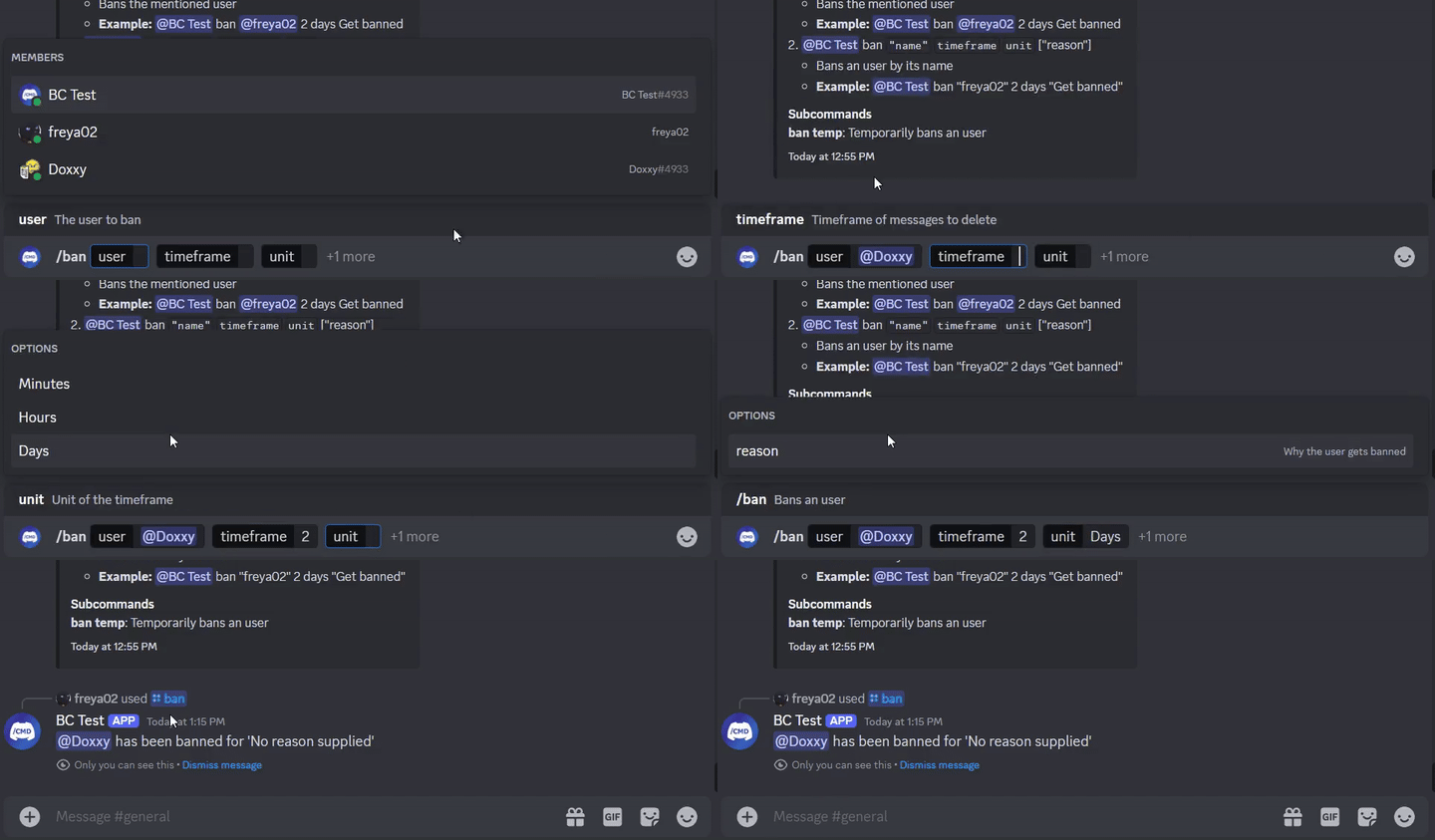
    @JDASlashCommand(name = " ban " , description = " Bans an user " )
    suspend fun onSlashBan (
        event : GuildSlashEvent ,
        @SlashOption(description = " The user to ban " ) user : User ,
        @SlashOption(description = " Timeframe of messages to delete " ) timeframe : Long ,
        // Use choices that come from the TimeUnit resolver
        @SlashOption(description = " Unit of the timeframe " , usePredefinedChoices = true ) unit : TimeUnit , // A resolver is used here
        @SlashOption(description = " Why the user gets banned " ) reason : String = " No reason supplied" // Optional
    ) {
        // ...
        event.reply_( " ${user.asMention} has been banned for ' $reason ' " , ephemeral = true )
          .deleteDelayed( 5 .seconds)
          .await()
    }
}
@Command
class TextBan : TextCommand () {
    @JDATextCommandVariation(path = [ " ban " ], description = " Bans the mentioned user " )
    suspend fun onTextBan (
        event : BaseCommandEvent ,
        @TextOption user : User ,
        @TextOption(example = " 2 " ) timeframe : Long ,
        @TextOption unit : TimeUnit , // A resolver is used here
        @TextOption(example = " Get banned " ) reason : String = " No reason supplied" // Optional
    ) {
        // ...
        event.reply( " ${user.asMention} has been banned " )
            .deleteDelayed( 5 .seconds)
            .await()
    }
}
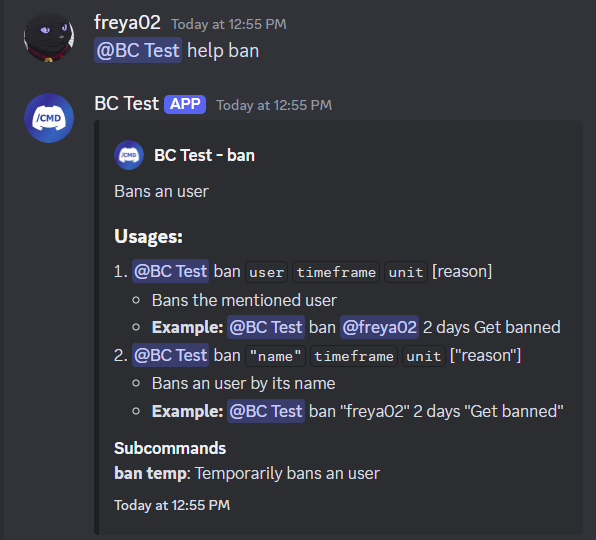
Затем можно использовать в качестве @Bot ban @freya02 1 days A totally valid reason
Вот как будет выглядеть контент справки с подкомандом и еще несколько вариаций:
RichTextParser ) и резолюры эмодзи (поворот :joy: в?)И гораздо больше функций!
Вам настоятельно рекомендуется иметь некоторый опыт работы с Kotlin (или Java), ООП, JDA и основы инъекции зависимостей, прежде чем вы начнете использовать эту библиотеку.
Отправляйтесь в вики, чтобы начать, вы также можете проверить примеры.
< dependencies >
  < dependency >
    < groupId >io.github.freya022</ groupId >
    < artifactId >BotCommands</ artifactId >
    < version >VERSION</ version >
  </ dependency >
</ dependencies > repositories {
mavenCentral()
}
dependencies {
implementation ' io.github.freya022:BotCommands:VERSION '
}В качестве альтернативы, вы можете использовать Jitpack для использования версий снимков , вы можете обратиться к JDA Wiki для получения дополнительной информации.
Вот как вы создали бы команду SLASH, которая отправляет сообщение в указанном канале.
 private val wastebasket : UnicodeEmoji by lazyUnicodeEmoji { Emojis . WASTEBASKET }

@Command
@RequiresComponents // Disables the command if components are not enabled
class SlashSay ( private val buttons : Buttons ) : ApplicationCommand() {
    @JDASlashCommand(name = " say " , description = " Sends a message in a channel " )
    suspend fun onSlashSay (
        event : GuildSlashEvent ,
        @SlashOption(description = " Channel to send the message in " ) channel : TextChannel ,
        @SlashOption(description = " What to say " ) content : String
    ) {
        val deleteButton = buttons.danger(wastebasket).ephemeral {
            bindTo { buttonEvent ->
                buttonEvent.deferEdit().queue()
                buttonEvent.hook.deleteOriginal().await()
            }
        }

        event.reply_( " Done! " , ephemeral = true )
            .deleteDelayed( 5 .seconds)
            .queue()

        channel.sendMessage(content)
            .addActionRow(deleteButton)
            .await()
    }
} private val wastebasket : UnicodeEmoji by lazyUnicodeEmoji { Emojis . WASTEBASKET }
@Command
@RequiresComponents // Disables the command if components are not enabled
class SlashSay ( private val buttons : Buttons ) : GlobalApplicationCommandProvider {
suspend fun onSlashSay ( event : GuildSlashEvent , channel : TextChannel , content : String ) {
val deleteButton = buttons.danger(wastebasket).ephemeral {
bindTo { buttonEvent ->
buttonEvent.deferEdit().queue()
buttonEvent.hook.deleteOriginal().await()
}
}
event.reply_( " Done! " , ephemeral = true )
.deleteDelayed( 5 .seconds)
.queue()
channel.sendMessage(content)
.addActionRow(deleteButton)
.await()
}
// This is nice if you need to run your own code to declare commands
// For example, a loop to create commands based on an enum
// If you don't need any dynamic stuff, just stick to annotations
override fun declareGlobalApplicationCommands ( manager : GlobalApplicationCommandManager ) {
manager.slashCommand( " say " , function = ::onSlashSay) {
description = " Sends a message in a channel "
option( " channel " ) {
description = " Channel to send the message in "
}
option( " content " ) {
description = " What to say "
}
}
}
} @ Command
@ RequiresComponents // Disables the command if components are not enabled
public class SlashSay extends ApplicationCommand {
// Little trick to get the emoji lazily, this will reduce the startup impact
static class Emojis {
private static final UnicodeEmoji WASTEBASKET = EmojiUtils . asUnicodeEmoji ( net . fellbaum . jemoji . Emojis . WASTEBASKET );
}
private final Buttons buttons ;
public SlashSay ( Buttons buttons ) {
this . buttons = buttons ;
}
@ JDASlashCommand ( name = "say" , description = "Sends a message in a channel" )
public void onSlashSay (
GuildSlashEvent event ,
@ SlashOption ( description = "Channel to send the message in" ) TextChannel channel ,
@ SlashOption ( description = "What to say" ) String content
) {
final Button deleteButton = buttons . danger ( Emojis . WASTEBASKET ). ephemeral ()
. bindTo ( buttonEvent -> {
buttonEvent . deferEdit (). queue ();
buttonEvent . getHook (). deleteOriginal (). queue ();
})
. build ();
event . reply ( "Done!" )
. setEphemeral ( true )
. delay ( Duration . ofSeconds ( 5 ))
. flatMap ( InteractionHook :: deleteOriginal )
. queue ();
channel . sendMessage ( content )
. addActionRow ( deleteButton )
. queue ();
}
}Пользователи IntelliJ Idea могут использовать живые шаблоны, представленные в этом zip -файле, помогая вам создавать команды и другие обработчики с предопределенными шаблонами, как для Kotlin, так и для Java, сохраняя последовательную схему именования и выступая в качестве чистого листа.
Например, если вы вводите slashCommand в своем классе, это генерирует команду SLASH и проведет вас через объявление.
Список живого шаблона можно найти в Settings > Editor > Live Templates , в группе BotCommands 3.X - [Language] .
Для руководства по установке вы можете следовать этому руководству от Jetbrains.
Не стесняйтесь присоединиться к серверу поддержки, если у вас есть какие -либо вопросы!
Если вы хотите внести свой вклад, убедитесь, что основывайте свою ветвь на 3.X и создайте свой пиар из него.
Было бы оценено сосредоточиться на улучшении документации, такой как вики, документация библиотеки или создание примеров.
Содействия будут сосредоточены на отчетах об ошибках и запросах функций, для которых вы можете создать проблемы.
Прочитайте руководство для получения более подробной информации.








