BotCommands
v3.0.0-alpha.22 | App emoji registry, QoL additions and fixes


Uma estrutura de Kotlin-primeiro (e Java) que torna a criação da Discord Bots um pedaço de bolo, usando a biblioteca JDA.
A estrutura que está sendo construída em torno de eventos e injeção de dependência, seu projeto pode aproveitar isso e evitar a passagem de objetos, além de poder usar facilmente os serviços prestados pela estrutura.
@Command
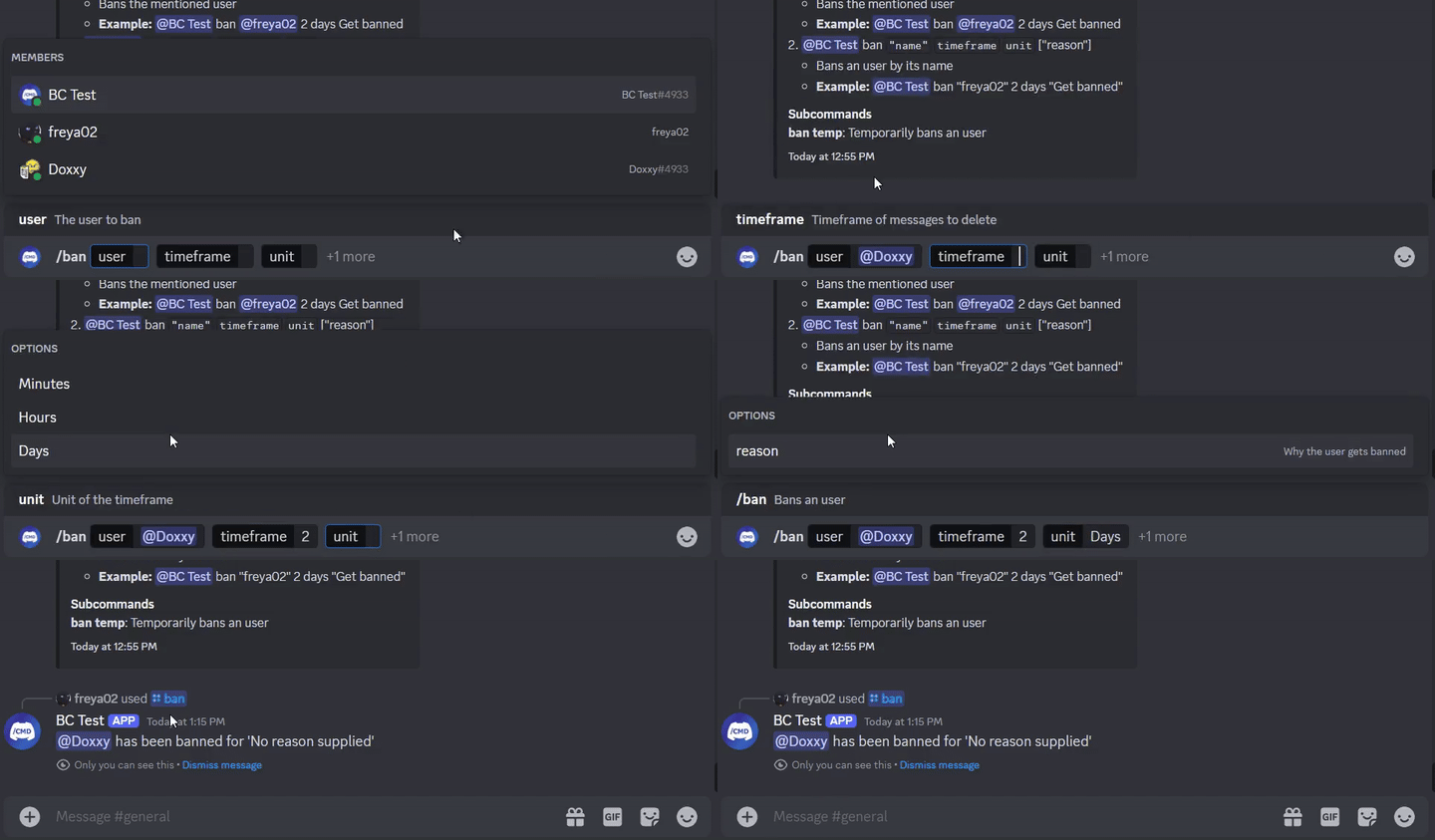
class SlashBan : ApplicationCommand () {
    @JDASlashCommand(name = " ban " , description = " Bans an user " )
    suspend fun onSlashBan (
        event : GuildSlashEvent ,
        @SlashOption(description = " The user to ban " ) user : User ,
        @SlashOption(description = " Timeframe of messages to delete " ) timeframe : Long ,
        // Use choices that come from the TimeUnit resolver
        @SlashOption(description = " Unit of the timeframe " , usePredefinedChoices = true ) unit : TimeUnit , // A resolver is used here
        @SlashOption(description = " Why the user gets banned " ) reason : String = " No reason supplied" // Optional
    ) {
        // ...
        event.reply_( " ${user.asMention} has been banned for ' $reason ' " , ephemeral = true )
          .deleteDelayed( 5 .seconds)
          .await()
    }
}
@Command
class TextBan : TextCommand () {
    @JDATextCommandVariation(path = [ " ban " ], description = " Bans the mentioned user " )
    suspend fun onTextBan (
        event : BaseCommandEvent ,
        @TextOption user : User ,
        @TextOption(example = " 2 " ) timeframe : Long ,
        @TextOption unit : TimeUnit , // A resolver is used here
        @TextOption(example = " Get banned " ) reason : String = " No reason supplied" // Optional
    ) {
        // ...
        event.reply( " ${user.asMention} has been banned " )
            .deleteDelayed( 5 .seconds)
            .await()
    }
}
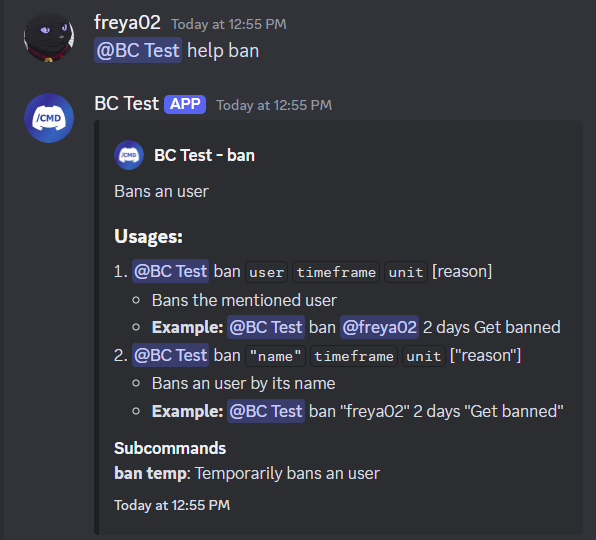
Então pode ser usado como @Bot ban @freya02 1 days A totally valid reason
Veja como o conteúdo da ajuda ficaria com um subcomando e mais algumas variações:
RichTextParser ) e resolvedores de emoji (transformando :joy: em?)?)E muito mais recursos!
Você é altamente recomendável ter alguma experiência com Kotlin (ou Java), OOP, JDA e básicos de injeção de dependência antes de começar a usar esta biblioteca.
Vá até o wiki para começar, você também pode conferir os exemplos.
< dependencies >
  < dependency >
    < groupId >io.github.freya022</ groupId >
    < artifactId >BotCommands</ artifactId >
    < version >VERSION</ version >
  </ dependency >
</ dependencies > repositories {
mavenCentral()
}
dependencies {
implementation ' io.github.freya022:BotCommands:VERSION '
}Como alternativa, você pode usar o Jitpack para usar versões instantâneas , você pode consultar o Wiki JDA para obter mais informações.
Aqui está como você criaria um comando Slash que envia uma mensagem em um canal especificado.
 private val wastebasket : UnicodeEmoji by lazyUnicodeEmoji { Emojis . WASTEBASKET }

@Command
@RequiresComponents // Disables the command if components are not enabled
class SlashSay ( private val buttons : Buttons ) : ApplicationCommand() {
    @JDASlashCommand(name = " say " , description = " Sends a message in a channel " )
    suspend fun onSlashSay (
        event : GuildSlashEvent ,
        @SlashOption(description = " Channel to send the message in " ) channel : TextChannel ,
        @SlashOption(description = " What to say " ) content : String
    ) {
        val deleteButton = buttons.danger(wastebasket).ephemeral {
            bindTo { buttonEvent ->
                buttonEvent.deferEdit().queue()
                buttonEvent.hook.deleteOriginal().await()
            }
        }

        event.reply_( " Done! " , ephemeral = true )
            .deleteDelayed( 5 .seconds)
            .queue()

        channel.sendMessage(content)
            .addActionRow(deleteButton)
            .await()
    }
} private val wastebasket : UnicodeEmoji by lazyUnicodeEmoji { Emojis . WASTEBASKET }
@Command
@RequiresComponents // Disables the command if components are not enabled
class SlashSay ( private val buttons : Buttons ) : GlobalApplicationCommandProvider {
suspend fun onSlashSay ( event : GuildSlashEvent , channel : TextChannel , content : String ) {
val deleteButton = buttons.danger(wastebasket).ephemeral {
bindTo { buttonEvent ->
buttonEvent.deferEdit().queue()
buttonEvent.hook.deleteOriginal().await()
}
}
event.reply_( " Done! " , ephemeral = true )
.deleteDelayed( 5 .seconds)
.queue()
channel.sendMessage(content)
.addActionRow(deleteButton)
.await()
}
// This is nice if you need to run your own code to declare commands
// For example, a loop to create commands based on an enum
// If you don't need any dynamic stuff, just stick to annotations
override fun declareGlobalApplicationCommands ( manager : GlobalApplicationCommandManager ) {
manager.slashCommand( " say " , function = ::onSlashSay) {
description = " Sends a message in a channel "
option( " channel " ) {
description = " Channel to send the message in "
}
option( " content " ) {
description = " What to say "
}
}
}
} @ Command
@ RequiresComponents // Disables the command if components are not enabled
public class SlashSay extends ApplicationCommand {
// Little trick to get the emoji lazily, this will reduce the startup impact
static class Emojis {
private static final UnicodeEmoji WASTEBASKET = EmojiUtils . asUnicodeEmoji ( net . fellbaum . jemoji . Emojis . WASTEBASKET );
}
private final Buttons buttons ;
public SlashSay ( Buttons buttons ) {
this . buttons = buttons ;
}
@ JDASlashCommand ( name = "say" , description = "Sends a message in a channel" )
public void onSlashSay (
GuildSlashEvent event ,
@ SlashOption ( description = "Channel to send the message in" ) TextChannel channel ,
@ SlashOption ( description = "What to say" ) String content
) {
final Button deleteButton = buttons . danger ( Emojis . WASTEBASKET ). ephemeral ()
. bindTo ( buttonEvent -> {
buttonEvent . deferEdit (). queue ();
buttonEvent . getHook (). deleteOriginal (). queue ();
})
. build ();
event . reply ( "Done!" )
. setEphemeral ( true )
. delay ( Duration . ofSeconds ( 5 ))
. flatMap ( InteractionHook :: deleteOriginal )
. queue ();
channel . sendMessage ( content )
. addActionRow ( deleteButton )
. queue ();
}
}Os usuários da Intellij IDEA podem usar modelos ao vivo fornecidos neste arquivo zip, ajudando você a fazer comandos e outros manipuladores com modelos predefinidos, tanto para Kotlin quanto Java, mantendo um esquema de nomeação consistente e atuando como uma folha de truques.
Por exemplo, se você digitar slashCommand em sua classe, isso gerará um comando Slash e o guiará através da declaração.
Uma lista de modelo ao vivo pode ser encontrada em Settings > Editor > Live Templates , no grupo BotCommands 3.X - [Language] .
Para um guia de instalação, você pode seguir este guia da JetBrains.
Não hesite em ingressar no servidor de suporte se tiver alguma dúvida!
Se você deseja contribuir, baseie sua filial no 3.X e crie seu PR a partir dela.
Seria apreciado se concentrar em melhorar a documentação, como o wiki, a documentação da biblioteca ou a criação de exemplos.
Os mantenedores se concentrarão nos relatórios de bugs e solicitações de recursos, para as quais você pode criar problemas.
Leia o guia contribuinte para obter mais detalhes.








