BotCommands
v3.0.0-alpha.22 | App emoji registry, QoL additions and fixes


JDA 라이브러리를 사용하여 불화 봇을 케이크 조각으로 만드는 Kotlin-First (및 Java) 프레임 워크.
이벤트 및 종속성 주입을 중심으로 구축 된 프레임 워크, 프로젝트는이를 활용하고 주변의 객체를 통과하지 못하며 프레임 워크에서 제공하는 서비스를 쉽게 사용할 수 있습니다.
@Command
class SlashBan : ApplicationCommand () {
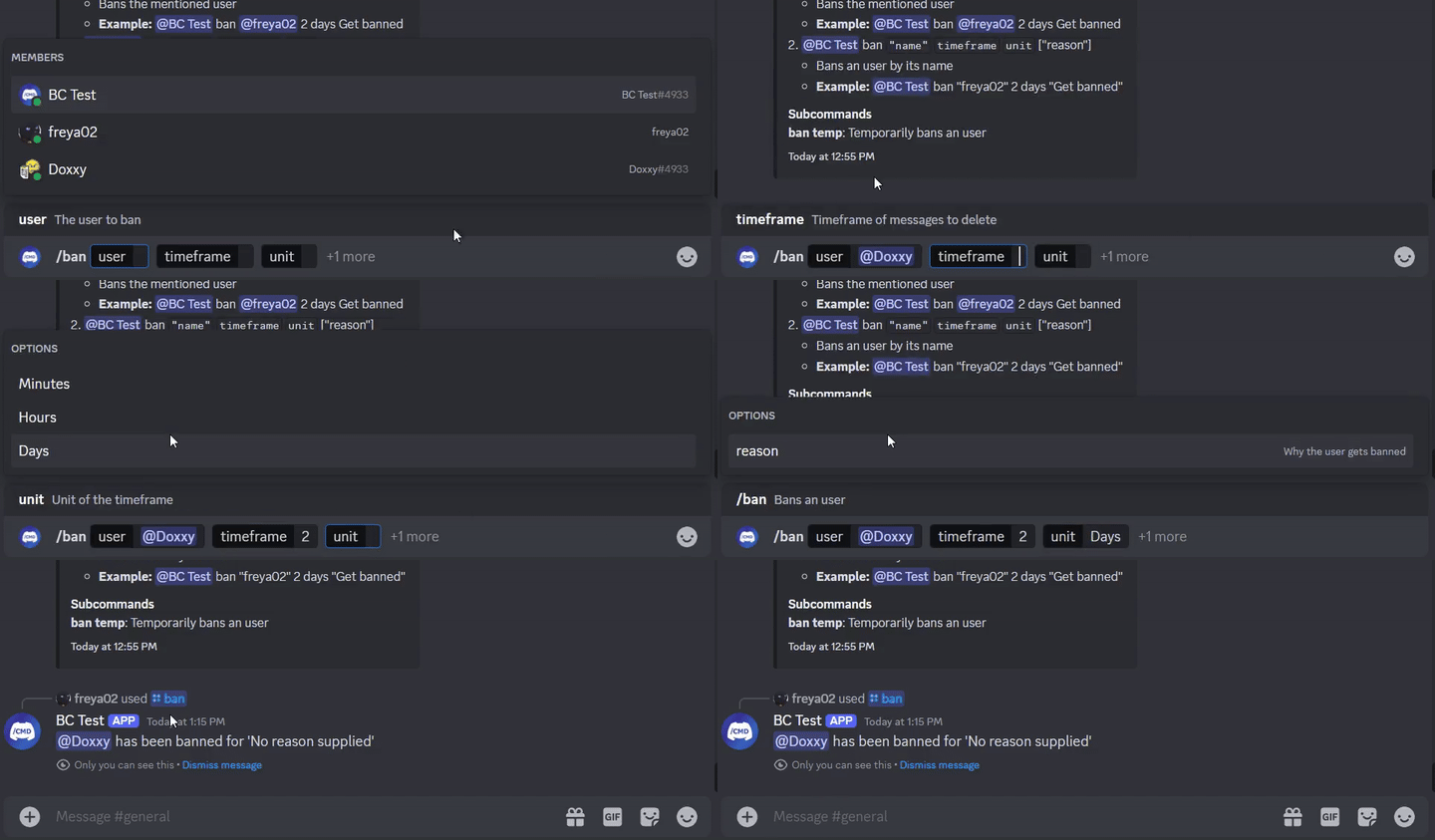
    @JDASlashCommand(name = " ban " , description = " Bans an user " )
    suspend fun onSlashBan (
        event : GuildSlashEvent ,
        @SlashOption(description = " The user to ban " ) user : User ,
        @SlashOption(description = " Timeframe of messages to delete " ) timeframe : Long ,
        // Use choices that come from the TimeUnit resolver
        @SlashOption(description = " Unit of the timeframe " , usePredefinedChoices = true ) unit : TimeUnit , // A resolver is used here
        @SlashOption(description = " Why the user gets banned " ) reason : String = " No reason supplied" // Optional
    ) {
        // ...
        event.reply_( " ${user.asMention} has been banned for ' $reason ' " , ephemeral = true )
          .deleteDelayed( 5 .seconds)
          .await()
    }
}
@Command
class TextBan : TextCommand () {
    @JDATextCommandVariation(path = [ " ban " ], description = " Bans the mentioned user " )
    suspend fun onTextBan (
        event : BaseCommandEvent ,
        @TextOption user : User ,
        @TextOption(example = " 2 " ) timeframe : Long ,
        @TextOption unit : TimeUnit , // A resolver is used here
        @TextOption(example = " Get banned " ) reason : String = " No reason supplied" // Optional
    ) {
        // ...
        event.reply( " ${user.asMention} has been banned " )
            .deleteDelayed( 5 .seconds)
            .await()
    }
}
그런 다음 @Bot ban @freya02 1 days A totally valid reason
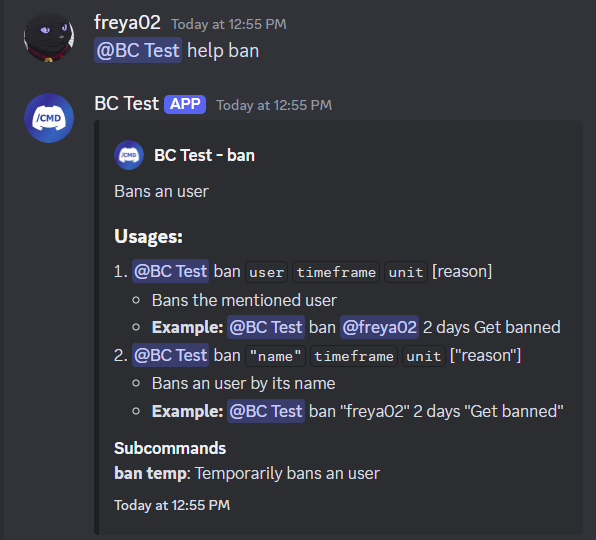
다음은 도움말 콘텐츠가 하위 명령과 몇 가지 변형으로 보이는 방법입니다.
RichTextParser 참조) 및 이모티콘 Resolvers (Turning :joy: in into?)그리고 더 많은 기능!
이 라이브러리 사용을 시작하기 전에 Kotlin (또는 Java), OOP, JDA 및 종속성 주입 기본 사항에 대한 경험이있는 것이 좋습니다.
시작하려면 위키로 가면 예제를 확인할 수도 있습니다.
< dependencies >
  < dependency >
    < groupId >io.github.freya022</ groupId >
    < artifactId >BotCommands</ artifactId >
    < version >VERSION</ version >
  </ dependency >
</ dependencies > repositories {
mavenCentral()
}
dependencies {
implementation ' io.github.freya022:BotCommands:VERSION '
}또는 Jitpack을 사용하여 Snapshot 버전을 사용할 수 있습니다. 자세한 내용은 JDA Wiki를 참조하십시오.
다음은 지정된 채널에서 메시지를 보내는 슬래시 명령을 만드는 방법입니다.
 private val wastebasket : UnicodeEmoji by lazyUnicodeEmoji { Emojis . WASTEBASKET }

@Command
@RequiresComponents // Disables the command if components are not enabled
class SlashSay ( private val buttons : Buttons ) : ApplicationCommand() {
    @JDASlashCommand(name = " say " , description = " Sends a message in a channel " )
    suspend fun onSlashSay (
        event : GuildSlashEvent ,
        @SlashOption(description = " Channel to send the message in " ) channel : TextChannel ,
        @SlashOption(description = " What to say " ) content : String
    ) {
        val deleteButton = buttons.danger(wastebasket).ephemeral {
            bindTo { buttonEvent ->
                buttonEvent.deferEdit().queue()
                buttonEvent.hook.deleteOriginal().await()
            }
        }

        event.reply_( " Done! " , ephemeral = true )
            .deleteDelayed( 5 .seconds)
            .queue()

        channel.sendMessage(content)
            .addActionRow(deleteButton)
            .await()
    }
} private val wastebasket : UnicodeEmoji by lazyUnicodeEmoji { Emojis . WASTEBASKET }
@Command
@RequiresComponents // Disables the command if components are not enabled
class SlashSay ( private val buttons : Buttons ) : GlobalApplicationCommandProvider {
suspend fun onSlashSay ( event : GuildSlashEvent , channel : TextChannel , content : String ) {
val deleteButton = buttons.danger(wastebasket).ephemeral {
bindTo { buttonEvent ->
buttonEvent.deferEdit().queue()
buttonEvent.hook.deleteOriginal().await()
}
}
event.reply_( " Done! " , ephemeral = true )
.deleteDelayed( 5 .seconds)
.queue()
channel.sendMessage(content)
.addActionRow(deleteButton)
.await()
}
// This is nice if you need to run your own code to declare commands
// For example, a loop to create commands based on an enum
// If you don't need any dynamic stuff, just stick to annotations
override fun declareGlobalApplicationCommands ( manager : GlobalApplicationCommandManager ) {
manager.slashCommand( " say " , function = ::onSlashSay) {
description = " Sends a message in a channel "
option( " channel " ) {
description = " Channel to send the message in "
}
option( " content " ) {
description = " What to say "
}
}
}
} @ Command
@ RequiresComponents // Disables the command if components are not enabled
public class SlashSay extends ApplicationCommand {
// Little trick to get the emoji lazily, this will reduce the startup impact
static class Emojis {
private static final UnicodeEmoji WASTEBASKET = EmojiUtils . asUnicodeEmoji ( net . fellbaum . jemoji . Emojis . WASTEBASKET );
}
private final Buttons buttons ;
public SlashSay ( Buttons buttons ) {
this . buttons = buttons ;
}
@ JDASlashCommand ( name = "say" , description = "Sends a message in a channel" )
public void onSlashSay (
GuildSlashEvent event ,
@ SlashOption ( description = "Channel to send the message in" ) TextChannel channel ,
@ SlashOption ( description = "What to say" ) String content
) {
final Button deleteButton = buttons . danger ( Emojis . WASTEBASKET ). ephemeral ()
. bindTo ( buttonEvent -> {
buttonEvent . deferEdit (). queue ();
buttonEvent . getHook (). deleteOriginal (). queue ();
})
. build ();
event . reply ( "Done!" )
. setEphemeral ( true )
. delay ( Duration . ofSeconds ( 5 ))
. flatMap ( InteractionHook :: deleteOriginal )
. queue ();
channel . sendMessage ( content )
. addActionRow ( deleteButton )
. queue ();
}
}Intellij Idea 사용자는이 ZIP 파일에 제공된 라이브 템플릿을 사용하여 Kotlin과 Java 모두에 대해 사전 정의 된 템플릿을 사용하여 명령 및 기타 처리기를 만들어 일관된 이름 지정 체계를 유지하고 치트 시트 역할을 할 수 있습니다.
예를 들어, 클래스에 slashCommand 입력하면 슬래시 명령을 생성하고 선언을 안내합니다.
라이브 템플릿 목록은 Settings > Editor > Live Templates , BotCommands 3.X - [Language] 그룹에서 찾을 수 있습니다.
설치 안내서는 JetBrains 의이 안내서를 팔로우 할 수 있습니다.
질문이 있으시면 언제든지 지원 서버에 가입하는 것을 망설이지 마십시오!
기여하려면 3.X 에 지점을 기반으로 PR을 작성하십시오.
Wiki, 라이브러리 문서와 같은 문서 개선 또는 예제를 작성하여 문서를 개선하는 데 중점을 두어 주셔서 감사합니다.
관리자는 버그 보고서 및 기능 요청에 중점을 두므로 문제를 일으킬 수 있습니다.
자세한 내용은 기고 가이드를 읽으십시오.








