BotCommands
v3.0.0-alpha.22 | App emoji registry, QoL additions and fixes


Un marco Kotlin-First (y Java) que hace que la creación de bots de discordia sea un pedazo de pastel, usando la biblioteca JDA.
El marco que se está construyendo en torno a eventos e inyección de dependencia, su proyecto puede aprovechar eso y evitar pasar objetos, al tiempo que también puede usar los servicios proporcionados por el marco.
@Command
class SlashBan : ApplicationCommand () {
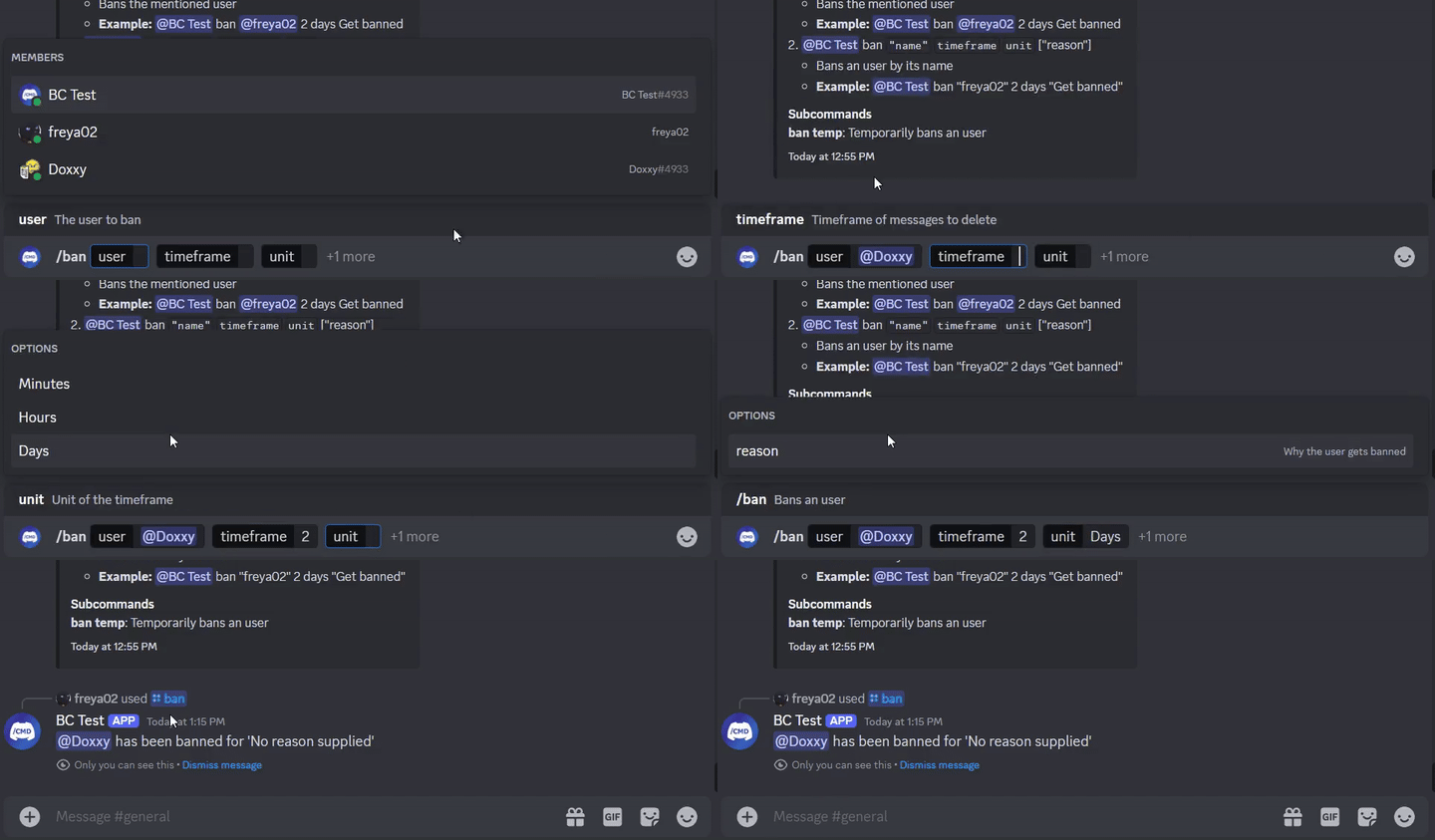
    @JDASlashCommand(name = " ban " , description = " Bans an user " )
    suspend fun onSlashBan (
        event : GuildSlashEvent ,
        @SlashOption(description = " The user to ban " ) user : User ,
        @SlashOption(description = " Timeframe of messages to delete " ) timeframe : Long ,
        // Use choices that come from the TimeUnit resolver
        @SlashOption(description = " Unit of the timeframe " , usePredefinedChoices = true ) unit : TimeUnit , // A resolver is used here
        @SlashOption(description = " Why the user gets banned " ) reason : String = " No reason supplied" // Optional
    ) {
        // ...
        event.reply_( " ${user.asMention} has been banned for ' $reason ' " , ephemeral = true )
          .deleteDelayed( 5 .seconds)
          .await()
    }
}
@Command
class TextBan : TextCommand () {
    @JDATextCommandVariation(path = [ " ban " ], description = " Bans the mentioned user " )
    suspend fun onTextBan (
        event : BaseCommandEvent ,
        @TextOption user : User ,
        @TextOption(example = " 2 " ) timeframe : Long ,
        @TextOption unit : TimeUnit , // A resolver is used here
        @TextOption(example = " Get banned " ) reason : String = " No reason supplied" // Optional
    ) {
        // ...
        event.reply( " ${user.asMention} has been banned " )
            .deleteDelayed( 5 .seconds)
            .await()
    }
}
Luego se puede usar como @Bot ban @freya02 1 days A totally valid reason
Así es como se vería el contenido de ayuda con un subcomando y algunas variaciones más:
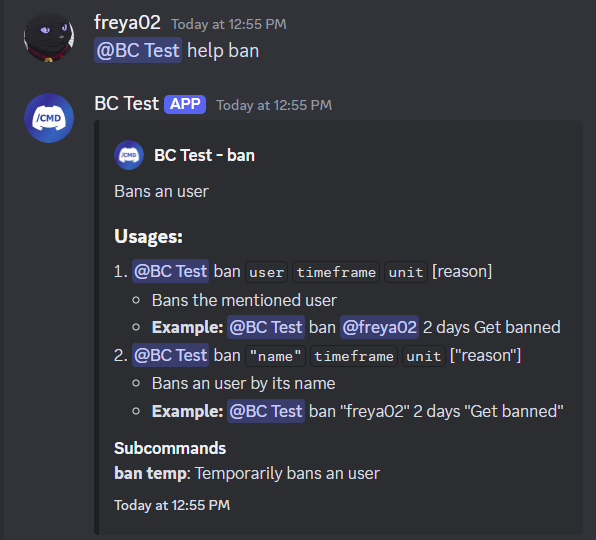
RichTextParser ) y Resolvers Emoji (girando :joy: AT?)¡Y muchas más características!
Se recomienda encarecidamente tener algo de experiencia con los conceptos básicos de inyección de Kotlin (o Java), OOP, JDA y de dependencia antes de comenzar a usar esta biblioteca.
Dirígete al wiki para comenzar, también puedes consultar los ejemplos.
< dependencies >
  < dependency >
    < groupId >io.github.freya022</ groupId >
    < artifactId >BotCommands</ artifactId >
    < version >VERSION</ version >
  </ dependency >
</ dependencies > repositories {
mavenCentral()
}
dependencies {
implementation ' io.github.freya022:BotCommands:VERSION '
}Alternativamente, puede usar jitpack para usar versiones de instantáneas , puede consultar el Wiki JDA para obtener más información.
Así es como crearía un comando Slash que envíe un mensaje en un canal especificado.
 private val wastebasket : UnicodeEmoji by lazyUnicodeEmoji { Emojis . WASTEBASKET }

@Command
@RequiresComponents // Disables the command if components are not enabled
class SlashSay ( private val buttons : Buttons ) : ApplicationCommand() {
    @JDASlashCommand(name = " say " , description = " Sends a message in a channel " )
    suspend fun onSlashSay (
        event : GuildSlashEvent ,
        @SlashOption(description = " Channel to send the message in " ) channel : TextChannel ,
        @SlashOption(description = " What to say " ) content : String
    ) {
        val deleteButton = buttons.danger(wastebasket).ephemeral {
            bindTo { buttonEvent ->
                buttonEvent.deferEdit().queue()
                buttonEvent.hook.deleteOriginal().await()
            }
        }

        event.reply_( " Done! " , ephemeral = true )
            .deleteDelayed( 5 .seconds)
            .queue()

        channel.sendMessage(content)
            .addActionRow(deleteButton)
            .await()
    }
} private val wastebasket : UnicodeEmoji by lazyUnicodeEmoji { Emojis . WASTEBASKET }
@Command
@RequiresComponents // Disables the command if components are not enabled
class SlashSay ( private val buttons : Buttons ) : GlobalApplicationCommandProvider {
suspend fun onSlashSay ( event : GuildSlashEvent , channel : TextChannel , content : String ) {
val deleteButton = buttons.danger(wastebasket).ephemeral {
bindTo { buttonEvent ->
buttonEvent.deferEdit().queue()
buttonEvent.hook.deleteOriginal().await()
}
}
event.reply_( " Done! " , ephemeral = true )
.deleteDelayed( 5 .seconds)
.queue()
channel.sendMessage(content)
.addActionRow(deleteButton)
.await()
}
// This is nice if you need to run your own code to declare commands
// For example, a loop to create commands based on an enum
// If you don't need any dynamic stuff, just stick to annotations
override fun declareGlobalApplicationCommands ( manager : GlobalApplicationCommandManager ) {
manager.slashCommand( " say " , function = ::onSlashSay) {
description = " Sends a message in a channel "
option( " channel " ) {
description = " Channel to send the message in "
}
option( " content " ) {
description = " What to say "
}
}
}
} @ Command
@ RequiresComponents // Disables the command if components are not enabled
public class SlashSay extends ApplicationCommand {
// Little trick to get the emoji lazily, this will reduce the startup impact
static class Emojis {
private static final UnicodeEmoji WASTEBASKET = EmojiUtils . asUnicodeEmoji ( net . fellbaum . jemoji . Emojis . WASTEBASKET );
}
private final Buttons buttons ;
public SlashSay ( Buttons buttons ) {
this . buttons = buttons ;
}
@ JDASlashCommand ( name = "say" , description = "Sends a message in a channel" )
public void onSlashSay (
GuildSlashEvent event ,
@ SlashOption ( description = "Channel to send the message in" ) TextChannel channel ,
@ SlashOption ( description = "What to say" ) String content
) {
final Button deleteButton = buttons . danger ( Emojis . WASTEBASKET ). ephemeral ()
. bindTo ( buttonEvent -> {
buttonEvent . deferEdit (). queue ();
buttonEvent . getHook (). deleteOriginal (). queue ();
})
. build ();
event . reply ( "Done!" )
. setEphemeral ( true )
. delay ( Duration . ofSeconds ( 5 ))
. flatMap ( InteractionHook :: deleteOriginal )
. queue ();
channel . sendMessage ( content )
. addActionRow ( deleteButton )
. queue ();
}
}Los usuarios de IntelliJ Idea pueden usar plantillas en vivo proporcionadas en este archivo zip, ayudándole a hacer comandos y otros manejadores con plantillas predefinidas, tanto para Kotlin como para Java, manteniendo un esquema de nombres consistente y actuando como una hoja de trucos.
Por ejemplo, si escribe slashCommand en su clase, esto generará un comando Slash y lo guiará a través de la declaración.
Se puede encontrar una lista de plantillas en vivo en Settings > Editor > Live Templates , en el grupo BotCommands 3.X - [Language] .
Para una guía de instalación, puede seguir esta guía desde JetBrains.
¡No dude en unirse al servidor de soporte si tiene alguna pregunta!
Si desea contribuir, asegúrese de basar su rama en 3.X y cree su PR a partir de ella.
Se agradecería centrarse en mejorar la documentación, como la wiki, la documentación de la biblioteca o creando ejemplos.
Los mantenedores se centrarán en informes de errores y solicitudes de funciones, para los que puede crear problemas.
Lea la guía contribuyente para obtener más detalles.








