BotCommands
v3.0.0-alpha.22 | App emoji registry, QoL additions and fixes


Kotlin-First(およびJava)フレームワークは、JDAライブラリを使用して、Discord Botsの作成をケーキにします。
イベントと依存関係の注入を中心に構築されているフレームワークは、プロジェクトを利用して、オブジェクトを渡すことを避け、フレームワークから提供されるサービスを簡単に使用できるようにすることができます。
@Command
class SlashBan : ApplicationCommand () {
    @JDASlashCommand(name = " ban " , description = " Bans an user " )
    suspend fun onSlashBan (
        event : GuildSlashEvent ,
        @SlashOption(description = " The user to ban " ) user : User ,
        @SlashOption(description = " Timeframe of messages to delete " ) timeframe : Long ,
        // Use choices that come from the TimeUnit resolver
        @SlashOption(description = " Unit of the timeframe " , usePredefinedChoices = true ) unit : TimeUnit , // A resolver is used here
        @SlashOption(description = " Why the user gets banned " ) reason : String = " No reason supplied" // Optional
    ) {
        // ...
        event.reply_( " ${user.asMention} has been banned for ' $reason ' " , ephemeral = true )
          .deleteDelayed( 5 .seconds)
          .await()
    }
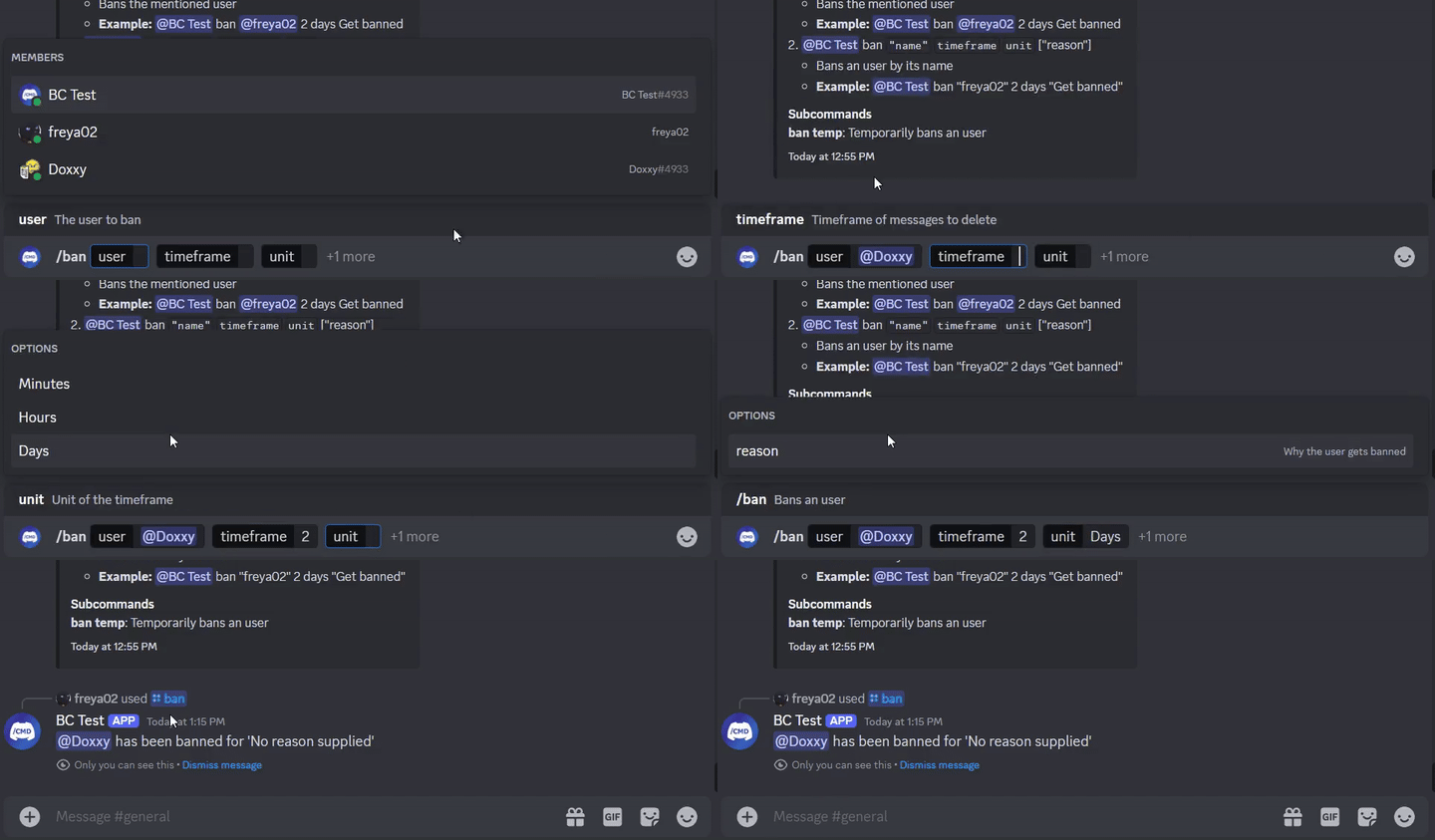
}
@Command
class TextBan : TextCommand () {
    @JDATextCommandVariation(path = [ " ban " ], description = " Bans the mentioned user " )
    suspend fun onTextBan (
        event : BaseCommandEvent ,
        @TextOption user : User ,
        @TextOption(example = " 2 " ) timeframe : Long ,
        @TextOption unit : TimeUnit , // A resolver is used here
        @TextOption(example = " Get banned " ) reason : String = " No reason supplied" // Optional
    ) {
        // ...
        event.reply( " ${user.asMention} has been banned " )
            .deleteDelayed( 5 .seconds)
            .await()
    }
}
その後、 @Bot ban @freya02 1 days A totally valid reason
サブコマンドとさらにいくつかのバリエーションでヘルプコンテンツがどのように見えるかは次のとおりです。
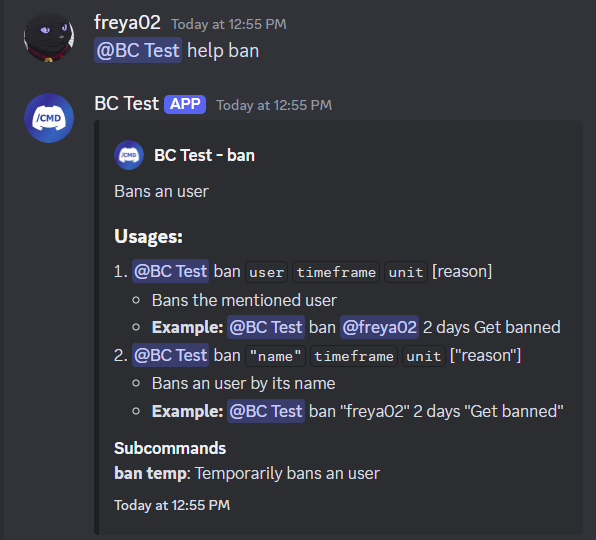
RichTextParserを参照)と絵文字リゾルバー(ターニング:joy: into?)そして、もっと多くの機能!
このライブラリの使用を開始する前に、Kotlin(またはJava)、OOP、JDA、および依存関係の噴射の基本である程度の経験を持つことを強くお勧めします。
Wikiにアクセスして始めましょう。例を確認することもできます。
< dependencies >
  < dependency >
    < groupId >io.github.freya022</ groupId >
    < artifactId >BotCommands</ artifactId >
    < version >VERSION</ version >
  </ dependency >
</ dependencies > repositories {
mavenCentral()
}
dependencies {
implementation ' io.github.freya022:BotCommands:VERSION '
}または、JitPackを使用してスナップショットバージョンを使用することもできます。詳細については、JDA Wikiを参照できます。
指定されたチャネルにメッセージを送信するスラッシュコマンドを作成する方法は次のとおりです。
 private val wastebasket : UnicodeEmoji by lazyUnicodeEmoji { Emojis . WASTEBASKET }

@Command
@RequiresComponents // Disables the command if components are not enabled
class SlashSay ( private val buttons : Buttons ) : ApplicationCommand() {
    @JDASlashCommand(name = " say " , description = " Sends a message in a channel " )
    suspend fun onSlashSay (
        event : GuildSlashEvent ,
        @SlashOption(description = " Channel to send the message in " ) channel : TextChannel ,
        @SlashOption(description = " What to say " ) content : String
    ) {
        val deleteButton = buttons.danger(wastebasket).ephemeral {
            bindTo { buttonEvent ->
                buttonEvent.deferEdit().queue()
                buttonEvent.hook.deleteOriginal().await()
            }
        }

        event.reply_( " Done! " , ephemeral = true )
            .deleteDelayed( 5 .seconds)
            .queue()

        channel.sendMessage(content)
            .addActionRow(deleteButton)
            .await()
    }
} private val wastebasket : UnicodeEmoji by lazyUnicodeEmoji { Emojis . WASTEBASKET }
@Command
@RequiresComponents // Disables the command if components are not enabled
class SlashSay ( private val buttons : Buttons ) : GlobalApplicationCommandProvider {
suspend fun onSlashSay ( event : GuildSlashEvent , channel : TextChannel , content : String ) {
val deleteButton = buttons.danger(wastebasket).ephemeral {
bindTo { buttonEvent ->
buttonEvent.deferEdit().queue()
buttonEvent.hook.deleteOriginal().await()
}
}
event.reply_( " Done! " , ephemeral = true )
.deleteDelayed( 5 .seconds)
.queue()
channel.sendMessage(content)
.addActionRow(deleteButton)
.await()
}
// This is nice if you need to run your own code to declare commands
// For example, a loop to create commands based on an enum
// If you don't need any dynamic stuff, just stick to annotations
override fun declareGlobalApplicationCommands ( manager : GlobalApplicationCommandManager ) {
manager.slashCommand( " say " , function = ::onSlashSay) {
description = " Sends a message in a channel "
option( " channel " ) {
description = " Channel to send the message in "
}
option( " content " ) {
description = " What to say "
}
}
}
} @ Command
@ RequiresComponents // Disables the command if components are not enabled
public class SlashSay extends ApplicationCommand {
// Little trick to get the emoji lazily, this will reduce the startup impact
static class Emojis {
private static final UnicodeEmoji WASTEBASKET = EmojiUtils . asUnicodeEmoji ( net . fellbaum . jemoji . Emojis . WASTEBASKET );
}
private final Buttons buttons ;
public SlashSay ( Buttons buttons ) {
this . buttons = buttons ;
}
@ JDASlashCommand ( name = "say" , description = "Sends a message in a channel" )
public void onSlashSay (
GuildSlashEvent event ,
@ SlashOption ( description = "Channel to send the message in" ) TextChannel channel ,
@ SlashOption ( description = "What to say" ) String content
) {
final Button deleteButton = buttons . danger ( Emojis . WASTEBASKET ). ephemeral ()
. bindTo ( buttonEvent -> {
buttonEvent . deferEdit (). queue ();
buttonEvent . getHook (). deleteOriginal (). queue ();
})
. build ();
event . reply ( "Done!" )
. setEphemeral ( true )
. delay ( Duration . ofSeconds ( 5 ))
. flatMap ( InteractionHook :: deleteOriginal )
. queue ();
channel . sendMessage ( content )
. addActionRow ( deleteButton )
. queue ();
}
}Intellij Ideaユーザーは、このZIPファイルで提供されるライブテンプレートを使用して、KotlinとJavaの両方で、定義済みのテンプレートを使用してコマンドや他のハンドラーを作成し、一貫した命名スキームを維持し、チートシートとして機能します。
たとえば、クラスにslashCommandを入力すると、これによりスラッシュコマンドが生成され、宣言をガイドします。
ライブテンプレートのリストはSettings > Editor > Live Templates 、 BotCommands 3.X - [Language]グループにあります。
インストールガイドについては、JetBrainsからこのガイドに従うことができます。
質問がある場合は、サポートサーバーに参加することを躊躇しないでください!
貢献したい場合は、 3.Xに枝を置いて、そこからPRを作成してください。
Wiki、ライブラリのドキュメントなど、ドキュメントの改善、または例を作成することに焦点を当てることができていただければ幸いです。
メンテナーは、問題を作成できるバグレポートと機能リクエストに焦点を当てます。
詳細については、寄稿ガイドをご覧ください。








