BotCommands
v3.0.0-alpha.22 | App emoji registry, QoL additions and fixes


A Kotlin-first (and Java) framework that makes creating Discord bots a piece of cake, using the JDA library.
The framework being built around events and dependency injection, your project can take advantage of that and avoid passing objects around, while also easily being able to use services provided by the framework.
@Command
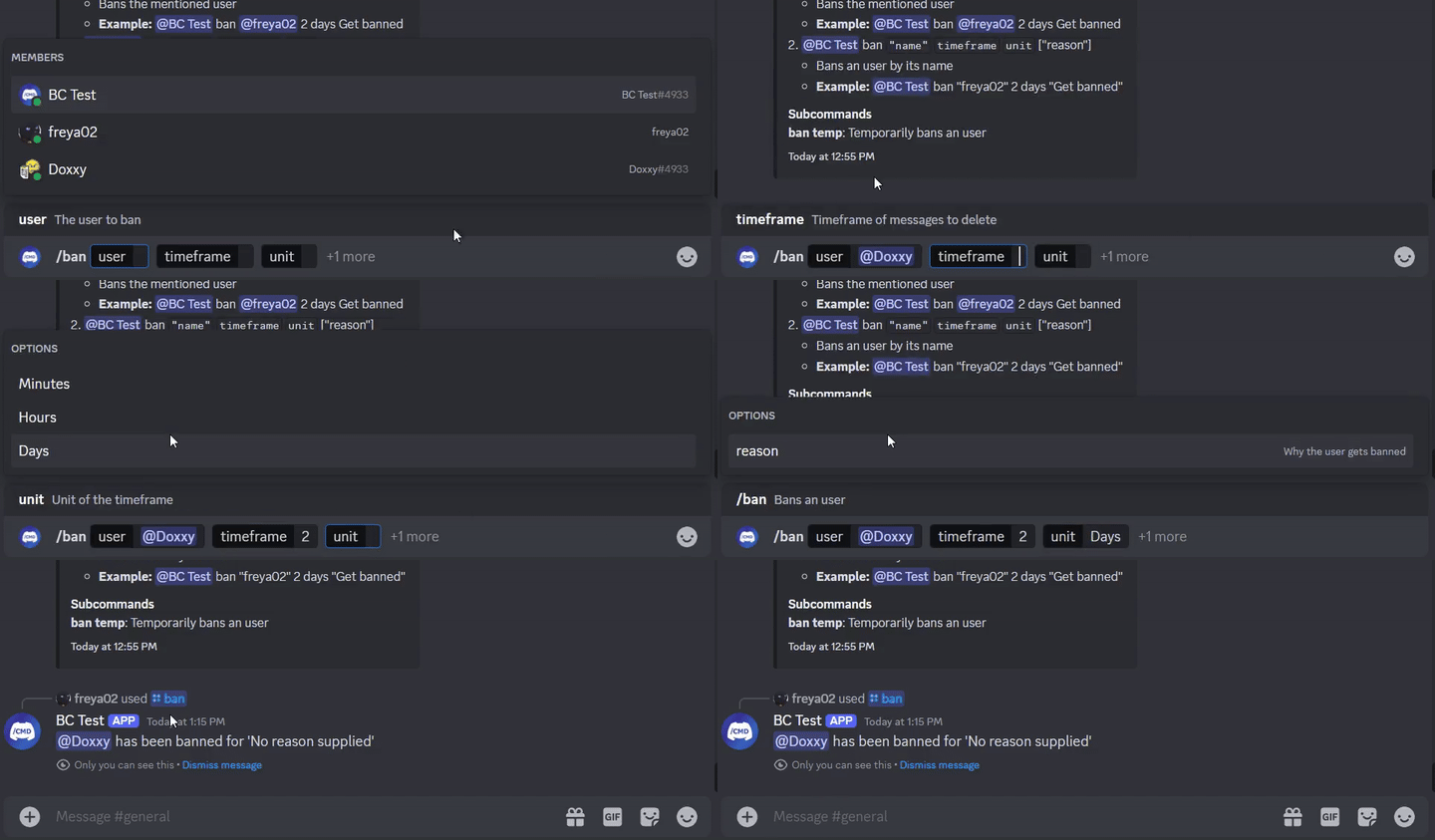
class SlashBan : ApplicationCommand() {
    @JDASlashCommand(name = "ban", description = "Bans an user")
    suspend fun onSlashBan(
        event: GuildSlashEvent,
        @SlashOption(description = "The user to ban") user: User,
        @SlashOption(description = "Timeframe of messages to delete") timeframe: Long,
        // Use choices that come from the TimeUnit resolver
        @SlashOption(description = "Unit of the timeframe", usePredefinedChoices = true) unit: TimeUnit, // A resolver is used here
        @SlashOption(description = "Why the user gets banned") reason: String = "No reason supplied" // Optional
    ) {
        // ...
        event.reply_("${user.asMention} has been banned for '$reason'", ephemeral = true)
          .deleteDelayed(5.seconds)
          .await()
    }
}
@Command
class TextBan : TextCommand() {
    @JDATextCommandVariation(path = ["ban"], description = "Bans the mentioned user")
    suspend fun onTextBan(
        event: BaseCommandEvent,
        @TextOption user: User,
        @TextOption(example = "2") timeframe: Long,
        @TextOption unit: TimeUnit, // A resolver is used here
        @TextOption(example = "Get banned") reason: String = "No reason supplied" // Optional
    ) {
        // ...
        event.reply("${user.asMention} has been banned")
            .deleteDelayed(5.seconds)
            .await()
    }
}
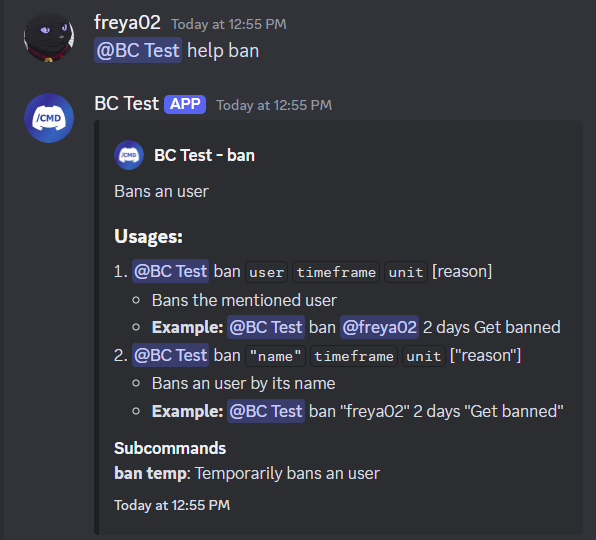
Can then be used as @Bot ban @freya02 1 days A totally valid reason
Here's how the help content would look with a subcommand and a few more variations:
RichTextParser) and emoji resolvers (turning :joy: into ?)And way more features!
You are strongly recommended to have some experience with Kotlin (or Java), OOP, JDA and Dependency Injection basics before you start using this library.
Head over to the wiki to get started, you can also check out the examples.
<dependencies>
  <dependency>
    <groupId>io.github.freya022</groupId>
    <artifactId>BotCommands</artifactId>
    <version>VERSION</version>
  </dependency>
</dependencies>repositories {
mavenCentral()
}
dependencies {
implementation 'io.github.freya022:BotCommands:VERSION'
}Alternatively, you can use Jitpack to use snapshot versions, you can refer to the JDA wiki for more information.
Here is how you would create a slash command that sends a message in a specified channel.
private val wastebasket: UnicodeEmoji by lazyUnicodeEmoji { Emojis.WASTEBASKET }

@Command
@RequiresComponents // Disables the command if components are not enabled
class SlashSay(private val buttons: Buttons) : ApplicationCommand() {
    @JDASlashCommand(name = "say", description = "Sends a message in a channel")
    suspend fun onSlashSay(
        event: GuildSlashEvent,
        @SlashOption(description = "Channel to send the message in") channel: TextChannel,
        @SlashOption(description = "What to say") content: String
    ) {
        val deleteButton = buttons.danger(wastebasket).ephemeral {
            bindTo { buttonEvent ->
                buttonEvent.deferEdit().queue()
                buttonEvent.hook.deleteOriginal().await()
            }
        }

        event.reply_("Done!", ephemeral = true)
            .deleteDelayed(5.seconds)
            .queue()

        channel.sendMessage(content)
            .addActionRow(deleteButton)
            .await()
    }
}private val wastebasket: UnicodeEmoji by lazyUnicodeEmoji { Emojis.WASTEBASKET }
@Command
@RequiresComponents // Disables the command if components are not enabled
class SlashSay(private val buttons: Buttons) : GlobalApplicationCommandProvider {
suspend fun onSlashSay(event: GuildSlashEvent, channel: TextChannel, content: String) {
val deleteButton = buttons.danger(wastebasket).ephemeral {
bindTo { buttonEvent ->
buttonEvent.deferEdit().queue()
buttonEvent.hook.deleteOriginal().await()
}
}
event.reply_("Done!", ephemeral = true)
.deleteDelayed(5.seconds)
.queue()
channel.sendMessage(content)
.addActionRow(deleteButton)
.await()
}
// This is nice if you need to run your own code to declare commands
// For example, a loop to create commands based on an enum
// If you don't need any dynamic stuff, just stick to annotations
override fun declareGlobalApplicationCommands(manager: GlobalApplicationCommandManager) {
manager.slashCommand("say", function = ::onSlashSay) {
description = "Sends a message in a channel"
option("channel") {
description = "Channel to send the message in"
}
option("content") {
description = "What to say"
}
}
}
}@Command
@RequiresComponents // Disables the command if components are not enabled
public class SlashSay extends ApplicationCommand {
// Little trick to get the emoji lazily, this will reduce the startup impact
static class Emojis {
private static final UnicodeEmoji WASTEBASKET = EmojiUtils.asUnicodeEmoji(net.fellbaum.jemoji.Emojis.WASTEBASKET);
}
private final Buttons buttons;
public SlashSay(Buttons buttons) {
this.buttons = buttons;
}
@JDASlashCommand(name = "say", description = "Sends a message in a channel")
public void onSlashSay(
GuildSlashEvent event,
@SlashOption(description = "Channel to send the message in") TextChannel channel,
@SlashOption(description = "What to say") String content
) {
final Button deleteButton = buttons.danger(Emojis.WASTEBASKET).ephemeral()
.bindTo(buttonEvent -> {
buttonEvent.deferEdit().queue();
buttonEvent.getHook().deleteOriginal().queue();
})
.build();
event.reply("Done!")
.setEphemeral(true)
.delay(Duration.ofSeconds(5))
.flatMap(InteractionHook::deleteOriginal)
.queue();
channel.sendMessage(content)
.addActionRow(deleteButton)
.queue();
}
}IntelliJ IDEA users can use live templates provided in this zip file, helping you make commands and other handlers with predefined templates, for both Kotlin and Java, keeping a consistent naming scheme and acting as a cheatsheet.
For example, if you type slashCommand in your class, this will generate a slash command
and guide you through the declaration.
A list of live template can be found in Settings > Editor > Live Templates,
in the BotCommands 3.X - [Language] group.
For an installation guide, you can follow this guide from JetBrains.
Don't hesitate to join the support server if you have any question!
If you want to contribute, make sure to base your branch on 3.X, and create your PR from it.
It would be appreciated to focus on improving the documentation,
such as the wiki, the library documentation, or by creating examples.
Maintainers will focus on bug reports and feature requests, which you can create issues for.
Read the contributing guide for more details.








