SkiaSharp.Components
1.0.0

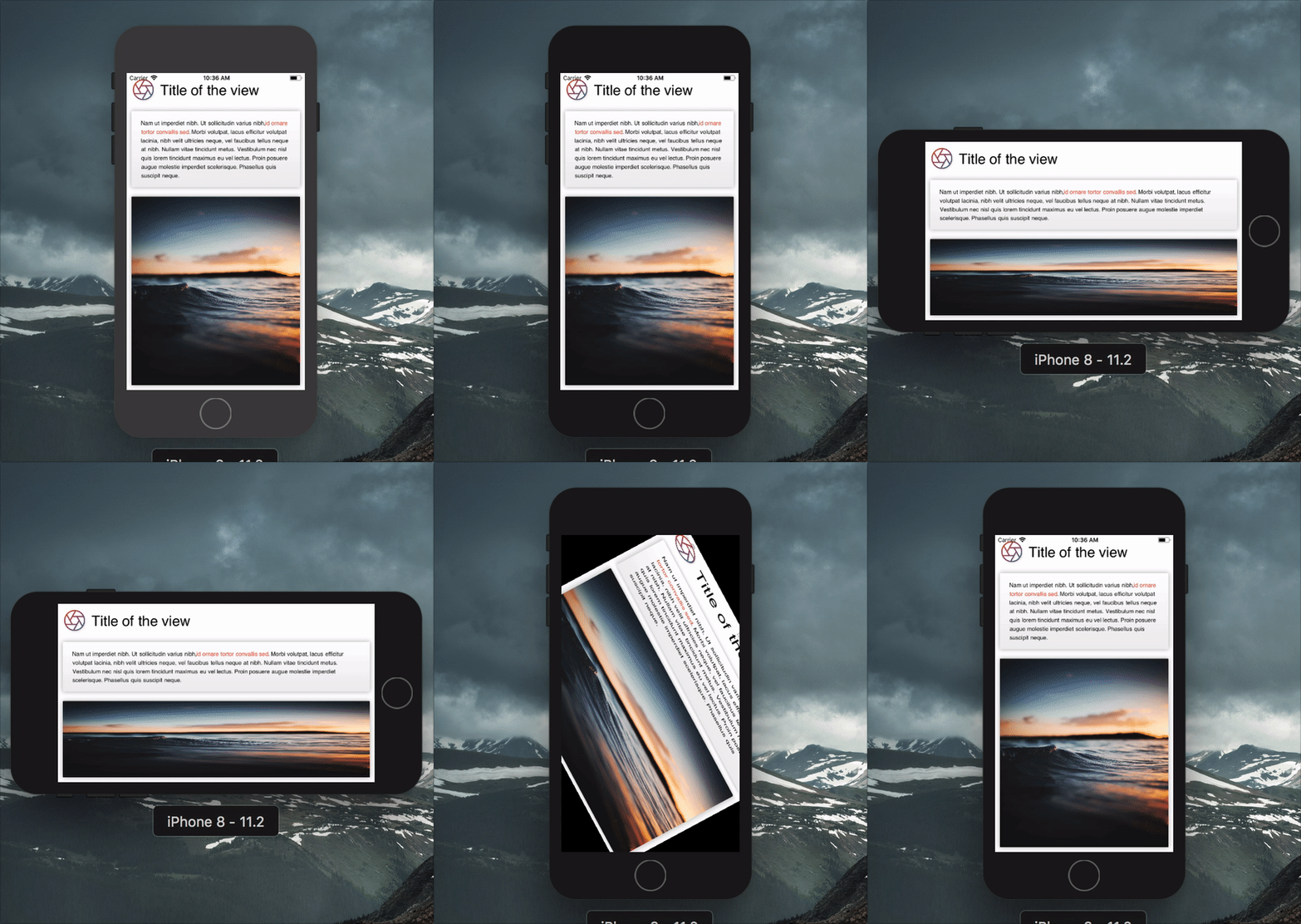
การผลิตรหัสการแสดงผลสำหรับ Skiasharp สามารถเป็นคำอื่นและซ้ำ ๆ ได้ Skiasharp.Components เป็นมุมมองระดับที่สูงขึ้นซึ่งทำให้การประกาศรัดกุมมากขึ้น
 var result = new Grid ( ) ;

this . Title = new Label
{
    TextSize = 30 ,
    Text = "Title of the view" ,
    VerticalAlignment = Alignment . Center ,
} ;

this . Description = new Label
{
    TextSize = 16 ,
    Spans = new [ ]
    {
        new Span
        {
            Text = "Nam ut imperdiet nibh. Ut sollicitudin varius nibh,"
        } ,
        new Span
        {
            ForegroundBrush = new ColorBrush ( new SKColor ( 0xFFF44336 ) ) ,
            Decorations = TextDecoration . Bold ,
            Text = "id ornare tortor convallis sed"
        } ,
        new Span
        {
            Text = ". Morbi volutpat, lacus efficitur volutpat lacinia, nibh velit ultricies neque, vel faucibus tellus neque at nibh. Nullam vitae tincidunt metus. Vestibulum nec nisl quis lorem tincidunt maximus eu vel lectus. Proin posuere augue molestie imperdiet scelerisque. Phasellus quis suscipit neque."
        } ,
    } ,
} ;

var gradient = new GradientBrush ( new SKPoint ( 0 , 0 ) , new SKPoint ( 0 , 1 ) , new [ ]
{
    new Tuple < float , SKColor > ( 0 , new SKColor ( 255 , 255 , 255 , 255 ) ) ,
    new Tuple < float , SKColor > ( 1 , new SKColor ( 238 , 238 , 238 , 255 ) ) ,
} ) ;

var shadow = new Shadow ( )
{
    Blur = new SKPoint ( 10 , 10 ) ,
    Color = SKColors . Black . WithAlpha ( 80 ) ,
} ;

this . Image = new Image ( )
{
    Source = "https://source.unsplash.com/random" ,
    Fill = new ColorBrush ( SKColors . LightGray ) ,
    CornerRadius = 5.0f ,
    Shadow = shadow ,
} ;

this . Box = new Box ( )
{
    Fill = gradient ,
    CornerRadius = 5.0f ,
    Shadow = shadow ,
} ;

var iconGradient = new GradientBrush ( new SKPoint ( 0 , 0 ) , new SKPoint ( 1 , 1 ) , new [ ]
{
    new Tuple < float , SKColor > ( 0 , new SKColor ( 0xFFF44336 ) ) ,
    new Tuple < float , SKColor > ( 1 , new SKColor ( 0xFF3F51B5 ) ) ,
} ) ;

this . Icon = new Path
{
    Source = IconPath . Aperture ,
    ViewBox = SKRect . Create ( 0 , 0 , 24 , 24 ) ,
    Stroke = new Stroke ( )
    {
        Size = 5 ,
        Brush = iconGradient ,
    } ,
} ;

// Setting grid column and rows
result . ColumnDefinitions = new [ ]
{
    Grid . Definition . Points ( 100 ) ,
    Grid . Definition . Stars ( 1 ) ,
} ;

result . RowDefinitions = new [ ]
{
    Grid . Definition . Points ( 100 ) ,
    Grid . Definition . Points ( 200 ) ,
    Grid . Definition . Stars ( 1 ) ,
} ;

// Setting child positions
result . AddView ( this . Icon , 0 , 0 ) ;
result . AddView ( this . Title , 1 , 0 ) ;
result . AddView ( this . Box , 0 , 1 , 2 ) ;
result . AddView ( this . Description , 0 , 1 , 2 ) ;

result . Layout ( SKRect . Create ( 0 , 0 , 500 , 500 ) ) ;
result . Render ( canvas ) ; ทุกครั้งที่คุณสมบัติของการเปลี่ยนแปลงมุมมองเหตุการณ์ Invalidated ของมุมมองจะถูกยกขึ้น สิ่งนี้มีประโยชน์ที่จะทราบว่าจะแสดงมุมมองอีกครั้งเมื่อใด
การโต้ตอบขั้นพื้นฐานมีให้ผ่านการควบคุม Tap ซึ่งเพิ่มเหตุการณ์เมื่อผู้ใช้สัมผัสกับเฟรม มันเป็นมุมมองเหมือนองค์ประกอบอื่น ๆ
 this . Button = new Tap ( )
{
    BackgroundBrush = new ColorBrush ( SKColors . DeepPink ) ,
    CornerRadius = 5 ,
} ;

this . Button . Tapped += ( s , e ) => Debug . WriteLine ( "Tapped" ) ;
this . Button . Pressed += ( s , e ) => ( ( Tap ) s ) . BackgroundBrush = new ColorBrush ( SKColors . LightPink ) ;
this . Button . Released += ( s , e ) => ( ( Tap ) s ) . BackgroundBrush = new ColorBrush ( SKColors . DeepPink ) ;
หากคุณใช้ Renderer การสัมผัสจะถูกต่อสายโดยอัตโนมัติ
ยินดีต้อนรับ! หากคุณพบข้อผิดพลาดโปรดรายงานและหากคุณต้องการคุณสมบัติโปรดรายงาน
หากคุณต้องการมีส่วนร่วมรหัสโปรดยื่นปัญหาและสร้างสาขาออกจากสาขา dev ปัจจุบันและยื่นคำขอดึง
mit ©aloïs deniel








