SkiaSharp.Components
1.0.0

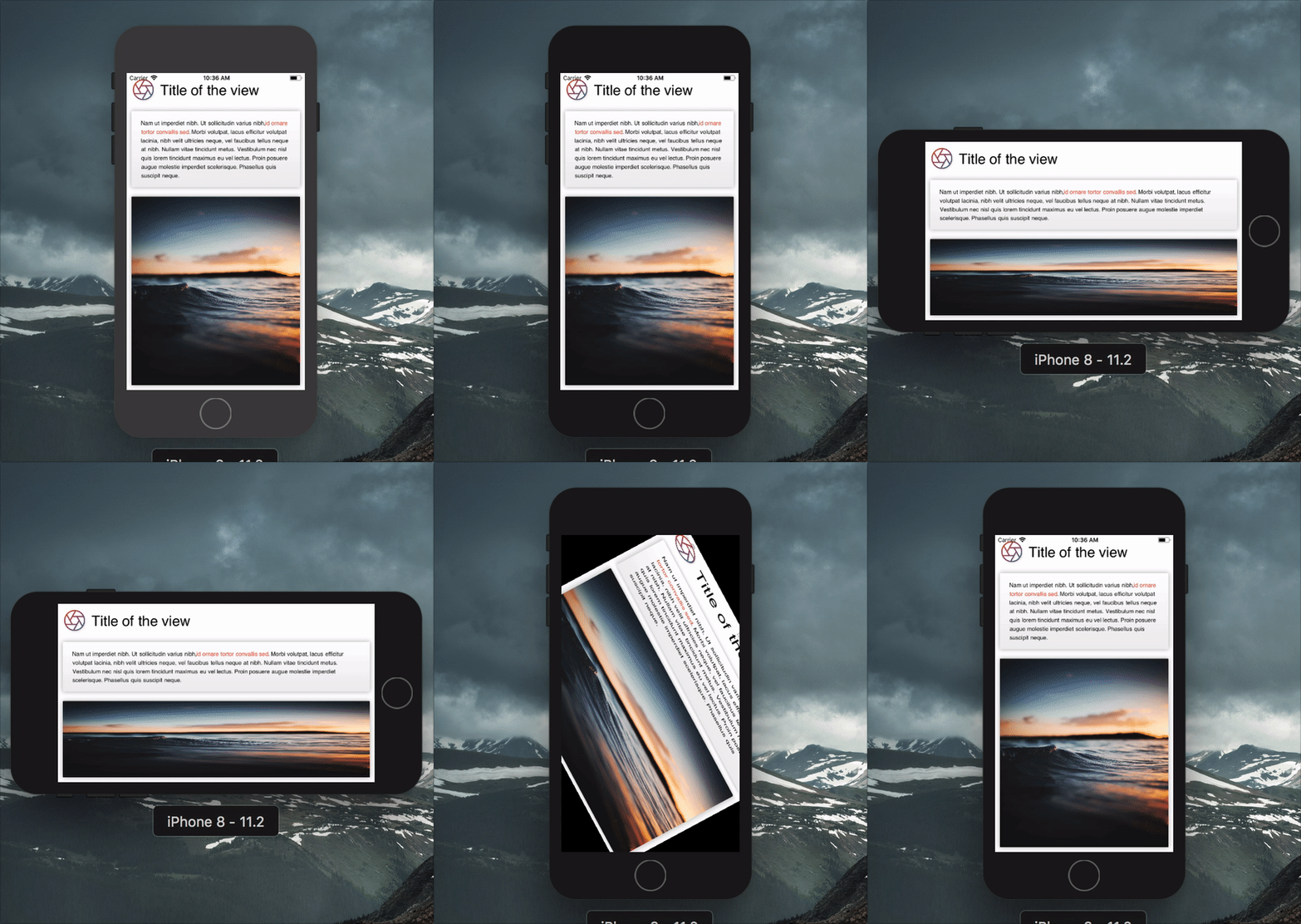
Memproduksi kode rendering untuk skiasharp bisa sangat bertele -tele dan berulang. SkiAsharp.components adalah pandangan tingkat yang lebih tinggi yang membuat deklarasi lebih ringkas.
 var result = new Grid ( ) ;

this . Title = new Label
{
    TextSize = 30 ,
    Text = "Title of the view" ,
    VerticalAlignment = Alignment . Center ,
} ;

this . Description = new Label
{
    TextSize = 16 ,
    Spans = new [ ]
    {
        new Span
        {
            Text = "Nam ut imperdiet nibh. Ut sollicitudin varius nibh,"
        } ,
        new Span
        {
            ForegroundBrush = new ColorBrush ( new SKColor ( 0xFFF44336 ) ) ,
            Decorations = TextDecoration . Bold ,
            Text = "id ornare tortor convallis sed"
        } ,
        new Span
        {
            Text = ". Morbi volutpat, lacus efficitur volutpat lacinia, nibh velit ultricies neque, vel faucibus tellus neque at nibh. Nullam vitae tincidunt metus. Vestibulum nec nisl quis lorem tincidunt maximus eu vel lectus. Proin posuere augue molestie imperdiet scelerisque. Phasellus quis suscipit neque."
        } ,
    } ,
} ;

var gradient = new GradientBrush ( new SKPoint ( 0 , 0 ) , new SKPoint ( 0 , 1 ) , new [ ]
{
    new Tuple < float , SKColor > ( 0 , new SKColor ( 255 , 255 , 255 , 255 ) ) ,
    new Tuple < float , SKColor > ( 1 , new SKColor ( 238 , 238 , 238 , 255 ) ) ,
} ) ;

var shadow = new Shadow ( )
{
    Blur = new SKPoint ( 10 , 10 ) ,
    Color = SKColors . Black . WithAlpha ( 80 ) ,
} ;

this . Image = new Image ( )
{
    Source = "https://source.unsplash.com/random" ,
    Fill = new ColorBrush ( SKColors . LightGray ) ,
    CornerRadius = 5.0f ,
    Shadow = shadow ,
} ;

this . Box = new Box ( )
{
    Fill = gradient ,
    CornerRadius = 5.0f ,
    Shadow = shadow ,
} ;

var iconGradient = new GradientBrush ( new SKPoint ( 0 , 0 ) , new SKPoint ( 1 , 1 ) , new [ ]
{
    new Tuple < float , SKColor > ( 0 , new SKColor ( 0xFFF44336 ) ) ,
    new Tuple < float , SKColor > ( 1 , new SKColor ( 0xFF3F51B5 ) ) ,
} ) ;

this . Icon = new Path
{
    Source = IconPath . Aperture ,
    ViewBox = SKRect . Create ( 0 , 0 , 24 , 24 ) ,
    Stroke = new Stroke ( )
    {
        Size = 5 ,
        Brush = iconGradient ,
    } ,
} ;

// Setting grid column and rows
result . ColumnDefinitions = new [ ]
{
    Grid . Definition . Points ( 100 ) ,
    Grid . Definition . Stars ( 1 ) ,
} ;

result . RowDefinitions = new [ ]
{
    Grid . Definition . Points ( 100 ) ,
    Grid . Definition . Points ( 200 ) ,
    Grid . Definition . Stars ( 1 ) ,
} ;

// Setting child positions
result . AddView ( this . Icon , 0 , 0 ) ;
result . AddView ( this . Title , 1 , 0 ) ;
result . AddView ( this . Box , 0 , 1 , 2 ) ;
result . AddView ( this . Description , 0 , 1 , 2 ) ;

result . Layout ( SKRect . Create ( 0 , 0 , 500 , 500 ) ) ;
result . Render ( canvas ) ; Setiap kali properti dari tampilan berubah, peristiwa tampilan Invalidated dinaikkan. Ini bermanfaat untuk mengetahui kapan harus membuat ulang tampilan.
Interaksi dasar tersedia melalui kontrol Tap yang meningkatkan peristiwa ketika pengguna menyentuh bingkainya. Ini adalah tampilan seperti komponen lainnya.
 this . Button = new Tap ( )
{
    BackgroundBrush = new ColorBrush ( SKColors . DeepPink ) ,
    CornerRadius = 5 ,
} ;

this . Button . Tapped += ( s , e ) => Debug . WriteLine ( "Tapped" ) ;
this . Button . Pressed += ( s , e ) => ( ( Tap ) s ) . BackgroundBrush = new ColorBrush ( SKColors . LightPink ) ;
this . Button . Released += ( s , e ) => ( ( Tap ) s ) . BackgroundBrush = new ColorBrush ( SKColors . DeepPink ) ;
Jika Anda menggunakan Renderer , sentuhan akan ditransfer secara otomatis.
Kontribusi dipersilakan! Jika Anda menemukan bug, silakan laporkan dan jika Anda ingin fitur, silakan laporkan.
Jika Anda ingin menyumbangkan kode, silakan ajukan masalah dan buat cabang dari cabang dev saat ini dan ajukan permintaan tarik.
MIT © Aloïs Deniel








