SkiaSharp.Components
1.0.0

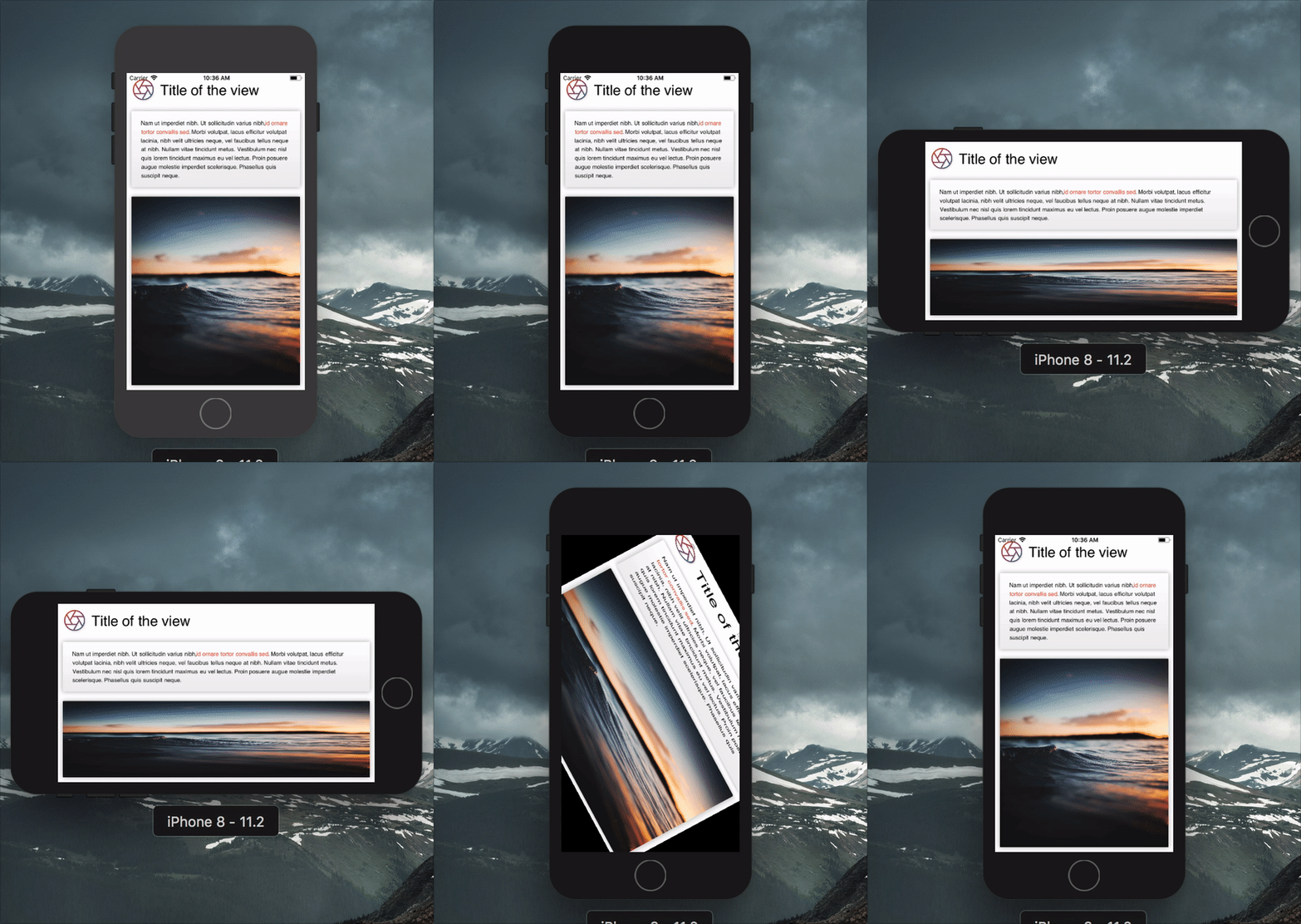
Skiasharpのレンダリングコードを作成することは、非常に冗長で反復的です。 skiasharp.componentsは、宣言をより簡潔にするより高いレベルのビューです。
 var result = new Grid ( ) ;

this . Title = new Label
{
    TextSize = 30 ,
    Text = "Title of the view" ,
    VerticalAlignment = Alignment . Center ,
} ;

this . Description = new Label
{
    TextSize = 16 ,
    Spans = new [ ]
    {
        new Span
        {
            Text = "Nam ut imperdiet nibh. Ut sollicitudin varius nibh,"
        } ,
        new Span
        {
            ForegroundBrush = new ColorBrush ( new SKColor ( 0xFFF44336 ) ) ,
            Decorations = TextDecoration . Bold ,
            Text = "id ornare tortor convallis sed"
        } ,
        new Span
        {
            Text = ". Morbi volutpat, lacus efficitur volutpat lacinia, nibh velit ultricies neque, vel faucibus tellus neque at nibh. Nullam vitae tincidunt metus. Vestibulum nec nisl quis lorem tincidunt maximus eu vel lectus. Proin posuere augue molestie imperdiet scelerisque. Phasellus quis suscipit neque."
        } ,
    } ,
} ;

var gradient = new GradientBrush ( new SKPoint ( 0 , 0 ) , new SKPoint ( 0 , 1 ) , new [ ]
{
    new Tuple < float , SKColor > ( 0 , new SKColor ( 255 , 255 , 255 , 255 ) ) ,
    new Tuple < float , SKColor > ( 1 , new SKColor ( 238 , 238 , 238 , 255 ) ) ,
} ) ;

var shadow = new Shadow ( )
{
    Blur = new SKPoint ( 10 , 10 ) ,
    Color = SKColors . Black . WithAlpha ( 80 ) ,
} ;

this . Image = new Image ( )
{
    Source = "https://source.unsplash.com/random" ,
    Fill = new ColorBrush ( SKColors . LightGray ) ,
    CornerRadius = 5.0f ,
    Shadow = shadow ,
} ;

this . Box = new Box ( )
{
    Fill = gradient ,
    CornerRadius = 5.0f ,
    Shadow = shadow ,
} ;

var iconGradient = new GradientBrush ( new SKPoint ( 0 , 0 ) , new SKPoint ( 1 , 1 ) , new [ ]
{
    new Tuple < float , SKColor > ( 0 , new SKColor ( 0xFFF44336 ) ) ,
    new Tuple < float , SKColor > ( 1 , new SKColor ( 0xFF3F51B5 ) ) ,
} ) ;

this . Icon = new Path
{
    Source = IconPath . Aperture ,
    ViewBox = SKRect . Create ( 0 , 0 , 24 , 24 ) ,
    Stroke = new Stroke ( )
    {
        Size = 5 ,
        Brush = iconGradient ,
    } ,
} ;

// Setting grid column and rows
result . ColumnDefinitions = new [ ]
{
    Grid . Definition . Points ( 100 ) ,
    Grid . Definition . Stars ( 1 ) ,
} ;

result . RowDefinitions = new [ ]
{
    Grid . Definition . Points ( 100 ) ,
    Grid . Definition . Points ( 200 ) ,
    Grid . Definition . Stars ( 1 ) ,
} ;

// Setting child positions
result . AddView ( this . Icon , 0 , 0 ) ;
result . AddView ( this . Title , 1 , 0 ) ;
result . AddView ( this . Box , 0 , 1 , 2 ) ;
result . AddView ( this . Description , 0 , 1 , 2 ) ;

result . Layout ( SKRect . Create ( 0 , 0 , 500 , 500 ) ) ;
result . Render ( canvas ) ; ビューのプロパティが変更されるたびに、ビューのInvalidatedイベントが提起されます。これは、いつビューを再レンダリングするかを知るのに役立ちます。
基本的なインタラクションは、ユーザーがフレームに触れるときにイベントを提起するTapコントロールを通じて利用できます。他のコンポーネントと同様にビューです。
 this . Button = new Tap ( )
{
    BackgroundBrush = new ColorBrush ( SKColors . DeepPink ) ,
    CornerRadius = 5 ,
} ;

this . Button . Tapped += ( s , e ) => Debug . WriteLine ( "Tapped" ) ;
this . Button . Pressed += ( s , e ) => ( ( Tap ) s ) . BackgroundBrush = new ColorBrush ( SKColors . LightPink ) ;
this . Button . Released += ( s , e ) => ( ( Tap ) s ) . BackgroundBrush = new ColorBrush ( SKColors . DeepPink ) ; Rendererを使用すると、タッチが自動的に配線されます。
貢献は大歓迎です!バグが見つかった場合は、報告してください。機能が必要な場合は、報告してください。
コードを提供したい場合は、問題を提出し、現在の開発ブランチからブランチを作成し、プルリクエストを提出してください。
MIT©AloïsDeniel








