SkiaSharp.Components
1.0.0

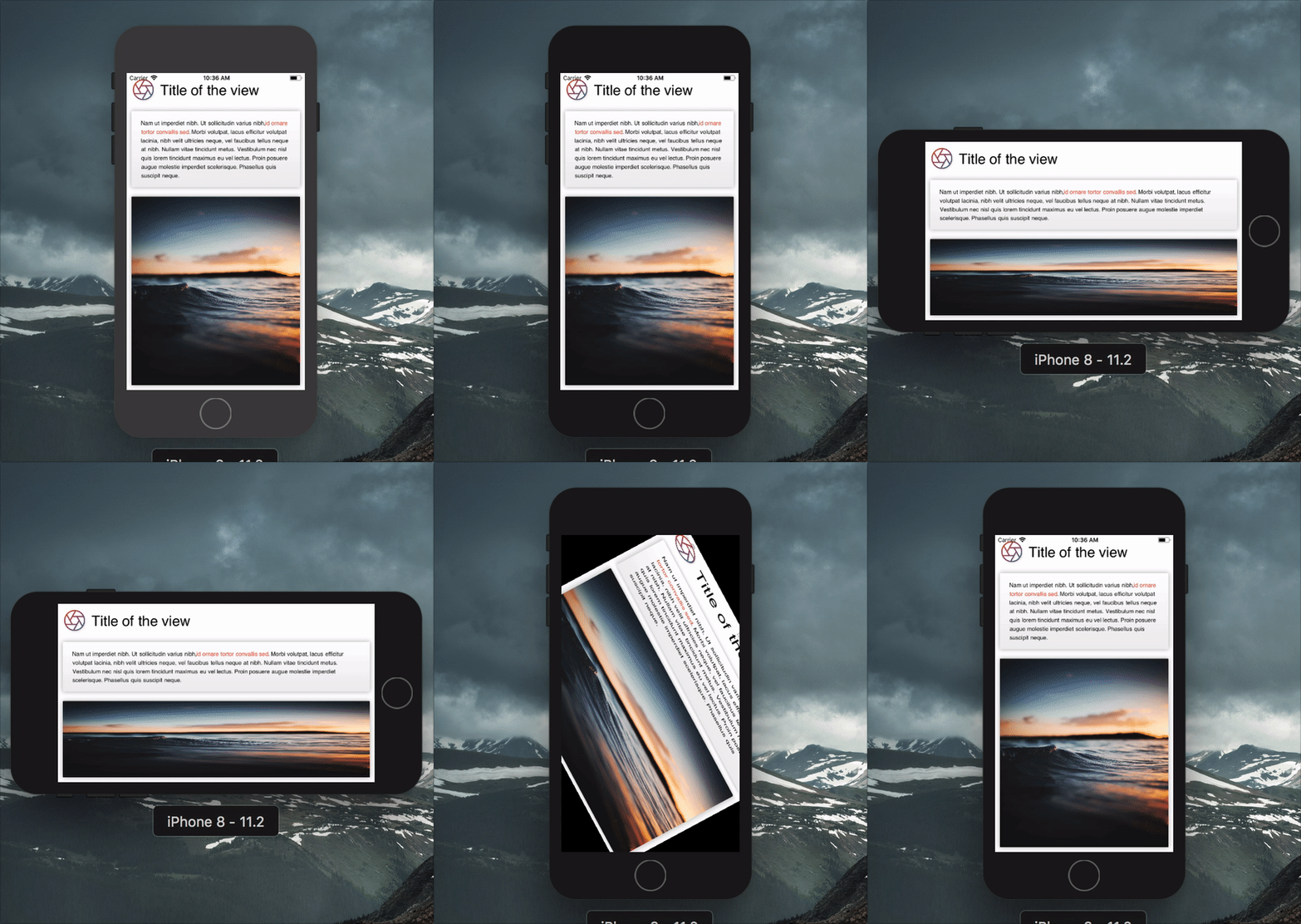
يمكن أن يكون إنتاج رمز التقديم لـ Skiasharp مطوّلة للغاية ومتكررة. Skiasharp.com هي وجهات نظر أعلى مستوى تجعل الإعلانات أكثر إيجازًا.
 var result = new Grid ( ) ;

this . Title = new Label
{
    TextSize = 30 ,
    Text = "Title of the view" ,
    VerticalAlignment = Alignment . Center ,
} ;

this . Description = new Label
{
    TextSize = 16 ,
    Spans = new [ ]
    {
        new Span
        {
            Text = "Nam ut imperdiet nibh. Ut sollicitudin varius nibh,"
        } ,
        new Span
        {
            ForegroundBrush = new ColorBrush ( new SKColor ( 0xFFF44336 ) ) ,
            Decorations = TextDecoration . Bold ,
            Text = "id ornare tortor convallis sed"
        } ,
        new Span
        {
            Text = ". Morbi volutpat, lacus efficitur volutpat lacinia, nibh velit ultricies neque, vel faucibus tellus neque at nibh. Nullam vitae tincidunt metus. Vestibulum nec nisl quis lorem tincidunt maximus eu vel lectus. Proin posuere augue molestie imperdiet scelerisque. Phasellus quis suscipit neque."
        } ,
    } ,
} ;

var gradient = new GradientBrush ( new SKPoint ( 0 , 0 ) , new SKPoint ( 0 , 1 ) , new [ ]
{
    new Tuple < float , SKColor > ( 0 , new SKColor ( 255 , 255 , 255 , 255 ) ) ,
    new Tuple < float , SKColor > ( 1 , new SKColor ( 238 , 238 , 238 , 255 ) ) ,
} ) ;

var shadow = new Shadow ( )
{
    Blur = new SKPoint ( 10 , 10 ) ,
    Color = SKColors . Black . WithAlpha ( 80 ) ,
} ;

this . Image = new Image ( )
{
    Source = "https://source.unsplash.com/random" ,
    Fill = new ColorBrush ( SKColors . LightGray ) ,
    CornerRadius = 5.0f ,
    Shadow = shadow ,
} ;

this . Box = new Box ( )
{
    Fill = gradient ,
    CornerRadius = 5.0f ,
    Shadow = shadow ,
} ;

var iconGradient = new GradientBrush ( new SKPoint ( 0 , 0 ) , new SKPoint ( 1 , 1 ) , new [ ]
{
    new Tuple < float , SKColor > ( 0 , new SKColor ( 0xFFF44336 ) ) ,
    new Tuple < float , SKColor > ( 1 , new SKColor ( 0xFF3F51B5 ) ) ,
} ) ;

this . Icon = new Path
{
    Source = IconPath . Aperture ,
    ViewBox = SKRect . Create ( 0 , 0 , 24 , 24 ) ,
    Stroke = new Stroke ( )
    {
        Size = 5 ,
        Brush = iconGradient ,
    } ,
} ;

// Setting grid column and rows
result . ColumnDefinitions = new [ ]
{
    Grid . Definition . Points ( 100 ) ,
    Grid . Definition . Stars ( 1 ) ,
} ;

result . RowDefinitions = new [ ]
{
    Grid . Definition . Points ( 100 ) ,
    Grid . Definition . Points ( 200 ) ,
    Grid . Definition . Stars ( 1 ) ,
} ;

// Setting child positions
result . AddView ( this . Icon , 0 , 0 ) ;
result . AddView ( this . Title , 1 , 0 ) ;
result . AddView ( this . Box , 0 , 1 , 2 ) ;
result . AddView ( this . Description , 0 , 1 , 2 ) ;

result . Layout ( SKRect . Create ( 0 , 0 , 500 , 500 ) ) ;
result . Render ( canvas ) ; في كل مرة يتغير فيها خاصية العرض ، يتم رفع الحدث Invalidated للعرض. هذا مفيد لمعرفة متى يتم إعادة عرض وجهة نظر.
تتوفر التفاعلات الأساسية من خلال التحكم Tap الذي يرفع الأحداث عندما يمس المستخدم إطاره. إنها وجهة نظر مثل أي مكونات أخرى.
 this . Button = new Tap ( )
{
    BackgroundBrush = new ColorBrush ( SKColors . DeepPink ) ,
    CornerRadius = 5 ,
} ;

this . Button . Tapped += ( s , e ) => Debug . WriteLine ( "Tapped" ) ;
this . Button . Pressed += ( s , e ) => ( ( Tap ) s ) . BackgroundBrush = new ColorBrush ( SKColors . LightPink ) ;
this . Button . Released += ( s , e ) => ( ( Tap ) s ) . BackgroundBrush = new ColorBrush ( SKColors . DeepPink ) ;
إذا كنت تستخدم Renderer ، فسيتم توصيل اللمسات تلقائيًا.
المساهمات مرحب بها! إذا وجدت خطأ ، يرجى الإبلاغ عنه وإذا كنت تريد ميزة ، فيرجى الإبلاغ عنها.
إذا كنت ترغب في المساهمة في رمز ، فيرجى تقديم مشكلة وإنشاء فرع من فرع DEV الحالي وتقديم طلب سحب.
MIT © Aloïs Deniel








