CodeDraw
1.0.0

Codedraw เป็นไลบรารีการวาดที่เป็นมิตรกับผู้เริ่มต้นซึ่งสามารถใช้ในการสร้างรูปภาพภาพเคลื่อนไหวและแม้กระทั่งแอปพลิเคชันแบบโต้ตอบ มันถูกออกแบบมาสำหรับผู้ที่เพิ่งเริ่มเรียนรู้การเขียนโปรแกรมทำให้พวกเขาสามารถสร้างแอปพลิเคชันกราฟิก
อ่านบทนำสู่ Codedraw สำหรับคู่มือผู้เริ่มต้นถึง Codedraw นอกจากนี้ยังให้ภาพรวมของคุณสมบัติที่มีอยู่ใน Codedraw
Javadoc สำหรับ Codedraw สามารถพบได้ที่นี่
สำหรับ Codedraw เวอร์ชัน C# ให้เยี่ยมชมที่เก็บ CodedRawProject
ไปที่รุ่นและดาวน์โหลด codedraw.jar ใหม่ล่าสุด
เปิด Intellij กับโครงการที่คุณต้องการเพิ่ม Codedraw คลิกที่ ไฟล์> โครงสร้างโครงการ ... ภายใต้ การตั้งค่าโครงการ เลือก ไลบรารี ที่ด้านบนซ้ายคลิกที่ ไอคอนขนาด เล็กและเลือกตัวเลือก Java ไปที่ codedraw.jar ที่ดาวน์โหลดแล้วเลือกแล้วกด ตกลง ตอนนี้คุณสามารถนำเข้า Codedraw ด้วย import codedraw.*; ที่ด้านบนของไฟล์ Java ของคุณ
ในการติดตั้ง Codedraw ด้วย Eclipse , Maven หรือ Gradle โปรดดูที่ Install.md
นี่คือตัวอย่างของวิธีที่คุณสามารถสร้างภาพคงที่ด้วยการใช้ Codedraw
 import codedraw .*;

public class Main {
    public static void main ( String [] args ) {
        // Creates a new CodeDraw window with a size of 400x400 pixel.
        CodeDraw cd = new CodeDraw ( 400 , 400 );

        // Sets the drawing color to red.
        cd . setColor ( Palette . RED );
        // Draws the outline of a rectangle.
        cd . drawRectangle ( 100 , 100 , 200 , 100 );
        // Draws a filled square.
        cd . fillSquare ( 180 , 150 , 80 );

        // Changes the color to light blue.
        cd . setColor ( Palette . LIGHT_BLUE );
        cd . fillCircle ( 300 , 200 , 50 );

        // Finally, the method "show" must be called
        // to display the drawn shapes in the CodeDraw window.
        cd . show ();
    }
}.show() ❗ 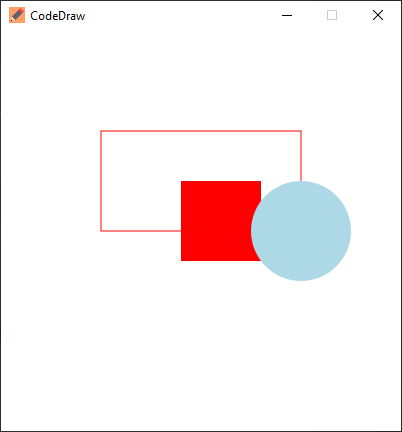
แอนิเมชั่นถูกสร้างขึ้นโดยการวาดหลายเฟรมจากนั้นหยุดระหว่างเฟรมเหล่านั้น ใน Codedraw สิ่งนี้สามารถทำได้โดยการสร้างลูปที่การวนซ้ำแต่ละครั้งจะใช้หนึ่งเฟรมแล้วรอระยะเวลาหนึ่ง 1 วินาทีหรือ 1,000 มิลลิวินาทีในกรณีนี้โดยใช้วิธีการ .show(1000)
 import codedraw .*;

public class Main {
    public static void main ( String [] args ) {
        CodeDraw cd = new CodeDraw ( 400 , 400 );

        for ( double sec = - Math . PI / 2 ; ! cd . isClosed (); sec += Math . PI / 30 ) {
            // Clears the entire canvas.
            cd . clear ();
            // Draws the second hand of the clock.
            cd . drawLine ( 200 , 200 , Math . cos ( sec ) * 100 + 200 , Math . sin ( sec ) * 100 + 200 );

            // Draws the twelve dots.
            for ( double j = 0 ; j < Math . PI * 2 ; j += Math . PI / 6 ) {
                cd . fillCircle ( Math . cos ( j ) * 100 + 200 , Math . sin ( j ) * 100 + 200 , 4 );
            }

            // Displays the drawn objects and waits 1 second.
            cd . show ( 1000 );
        }
    }
} โปรแกรมแบบโต้ตอบสามารถสร้างขึ้นได้โดยการอ่านเหตุการณ์จาก EventsCanner และ switch ING ตามประเภทของเหตุการณ์ ในรุ่น Java รุ่นเก่า EventsCanner ยังสามารถใช้ในลักษณะเดียวกับ java.util.Scanner ด้วย has... และ next... วิธีการ คำอธิบายโดยละเอียดเพิ่มเติมสามารถพบได้ในส่วนเหตุการณ์การจัดการในบทนำสู่ Codedraw
นอกจากนี้คุณยังสามารถใช้ตัวสร้างรหัสเหตุการณ์ codedraw เพื่อสร้างรหัสเหตุการณ์ของคุณโดยอัตโนมัติ
 import codedraw .*;

public class Main {
    public static void main ( String [] args ) {
        CodeDraw cd = new CodeDraw ();

        cd . drawText ( 200 , 200 , "Move your mouse over here." );
        cd . show ();

        cd . setColor ( Palette . RED );

        // Creates an endless loop (until you close the window).
        while (! cd . isClosed ()) {
            // Creates a loop that consumes all the currently available events.
            for ( var e : cd . getEventScanner ()) {
                switch ( e ) {
                    // If the event is a mouse move event, a red square will be drawn at its location.
                    case MouseMoveEvent a ->
                        cd . fillSquare ( a . getX () - 5 , a . getY () - 5 , 10 );
                    default -> { }
                }
            }

            // Display the red squares that have been drawn up to this point.
            cd . show ( 16 );
        }
    }
} ตัวอย่างทั้งหมดเหล่านี้สามารถสร้างขึ้นได้โดยใช้อินเทอร์เฟซ Animation ชั่น อินสแตนซ์ของอินเทอร์เฟซ Animation ชั่นสามารถส่งผ่านไปยัง Codedraw ซึ่งต่อมาเรียกใช้วิธีการที่คุณใช้ ตัวอย่างต่อไปนี้ช่วยให้คุณควบคุมวงกลมด้วย wasd-keys วิธี onKeyDown จะถูกเรียกใช้ในแต่ละครั้งที่คีย์ถูกกดลงและปรับเปลี่ยนตำแหน่งของวงกลม วิธี draw เรียกว่า 60 ครั้งต่อวินาทีและวาดวงกลมที่พิกัด XY
 import codedraw .*;

public class MyAnimation implements Animation {
    public static void main ( String [] args ) {
        CodeDraw . run ( new MyAnimation ());
    }

    private int x = 50 ;
    private int y = 50 ;

    @ Override
    public void onKeyDown ( KeyDownEvent event ) {
        if ( event . getKey () == Key . W ) {
            y -= 20 ;
        }
        else if ( event . getKey () == Key . A ) {
            x -= 20 ;
        }
        else if ( event . getKey () == Key . S ) {
            y += 20 ;
        }
        else if ( event . getKey () == Key . D ) {
            x += 20 ;
        }
    }

    @ Override
    public void draw ( Image canvas ) {
        canvas . clear ();
        canvas . fillCircle ( x , y , 10 );
    }
}อย่าลังเลที่จะถามคำถามแนะนำคุณสมบัติหรือทำรายงานข้อผิดพลาดในส่วนปัญหา -





