CodeDraw
1.0.0

CodedRawは、写真、アニメーション、さらにはインタラクティブなアプリケーションを作成するために使用できる初心者向けの描画ライブラリです。プログラミングを学び始めたばかりの人々のために設計されており、グラフィカルアプリケーションを作成できるようにします。
CodedRawの初心者ガイドのCodedRawの紹介を読んでください。また、CodedRawで利用可能な機能の概要も提供します。
CodedRawのJavadocはここにあります。
CodedRawのC#バージョンについては、CodedRawProjectリポジトリにアクセスしてください。
リリースに移動して、最新のcodedraw.jarをダウンロードします。
CodeDrawを追加したいプロジェクトでIntellijを開きます。 [ファイル]> [プロジェクト構造]をクリックしてください...。プロジェクト設定では、ライブラリを選択します。左上で、小さなプラスアイコンをクリックして、 Javaオプションを選択します。ダウンロードされたcodedraw.jarに移動して選択してから、 [OK]を押します。これで、 import codedraw.*; Javaファイルの上部に。
Eclipse 、 Maven 、またはGradleを使用してCodedRawをインストールするには、install.mdを参照してください。
CodedRawを使用して静的画像を作成する方法の例は次のとおりです。
 import codedraw .*;

public class Main {
    public static void main ( String [] args ) {
        // Creates a new CodeDraw window with a size of 400x400 pixel.
        CodeDraw cd = new CodeDraw ( 400 , 400 );

        // Sets the drawing color to red.
        cd . setColor ( Palette . RED );
        // Draws the outline of a rectangle.
        cd . drawRectangle ( 100 , 100 , 200 , 100 );
        // Draws a filled square.
        cd . fillSquare ( 180 , 150 , 80 );

        // Changes the color to light blue.
        cd . setColor ( Palette . LIGHT_BLUE );
        cd . fillCircle ( 300 , 200 , 50 );

        // Finally, the method "show" must be called
        // to display the drawn shapes in the CodeDraw window.
        cd . show ();
    }
}.show()を呼び出すことを忘れないでください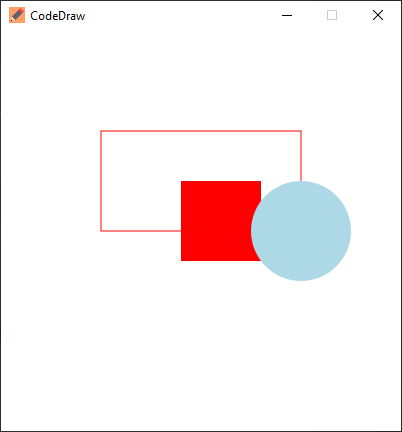
アニメーションは、複数のフレームを描画し、それらのフレームの間に一時停止することによって作成されます。 CodedRawでは、各反復が1つのフレームを描画し、この場合は1秒または1000ミリ秒の一定の時間を待機し、メソッド.show(1000)を使用して、1秒間または1000ミリ秒待つことによって達成されます。
 import codedraw .*;

public class Main {
    public static void main ( String [] args ) {
        CodeDraw cd = new CodeDraw ( 400 , 400 );

        for ( double sec = - Math . PI / 2 ; ! cd . isClosed (); sec += Math . PI / 30 ) {
            // Clears the entire canvas.
            cd . clear ();
            // Draws the second hand of the clock.
            cd . drawLine ( 200 , 200 , Math . cos ( sec ) * 100 + 200 , Math . sin ( sec ) * 100 + 200 );

            // Draws the twelve dots.
            for ( double j = 0 ; j < Math . PI * 2 ; j += Math . PI / 6 ) {
                cd . fillCircle ( Math . cos ( j ) * 100 + 200 , Math . sin ( j ) * 100 + 200 , 4 );
            }

            // Displays the drawn objects and waits 1 second.
            cd . show ( 1000 );
        }
    }
}Interactiveプログラムは、EventsCannerのイベントを読んで、イベントの種類に基づいてswitchことで作成できます。 next... Javaバージョンでは、eventsCannerはhas... java.util.Scannerと同じ方法で使用することもできます。より詳細な説明は、CodedRawの紹介のハンドリングイベントセクションにあります。
CodedRawイベントコードジェネレーターを使用して、イベントコードを自動的に生成することもできます。
 import codedraw .*;

public class Main {
    public static void main ( String [] args ) {
        CodeDraw cd = new CodeDraw ();

        cd . drawText ( 200 , 200 , "Move your mouse over here." );
        cd . show ();

        cd . setColor ( Palette . RED );

        // Creates an endless loop (until you close the window).
        while (! cd . isClosed ()) {
            // Creates a loop that consumes all the currently available events.
            for ( var e : cd . getEventScanner ()) {
                switch ( e ) {
                    // If the event is a mouse move event, a red square will be drawn at its location.
                    case MouseMoveEvent a ->
                        cd . fillSquare ( a . getX () - 5 , a . getY () - 5 , 10 );
                    default -> { }
                }
            }

            // Display the red squares that have been drawn up to this point.
            cd . show ( 16 );
        }
    }
}これらのすべての例は、 Animationインターフェイスを使用して作成することもできます。 AnimationインターフェイスのインスタンスをCodedRawに渡すことができ、その後、実装するメソッドを呼び出します。次の例では、wasd-keysで円を制御できます。 onKeyDownメソッドは、キーが押されて円の位置を変更するたびにトリガーされます。 drawメソッドは1秒あたり60回呼び出され、xy座標の円を描画します。
 import codedraw .*;

public class MyAnimation implements Animation {
    public static void main ( String [] args ) {
        CodeDraw . run ( new MyAnimation ());
    }

    private int x = 50 ;
    private int y = 50 ;

    @ Override
    public void onKeyDown ( KeyDownEvent event ) {
        if ( event . getKey () == Key . W ) {
            y -= 20 ;
        }
        else if ( event . getKey () == Key . A ) {
            x -= 20 ;
        }
        else if ( event . getKey () == Key . S ) {
            y += 20 ;
        }
        else if ( event . getKey () == Key . D ) {
            x += 20 ;
        }
    }

    @ Override
    public void draw ( Image canvas ) {
        canvas . clear ();
        canvas . fillCircle ( x , y , 10 );
    }
}問題のセクションで質問をしたり、機能を提案したり、バグレポートを作成したりしてください。 ?





