CodeDraw
1.0.0

CodedRaw는 초보자 친화적 인 드로잉 라이브러리로 사진, 애니메이션 및 대화식 응용 프로그램을 만드는 데 사용할 수 있습니다. 프로그래밍을 배우기 시작한 사람들을 위해 설계되어 그래픽 응용 프로그램을 만들 수 있습니다.
CodedRaw에 대한 초보자 가이드를 위해 CodedRaw 소개를 읽으십시오. 또한 CodedRaw에서 사용 가능한 기능에 대한 개요도 제공합니다.
CodedRaw 용 Javadoc은 여기에서 찾을 수 있습니다.
CodedRaw의 C# 버전은 CodedRawProject 저장소를 방문하십시오.
릴리스로 이동하여 최신 CodedRaw.jar를 다운로드하십시오.
CodedRaw를 추가하려는 프로젝트로 Intellij를 열어보십시오. 파일> 프로젝트 구조를 클릭하십시오 .... 프로젝트 설정 에서 라이브러리를 선택하십시오. 왼쪽 상단에서 작은 플러스 아이콘을 클릭하고 Java 옵션을 선택하십시오. 다운로드 된 CodedRaw.jar로 이동하여 선택한 다음 OK를 누릅니다. 이제 import codedraw.*; Java 파일의 상단에 있습니다.
Eclipse , Maven 또는 Gradle 과 함께 CodedRaw를 설치하려면 Install.md를 참조하십시오.
다음은 CodedRaw를 사용하여 정적 이미지를 만드는 방법의 예입니다.
 import codedraw .*;

public class Main {
    public static void main ( String [] args ) {
        // Creates a new CodeDraw window with a size of 400x400 pixel.
        CodeDraw cd = new CodeDraw ( 400 , 400 );

        // Sets the drawing color to red.
        cd . setColor ( Palette . RED );
        // Draws the outline of a rectangle.
        cd . drawRectangle ( 100 , 100 , 200 , 100 );
        // Draws a filled square.
        cd . fillSquare ( 180 , 150 , 80 );

        // Changes the color to light blue.
        cd . setColor ( Palette . LIGHT_BLUE );
        cd . fillCircle ( 300 , 200 , 50 );

        // Finally, the method "show" must be called
        // to display the drawn shapes in the CodeDraw window.
        cd . show ();
    }
}.show() ❗ 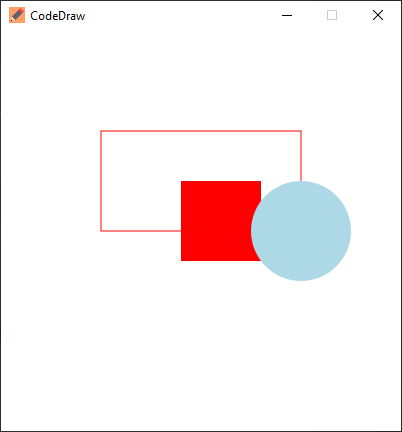
애니메이션은 여러 프레임을 그린 다음 해당 프레임 사이에서 일시 중지하여 생성됩니다. CodedRaw에서, 이것은 각 반복이 하나의 프레임을 그리는 루프를 생성 한 다음,이 경우 1 초 또는 .show(1000) 밀리 초의 일정 시간을 기다립니다.
 import codedraw .*;

public class Main {
    public static void main ( String [] args ) {
        CodeDraw cd = new CodeDraw ( 400 , 400 );

        for ( double sec = - Math . PI / 2 ; ! cd . isClosed (); sec += Math . PI / 30 ) {
            // Clears the entire canvas.
            cd . clear ();
            // Draws the second hand of the clock.
            cd . drawLine ( 200 , 200 , Math . cos ( sec ) * 100 + 200 , Math . sin ( sec ) * 100 + 200 );

            // Draws the twelve dots.
            for ( double j = 0 ; j < Math . PI * 2 ; j += Math . PI / 6 ) {
                cd . fillCircle ( Math . cos ( j ) * 100 + 200 , Math . sin ( j ) * 100 + 200 , 4 );
            }

            // Displays the drawn objects and waits 1 second.
            cd . show ( 1000 );
        }
    }
} 이벤트 유형에 따라 EventsCanner의 이벤트를 읽고 이벤트를 switch 하여 대화식 프로그램을 만들 수 있습니다. 구형 Java 버전에서는 EventsCanner는 java.util.Scanner has... 같은 방식 next... 사용될 수 있습니다. 보다 자세한 설명은 CodedRaw 소개의 취급 이벤트 섹션에서 찾을 수 있습니다.
CodedRaw 이벤트 코드 생성기를 사용하여 이벤트 코드를 자동으로 생성 할 수도 있습니다.
 import codedraw .*;

public class Main {
    public static void main ( String [] args ) {
        CodeDraw cd = new CodeDraw ();

        cd . drawText ( 200 , 200 , "Move your mouse over here." );
        cd . show ();

        cd . setColor ( Palette . RED );

        // Creates an endless loop (until you close the window).
        while (! cd . isClosed ()) {
            // Creates a loop that consumes all the currently available events.
            for ( var e : cd . getEventScanner ()) {
                switch ( e ) {
                    // If the event is a mouse move event, a red square will be drawn at its location.
                    case MouseMoveEvent a ->
                        cd . fillSquare ( a . getX () - 5 , a . getY () - 5 , 10 );
                    default -> { }
                }
            }

            // Display the red squares that have been drawn up to this point.
            cd . show ( 16 );
        }
    }
} 이 모든 예제는 Animation 인터페이스를 사용하여 만들 수도 있습니다. Animation 인터페이스 인스턴스를 코드 로우로 전달할 수 있으며, 이후에 구현하는 메소드를 호출합니다. 다음 예제를 사용하면 Wasd-Keys로 원을 제어 할 수 있습니다. 키가 눌러지고 원의 위치를 수정할 때마다 onKeyDown 메소드가 트리거됩니다. draw 방법은 초당 60 회라고하며 xy 좌표에서 원을 그립니다.
 import codedraw .*;

public class MyAnimation implements Animation {
    public static void main ( String [] args ) {
        CodeDraw . run ( new MyAnimation ());
    }

    private int x = 50 ;
    private int y = 50 ;

    @ Override
    public void onKeyDown ( KeyDownEvent event ) {
        if ( event . getKey () == Key . W ) {
            y -= 20 ;
        }
        else if ( event . getKey () == Key . A ) {
            x -= 20 ;
        }
        else if ( event . getKey () == Key . S ) {
            y += 20 ;
        }
        else if ( event . getKey () == Key . D ) {
            x += 20 ;
        }
    }

    @ Override
    public void draw ( Image canvas ) {
        canvas . clear ();
        canvas . fillCircle ( x , y , 10 );
    }
}문제 섹션에서 자유롭게 질문하거나 기능을 제안하거나 버그보고를하십시오. ?





