CodeDraw
1.0.0

CodedRaw هي مكتبة رسم صديقة للمبتدئين يمكن استخدامها لإنشاء الصور والرسوم المتحركة وحتى التطبيقات التفاعلية. إنه مصمم للأشخاص الذين بدأوا للتو في تعلم البرمجة ، وتمكينهم من إنشاء تطبيقات رسومية.
اقرأ مقدمة إلى CodedRaw للحصول على دليل المبتدئين إلى CodedRaw. كما أنه يقدم لمحة عامة عن الميزات المتوفرة في Codedraw.
يمكن العثور على Javadoc لـ Codedraw هنا.
للحصول على إصدار C# من CodedRaw ، تفضل بزيارة مستودع CodedRawProject.
انتقل إلى الإصدارات وتنزيل أحدث codedraw.jar.
افتح Intellij مع المشروع حيث ترغب في إضافة Codedraw. انقر على ملف> بنية المشروع ... ضمن إعدادات المشروع ، حدد المكتبات . في الجزء العلوي الأيسر ، انقر فوق أيقونة زائد صغير وحدد خيار Java . انتقل إلى CodedRaw.jar الذي تم تنزيله ، وحدده ثم اضغط على OK . الآن يمكنك استيراد codedraw مع import codedraw.*; في الجزء العلوي من ملفات Java الخاصة بك.
لتثبيت CodedRaw مع Eclipse أو Maven أو Gradle ، يرجى الرجوع إلى install.md.
فيما يلي مثال على كيفية إنشاء صورة ثابتة باستخدام CodedRaw.
 import codedraw .*;

public class Main {
    public static void main ( String [] args ) {
        // Creates a new CodeDraw window with a size of 400x400 pixel.
        CodeDraw cd = new CodeDraw ( 400 , 400 );

        // Sets the drawing color to red.
        cd . setColor ( Palette . RED );
        // Draws the outline of a rectangle.
        cd . drawRectangle ( 100 , 100 , 200 , 100 );
        // Draws a filled square.
        cd . fillSquare ( 180 , 150 , 80 );

        // Changes the color to light blue.
        cd . setColor ( Palette . LIGHT_BLUE );
        cd . fillCircle ( 300 , 200 , 50 );

        // Finally, the method "show" must be called
        // to display the drawn shapes in the CodeDraw window.
        cd . show ();
    }
}.show() ❗ 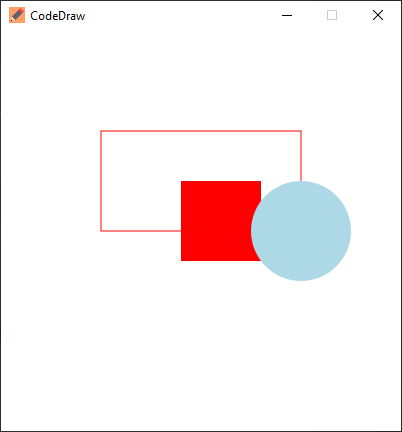
يتم إنشاء الرسوم المتحركة عن طريق رسم إطارات متعددة ثم توقف بين تلك الإطارات. في CodedRaw ، يتم تحقيق ذلك عن طريق إنشاء حلقة يرسم فيها كل تكرار إطارًا واحدًا ثم ينتظر قدرًا معينًا من الوقت أو ثانية أو 1000 مللي ثانية في هذه الحالة ، باستخدام الطريقة .show(1000) .
 import codedraw .*;

public class Main {
    public static void main ( String [] args ) {
        CodeDraw cd = new CodeDraw ( 400 , 400 );

        for ( double sec = - Math . PI / 2 ; ! cd . isClosed (); sec += Math . PI / 30 ) {
            // Clears the entire canvas.
            cd . clear ();
            // Draws the second hand of the clock.
            cd . drawLine ( 200 , 200 , Math . cos ( sec ) * 100 + 200 , Math . sin ( sec ) * 100 + 200 );

            // Draws the twelve dots.
            for ( double j = 0 ; j < Math . PI * 2 ; j += Math . PI / 6 ) {
                cd . fillCircle ( Math . cos ( j ) * 100 + 200 , Math . sin ( j ) * 100 + 200 , 4 );
            }

            // Displays the drawn objects and waits 1 second.
            cd . show ( 1000 );
        }
    }
} يمكن إنشاء البرامج التفاعلية عن طريق قراءة الأحداث من eventscanner switch على أساس نوع الحدث. في إصدارات Java الأقدم ، يمكن أيضًا استخدام eventscanner بنفس طريقة استخدام java.util.Scanner with has... والطرق next... يمكن العثور على تفسير أكثر تفصيلاً في قسم أحداث المناولة في مقدمة CodedRaw.
يمكنك أيضًا استخدام مولد رمز حدث CodedRaw لإنشاء رمز الحدث تلقائيًا لك.
 import codedraw .*;

public class Main {
    public static void main ( String [] args ) {
        CodeDraw cd = new CodeDraw ();

        cd . drawText ( 200 , 200 , "Move your mouse over here." );
        cd . show ();

        cd . setColor ( Palette . RED );

        // Creates an endless loop (until you close the window).
        while (! cd . isClosed ()) {
            // Creates a loop that consumes all the currently available events.
            for ( var e : cd . getEventScanner ()) {
                switch ( e ) {
                    // If the event is a mouse move event, a red square will be drawn at its location.
                    case MouseMoveEvent a ->
                        cd . fillSquare ( a . getX () - 5 , a . getY () - 5 , 10 );
                    default -> { }
                }
            }

            // Display the red squares that have been drawn up to this point.
            cd . show ( 16 );
        }
    }
} يمكن أيضًا إنشاء كل هذه الأمثلة باستخدام واجهة Animation . يمكن تمرير مثيل لواجهة Animation إلى CodedRaw الذي يستدعي لاحقًا الطرق التي تنفذها. يمكّنك المثال التالي التحكم في دائرة باستخدام wasd-keys. يتم تشغيل طريقة onKeyDown في كل مرة يتم فيها الضغط على مفتاح وتعديل موضع الدائرة. تسمى طريقة draw 60 مرة في الثانية وتسحب الدائرة في الإحداثيات XY.
 import codedraw .*;

public class MyAnimation implements Animation {
    public static void main ( String [] args ) {
        CodeDraw . run ( new MyAnimation ());
    }

    private int x = 50 ;
    private int y = 50 ;

    @ Override
    public void onKeyDown ( KeyDownEvent event ) {
        if ( event . getKey () == Key . W ) {
            y -= 20 ;
        }
        else if ( event . getKey () == Key . A ) {
            x -= 20 ;
        }
        else if ( event . getKey () == Key . S ) {
            y += 20 ;
        }
        else if ( event . getKey () == Key . D ) {
            x += 20 ;
        }
    }

    @ Override
    public void draw ( Image canvas ) {
        canvas . clear ();
        canvas . fillCircle ( x , y , 10 );
    }
}لا تتردد في طرح الأسئلة أو اقتراح الميزات أو تقديم تقارير الأخطاء في قسم الإصدار. ؟





