db per tenant
1.0.0

repo นี้มีตัวอย่างของสถาปัตยกรรมที่ปรับขนาดได้สำหรับแอปพลิเคชัน AI ที่ขับเคลื่อนด้วย บนพื้นผิวมันเป็นแอพ AI ที่ผู้ใช้สามารถอัปโหลด PDFs และแชทกับพวกเขาได้ อย่างไรก็ตามภายใต้ประทุนผู้ใช้แต่ละคนจะได้รับอินสแตนซ์ฐานข้อมูลเวกเตอร์เฉพาะ (postgres บนนีออนด้วย pgvector)
คุณสามารถตรวจสอบเวอร์ชันสดได้ที่ https://db-per-tenant.up.railway.app/
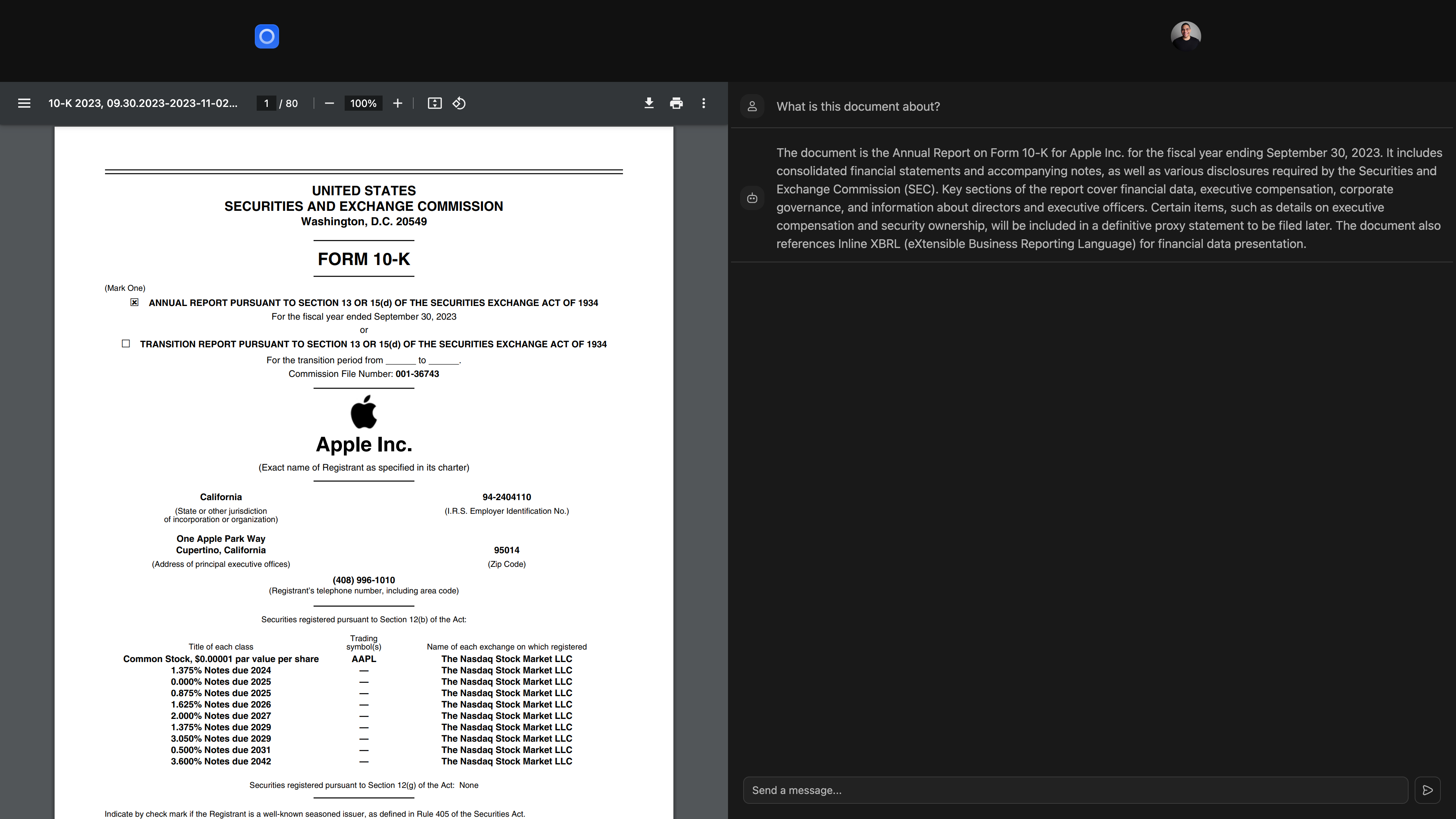
แอพนี้สร้างขึ้นโดยใช้เทคโนโลยีต่อไปนี้:
แทนที่จะมีการฝังเวกเตอร์ทั้งหมดที่เก็บไว้ในฐานข้อมูล Postgres เดียวคุณให้บริการผู้เช่าแต่ละราย (ผู้ใช้, องค์กร, พื้นที่ทำงานหรือเอนทิตีอื่น ๆ ที่ต้องแยก) ด้วยอินสแตนซ์ฐานข้อมูล Postgres เฉพาะของตัวเองที่คุณสามารถจัดเก็บและสอบถามฝังตัว
ขึ้นอยู่กับแอปพลิเคชันของคุณคุณจะจัดทำฐานข้อมูลเวกเตอร์หลังจากเหตุการณ์เฉพาะ (เช่นการลงทะเบียนผู้ใช้การสร้างองค์กรหรืออัปเกรดเป็นระดับที่ต้องชำระ) จากนั้นคุณจะติดตามผู้เช่าและฐานข้อมูลเวกเตอร์ที่เกี่ยวข้องในฐานข้อมูลหลักของแอปพลิเคชันของคุณ
วิธีการนี้มีประโยชน์หลายประการ:
นี่คือแผนภาพสถาปัตยกรรมฐานข้อมูลของแอพสาธิตที่อยู่ใน repo นี้:
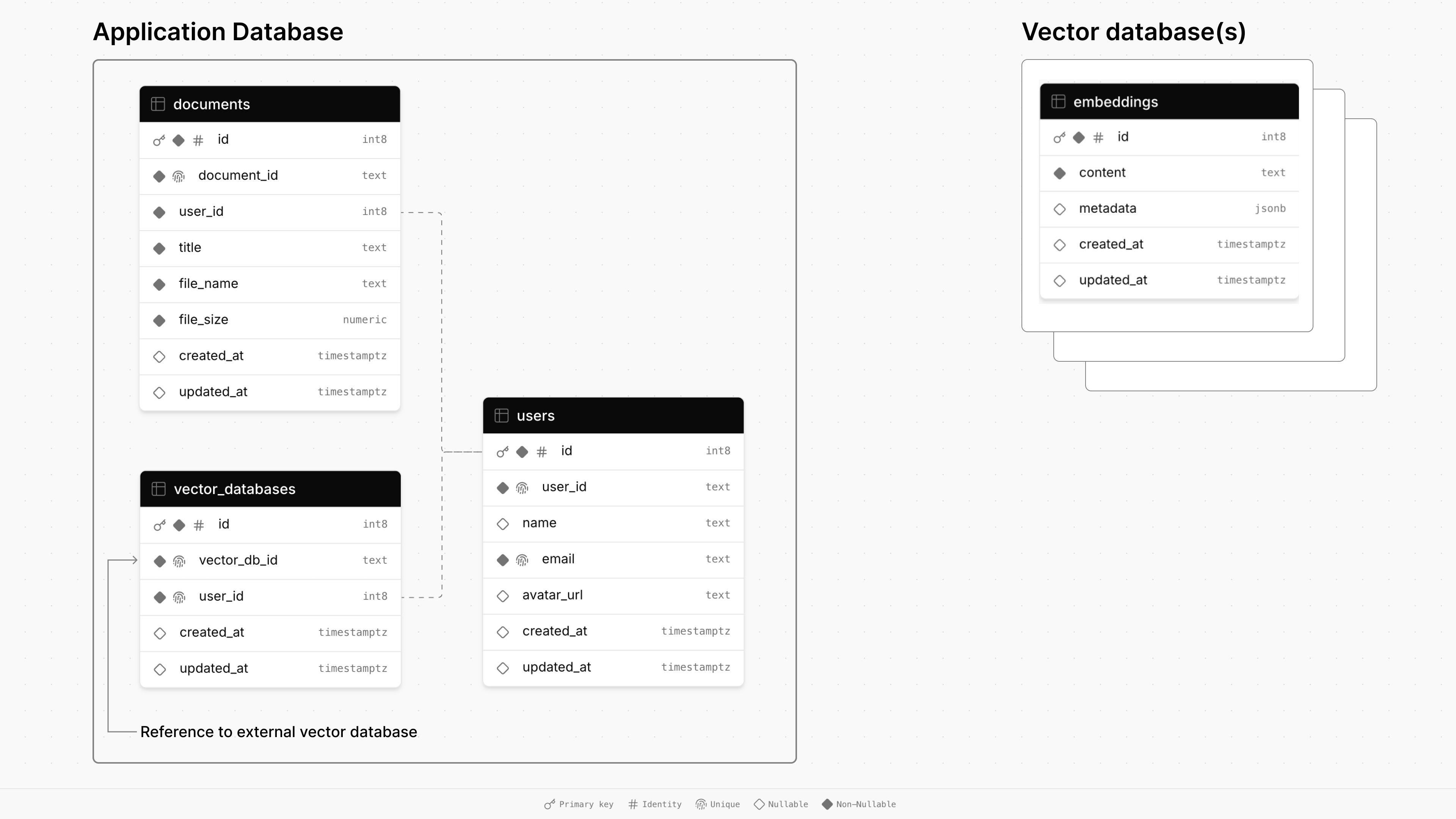
ฐานข้อมูลของแอปพลิเคชันหลักประกอบด้วยสามตาราง: documents users และ vector_databases
documents เก็บข้อมูลเกี่ยวกับไฟล์รวมถึงชื่อเรื่องขนาดและการประทับเวลาและเชื่อมโยงกับผู้ใช้ผ่านคีย์ต่างประเทศusers ดูแลโปรไฟล์ผู้ใช้รวมถึงชื่ออีเมลและ URL Avatarvector_databases ติดตามฐานข้อมูลเวกเตอร์ที่เป็นของผู้ใช้ จากนั้นแต่ละฐานข้อมูลเวกเตอร์ที่ได้รับการจัดเตรียมจะมีตาราง embeddings สำหรับการจัดเก็บชิ้นเอกสารสำหรับการค้นพบแบบสืบค้น (RAG)
สำหรับแอพนี้ฐานข้อมูลเวกเตอร์จะถูกจัดเตรียมเมื่อผู้ใช้ลงทะเบียน เมื่อพวกเขาอัปโหลดเอกสารแล้วจะได้รับการจัดเก็บและเก็บไว้ในฐานข้อมูลเวกเตอร์เฉพาะ ในที่สุดเมื่อผู้ใช้แชทกับเอกสารของพวกเขาการค้นหาความคล้ายคลึงกันของเวกเตอร์จะทำงานกับฐานข้อมูลของพวกเขาเพื่อดึงข้อมูลที่เกี่ยวข้องเพื่อตอบรับพรอมต์
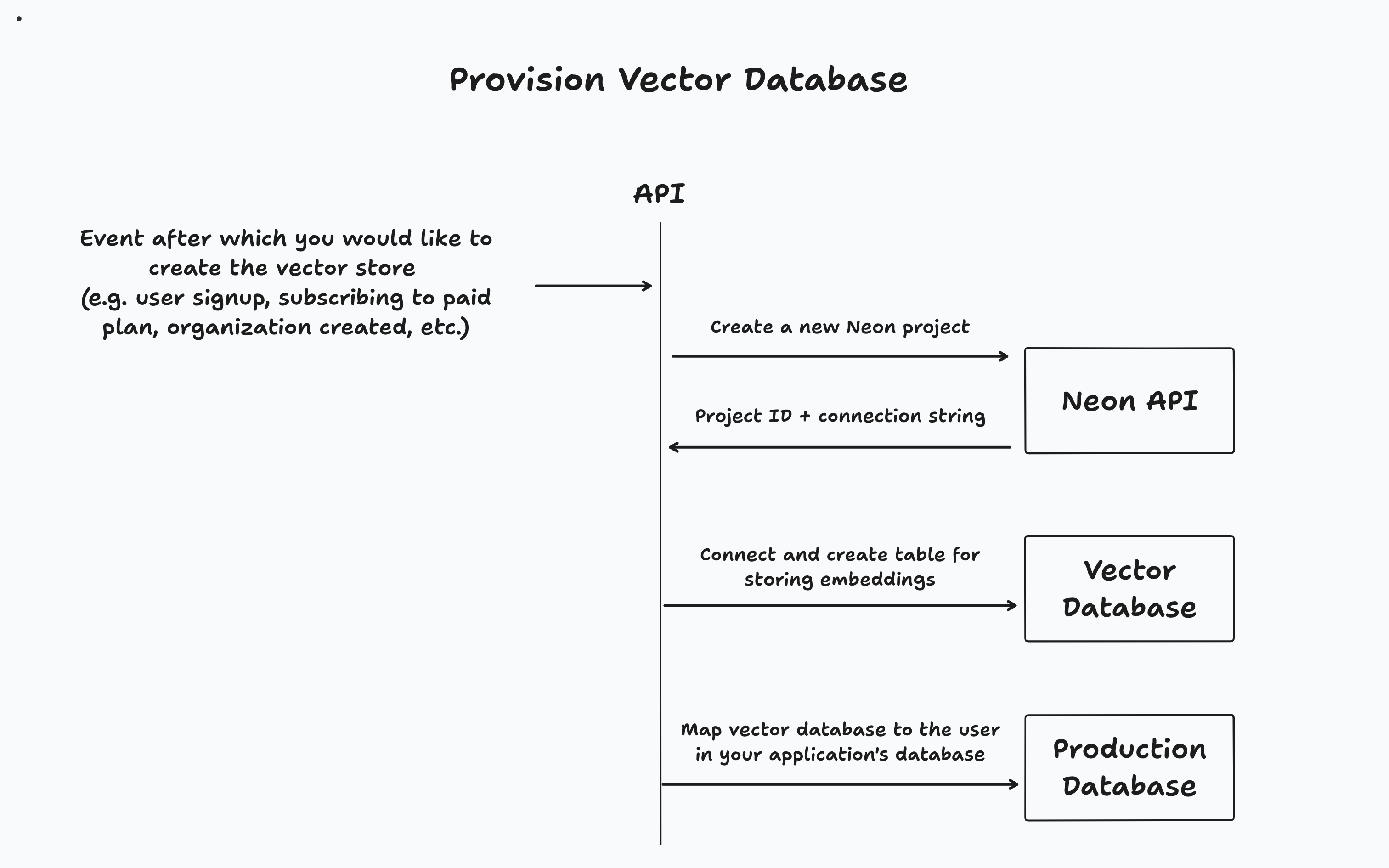
 // Code from app/lib/auth.ts

authenticator . use (
  new GoogleStrategy (
  	{
  		clientID : process . env . GOOGLE_CLIENT_ID ,
  		clientSecret : process . env . GOOGLE_CLIENT_SECRET ,
  		callbackURL : process . env . GOOGLE_CALLBACK_URL ,
  	} ,
  	async ( { profile } ) => {
  		const email = profile . emails [ 0 ] . value ;

  		try {
  			const userData = await db
  				. select ( {
  					user : users ,
  					vectorDatabase : vectorDatabases ,
  				} )
  				. from ( users )
  				. leftJoin ( vectorDatabases , eq ( users . id , vectorDatabases . userId ) )
  				. where ( eq ( users . email , email ) ) ;

  			if (
  				userData . length === 0 ||
  				! userData [ 0 ] . vectorDatabase ||
  				! userData [ 0 ] . user
  			) {
  				const { data , error } = await neonApiClient . POST ( "/projects" , {
  					body : {
  						project : { } ,
  					} ,
  				} ) ;

  				if ( error ) {
  					throw new Error ( `Failed to create Neon project, ${ error } ` ) ;
  				}

  				const vectorDbId = data ?. project . id ;

  				const vectorDbConnectionUri = data . connection_uris [ 0 ] ?. connection_uri ;

  				const sql = postgres ( vectorDbConnectionUri ) ;

  				await sql `CREATE EXTENSION IF NOT EXISTS vector;` ;

  				await migrate ( drizzle ( sql ) , { migrationsFolder : "./drizzle" } ) ;

  				const newUser = await db
  					. insert ( users )
  					. values ( {
  						email ,
  						name : profile . displayName ,
  						avatarUrl : profile . photos [ 0 ] . value ,
  						userId : generateId ( { object : "user" } ) ,
  					} )
  					. onConflictDoNothing ( )
  					. returning ( ) ;

  				await db
  					. insert ( vectorDatabases )
  					. values ( {
  						vectorDbId ,
  						userId : newUser [ 0 ] . id ,
  					} )
  					. returning ( ) ;

  				const result = {
  					... newUser [ 0 ] ,
  					vectorDbId ,
  				} ;

  				return result ;
  			}

  			return {
  				... userData [ 0 ] . user ,
  				vectorDbId : userData [ 0 ] . vectorDatabase . vectorDbId ,
  			} ;
  		} catch ( error ) {
  			console . error ( "User creation error:" , error ) ;
  			throw new Error ( getErrorMessage ( error ) ) ;
  		}
  	} ,
  ) ,
) ;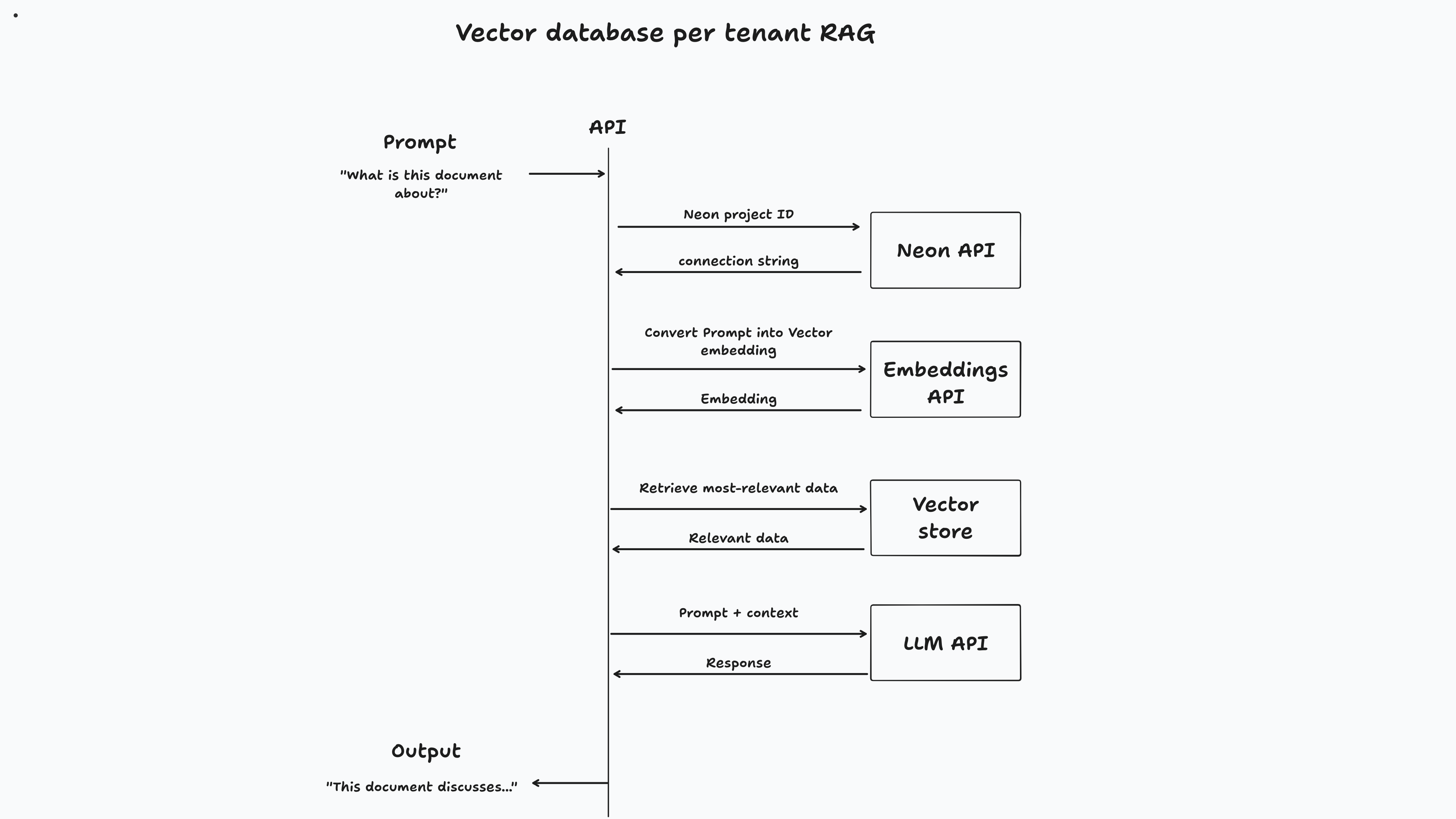
 // Code from app/routes/api/document/chat
// Get the user's messages and the document ID from the request body.
const {
  	messages ,
  	documentId ,
  } : {
  	messages : Message [ ] ;
  	documentId : string ;
  } = await request . json ( ) ;

  const { content : prompt } = messages [ messages . length - 1 ] ;

  const { data , error } = await neonApiClient . GET (
  	"/projects/{project_id}/connection_uri" ,
  	{
  		params : {
  			path : {
  				project_id : user . vectorDbId ,
  			} ,
  			query : {
  				role_name : "neondb_owner" ,
  				database_name : "neondb" ,
  			} ,
  		} ,
  	} ,
  ) ;

  if ( error ) {
  	return json ( {
  		error : error ,
  	} ) ;
  }

  const embeddings = new OpenAIEmbeddings ( {
  	apiKey : process . env . OPENAI_API_KEY ,
  	dimensions : 1536 ,
  	model : "text-embedding-3-small" ,
  } ) ;

  const vectorStore = await NeonPostgres . initialize ( embeddings , {
  	connectionString : data . uri ,
  	tableName : "embeddings" ,
  	columns : {
  		contentColumnName : "content" ,
  		metadataColumnName : "metadata" ,
  		vectorColumnName : "embedding" ,
  	} ,
  } ) ;

  const result = await vectorStore . similaritySearch ( prompt , 2 , {
  	documentId ,
  } ) ;

  const model = new ChatOpenAI ( {
  	apiKey : process . env . OPENAI_API_KEY ,
  	model : "gpt-4o-mini" ,
  	temperature : 0 ,
  } ) ;

  const allMessages = messages . map ( ( message ) =>
  	message . role === "user"
  		? new HumanMessage ( message . content )
  		: new AIMessage ( message . content ) ,
  ) ;

  const systemMessage = new SystemMessage (
  	`You are a helpful assistant, here's some extra additional context that you can use to answer questions. Only use this information if it's relevant:

  	${ result . map ( ( r ) => r . pageContent ) . join ( " " ) } ` ,
  ) ;

  allMessages . push ( systemMessage ) ;

  const stream = await model . stream ( allMessages ) ;

  return LangChainAdapter . toDataStreamResponse ( stream ) ;
ในขณะที่วิธีการนี้มีประโยชน์ แต่ก็อาจเป็นเรื่องท้าทายที่จะนำไปใช้ คุณต้องจัดการวงจรชีวิตของแต่ละฐานข้อมูลรวมถึงการจัดสรรการปรับขนาดและการยกเลิกการจัดเตรียม โชคดีที่ postgres บนนีออนถูกตั้งค่าแตกต่างกัน:
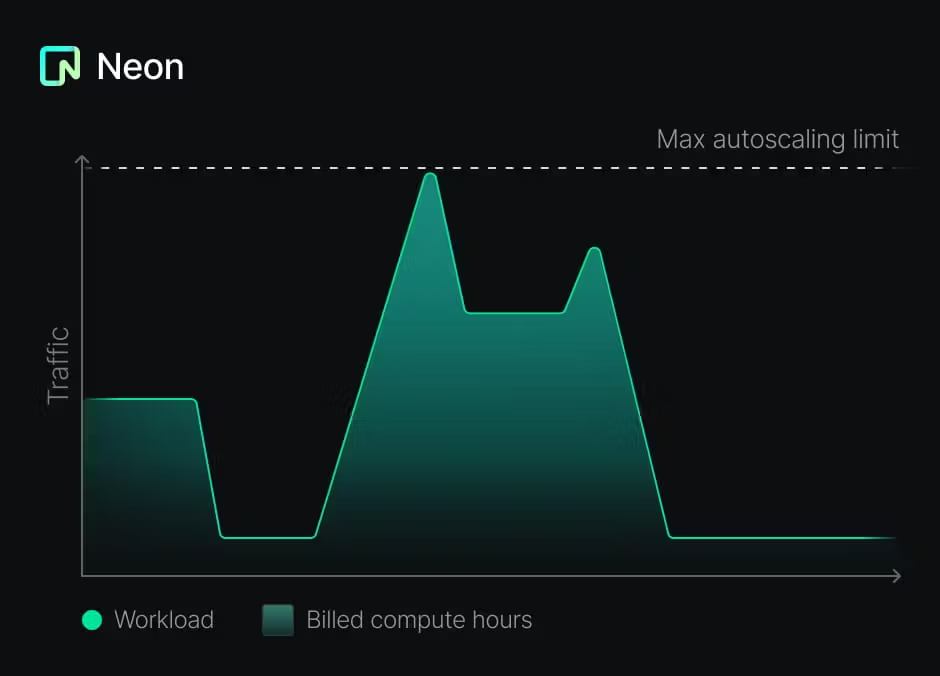
สิ่งนี้ทำให้รูปแบบที่เสนอในการสร้างฐานข้อมูลต่อผู้เช่าไม่เพียง แต่เป็นไปได้ แต่ยังคุ้มค่า
เมื่อคุณมีฐานข้อมูลต่อผู้เช่าคุณต้องจัดการการย้ายถิ่นสำหรับแต่ละฐานข้อมูล โครงการนี้ใช้ Drizzle:
/app/lib/vector-db/schema.ts โดยใช้ typeScriptbun run vector-db:generate และเก็บไว้ใน /app/lib/vector-db/migrationsbun run vector-db:migrate คำสั่งนี้จะเรียกใช้สคริปต์ที่เชื่อมต่อกับฐานข้อมูลของผู้เช่าแต่ละรายและใช้การย้ายถิ่นเป็นสิ่งสำคัญที่จะต้องทราบว่าการเปลี่ยนแปลงสคีมาใด ๆ ที่คุณต้องการแนะนำควรเข้ากันได้ย้อนหลัง มิฉะนั้นคุณจะต้องจัดการกับการอพยพของสคีมาแตกต่างกัน
ในขณะที่รูปแบบนี้มีประโยชน์ในการสร้างแอปพลิเคชัน AI คุณสามารถใช้มันเพื่อให้ฐานข้อมูลของผู้เช่าแต่ละราย นอกจากนี้คุณยังสามารถใช้ฐานข้อมูลอื่นที่ไม่ใช่ postgres สำหรับฐานข้อมูลหลักของแอปพลิเคชันของคุณ (เช่น MySQL, MongoDB, MSSQL Server ฯลฯ )
หากคุณมีคำถามใด ๆ อย่าลังเลที่จะติดต่อใน Neon Discord หรือติดต่อทีมขายนีออน เราชอบที่จะได้ยินจากคุณ





