db per tenant
1.0.0

このレポは、AI搭載アプリケーション用のスケーラブルなアーキテクチャの例が含まれています。表面的には、ユーザーがPDFをアップロードしてチャットできるAIアプリです。ただし、ボンネットの下では、各ユーザーが専用のベクトルデータベースインスタンス(PGVectorを使用したネオンのポストグレス)を取得します。
https://db-per-pertenant.up.railway.app/でライブバージョンを確認できます。
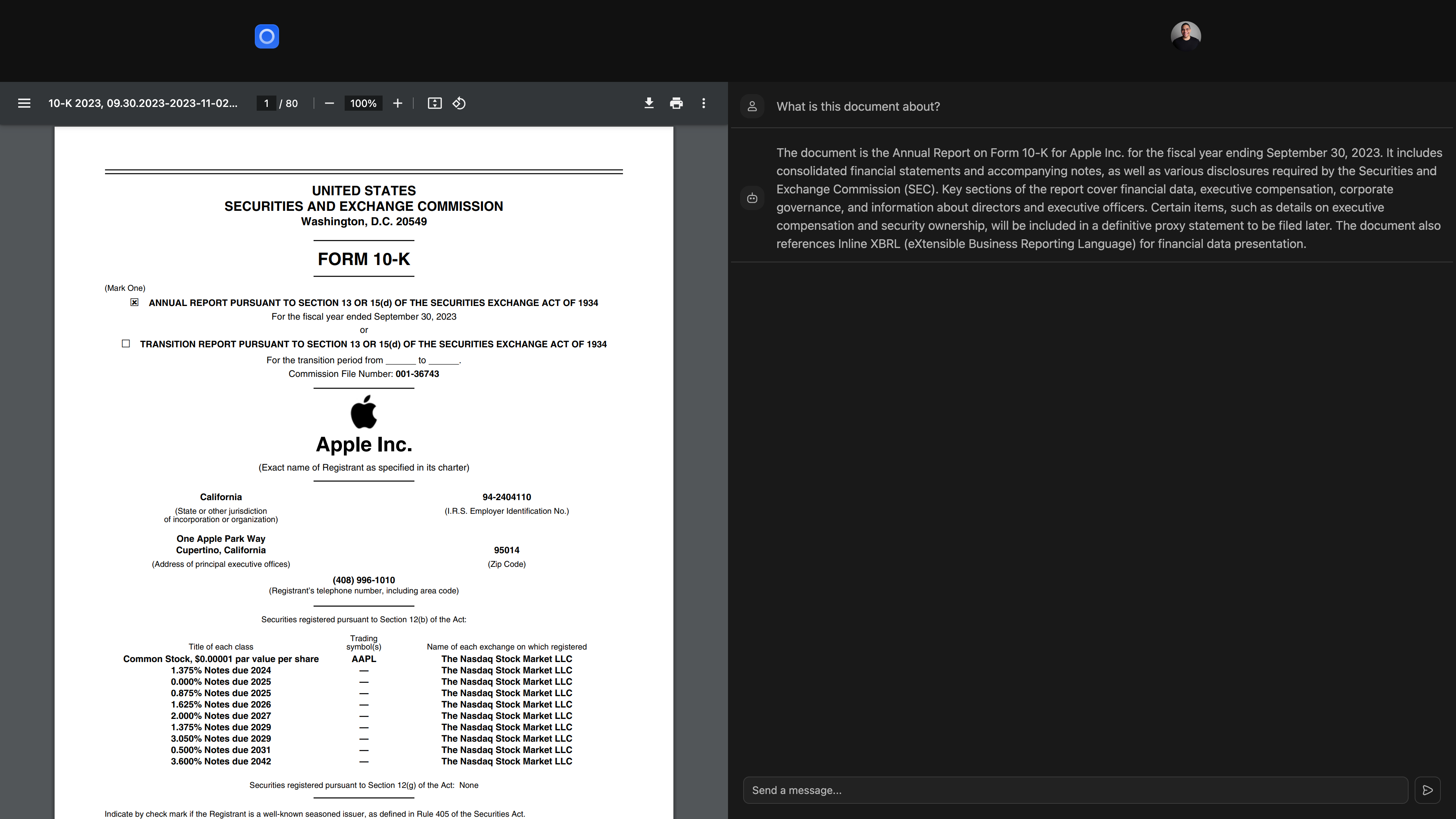
このアプリは、次のテクノロジーを使用して構築されています。
すべてのベクトル埋め込みを単一のPostgresデータベースに保存するのではなく、各テナント(ユーザー、組織、ワークスペース、または分離を必要とするその他のエンティティ)を提供します。
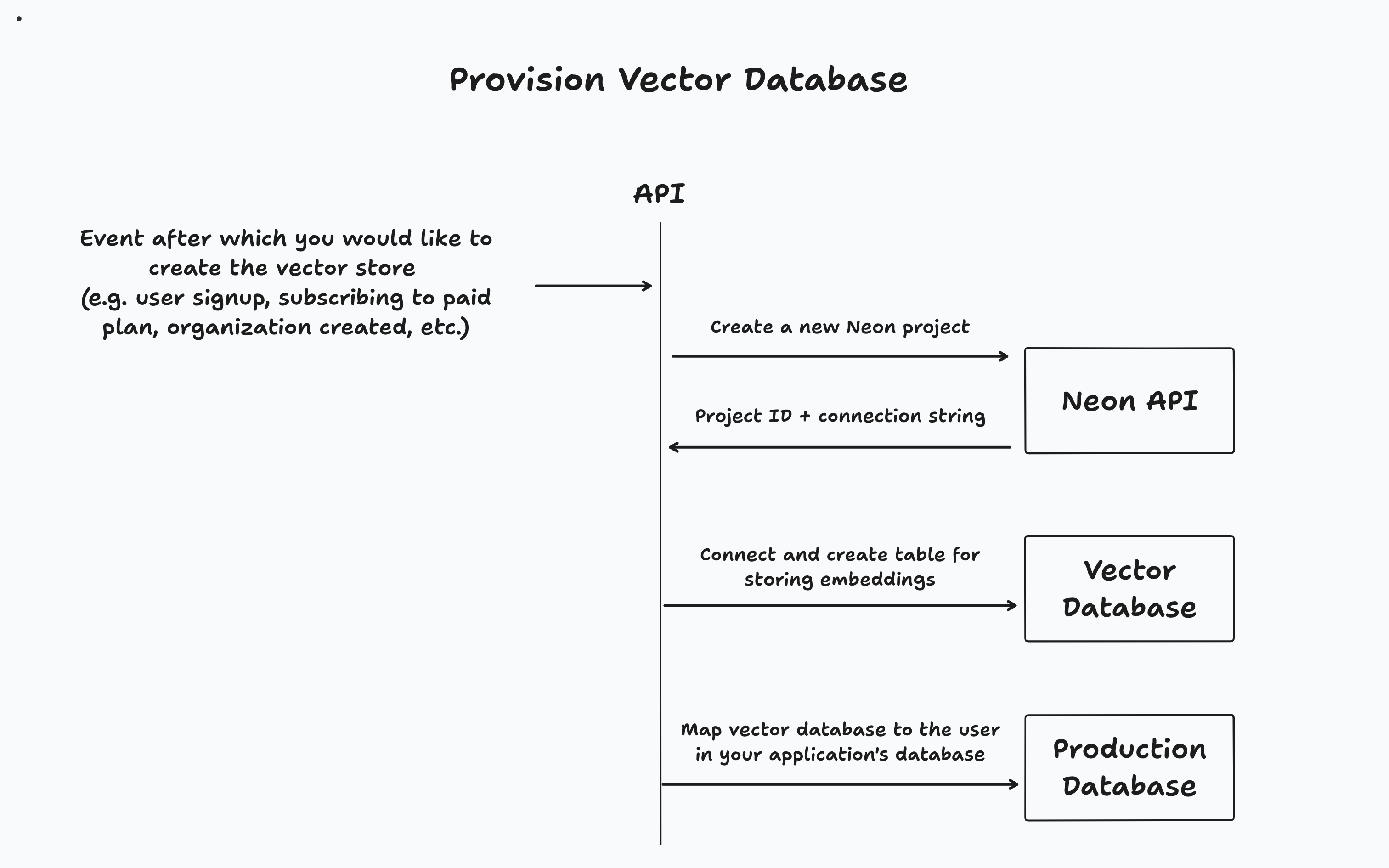
アプリケーションに応じて、特定のイベント(ユーザーサインアップ、組織作成、または有料層へのアップグレードなど)の後にベクトルデータベースをプロビジョニングします。次に、アプリケーションのメインデータベースでテナントと関連するベクトルデータベースを追跡します。
このアプローチはいくつかの利点を提供します:
これは、このレポーにあるデモアプリのデータベースアーキテクチャ図です。
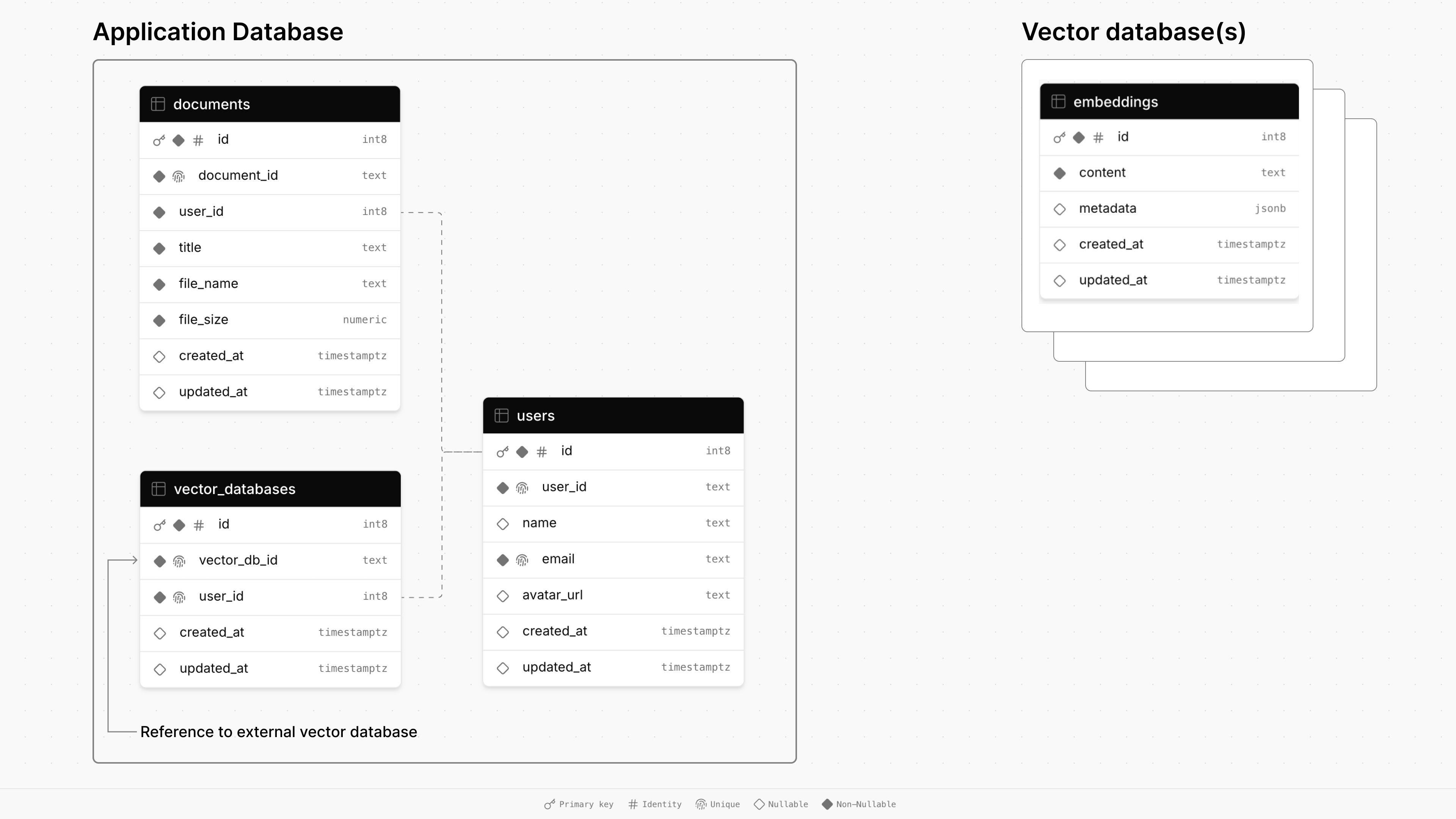
メインアプリケーションのデータベースは、 documents 、 users 、 vector_databases 3つのテーブルで構成されています。
documentsは、タイトル、サイズ、タイムスタンプなど、ファイルに関する情報を保存し、外部キーを介してユーザーにリンクされています。usersテーブルは、名前、電子メール、アバターURLなどのユーザープロファイルを維持しています。vector_databasesテーブルは、どのベクターデータベースがどのユーザーに属しているかを追跡します。次に、プロビジョニングされた各ベクトルデータベースには、検索された生成(RAG)のためのドキュメントチャンクを保存するためのembeddingsテーブルがあります。
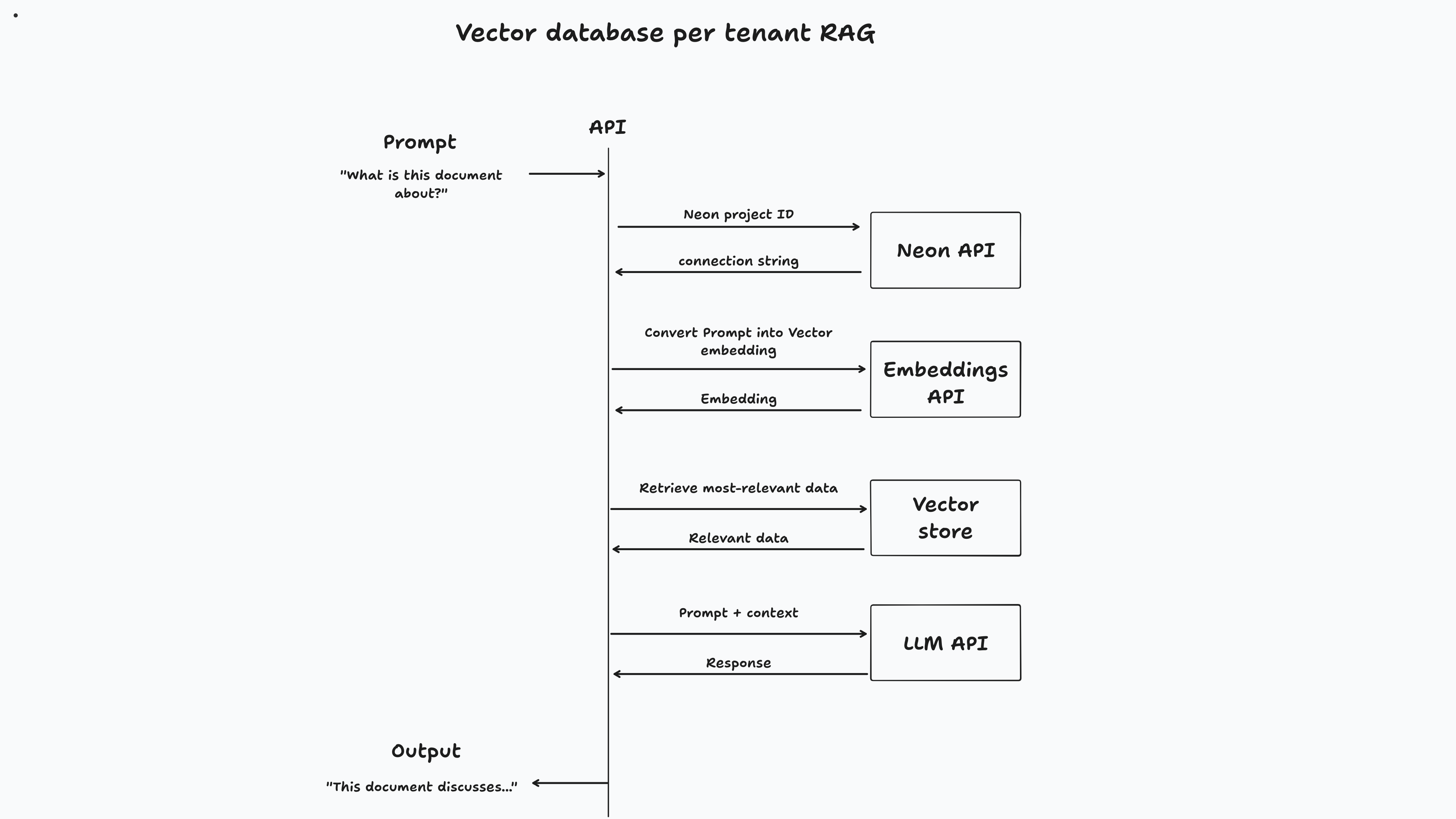
このアプリでは、ユーザーがサインアップしたときにベクトルデータベースがプロビジョニングされます。ドキュメントをアップロードすると、専用のベクトルデータベースにチャンクされて保存されます。最後に、ユーザーがドキュメントとチャットすると、ベクトルの類似性検索がデータベースに対して実行され、関連情報を取得してプロンプトに答えます。
 // Code from app/lib/auth.ts

authenticator . use (
  new GoogleStrategy (
  	{
  		clientID : process . env . GOOGLE_CLIENT_ID ,
  		clientSecret : process . env . GOOGLE_CLIENT_SECRET ,
  		callbackURL : process . env . GOOGLE_CALLBACK_URL ,
  	} ,
  	async ( { profile } ) => {
  		const email = profile . emails [ 0 ] . value ;

  		try {
  			const userData = await db
  				. select ( {
  					user : users ,
  					vectorDatabase : vectorDatabases ,
  				} )
  				. from ( users )
  				. leftJoin ( vectorDatabases , eq ( users . id , vectorDatabases . userId ) )
  				. where ( eq ( users . email , email ) ) ;

  			if (
  				userData . length === 0 ||
  				! userData [ 0 ] . vectorDatabase ||
  				! userData [ 0 ] . user
  			) {
  				const { data , error } = await neonApiClient . POST ( "/projects" , {
  					body : {
  						project : { } ,
  					} ,
  				} ) ;

  				if ( error ) {
  					throw new Error ( `Failed to create Neon project, ${ error } ` ) ;
  				}

  				const vectorDbId = data ?. project . id ;

  				const vectorDbConnectionUri = data . connection_uris [ 0 ] ?. connection_uri ;

  				const sql = postgres ( vectorDbConnectionUri ) ;

  				await sql `CREATE EXTENSION IF NOT EXISTS vector;` ;

  				await migrate ( drizzle ( sql ) , { migrationsFolder : "./drizzle" } ) ;

  				const newUser = await db
  					. insert ( users )
  					. values ( {
  						email ,
  						name : profile . displayName ,
  						avatarUrl : profile . photos [ 0 ] . value ,
  						userId : generateId ( { object : "user" } ) ,
  					} )
  					. onConflictDoNothing ( )
  					. returning ( ) ;

  				await db
  					. insert ( vectorDatabases )
  					. values ( {
  						vectorDbId ,
  						userId : newUser [ 0 ] . id ,
  					} )
  					. returning ( ) ;

  				const result = {
  					... newUser [ 0 ] ,
  					vectorDbId ,
  				} ;

  				return result ;
  			}

  			return {
  				... userData [ 0 ] . user ,
  				vectorDbId : userData [ 0 ] . vectorDatabase . vectorDbId ,
  			} ;
  		} catch ( error ) {
  			console . error ( "User creation error:" , error ) ;
  			throw new Error ( getErrorMessage ( error ) ) ;
  		}
  	} ,
  ) ,
) ;
 // Code from app/routes/api/document/chat
// Get the user's messages and the document ID from the request body.
const {
  	messages ,
  	documentId ,
  } : {
  	messages : Message [ ] ;
  	documentId : string ;
  } = await request . json ( ) ;

  const { content : prompt } = messages [ messages . length - 1 ] ;

  const { data , error } = await neonApiClient . GET (
  	"/projects/{project_id}/connection_uri" ,
  	{
  		params : {
  			path : {
  				project_id : user . vectorDbId ,
  			} ,
  			query : {
  				role_name : "neondb_owner" ,
  				database_name : "neondb" ,
  			} ,
  		} ,
  	} ,
  ) ;

  if ( error ) {
  	return json ( {
  		error : error ,
  	} ) ;
  }

  const embeddings = new OpenAIEmbeddings ( {
  	apiKey : process . env . OPENAI_API_KEY ,
  	dimensions : 1536 ,
  	model : "text-embedding-3-small" ,
  } ) ;

  const vectorStore = await NeonPostgres . initialize ( embeddings , {
  	connectionString : data . uri ,
  	tableName : "embeddings" ,
  	columns : {
  		contentColumnName : "content" ,
  		metadataColumnName : "metadata" ,
  		vectorColumnName : "embedding" ,
  	} ,
  } ) ;

  const result = await vectorStore . similaritySearch ( prompt , 2 , {
  	documentId ,
  } ) ;

  const model = new ChatOpenAI ( {
  	apiKey : process . env . OPENAI_API_KEY ,
  	model : "gpt-4o-mini" ,
  	temperature : 0 ,
  } ) ;

  const allMessages = messages . map ( ( message ) =>
  	message . role === "user"
  		? new HumanMessage ( message . content )
  		: new AIMessage ( message . content ) ,
  ) ;

  const systemMessage = new SystemMessage (
  	`You are a helpful assistant, here's some extra additional context that you can use to answer questions. Only use this information if it's relevant:

  	${ result . map ( ( r ) => r . pageContent ) . join ( " " ) } ` ,
  ) ;

  allMessages . push ( systemMessage ) ;

  const stream = await model . stream ( allMessages ) ;

  return LangChainAdapter . toDataStreamResponse ( stream ) ;
このアプローチは有益ですが、実装するのも難しい場合があります。プロビジョニング、スケーリング、プロビジョニングの解除など、各データベースのライフサイクルを管理する必要があります。幸いなことに、ネオンのポストグレスは異なって設定されています。
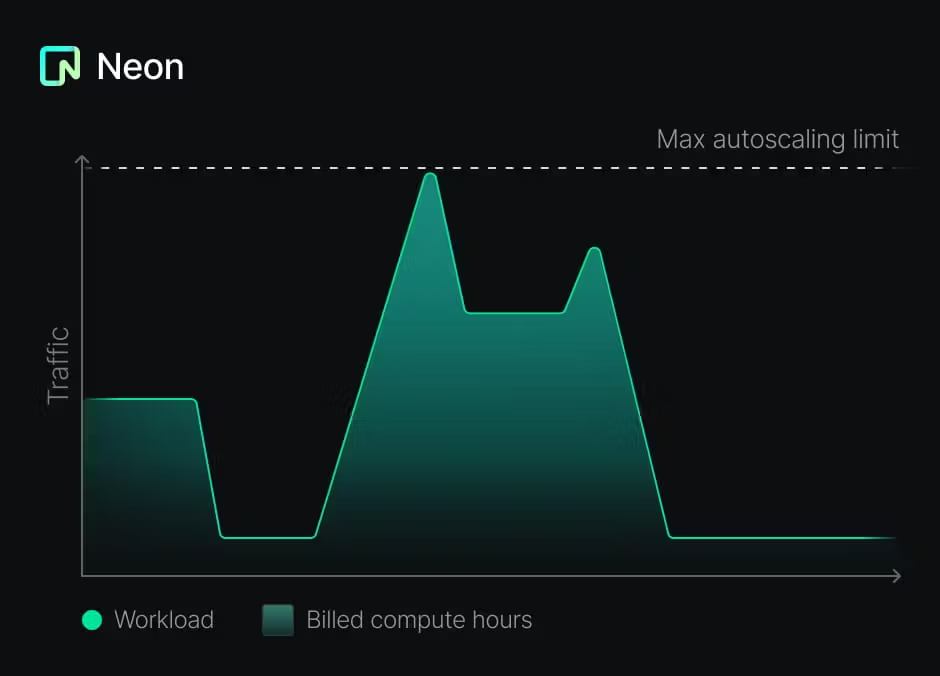
これにより、テナントごとにデータベースを作成するという提案されたパターンが可能であるだけでなく、費用対効果も高くなります。
テナントごとにデータベースがある場合、各データベースの移行を管理する必要があります。このプロジェクトでは、Drizzleを使用しています。
/app/lib/vector-db/schema.tsで定義されています。bun run vector-db:generate /app/lib/vector-db/migrations実行することにより生成されます。bun run vector-db:migrateを実行できます。このコマンドは、各テナントのデータベースに接続して移行を適用するスクリプトを実行します。導入したいスキーマの変更は、後方互換性があるはずであることに注意することが重要です。それ以外の場合は、スキーマの移行を異なる方法で処理する必要があります。
このパターンはAIアプリケーションの構築に役立ちますが、それを使用して各テナントに独自のデータベースを提供することができます。また、メインアプリケーションのデータベース(MySQL、MongoDB、MSSQL Serverなど)にPostgres以外のデータベースを使用することもできます。
ご質問がある場合は、Neon Iscordに自由に連絡するか、Neon Salesチームに連絡してください。ご連絡をお待ちしております。





