food 101 keras
1.0.0

 from IPython . display import HTML , Image

url = 'http://stratospark.com/demos/food-101/'
el = '<' + 'iframe src="{}"' . format ( url ) + ' width="100%" height=600></iframe>' # prevent notebook render bug
HTML ( el )หากคุณกำลังอ่านสิ่งนี้ใน GitHub การสาธิตจะเป็นแบบนี้ โปรดไปที่ลิงค์ด้านล่างเพื่อดูการสาธิตสดในบล็อกของฉัน
Image ( 'demo.jpg' )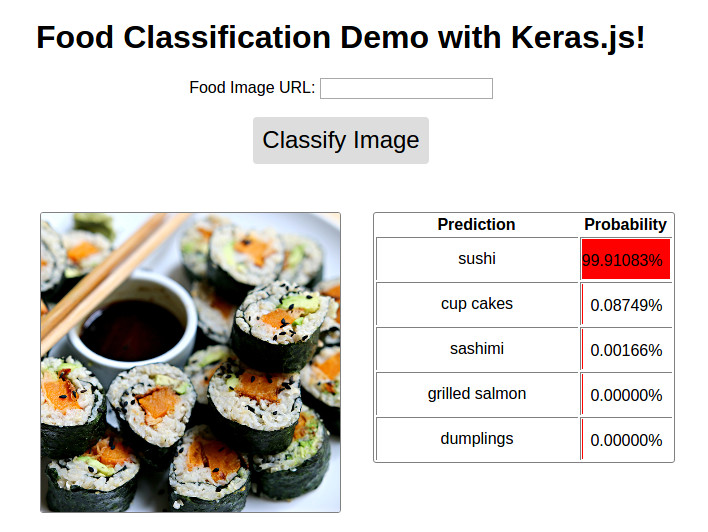
มีการสาธิต @ http://blog.stratospark.com/deep-learning-applied-food-classification-deep-learning-keras.html
รหัสว่าง @ https://github.com/stratospark/food-101-keras
การอัปเดต
เครือข่าย Neural Convolutional (CNN) ซึ่งเป็นเทคนิคภายในสาขาการเรียนรู้ลึกที่กว้างขึ้นได้รับการปฏิวัติในแอพพลิเคชั่นการมองเห็นคอมพิวเตอร์โดยเฉพาะอย่างยิ่งในช่วงครึ่งทศวรรษที่ผ่านมา กรณีการใช้งานหลักอย่างหนึ่งคือการจำแนกรูปภาพเช่นการพิจารณาว่ารูปภาพเป็นของสุนัขหรือแมว
คุณไม่จำเป็นต้อง จำกัด ตัวเองให้เป็นตัวจําแนกไบนารีแน่นอน CNNs สามารถปรับขนาดเป็นหลายพันคลาสที่แตกต่างกันตามที่เห็นในชุดข้อมูล ImageNet ที่รู้จักกันดีของ 1,000 คลาสที่ใช้เพื่อเปรียบเทียบประสิทธิภาพการมองเห็นคอมพิวเตอร์อัลกอริทึม
ในช่วงสองสามปีที่ผ่านมาเทคนิคที่ทันสมัยเหล่านี้เริ่มมีให้สำหรับชุมชนการพัฒนาซอฟต์แวร์ที่กว้างขึ้น แพ็คเกจความแข็งแรงทางอุตสาหกรรมเช่น TensorFlow ทำให้เรามีหน่วยการสร้างแบบเดียวกับที่ Google ใช้ในการเขียนแอปพลิเคชันการเรียนรู้ลึกสำหรับอุปกรณ์ที่ฝังตัว/มือถือไปยังกลุ่มที่ปรับขนาดได้ในคลาวด์ - โดยไม่ต้องใช้งาน HANDICE การดำเนินการของ GPU เมทริกซ์การไล่ระดับสีอนุพันธ์บางส่วน ที่ทำให้แอปพลิเคชันมีประสิทธิภาพเป็นไปได้
เหนือสิ่งอื่นใดทั้งหมดนี้เป็น API ที่ใช้งานง่ายเช่น Keras ที่เป็นนามธรรมของรายละเอียดระดับต่ำกว่าและช่วยให้เรามุ่งเน้นไปที่การสร้างต้นแบบอย่างรวดเร็วกราฟการคำนวณการเรียนรู้อย่างลึกซึ้ง เหมือนที่เราจะผสมและจับคู่เลโก้เพื่อให้ได้ผลลัพธ์ที่ต้องการ
ในฐานะที่เป็นโครงการเบื้องต้นสำหรับตัวเองฉันเลือกที่จะใช้ตัวจําแนกภาพที่ผ่านการฝึกอบรมมาก่อนที่มาพร้อมกับเครสและฝึกใหม่ในชุดข้อมูลที่ฉันพบว่าน่าสนใจ ฉันทำอาหารที่ดีและทำอาหารที่บ้านเป็นอย่างมากดังนั้นบางสิ่งบางอย่างตามสายเหล่านั้นก็น่ารับประทาน
ในกระดาษ Food-101-ส่วนประกอบการจำแนกการขุดด้วยป่าสุ่มพวกเขาแนะนำชุดข้อมูล Food-101 มีอาหารที่แตกต่างกัน 101 รายการโดยมี 1,000 ภาพที่มีป้ายกำกับต่อชั้นเรียนสำหรับการฝึกอบรมภายใต้การดูแล
ฉันได้รับแรงบันดาลใจจากโพสต์บล็อก Keras นี้: การสร้างโมเดลการจำแนกรูปภาพที่ทรงพลังโดยใช้ข้อมูลน้อยมากและสคริปต์ที่เกี่ยวข้องที่ฉันพบใน GitHub: Keras-Finetuning
ฉันได้สร้างระบบเมื่อเร็ว ๆ นี้เพื่อจุดประสงค์ในการทดลองกับการเรียนรู้อย่างลึกซึ้ง ส่วนประกอบสำคัญคือ Nvidia Titan X Pascal W/12 GB หน่วยความจำ, RAM ของระบบ 96 GB รวมถึง Intel Core i7 12 คอร์ มันกำลังใช้งาน 64 บิต Ubuntu 16.04 และใช้การแจกแจง Anaconda Python น่าเสียดายที่คุณจะไม่สามารถติดตามสมุดบันทึกนี้ในระบบของคุณเองได้เว้นแต่คุณจะมี RAM เพียงพอ ในอนาคตฉันต้องการเรียนรู้วิธีจัดการชุดข้อมูลที่มีขนาดใหญ่กว่า RAM ในแบบที่นักแสดง กรุณาติดต่อถ้าคุณมีความคิด!
ฉันใช้เวลาประมาณ 1 เดือนในการสร้างโครงการนี้พยายามฝึกอบรมหลายสิบรุ่นและสำรวจพื้นที่ต่าง ๆ เช่นการประมวลผลหลายครั้งเพื่อเพิ่มภาพที่เร็วขึ้น นี่คือโน้ตบุ๊กรุ่นที่ทำความสะอาดซึ่งมีรูปแบบที่มีประสิทธิภาพดีที่สุดของฉันเมื่อวันที่ 22 มกราคม 2017
หลังจากการปรับแต่งแบบจำลองของ Google InceptionV3 ที่ผ่านการฝึกอบรมมาก่อนฉันสามารถบรรลุ ความแม่นยำสูงสุด 82.03% ในชุดทดสอบโดยใช้การเพาะปลูกครั้งเดียวต่อรายการ การใช้ 10 พืชต่อตัวอย่างและการใช้คลาสที่คาดการณ์บ่อยที่สุด (ES) ฉันสามารถบรรลุ ความแม่นยำสูงสุด 86.97% Top-1 และ 97.42% ความแม่นยำสูงสุด 5 อันดับแรก
คนอื่น ๆ สามารถบรรลุผลลัพธ์ที่แม่นยำมากขึ้น:
ดำเนินการ! ตรวจสอบ: http://blog.stratospark.com/creating-a-deep-learning-ios-app-with-keras-and-tensorflow.html
มานำเข้าแพ็คเกจทั้งหมดที่จำเป็นสำหรับสมุดบันทึกที่เหลือ:
 import matplotlib . pyplot as plt
import matplotlib . image as img
import numpy as np
from scipy . misc import imresize

% matplotlib inline

import os
from os import listdir
from os . path import isfile , join
import shutil
import stat
import collections
from collections import defaultdict

from ipywidgets import interact , interactive , fixed
import ipywidgets as widgets

import h5py
from sklearn . model_selection import train_test_split
from keras . utils . np_utils import to_categorical
from keras . applications . inception_v3 import preprocess_input
from keras . models import load_model
Using TensorFlow backend.
ดาวน์โหลดชุดข้อมูลและแยกออกภายในโฟลเดอร์โน้ตบุ๊ก มันอาจจะง่ายกว่าที่จะทำในหน้าต่างเทอร์มินัลแยกต่างหาก
# !wget http://data.vision.ee.ethz.ch/cvl/food-101.tar.gz # !tar xzvf food-101.tar.gzมาดูกันว่ามีการแสดงอาหารประเภทใดที่นี่:
!l s food - 101 / images apple_pie eggs_benedict onion_rings
baby_back_ribs escargots oysters
baklava falafel pad_thai
beef_carpaccio filet_mignon paella
beef_tartare fish_and_chips pancakes
beet_salad foie_gras panna_cotta
beignets french_fries peking_duck
bibimbap french_onion_soup pho
bread_pudding french_toast pizza
breakfast_burrito fried_calamari pork_chop
bruschetta fried_rice poutine
caesar_salad frozen_yogurt prime_rib
cannoli garlic_bread pulled_pork_sandwich
caprese_salad gnocchi ramen
carrot_cake greek_salad ravioli
ceviche grilled_cheese_sandwich red_velvet_cake
cheesecake grilled_salmon risotto
cheese_plate guacamole samosa
chicken_curry gyoza sashimi
chicken_quesadilla hamburger scallops
chicken_wings hot_and_sour_soup seaweed_salad
chocolate_cake hot_dog shrimp_and_grits
chocolate_mousse huevos_rancheros spaghetti_bolognese
churros hummus spaghetti_carbonara
clam_chowder ice_cream spring_rolls
club_sandwich lasagna steak
crab_cakes lobster_bisque strawberry_shortcake
creme_brulee lobster_roll_sandwich sushi
croque_madame macaroni_and_cheese tacos
cup_cakes macarons takoyaki
deviled_eggs miso_soup tiramisu
donuts mussels tuna_tartare
dumplings nachos waffles
edamame omelette
!l s food - 101 / images / apple_pie / | head - 10 1005649.jpg
1011328.jpg
101251.jpg
1014775.jpg
1026328.jpg
1028787.jpg
1034399.jpg
103801.jpg
1038694.jpg
1043283.jpg
ls: write error: Broken pipe
ลองดูภาพสุ่มจากแต่ละชั้นอาหาร คุณสามารถคลิกขวาและเปิดภาพในหน้าต่างใหม่หรือบันทึกเพื่อดูด้วยความละเอียดที่สูงขึ้น
 root_dir = 'food-101/images/'
rows = 17
cols = 6
fig , ax = plt . subplots ( rows , cols , frameon = False , figsize = ( 15 , 25 ))
fig . suptitle ( 'Random Image from Each Food Class' , fontsize = 20 )
sorted_food_dirs = sorted ( os . listdir ( root_dir ))
for i in range ( rows ):
    for j in range ( cols ):
        try :
            food_dir = sorted_food_dirs [ i * cols + j ]
        except :
            break
        all_files = os . listdir ( os . path . join ( root_dir , food_dir ))
        rand_img = np . random . choice ( all_files )
        img = plt . imread ( os . path . join ( root_dir , food_dir , rand_img ))
        ax [ i ][ j ]. imshow ( img )
        ec = ( 0 , .6 , .1 )
        fc = ( 0 , .7 , .2 )
        ax [ i ][ j ]. text ( 0 , - 20 , food_dir , size = 10 , rotation = 0 ,
                ha = "left" , va = "top" ,
                bbox = dict ( boxstyle = "round" , ec = ec , fc = fc ))
plt . setp ( ax , xticks = [], yticks = [])
plt . tight_layout ( rect = [ 0 , 0.03 , 1 , 0.95 ])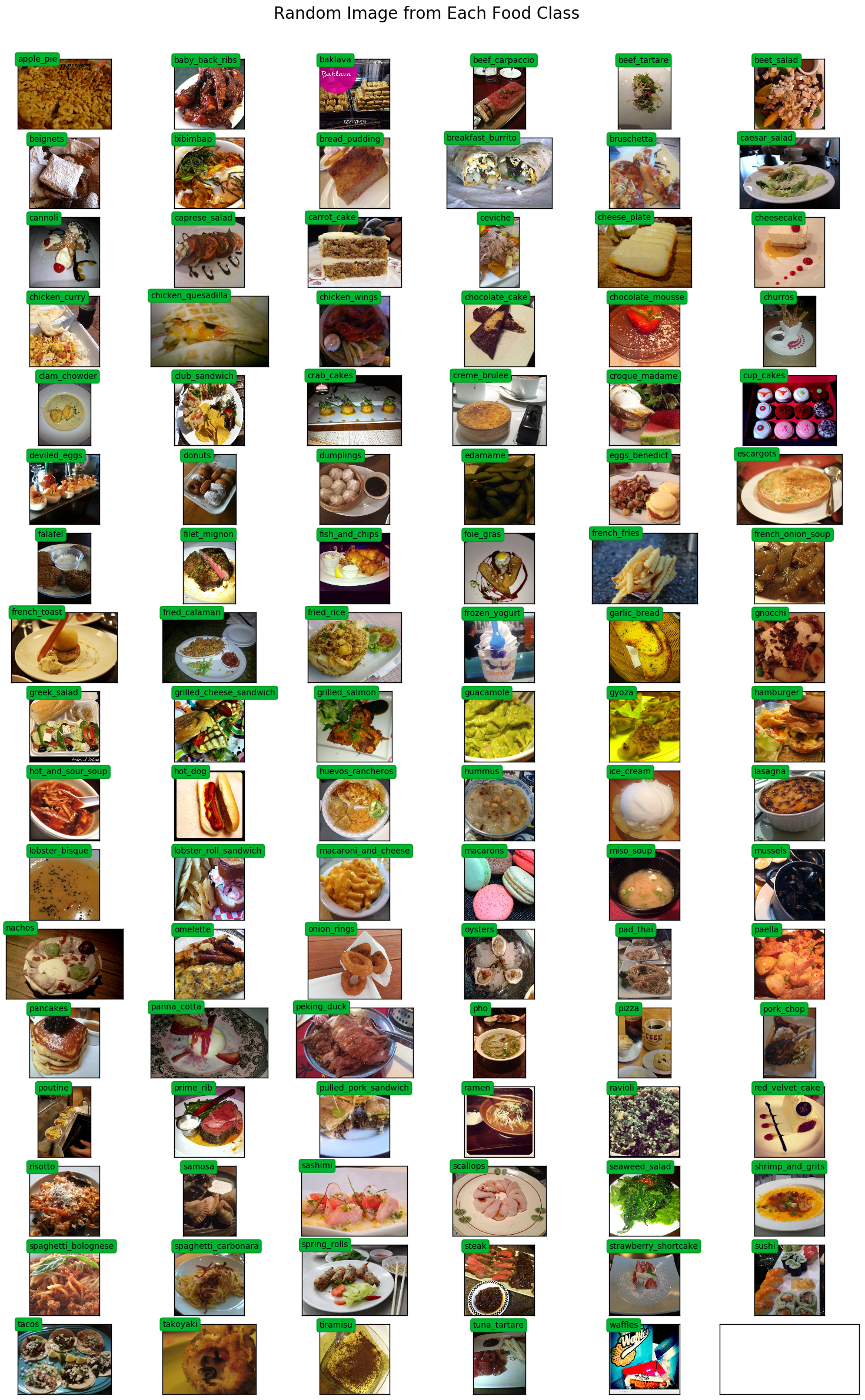
การ multiprocessing.Pool จะถูกใช้เพื่อเร่งการเพิ่มภาพระหว่างการฝึกอบรม
 # Setup multiprocessing pool
# Do this early, as once images are loaded into memory there will be Errno 12
# http://stackoverflow.com/questions/14749897/python-multiprocessing-memory-usage
import multiprocessing as mp

num_processes = 6
pool = mp . Pool ( processes = num_processes )
เราต้องการแผนที่จากชั้นเรียนไปยังดัชนีและในทางกลับกันสำหรับการเข้ารหัสฉลากที่เหมาะสมและการพิมพ์สวย ๆ
 class_to_ix = {}
ix_to_class = {}
with open ( 'food-101/meta/classes.txt' , 'r' ) as txt :
    classes = [ l . strip () for l in txt . readlines ()]
    class_to_ix = dict ( zip ( classes , range ( len ( classes ))))
    ix_to_class = dict ( zip ( range ( len ( classes )), classes ))
    class_to_ix = { v : k for k , v in ix_to_class . items ()}
sorted_class_to_ix = collections . OrderedDict ( sorted ( class_to_ix . items ()))
ชุดข้อมูล Food-101 มีการแยกรถไฟ/ทดสอบ เราต้องการใช้สิ่งนี้เพื่อเปรียบเทียบประสิทธิภาพการจำแนกประเภทของเรากับการใช้งานอื่น ๆ
 # Only split files if haven't already
if not os . path . isdir ( './food-101/test' ) and not os . path . isdir ( './food-101/train' ):

    def copytree ( src , dst , symlinks = False , ignore = None ):
        if not os . path . exists ( dst ):
            os . makedirs ( dst )
            shutil . copystat ( src , dst )
        lst = os . listdir ( src )
        if ignore :
            excl = ignore ( src , lst )
            lst = [ x for x in lst if x not in excl ]
        for item in lst :
            s = os . path . join ( src , item )
            d = os . path . join ( dst , item )
            if symlinks and os . path . islink ( s ):
                if os . path . lexists ( d ):
                    os . remove ( d )
                os . symlink ( os . readlink ( s ), d )
                try :
                    st = os . lstat ( s )
                    mode = stat . S_IMODE ( st . st_mode )
                    os . lchmod ( d , mode )
                except :
                    pass # lchmod not available
            elif os . path . isdir ( s ):
                copytree ( s , d , symlinks , ignore )
            else :
                shutil . copy2 ( s , d )

    def generate_dir_file_map ( path ):
        dir_files = defaultdict ( list )
        with open ( path , 'r' ) as txt :
            files = [ l . strip () for l in txt . readlines ()]
            for f in files :
                dir_name , id = f . split ( '/' )
                dir_files [ dir_name ]. append ( id + '.jpg' )
        return dir_files

    train_dir_files = generate_dir_file_map ( 'food-101/meta/train.txt' )
    test_dir_files = generate_dir_file_map ( 'food-101/meta/test.txt' )


    def ignore_train ( d , filenames ):
        print ( d )
        subdir = d . split ( '/' )[ - 1 ]
        to_ignore = train_dir_files [ subdir ]
        return to_ignore

    def ignore_test ( d , filenames ):
        print ( d )
        subdir = d . split ( '/' )[ - 1 ]
        to_ignore = test_dir_files [ subdir ]
        return to_ignore

    copytree ( 'food-101/images' , 'food-101/test' , ignore = ignore_train )
    copytree ( 'food-101/images' , 'food-101/train' , ignore = ignore_test )

else :
    print ( 'Train/Test files already copied into separate folders.' )
Train/Test files already copied into separate folders.
ตอนนี้เราพร้อมที่จะโหลดการฝึกอบรมและทดสอบภาพลงในหน่วยความจำ หลังจากโหลดทุกอย่างหน่วยความจำประมาณ 80 GB จะได้รับการจัดสรร
ภาพใด ๆ ที่มีความกว้างหรือความยาวเล็กกว่า min_size จะถูกปรับขนาด นี่คือเพื่อให้เราสามารถทานพืชขนาดที่เหมาะสมในระหว่างการเพิ่มภาพ
 % % time

# Load dataset images and resize to meet minimum width and height pixel size
def load_images ( root , min_side = 299 ):
    all_imgs = []
    all_classes = []
    resize_count = 0
    invalid_count = 0
    for i , subdir in enumerate ( listdir ( root )):
        imgs = listdir ( join ( root , subdir ))
        class_ix = class_to_ix [ subdir ]
        print ( i , class_ix , subdir )
        for img_name in imgs :
            img_arr = img . imread ( join ( root , subdir , img_name ))
            img_arr_rs = img_arr
            try :
                w , h , _ = img_arr . shape
                if w < min_side :
                    wpercent = ( min_side / float ( w ))
                    hsize = int (( float ( h ) * float ( wpercent )))
                    #print('new dims:', min_side, hsize)
                    img_arr_rs = imresize ( img_arr , ( min_side , hsize ))
                    resize_count += 1
                elif h < min_side :
                    hpercent = ( min_side / float ( h ))
                    wsize = int (( float ( w ) * float ( hpercent )))
                    #print('new dims:', wsize, min_side)
                    img_arr_rs = imresize ( img_arr , ( wsize , min_side ))
                    resize_count += 1
                all_imgs . append ( img_arr_rs )
                all_classes . append ( class_ix )
            except :
                print ( 'Skipping bad image: ' , subdir , img_name )
                invalid_count += 1
    print ( len ( all_imgs ), 'images loaded' )
    print ( resize_count , 'images resized' )
    print ( invalid_count , 'images skipped' )
    return np . array ( all_imgs ), np . array ( all_classes )

X_test , y_test = load_images ( 'food-101/test' , min_side = 299 )
0 41 french_onion_soup
1 99 tuna_tartare
2 2 baklava
3 12 cannoli
4 8 bread_pudding
5 58 ice_cream
6 63 macarons
7 38 fish_and_chips
8 3 beef_carpaccio
9 59 lasagna
10 84 risotto
11 53 hamburger
12 7 bibimbap
13 15 ceviche
14 92 spring_rolls
15 78 poutine
16 76 pizza
17 19 chicken_quesadilla
18 71 paella
19 11 caesar_salad
20 30 deviled_eggs
21 40 french_fries
22 25 club_sandwich
23 77 pork_chop
24 31 donuts
25 93 steak
26 43 fried_calamari
27 52 gyoza
28 20 chicken_wings
29 47 gnocchi
30 46 garlic_bread
31 81 ramen
32 86 sashimi
33 100 waffles
34 60 lobster_bisque
35 23 churros
36 1 baby_back_ribs
37 0 apple_pie
38 27 creme_brulee
39 79 prime_rib
40 54 hot_and_sour_soup
41 55 hot_dog
42 82 ravioli
43 66 nachos
44 85 samosa
45 95 sushi
46 70 pad_thai
47 87 scallops
48 42 french_toast
49 13 caprese_salad
50 21 chocolate_cake
51 83 red_velvet_cake
52 88 seaweed_salad
53 96 tacos
54 16 cheesecake
55 90 spaghetti_bolognese
56 94 strawberry_shortcake
57 64 miso_soup
58 98 tiramisu
59 74 peking_duck
60 17 cheese_plate
61 69 oysters
62 14 carrot_cake
63 6 beignets
64 61 lobster_roll_sandwich
65 45 frozen_yogurt
66 24 clam_chowder
67 9 breakfast_burrito
68 72 pancakes
69 32 dumplings
70 57 hummus
71 10 bruschetta
72 44 fried_rice
73 97 takoyaki
74 50 grilled_salmon
75 4 beef_tartare
76 89 shrimp_and_grits
77 28 croque_madame
78 49 grilled_cheese_sandwich
79 80 pulled_pork_sandwich
80 56 huevos_rancheros
81 35 escargots
82 91 spaghetti_carbonara
83 34 eggs_benedict
84 33 edamame
85 22 chocolate_mousse
86 18 chicken_curry
87 65 mussels
88 36 falafel
89 37 filet_mignon
90 26 crab_cakes
91 48 greek_salad
92 5 beet_salad
93 51 guacamole
94 29 cup_cakes
95 68 onion_rings
96 39 foie_gras
97 67 omelette
98 73 panna_cotta
99 75 pho
100 62 macaroni_and_cheese
25250 images loaded
693 images resized
0 images skipped
CPU times: user 1min 18s, sys: 4.82 s, total: 1min 23s
Wall time: 1min 23s
 % % time
X_train , y_train = load_images ( 'food-101/train' , min_side = 299 )
0 41 french_onion_soup
1 99 tuna_tartare
2 2 baklava
3 12 cannoli
4 8 bread_pudding
Skipping bad image: bread_pudding 1375816.jpg
5 58 ice_cream
6 63 macarons
7 38 fish_and_chips
8 3 beef_carpaccio
9 59 lasagna
Skipping bad image: lasagna 3787908.jpg
10 84 risotto
11 53 hamburger
12 7 bibimbap
13 15 ceviche
14 92 spring_rolls
15 78 poutine
16 76 pizza
17 19 chicken_quesadilla
18 71 paella
19 11 caesar_salad
20 30 deviled_eggs
21 40 french_fries
22 25 club_sandwich
23 77 pork_chop
24 31 donuts
25 93 steak
Skipping bad image: steak 1340977.jpg
26 43 fried_calamari
27 52 gyoza
28 20 chicken_wings
29 47 gnocchi
30 46 garlic_bread
31 81 ramen
32 86 sashimi
33 100 waffles
34 60 lobster_bisque
35 23 churros
36 1 baby_back_ribs
37 0 apple_pie
38 27 creme_brulee
39 79 prime_rib
40 54 hot_and_sour_soup
41 55 hot_dog
42 82 ravioli
43 66 nachos
44 85 samosa
45 95 sushi
46 70 pad_thai
47 87 scallops
48 42 french_toast
49 13 caprese_salad
50 21 chocolate_cake
51 83 red_velvet_cake
52 88 seaweed_salad
53 96 tacos
54 16 cheesecake
55 90 spaghetti_bolognese
56 94 strawberry_shortcake
57 64 miso_soup
58 98 tiramisu
59 74 peking_duck
60 17 cheese_plate
61 69 oysters
62 14 carrot_cake
63 6 beignets
64 61 lobster_roll_sandwich
65 45 frozen_yogurt
66 24 clam_chowder
67 9 breakfast_burrito
68 72 pancakes
69 32 dumplings
70 57 hummus
71 10 bruschetta
72 44 fried_rice
73 97 takoyaki
74 50 grilled_salmon
75 4 beef_tartare
76 89 shrimp_and_grits
77 28 croque_madame
78 49 grilled_cheese_sandwich
79 80 pulled_pork_sandwich
80 56 huevos_rancheros
81 35 escargots
82 91 spaghetti_carbonara
83 34 eggs_benedict
84 33 edamame
85 22 chocolate_mousse
86 18 chicken_curry
87 65 mussels
88 36 falafel
89 37 filet_mignon
90 26 crab_cakes
91 48 greek_salad
92 5 beet_salad
93 51 guacamole
94 29 cup_cakes
95 68 onion_rings
96 39 foie_gras
97 67 omelette
98 73 panna_cotta
99 75 pho
100 62 macaroni_and_cheese
75747 images loaded
2091 images resized
3 images skipped
CPU times: user 3min 51s, sys: 13.9 s, total: 4min 5s
Wall time: 4min 5s
 print ( 'X_train shape' , X_train . shape )
print ( 'y_train shape' , y_train . shape )
print ( 'X_test shape' , X_test . shape )
print ( 'y_test shape' , y_test . shape )
X_train shape (75747,)
y_train shape (75747,)
X_test shape (25250,)
y_test shape (25250,)
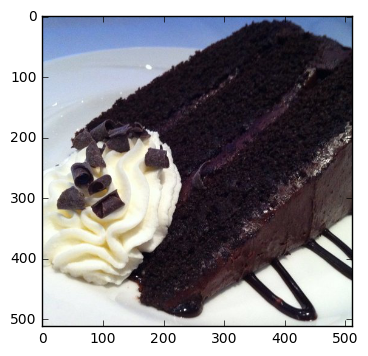
 @ interact ( n = ( 0 , len ( X_train )))
def show_pic ( n ):
    plt . imshow ( X_train [ n ])
    print ( 'class:' , y_train [ n ], ix_to_class [ y_train [ n ]])
class: 21 chocolate_cake
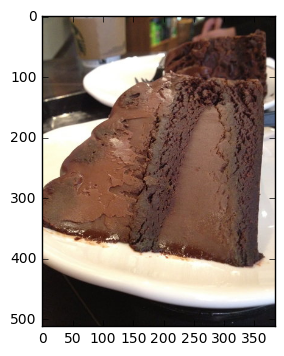
 @ interact ( n = ( 0 , len ( X_test )))
def show_pic ( n ):
    plt . imshow ( X_test [ n ])
    print ( 'class:' , y_test [ n ], ix_to_class [ y_test [ n ]])
class: 21 chocolate_cake
 @ interact ( n_class = sorted_class_to_ix )
def show_random_images_of_class ( n_class = 0 ):
    print ( n_class )
    nrows = 4
    ncols = 8
    fig , axes = plt . subplots ( nrows = nrows , ncols = ncols )
    fig . set_size_inches ( 12 , 8 )
    #fig.tight_layout()
    imgs = np . random . choice (( y_train == n_class ). nonzero ()[ 0 ], nrows * ncols )
    for i , ax in enumerate ( axes . flat ):
        im = ax . imshow ( X_train [ imgs [ i ]])
        ax . set_axis_off ()
        ax . title . set_visible ( False )
        ax . xaxis . set_ticks ([])
        ax . yaxis . set_ticks ([])
        for spine in ax . spines . values ():
            spine . set_visible ( False )
    plt . subplots_adjust ( left = 0 , wspace = 0 , hspace = 0 )
    plt . show ()
0
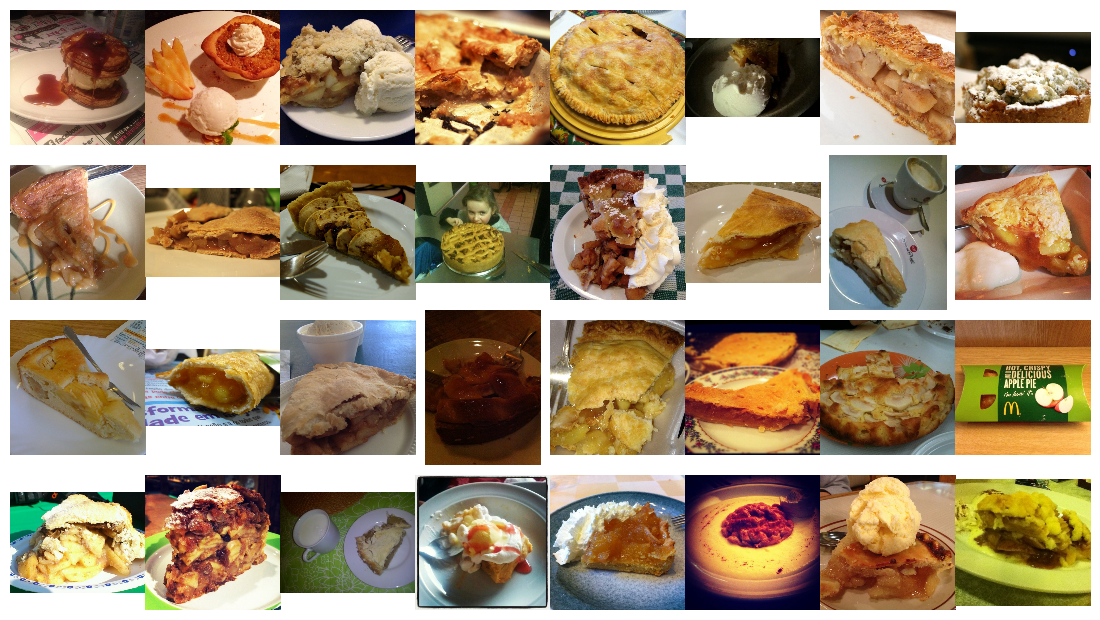
 @ interact ( n_class = sorted_class_to_ix )
def show_random_images_of_class ( n_class = 0 ):
    print ( n_class )
    nrows = 4
    ncols = 8
    fig , axes = plt . subplots ( nrows = nrows , ncols = ncols )
    fig . set_size_inches ( 12 , 8 )
    #fig.tight_layout()
    imgs = np . random . choice (( y_test == n_class ). nonzero ()[ 0 ], nrows * ncols )
    for i , ax in enumerate ( axes . flat ):
        im = ax . imshow ( X_test [ imgs [ i ]])
        ax . set_axis_off ()
        ax . title . set_visible ( False )
        ax . xaxis . set_ticks ([])
        ax . yaxis . set_ticks ([])
        for spine in ax . spines . values ():
            spine . set_visible ( False )
    plt . subplots_adjust ( left = 0 , wspace = 0 , hspace = 0 )
    plt . show ()
0
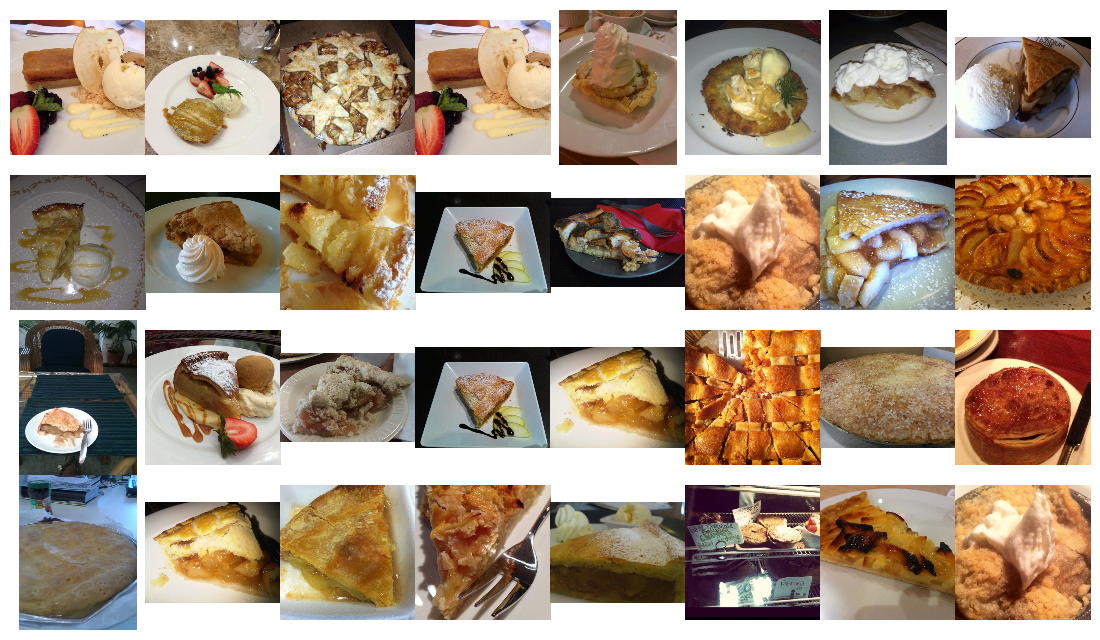
เราจำเป็นต้องเข้ารหัสค่าฉลากแต่ละอันเพื่อสร้างเวกเตอร์ของคุณสมบัติไบนารีมากกว่าคุณสมบัติหนึ่งที่สามารถใช้กับค่า n_classes
 from keras . utils . np_utils import to_categorical

n_classes = 101
y_train_cat = to_categorical ( y_train , nb_classes = n_classes )
y_test_cat = to_categorical ( y_test , nb_classes = n_classes )
from keras . applications . inception_v3 import InceptionV3
from keras . applications . inception_v3 import preprocess_input , decode_predictions
from keras . preprocessing import image
from keras . layers import Input
import tools . image_gen_extended as T
# Useful for checking the output of the generators after code change
#from importlib import reload
#reload(T)ฉันต้องมีท่อส่งภาพที่ทรงพลังกว่าที่ส่งมอบให้กับ Keras โชคดีที่ฉันสามารถค้นหารุ่นที่แก้ไขนี้เพื่อใช้เป็นฐานของฉัน
ผู้เขียนได้เพิ่มไปป์ไลน์ที่ขยายได้ซึ่งทำให้สามารถระบุการดัดแปลงเพิ่มเติมเช่นฟังก์ชั่นการปลูกพืชที่กำหนดเองและสามารถใช้ประมวลผลภาพล่วงหน้า ความสามารถในการใช้การประมวลผลล่วงหน้าแบบไดนามิกเป็นสิ่งจำเป็นเนื่องจากฉันไม่มีหน่วยความจำไม่เพียงพอที่จะเก็บชุดการฝึกอบรมทั้งหมดเป็น float32s ฉันสามารถโหลดชุดการฝึกทั้งหมดเป็น uint8s ได้
นอกจากนี้ฉันยังไม่ได้ใช้ประโยชน์จาก GPU หรือ CPU แบบมัลติคอร์อย่างเต็มที่ โดยค่าเริ่มต้น Python สามารถใช้แกนเดียวได้เท่านั้นดังนั้นจึง จำกัด จำนวนภาพที่ประมวลผล/เพิ่มภาพที่ฉันสามารถส่งไปยัง GPU สำหรับการฝึกอบรม จากการตรวจสอบประสิทธิภาพบางอย่างฉันใช้เพียงเล็กน้อยของ GPU โดยเฉลี่ยเท่านั้น ด้วยการผสมผสาน multiprocessing Pool Python ฉันสามารถใช้ประโยชน์จาก CPU ได้ประมาณ 50% และการใช้ GPU 90%
ผลลัพธ์ที่ได้คือการฝึกซ้อมแต่ละครั้งจาก 45 นาทีถึง 22 นาที! คุณสามารถเรียกใช้กราฟ GPU ด้วยตนเองในขณะที่ฝึกในสมุดบันทึกนี้ แรงบันดาลใจในการพยายามปรับปรุงการเพิ่มข้อมูลและประสิทธิภาพของ GPU มาจาก Jimmie Goode: เครื่องกำเนิด Python บัฟเฟอร์สำหรับการเพิ่มข้อมูล
ในขณะนี้รหัสค่อนข้างบั๊กและต้องเริ่มต้นเคอร์เนล Python เมื่อใดก็ตามที่การฝึกอบรมถูกขัดจังหวะด้วยตนเอง รหัสค่อนข้างถูกแฮ็กเข้าด้วยกันและคุณสมบัติบางอย่างเช่นที่เกี่ยวข้องกับการติดตั้งถูกปิดใช้งาน ฉันหวังว่าจะปรับปรุง imagedatagenerator นี้และปล่อยให้ชุมชนในอนาคต
display ( Image ( './gpu.png' ))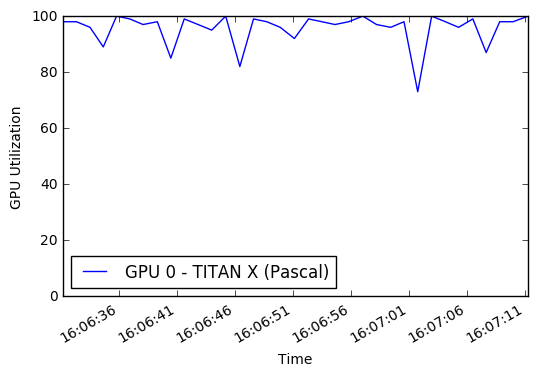
 % % time

# this is the augmentation configuration we will use for training
train_datagen = T . ImageDataGenerator (
    featurewise_center = False ,  # set input mean to 0 over the dataset
    samplewise_center = False ,  # set each sample mean to 0
    featurewise_std_normalization = False ,  # divide inputs by std of the dataset
    samplewise_std_normalization = False ,  # divide each input by its std
    zca_whitening = False ,  # apply ZCA whitening
    rotation_range = 0 ,  # randomly rotate images in the range (degrees, 0 to 180)
    width_shift_range = 0.2 ,  # randomly shift images horizontally (fraction of total width)
    height_shift_range = 0.2 ,  # randomly shift images vertically (fraction of total height)
    horizontal_flip = True ,  # randomly flip images
    vertical_flip = False , # randomly flip images
    zoom_range = [ .8 , 1 ],
    channel_shift_range = 30 ,
    fill_mode = 'reflect' )
train_datagen . config [ 'random_crop_size' ] = ( 299 , 299 )
train_datagen . set_pipeline ([ T . random_transform , T . random_crop , T . preprocess_input ])
train_generator = train_datagen . flow ( X_train , y_train_cat , batch_size = 64 , seed = 11 , pool = pool )
test_datagen = T . ImageDataGenerator ()
test_datagen . config [ 'random_crop_size' ] = ( 299 , 299 )
test_datagen . set_pipeline ([ T . random_transform , T . random_crop , T . preprocess_input ])
test_generator = test_datagen . flow ( X_test , y_test_cat , batch_size = 64 , seed = 11 , pool = pool )เราสามารถดูว่าภาพประเภทใดที่ออกมาจากเครื่องถ่ายภาพเหล่านี้:
 def reverse_preprocess_input ( x0 ):
    x = x0 / 2.0
    x += 0.5
    x *= 255.
    return x
% % time
@ interact ()
def show_images ( unprocess = True ):
for x in test_generator :
fig , axes = plt . subplots ( nrows = 8 , ncols = 4 )
fig . set_size_inches ( 8 , 8 )
page = 0
page_size = 32
start_i = page * page_size
for i , ax in enumerate ( axes . flat ):
img = x [ 0 ][ i + start_i ]
if unprocess :
im = ax . imshow ( reverse_preprocess_input ( img ). astype ( 'uint8' ) )
else :
im = ax . imshow ( img )
ax . set_axis_off ()
ax . title . set_visible ( False )
ax . xaxis . set_ticks ([])
ax . yaxis . set_ticks ([])
for spine in ax . spines . values ():
spine . set_visible ( False )
plt . subplots_adjust ( left = 0 , wspace = 0 , hspace = 0 )
plt . show ()
break 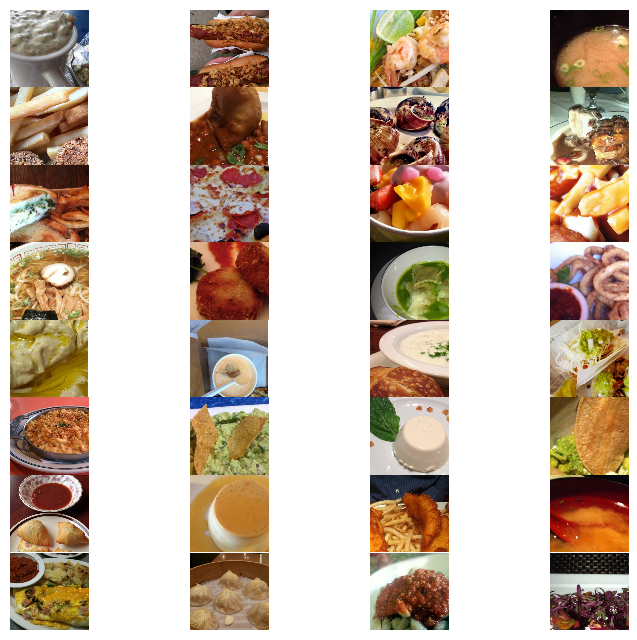
 CPU times: user 1.54 s, sys: 524 ms, total: 2.06 s
Wall time: 2.24 s
 % % time
show_images ( unprocess = False )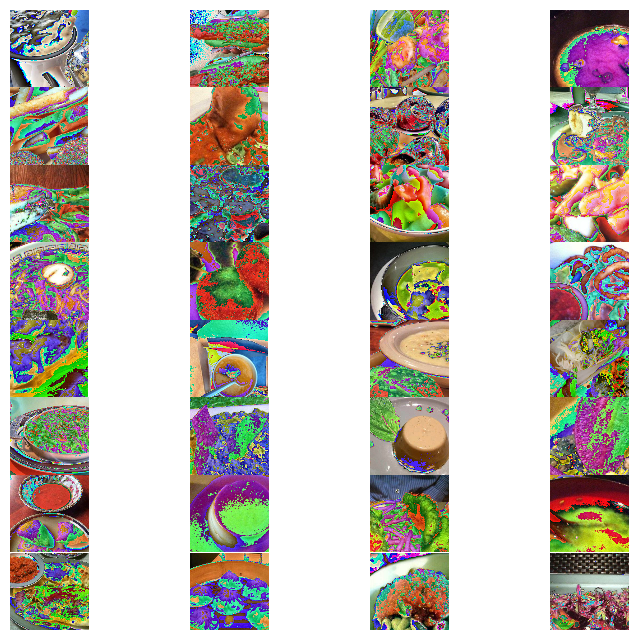
 CPU times: user 1.58 s, sys: 300 ms, total: 1.88 s
Wall time: 2.11 s
เราจะฝึกอบรมแบบจำลอง Google InceptionV3 อีกครั้งโดยได้รับการฝึกฝนเกี่ยวกับ Imagenet สถาปัตยกรรมเครือข่ายประสาทแสดงอยู่ด้านล่าง
 % % time
from keras . models import Sequential , Model
from keras . layers import Dense , Dropout , Activation , Flatten
from keras . layers import Convolution2D , MaxPooling2D , ZeroPadding2D , GlobalAveragePooling2D , AveragePooling2D
from keras . layers . normalization import BatchNormalization
from keras . preprocessing . image import ImageDataGenerator
from keras . callbacks import ModelCheckpoint , CSVLogger , LearningRateScheduler , ReduceLROnPlateau
from keras . optimizers import SGD
from keras . regularizers import l2
import keras . backend as K
import math

K . clear_session ()

base_model = InceptionV3 ( weights = 'imagenet' , include_top = False , input_tensor = Input ( shape = ( 299 , 299 , 3 )))
x = base_model . output
x = AveragePooling2D ( pool_size = ( 8 , 8 ))( x )
x = Dropout ( .4 )( x )
x = Flatten ()( x )
predictions = Dense ( n_classes , init = 'glorot_uniform' , W_regularizer = l2 ( .0005 ), activation = 'softmax' )( x )

model = Model ( input = base_model . input , output = predictions )

opt = SGD ( lr = .01 , momentum = .9 )
model . compile ( optimizer = opt , loss = 'categorical_crossentropy' , metrics = [ 'accuracy' ])

checkpointer = ModelCheckpoint ( filepath = 'model4.{epoch:02d}-{val_loss:.2f}.hdf5' , verbose = 1 , save_best_only = True )
csv_logger = CSVLogger ( 'model4.log' )

def schedule ( epoch ):
    if epoch < 15 :
        return .01
    elif epoch < 28 :
        return .002
    else :
        return .0004
lr_scheduler = LearningRateScheduler ( schedule )

model . fit_generator ( train_generator ,
                    validation_data = test_generator ,
                    nb_val_samples = X_test . shape [ 0 ],
                    samples_per_epoch = X_train . shape [ 0 ],
                    nb_epoch = 32 ,
                    verbose = 2 ,
                    callbacks = [ lr_scheduler , csv_logger , checkpointer ])
Epoch 1/32
Epoch 00000: val_loss improved from inf to 3.37355, saving model to model4.00-3.37.hdf5
1342s - loss: 4.2541 - acc: 0.0810 - val_loss: 3.3736 - val_acc: 0.2010
Epoch 2/32
Epoch 00001: val_loss improved from 3.37355 to 2.36625, saving model to model4.01-2.37.hdf5
1329s - loss: 2.9745 - acc: 0.3075 - val_loss: 2.3662 - val_acc: 0.4071
Epoch 3/32
Epoch 00002: val_loss improved from 2.36625 to 1.79355, saving model to model4.02-1.79.hdf5
1329s - loss: 2.3080 - acc: 0.4539 - val_loss: 1.7935 - val_acc: 0.5338
Epoch 4/32
Epoch 00003: val_loss improved from 1.79355 to 1.48898, saving model to model4.03-1.49.hdf5
1356s - loss: 2.0102 - acc: 0.5216 - val_loss: 1.4890 - val_acc: 0.6068
Epoch 5/32
Epoch 00004: val_loss improved from 1.48898 to 1.34121, saving model to model4.04-1.34.hdf5
1330s - loss: 1.8436 - acc: 0.5577 - val_loss: 1.3412 - val_acc: 0.6431
Epoch 6/32
Epoch 00005: val_loss improved from 1.34121 to 1.22485, saving model to model4.05-1.22.hdf5
1329s - loss: 1.7057 - acc: 0.5909 - val_loss: 1.2248 - val_acc: 0.6740
Epoch 7/32
Epoch 00006: val_loss did not improve
1328s - loss: 1.5996 - acc: 0.6126 - val_loss: 1.2310 - val_acc: 0.6716
Epoch 8/32
Epoch 00007: val_loss improved from 1.22485 to 1.11248, saving model to model4.07-1.11.hdf5
1331s - loss: 1.5148 - acc: 0.6314 - val_loss: 1.1125 - val_acc: 0.7022
Epoch 9/32
Epoch 00008: val_loss improved from 1.11248 to 1.07145, saving model to model4.08-1.07.hdf5
1331s - loss: 1.4395 - acc: 0.6506 - val_loss: 1.0714 - val_acc: 0.7095
Epoch 10/32
Epoch 00009: val_loss improved from 1.07145 to 1.05129, saving model to model4.09-1.05.hdf5
1333s - loss: 1.3900 - acc: 0.6637 - val_loss: 1.0513 - val_acc: 0.7181
Epoch 11/32
Epoch 00010: val_loss improved from 1.05129 to 1.03356, saving model to model4.10-1.03.hdf5
1331s - loss: 1.3316 - acc: 0.6780 - val_loss: 1.0336 - val_acc: 0.7250
Epoch 12/32
Epoch 00011: val_loss improved from 1.03356 to 1.00622, saving model to model4.11-1.01.hdf5
1331s - loss: 1.2850 - acc: 0.6893 - val_loss: 1.0062 - val_acc: 0.7275
Epoch 13/32
Epoch 00012: val_loss improved from 1.00622 to 0.94016, saving model to model4.12-0.94.hdf5
1330s - loss: 1.2325 - acc: 0.7003 - val_loss: 0.9402 - val_acc: 0.7461
Epoch 14/32
Epoch 00013: val_loss did not improve
1330s - loss: 1.1970 - acc: 0.7086 - val_loss: 0.9461 - val_acc: 0.7453
Epoch 15/32
Epoch 00014: val_loss did not improve
1329s - loss: 1.1683 - acc: 0.7154 - val_loss: 0.9691 - val_acc: 0.7396
Epoch 16/32
Epoch 00015: val_loss improved from 0.94016 to 0.71776, saving model to model4.15-0.72.hdf5
1329s - loss: 0.9398 - acc: 0.7724 - val_loss: 0.7178 - val_acc: 0.8055
Epoch 17/32
Epoch 00016: val_loss improved from 0.71776 to 0.70245, saving model to model4.16-0.70.hdf5
1329s - loss: 0.8591 - acc: 0.7916 - val_loss: 0.7025 - val_acc: 0.8069
Epoch 18/32
Epoch 00017: val_loss did not improve
1327s - loss: 0.8238 - acc: 0.8023 - val_loss: 0.7093 - val_acc: 0.8053
Epoch 19/32
Epoch 00018: val_loss did not improve
1327s - loss: 0.7947 - acc: 0.8093 - val_loss: 0.7048 - val_acc: 0.8059
Epoch 20/32
Epoch 00019: val_loss did not improve
1327s - loss: 0.7713 - acc: 0.8143 - val_loss: 0.7097 - val_acc: 0.8061
Epoch 21/32
Epoch 00020: val_loss improved from 0.70245 to 0.69545, saving model to model4.20-0.70.hdf5
1329s - loss: 0.7458 - acc: 0.8195 - val_loss: 0.6955 - val_acc: 0.8104
Epoch 22/32
Epoch 00021: val_loss did not improve
1328s - loss: 0.7282 - acc: 0.8232 - val_loss: 0.6977 - val_acc: 0.8119
Epoch 23/32
Epoch 00022: val_loss improved from 0.69545 to 0.69190, saving model to model4.22-0.69.hdf5
1328s - loss: 0.7114 - acc: 0.8284 - val_loss: 0.6919 - val_acc: 0.8150
Epoch 24/32
Epoch 00023: val_loss did not improve
1325s - loss: 0.6983 - acc: 0.8311 - val_loss: 0.7002 - val_acc: 0.8116
Epoch 25/32
Epoch 00024: val_loss did not improve
1330s - loss: 0.6719 - acc: 0.8381 - val_loss: 0.7031 - val_acc: 0.8112
Epoch 26/32
Epoch 00025: val_loss did not improve
1382s - loss: 0.6607 - acc: 0.8407 - val_loss: 0.7115 - val_acc: 0.8083
Epoch 27/32
Epoch 00026: val_loss did not improve
1330s - loss: 0.6479 - acc: 0.8439 - val_loss: 0.7037 - val_acc: 0.8126
Epoch 28/32
Epoch 00027: val_loss did not improve
1328s - loss: 0.6292 - acc: 0.8478 - val_loss: 0.7122 - val_acc: 0.8086
Epoch 29/32
Epoch 00028: val_loss improved from 0.69190 to 0.68908, saving model to model4.28-0.69.hdf5
1330s - loss: 0.5983 - acc: 0.8580 - val_loss: 0.6891 - val_acc: 0.8165
Epoch 30/32
Epoch 00029: val_loss improved from 0.68908 to 0.68740, saving model to model4.29-0.69.hdf5
1330s - loss: 0.5817 - acc: 0.8612 - val_loss: 0.6874 - val_acc: 0.8149
Epoch 31/32
Epoch 00030: val_loss did not improve
1328s - loss: 0.5729 - acc: 0.8642 - val_loss: 0.6912 - val_acc: 0.8143
Epoch 32/32
Epoch 00031: val_loss did not improve
1329s - loss: 0.5638 - acc: 0.8663 - val_loss: 0.6895 - val_acc: 0.8159
CPU times: user 8h 49min 20s, sys: 1h 55min 54s, total: 10h 45min 14s
Wall time: 11h 51min 18s
ณ จุดนี้เราเห็นความแม่นยำสูงสุด 81.65 การครอบตัด Top-1 ในชุดทดสอบ เราสามารถฝึกอบรมแบบจำลองต่อไปในอัตราการเรียนรู้ที่ช้าลงเพื่อดูว่ามันดีขึ้นหรือไม่
การทดลองครั้งแรกของฉันใช้ Optimizers ที่ทันสมัยกว่าเช่น Adam และ Adadelta พร้อมกับอัตราการเรียนรู้ที่สูงขึ้น ฉันติดอยู่ในขณะที่ความแม่นยำต่ำกว่า 80% ก่อนที่ฉันจะตัดสินใจติดตามวรรณกรรมอย่างใกล้ชิดและใช้ Descent Stochastic Gradient Descent (SGD) ด้วยตารางการเรียนรู้ที่ลดลงอย่างรวดเร็ว เมื่อเราค้นหาผ่านพื้นผิวหลายมิติบางครั้งจะช้าลงไปไกล
เนื่องจากความไม่แน่นอนบางอย่างด้วยรหัสการประมวลผลแบบหลายโปรเซสเซอร์ของฉันบางครั้งฉันต้องรีสตาร์ทโน้ตบุ๊กโหลดรุ่นล่าสุดจากนั้นทำการฝึกอบรมต่อ
 % % time
from keras . models import Sequential , Model , load_model
from keras . layers import Dense , Dropout , Activation , Flatten
from keras . layers import Convolution2D , MaxPooling2D , ZeroPadding2D , GlobalAveragePooling2D , AveragePooling2D
from keras . layers . normalization import BatchNormalization
from keras . preprocessing . image import ImageDataGenerator
from keras . callbacks import ModelCheckpoint , CSVLogger , LearningRateScheduler , ReduceLROnPlateau
from keras . optimizers import SGD
from keras . regularizers import l2
import keras . backend as K
import math

model = load_model ( filepath = './model4.29-0.69.hdf5' )

opt = SGD ( lr = .01 , momentum = .9 )
model . compile ( optimizer = opt , loss = 'categorical_crossentropy' , metrics = [ 'accuracy' ])

checkpointer = ModelCheckpoint ( filepath = 'model4b.{epoch:02d}-{val_loss:.2f}.hdf5' , verbose = 1 , save_best_only = True )
csv_logger = CSVLogger ( 'model4b.log' )

def schedule ( epoch ):
    if epoch < 10 :
        return .00008
    elif epoch < 20 :
        return .000016
    else :
        return .0000032

lr_scheduler = LearningRateScheduler ( schedule )

model . fit_generator ( train_generator ,
                    validation_data = test_generator ,
                    nb_val_samples = X_test . shape [ 0 ],
                    samples_per_epoch = X_train . shape [ 0 ],
                    nb_epoch = 32 ,
                    verbose = 2 ,
callbacks = [ lr_scheduler , csv_logger , checkpointer ]) ณ จุดนี้เราควรได้รับการฝึกฝนหลายรุ่นที่บันทึกไว้ในดิสก์ เราสามารถผ่านพวกเขาและใช้ฟังก์ชั่น load_model เพื่อโหลดโมเดลด้วยความสูญเสียต่ำสุด / ความแม่นยำสูงสุด
 % % time
#model = load_model(filepath='./model4.29-0.69.hdf5') # 86.8039 10-crop Top-1 test accuracy
model = load_model ( filepath = './model4b.10-0.68.hdf5' ) # 86.9703
CPU times: user 36.4 s, sys: 1.11 s, total: 37.5 s
Wall time: 36.5 s
นอกจากนี้เรายังต้องการประเมินชุดทดสอบโดยใช้พืชหลายชนิด สิ่งนี้สามารถเพิ่มความแม่นยำได้ 5% เมื่อเทียบกับการประเมินผลการเพาะปลูกครั้งเดียว เป็นเรื่องปกติที่จะใช้พืชผลต่อไปนี้: ซ้ายบน, ขวาบน, ซ้ายล่าง, ล่างขวาล่าง, กึ่งกลาง นอกจากนี้เรายังใช้พืชเดียวกันกับภาพที่พลิกไปจากซ้ายไปขวาสร้างพืชผลทั้งหมด 10 ชนิด
นอกจากนี้เราต้องการส่งคืนการคาดการณ์ N-N สำหรับแต่ละพืชเพื่อคำนวณความแม่นยำสูงสุด 5 Top-5
 def center_crop ( x , center_crop_size , ** kwargs ):
    centerw , centerh = x . shape [ 0 ] // 2 , x . shape [ 1 ] // 2
    halfw , halfh = center_crop_size [ 0 ] // 2 , center_crop_size [ 1 ] // 2
    return x [ centerw - halfw : centerw + halfw + 1 , centerh - halfh : centerh + halfh + 1 , :]
def predict_10_crop ( img , ix , top_n = 5 , plot = False , preprocess = True , debug = False ):
flipped_X = np . fliplr ( img )
crops = [
img [: 299 ,: 299 , :], # Upper Left
img [: 299 , img . shape [ 1 ] - 299 :, :], # Upper Right
img [ img . shape [ 0 ] - 299 :, : 299 , :], # Lower Left
img [ img . shape [ 0 ] - 299 :, img . shape [ 1 ] - 299 :, :], # Lower Right
center_crop ( img , ( 299 , 299 )),
flipped_X [: 299 ,: 299 , :],
flipped_X [: 299 , flipped_X . shape [ 1 ] - 299 :, :],
flipped_X [ flipped_X . shape [ 0 ] - 299 :, : 299 , :],
flipped_X [ flipped_X . shape [ 0 ] - 299 :, flipped_X . shape [ 1 ] - 299 :, :],
center_crop ( flipped_X , ( 299 , 299 ))
]
if preprocess :
crops = [ preprocess_input ( x . astype ( 'float32' )) for x in crops ]
if plot :
fig , ax = plt . subplots ( 2 , 5 , figsize = ( 10 , 4 ))
ax [ 0 ][ 0 ]. imshow ( crops [ 0 ])
ax [ 0 ][ 1 ]. imshow ( crops [ 1 ])
ax [ 0 ][ 2 ]. imshow ( crops [ 2 ])
ax [ 0 ][ 3 ]. imshow ( crops [ 3 ])
ax [ 0 ][ 4 ]. imshow ( crops [ 4 ])
ax [ 1 ][ 0 ]. imshow ( crops [ 5 ])
ax [ 1 ][ 1 ]. imshow ( crops [ 6 ])
ax [ 1 ][ 2 ]. imshow ( crops [ 7 ])
ax [ 1 ][ 3 ]. imshow ( crops [ 8 ])
ax [ 1 ][ 4 ]. imshow ( crops [ 9 ])
y_pred = model . predict ( np . array ( crops ))
preds = np . argmax ( y_pred , axis = 1 )
top_n_preds = np . argpartition ( y_pred , - top_n )[:, - top_n :]
if debug :
print ( 'Top-1 Predicted:' , preds )
print ( 'Top-5 Predicted:' , top_n_preds )
print ( 'True Label:' , y_test [ ix ])
return preds , top_n_preds
ix = 13001
predict_10_crop ( X_test [ ix ], ix , top_n = 5 , plot = True , preprocess = False , debug = True ) Top-1 Predicted: [74 74 74 74 74 74 74 74 74 74]
Top-5 Predicted: [[33 97 37 39 74]
[28 52 37 39 74]
[73 39 52 37 74]
[35 33 37 39 74]
[35 33 37 39 74]
[35 33 37 39 74]
[35 33 37 39 74]
[97 37 73 39 74]
[73 52 37 39 74]
[34 35 33 39 74]]
True Label: 88
(array([74, 74, 74, 74, 74, 74, 74, 74, 74, 74]), array([[33, 97, 37, 39, 74],
[28, 52, 37, 39, 74],
[73, 39, 52, 37, 74],
[35, 33, 37, 39, 74],
[35, 33, 37, 39, 74],
[35, 33, 37, 39, 74],
[35, 33, 37, 39, 74],
[97, 37, 73, 39, 74],
[73, 52, 37, 39, 74],
[34, 35, 33, 39, 74]]))
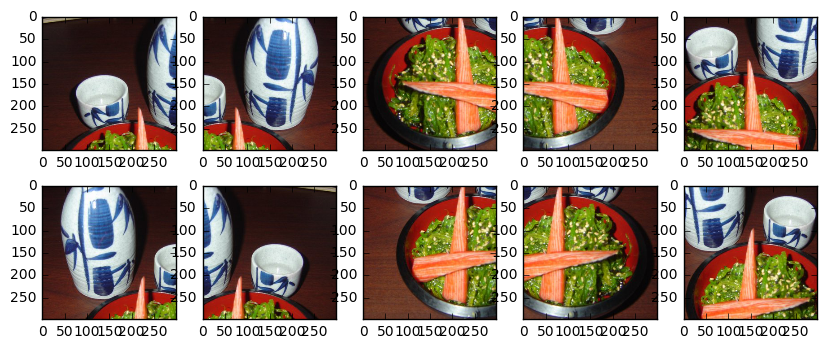
นอกจากนี้เรายังต้องประมวลผลภาพล่วงหน้าสำหรับรูปแบบการลงทะเบียน:
 ix = 13001
predict_10_crop ( X_test [ ix ], ix , top_n = 5 , plot = True , preprocess = True , debug = True )
Top-1 Predicted: [51 51 88 88 88 51 51 88 88 88]
Top-5 Predicted: [[18 79 51 13 48]
[48 79 11 55 51]
[79 93 81 37 88]
[51 86 93 81 88]
[11 79 51 81 88]
[19 79 51 56 13]
[11 88 48 51 13]
[37 93 86 88 81]
[37 79 93 88 81]
[84 81 11 79 88]]
True Label: 88
(array([51, 51, 88, 88, 88, 51, 51, 88, 88, 88]), array([[18, 79, 51, 13, 48],
[48, 79, 11, 55, 51],
[79, 93, 81, 37, 88],
[51, 86, 93, 81, 88],
[11, 79, 51, 81, 88],
[19, 79, 51, 56, 13],
[11, 88, 48, 51, 13],
[37, 93, 86, 88, 81],
[37, 79, 93, 88, 81],
[84, 81, 11, 79, 88]]))
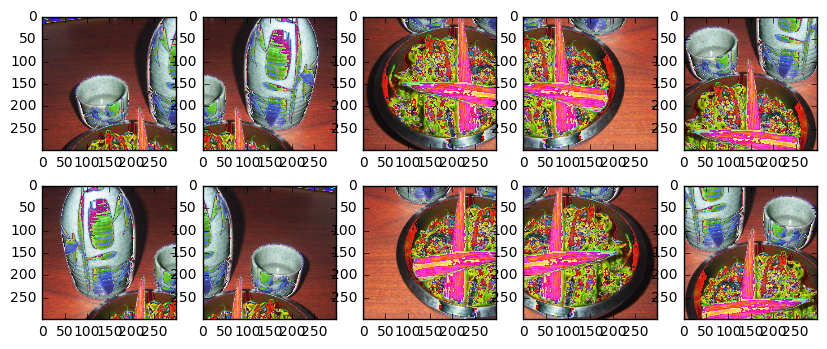
ตอนนี้เราสร้างพืชสำหรับแต่ละรายการในชุดทดสอบและรับการคาดการณ์ นี่เป็นกระบวนการที่ช้าในขณะนี้เนื่องจากฉันไม่ได้ใช้ประโยชน์จากการประมวลผลหลายครั้งหรือแบบขนานประเภทอื่น ๆ
 % % time
preds_10_crop = {}
for ix in range ( len ( X_test )):
    if ix % 1000 == 0 :
        print ( ix )
    preds_10_crop [ ix ] = predict_10_crop ( X_test [ ix ], ix )
0
1000
2000
3000
4000
5000
6000
7000
8000
9000
10000
11000
12000
13000
14000
15000
16000
17000
18000
19000
20000
21000
22000
23000
24000
25000
CPU times: user 50min 3s, sys: 5min 13s, total: 55min 16s
Wall time: 31min 28s
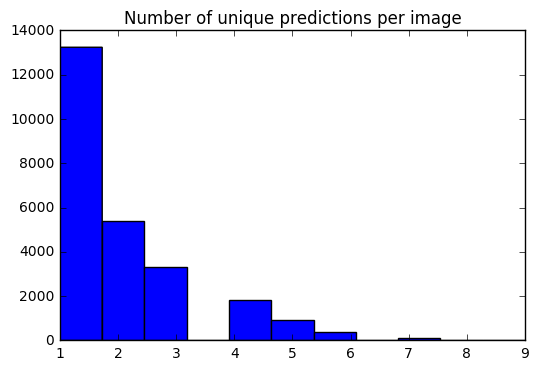
ตอนนี้เรามีชุดการคาดการณ์ 10 ชุดสำหรับแต่ละภาพ ด้วยการใช้ฮิสโตแกรมฉันสามารถดูได้ว่า # ของการคาดการณ์ที่ไม่ซ้ำกันสำหรับแต่ละภาพมีการแจกจ่ายอย่างไร
 preds_uniq = { k : np . unique ( v [ 0 ]) for k , v in preds_10_crop . items ()}
preds_hist = np . array ([ len ( x ) for x in preds_uniq . values ()])

plt . hist ( preds_hist , bins = 11 )
plt . title ( 'Number of unique predictions per image' )
<matplotlib.text.Text at 0x7fe30c3daa20>
มาสร้างพจนานุกรมเพื่อทำแผนที่ดัชนีรายการทดสอบกับการคาดการณ์ Top-1 / Top-5
 preds_top_1 = { k : collections . Counter ( v [ 0 ]). most_common ( 1 ) for k , v in preds_10_crop . items ()}

top_5_per_ix = { k : collections . Counter ( preds_10_crop [ k ][ 1 ]. reshape ( - 1 )). most_common ( 5 )
                for k , v in preds_10_crop . items ()}
preds_top_5 = { k : [ y [ 0 ] for y in v ] for k , v in top_5_per_ix . items ()}
% % time
right_counter = 0
for i in range ( len ( y_test )):
guess , actual = preds_top_1 [ i ][ 0 ][ 0 ], y_test [ i ]
if guess == actual :
right_counter += 1
print ( 'Top-1 Accuracy, 10-Crop: {0:.2f}%' . format ( right_counter / len ( y_test ) * 100 )) Top-1 Accuracy, 10-Crop: 86.97%
CPU times: user 28 ms, sys: 0 ns, total: 28 ms
Wall time: 27.3 ms
 % % time
top_5_counter = 0
for i in range ( len ( y_test )):
    guesses , actual = preds_top_5 [ i ], y_test [ i ]
    if actual in guesses :
        top_5_counter += 1

print ( 'Top-5 Accuracy, 10-Crop: {0:.2f}%' . format ( top_5_counter / len ( y_test ) * 100 ))
Top-5 Accuracy, 10-Crop: 97.42%
CPU times: user 28 ms, sys: 0 ns, total: 28 ms
Wall time: 27 ms
y_pred = [ x [ 0 ][ 0 ] for x in preds_top_1 . values ()] @ interact ( page = [ 0 , int ( len ( X_test ) / 20 )])
def show_images_prediction ( page = 0 ):
page_size = 20
nrows = 4
ncols = 5
fig , axes = plt . subplots ( nrows = nrows , ncols = ncols , figsize = ( 12 , 12 ))
fig . set_size_inches ( 12 , 8 )
#fig.tight_layout()
#imgs = np.random.choice((y_all == n_class).nonzero()[0], nrows * ncols)
start_i = page * page_size
for i , ax in enumerate ( axes . flat ):
im = ax . imshow ( X_test [ i + start_i ])
ax . set_axis_off ()
ax . title . set_visible ( False )
ax . xaxis . set_ticks ([])
ax . yaxis . set_ticks ([])
for spine in ax . spines . values ():
spine . set_visible ( False )
predicted = ix_to_class [ y_pred [ i + start_i ]]
match = predicted == ix_to_class [ y_test [ start_i + i ]]
ec = ( 1 , .5 , .5 )
fc = ( 1 , .8 , .8 )
if match :
ec = ( 0 , .6 , .1 )
fc = ( 0 , .7 , .2 )
# predicted label
ax . text ( 0 , 400 , 'P: ' + predicted , size = 10 , rotation = 0 ,
ha = "left" , va = "top" ,
bbox = dict ( boxstyle = "round" ,
ec = ec ,
fc = fc ,
)
)
if not match :
# true label
ax . text ( 0 , 480 , 'A: ' + ix_to_class [ y_test [ start_i + i ]], size = 10 , rotation = 0 ,
ha = "left" , va = "top" ,
bbox = dict ( boxstyle = "round" ,
ec = ec ,
fc = fc ,
)
)
plt . subplots_adjust ( left = 0 , wspace = 1 , hspace = 0 )
plt . show ()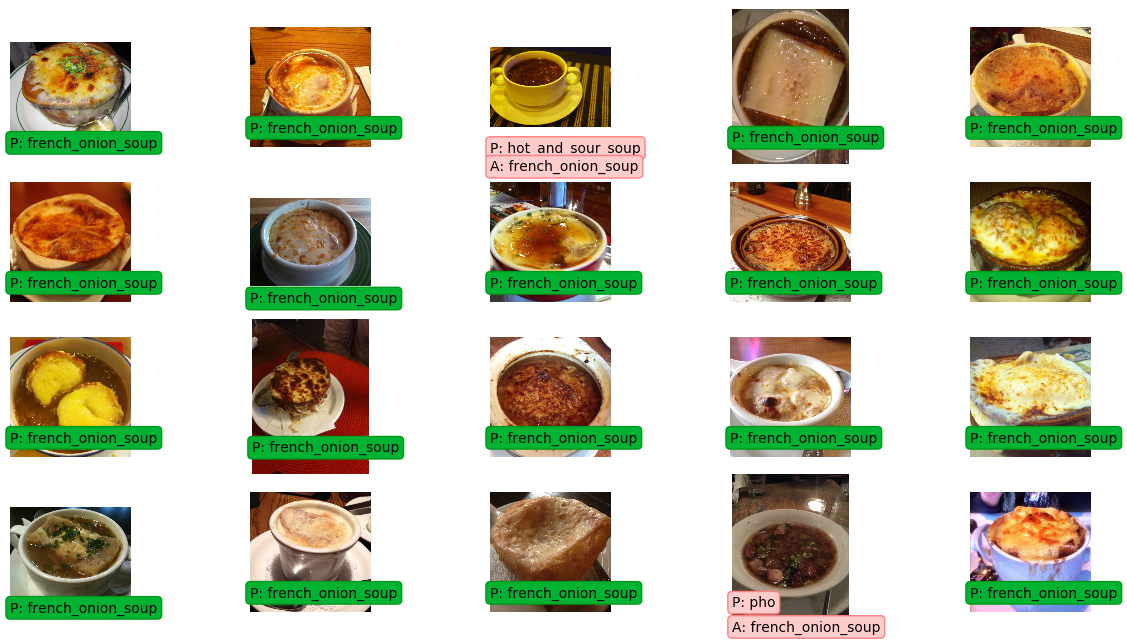
เมทริกซ์ความสับสนจะพล็อตฉลากแต่ละชั้นเรียนและมีกี่ครั้งที่มีการติดฉลากอย่างถูกต้องเทียบกับเวลาอื่น ๆ ที่มีการระบุว่าเป็นคลาสที่แตกต่างกันอย่างไม่ถูกต้อง
 % % time
from sklearn . metrics import confusion_matrix
import itertools

def plot_confusion_matrix ( cm , classes ,
                          normalize = False ,
                          title = 'Confusion matrix' ,
                          cmap = plt . cm . Blues ):
    """
    This function prints and plots the confusion matrix.
    Normalization can be applied by setting `normalize=True`.
    """
    plt . imshow ( cm , interpolation = 'nearest' , cmap = cmap )
    plt . title ( title )
    plt . colorbar ()
    tick_marks = np . arange ( len ( classes ))
    plt . xticks ( tick_marks , classes , rotation = 90 )
    plt . yticks ( tick_marks , classes )

    if normalize :
        cm = cm . astype ( 'float' ) / cm . sum ( axis = 1 )[:, np . newaxis ]
        print ( "Normalized confusion matrix" )
    else :
        print ( 'Confusion matrix, without normalization' )

    print ( cm )

    thresh = cm . max () / 2.
    for i , j in itertools . product ( range ( cm . shape [ 0 ]), range ( cm . shape [ 1 ])):
        plt . text ( j , i , cm [ i , j ],
                 horizontalalignment = "center" ,
                 color = "white" if cm [ i , j ] > thresh else "black" )

    plt . tight_layout ()
    plt . ylabel ( 'True label' )
    plt . xlabel ( 'Predicted label' )


# Compute confusion matrix
cnf_matrix = confusion_matrix ( y_test , y_pred )
np . set_printoptions ( precision = 2 )

class_names = [ ix_to_class [ i ] for i in range ( 101 )]

plt . figure ()
fig = plt . gcf ()
fig . set_size_inches ( 32 , 32 )
plot_confusion_matrix ( cnf_matrix , classes = class_names ,
                      title = 'Confusion matrix, without normalization' ,
                      cmap = plt . cm . cool )
plt . show ()
Confusion matrix, without normalization
[[179 0 4 ..., 2 0 5]
[ 0 218 0 ..., 0 0 0]
[ 4 0 228 ..., 1 0 0]
...,
[ 0 0 0 ..., 212 0 1]
[ 0 0 0 ..., 0 208 0]
[ 0 0 0 ..., 0 0 224]]
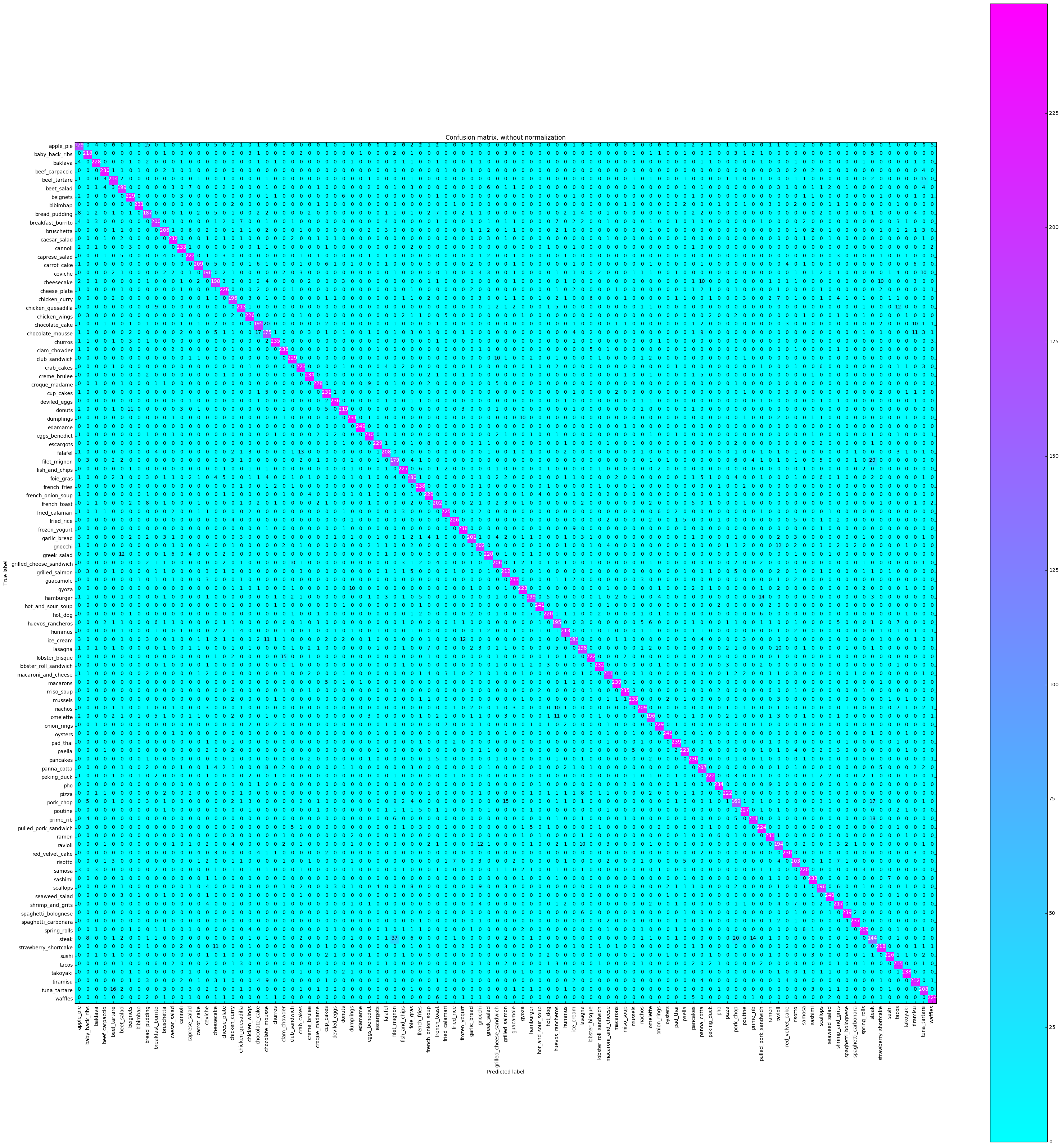
 CPU times: user 16.4 s, sys: 1.22 s, total: 17.6 s
Wall time: 16.4 s
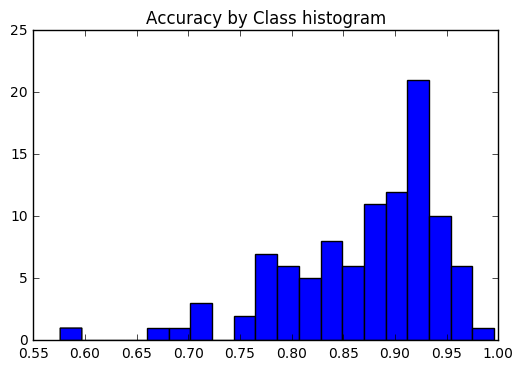
เราต้องการดูว่าความแม่นยำนั้นสอดคล้องกันในทุกคลาสหรือไม่หรือบางคลาสนั้นง่ายกว่า / ยากกว่าที่จะติดฉลากมากกว่าคนอื่น ๆ ตามพล็อตของเรามีชั้นเรียนสองสามชั้นในแง่ของการติดฉลากได้ยากขึ้นอย่างถูกต้อง
 corrects = collections . defaultdict ( int )
incorrects = collections . defaultdict ( int )
for ( pred , actual ) in zip ( y_pred , y_test ):
    if pred == actual :
        corrects [ actual ] += 1
    else :
        incorrects [ actual ] += 1

class_accuracies = {}
for ix in range ( 101 ):
    class_accuracies [ ix ] = corrects [ ix ] / 250

plt . hist ( list ( class_accuracies . values ()), bins = 20 )
plt . title ( 'Accuracy by Class histogram' )
<matplotlib.text.Text at 0x7fe2d5d4f860>
 sorted_class_accuracies = sorted ( class_accuracies . items (), key = lambda x : - x [ 1 ])
[( ix_to_class [ c [ 0 ]], c [ 1 ]) for c in sorted_class_accuracies ]
[('edamame', 0.996),
('hot_and_sour_soup', 0.964),
('oysters', 0.964),
('seaweed_salad', 0.96),
('macarons', 0.956),
('pad_thai', 0.956),
('spaghetti_bolognese', 0.956),
('french_fries', 0.952),
('frozen_yogurt', 0.952),
('takoyaki', 0.952),
('spaghetti_carbonara', 0.948),
('clam_chowder', 0.944),
('deviled_eggs', 0.944),
('churros', 0.94),
('miso_soup', 0.94),
('creme_brulee', 0.936),
('pho', 0.936),
('cannoli', 0.932),
('guacamole', 0.932),
('mussels', 0.932),
('sashimi', 0.932),
('caesar_salad', 0.928),
('lobster_roll_sandwich', 0.928),
('bibimbap', 0.924),
('cup_cakes', 0.924),
('dumplings', 0.924),
('ramen', 0.924),
('beef_carpaccio', 0.92),
('eggs_benedict', 0.92),
('pancakes', 0.92),
('red_velvet_cake', 0.92),
('beignets', 0.916),
('club_sandwich', 0.916),
('escargots', 0.916),
('french_onion_soup', 0.916),
('onion_rings', 0.916),
('baklava', 0.912),
('croque_madame', 0.912),
('fish_and_chips', 0.908),
('poutine', 0.908),
('cheese_plate', 0.904),
('chicken_wings', 0.904),
('fried_rice', 0.904),
('sushi', 0.904),
('fried_calamari', 0.9),
('pulled_pork_sandwich', 0.896),
('waffles', 0.896),
('crab_cakes', 0.892),
('gyoza', 0.892),
('paella', 0.892),
('caprese_salad', 0.888),
('lobster_bisque', 0.888),
('peking_duck', 0.888),
('pizza', 0.888),
('greek_salad', 0.88),
('hot_dog', 0.88),
('samosa', 0.88),
('donuts', 0.876),
('spring_rolls', 0.876),
('baby_back_ribs', 0.872),
('strawberry_shortcake', 0.872),
('shrimp_and_grits', 0.868),
('tacos', 0.86),
('beef_tartare', 0.856),
('prime_rib', 0.856),
('chicken_quesadilla', 0.852),
('hummus', 0.852),
('grilled_salmon', 0.848),
('tiramisu', 0.848),
('macaroni_and_cheese', 0.844),
('carrot_cake', 0.836),
('nachos', 0.836),
('falafel', 0.832),
('tuna_tartare', 0.832),
('panna_cotta', 0.828),
('bruschetta', 0.824),
('grilled_cheese_sandwich', 0.824),
('risotto', 0.812),
('french_toast', 0.808),
('gnocchi', 0.808),
('garlic_bread', 0.804),
('breakfast_burrito', 0.8),
('beet_salad', 0.796),
('hamburger', 0.796),
('cheesecake', 0.792),
('lasagna', 0.792),
('ceviche', 0.784),
('chicken_curry', 0.784),
('omelette', 0.784),
('scallops', 0.784),
('chocolate_cake', 0.78),
('huevos_rancheros', 0.78),
('ravioli', 0.776),
('ice_cream', 0.764),
('bread_pudding', 0.748),
('foie_gras', 0.72),
('apple_pie', 0.716),
('filet_mignon', 0.716),
('chocolate_mousse', 0.7),
('pork_chop', 0.676),
('steak', 0.576)]
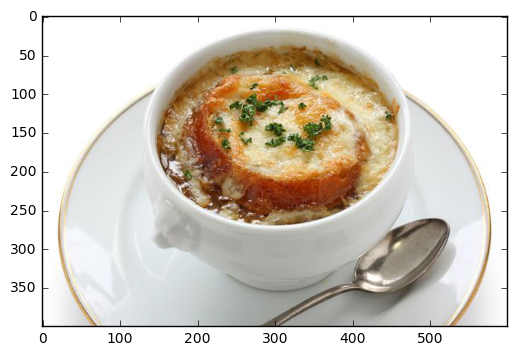
การทำนายจากไฟล์ท้องถิ่น
 pic_path = '/home/stratospark/Downloads/soup.jpg'
pic = img . imread ( pic_path )
preds = predict_10_crop ( np . array ( pic ), 0 )[ 0 ]
best_pred = collections . Counter ( preds ). most_common ( 1 )[ 0 ][ 0 ]
print ( ix_to_class [ best_pred ])
plt . imshow ( pic )
french_onion_soup
<matplotlib.image.AxesImage at 0x7fe2d59eb5c0>
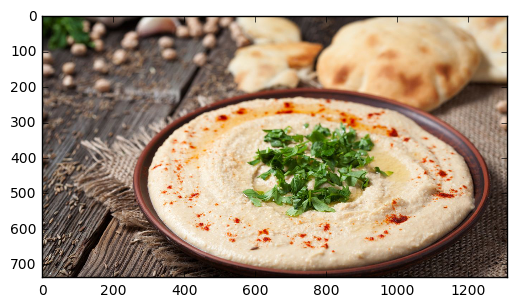
การทำนายจากภาพบนอินเทอร์เน็ต
 import urllib . request

@ interact
def predict_remote_image ( url = 'http://themodelhouse.tv/wp-content/uploads/2016/08/hummus.jpg' ):
    with urllib . request . urlopen ( url ) as f :
        pic = plt . imread ( f , format = 'jpg' )
        preds = predict_10_crop ( np . array ( pic ), 0 )[ 0 ]
        best_pred = collections . Counter ( preds ). most_common ( 1 )[ 0 ][ 0 ]
        print ( ix_to_class [ best_pred ])
        plt . imshow ( pic )
hummus
 with open ( 'model.json' , 'w' ) as f :
    f . write ( model . to_json ())
import json
json . dumps ( ix_to_class ) '{"0": "apple_pie", "1": "baby_back_ribs", "2": "baklava", "3": "beef_carpaccio", "4": "beef_tartare", "5": "beet_salad", "6": "beignets", "7": "bibimbap", "8": "bread_pudding", "9": "breakfast_burrito", "10": "bruschetta", "11": "caesar_salad", "12": "cannoli", "13": "caprese_salad", "14": "carrot_cake", "15": "ceviche", "16": "cheesecake", "17": "cheese_plate", "18": "chicken_curry", "19": "chicken_quesadilla", "20": "chicken_wings", "21": "chocolate_cake", "22": "chocolate_mousse", "23": "churros", "24": "clam_chowder", "25": "club_sandwich", "26": "crab_cakes", "27": "creme_brulee", "28": "croque_madame", "29": "cup_cakes", "30": "deviled_eggs", "31": "donuts", "32": "dumplings", "33": "edamame", "34": "eggs_benedict", "35": "escargots", "36": "falafel", "37": "filet_mignon", "38": "fish_and_chips", "39": "foie_gras", "40": "french_fries", "41": "french_onion_soup", "42": "french_toast", "43": "fried_calamari", "44": "fried_rice", "45": "frozen_yogurt", "46": "garlic_bread", "47": "gnocchi", "48": "greek_salad", "49": "grilled_cheese_sandwich", "50": "grilled_salmon", "51": "guacamole", "52": "gyoza", "53": "hamburger", "54": "hot_and_sour_soup", "55": "hot_dog", "56": "huevos_rancheros", "57": "hummus", "58": "ice_cream", "59": "lasagna", "60": "lobster_bisque", "61": "lobster_roll_sandwich", "62": "macaroni_and_cheese", "63": "macarons", "64": "miso_soup", "65": "mussels", "66": "nachos", "67": "omelette", "68": "onion_rings", "69": "oysters", "70": "pad_thai", "71": "paella", "72": "pancakes", "73": "panna_cotta", "74": "peking_duck", "75": "pho", "76": "pizza", "77": "pork_chop", "78": "poutine", "79": "prime_rib", "80": "pulled_pork_sandwich", "81": "ramen", "82": "ravioli", "83": "red_velvet_cake", "84": "risotto", "85": "samosa", "86": "sashimi", "87": "scallops", "88": "seaweed_salad", "89": "shrimp_and_grits", "90": "spaghetti_bolognese", "91": "spaghetti_carbonara", "92": "spring_rolls", "93": "steak", "94": "strawberry_shortcake", "95": "sushi", "96": "tacos", "97": "takoyaki", "98": "tiramisu", "99": "tuna_tartare", "100": "waffles"}'





