godot 4.0 tool_button
Old Version

편집기 버튼 코드 한 줄 : 제로 줄의 코드.@tool
간단히 설치하고 모든 노드를 선택하십시오.
보다 고급 기능을 보려면 아래를 참조하십시오.
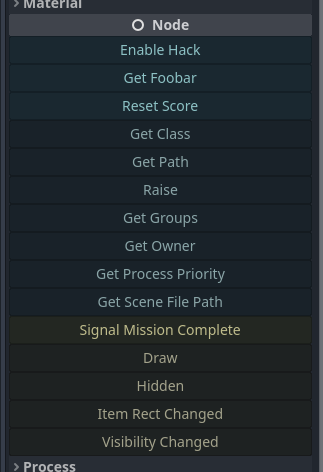
@tool 추가하십시오._get_tool_buttons() -> Array 메소드를 추가하십시오."my_method" 방법의 이름my_methodmethod.bind(true, "ok" 1.0)func(): print("Hey!")func press_me(): print("You pressed me!")"my_signal" 신호 이름my_signal["my_signal", [true, "ok"]]{call=method.bind(true), text="My Method", tint=Color.RED}["my_method", method2.bind(1.0), "a_signal", {text="X", call=reset}] 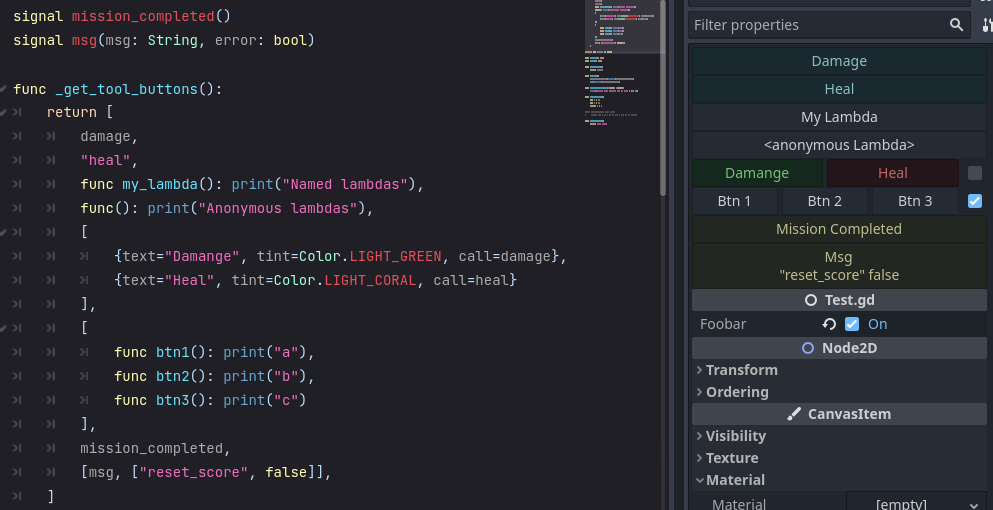
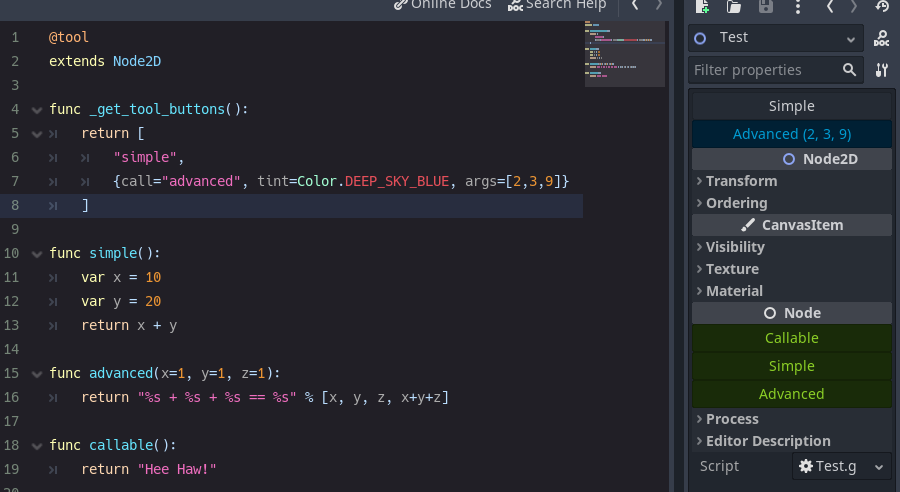
검사관 위에 표시되는 버튼을 지정하려면 _get_tool_buttons func를 추가하십시오.
Strings :
@tool
extends Node

func _get_tool_buttons() :
	return [ boost_score, remove_player ]

func boost_score() :
	Player.score += 100

func remove_player() :
	Player.queue_free()
및/또는 Callable s
 # WARNING, some stuff won't work: If you get *"Cannot access member without instance"*: https://github.com/godotengine/godot/issues/56780
@tool
extends Node

func _get_tool_buttons() :
	return [
		func add_score() : score += 10 ,
		func reset_health() : health = 0
	]
및/또는 Dictionarys
@tool
extends Node

signal reset()

func _get_tool_buttons() : return [
	" boost_score " ,
	{ call = " boost_score " , args = [ 100 ] , tint = Color.DEEP_SKY_BLUE } ,
	{ call = " emit_signal " , args = [ " reset " ] , text = " Reset " , tint = Color.TOMATO } ,
	{
		call = func() : print( " My Health: " , health),
		text = " Print Health " ,
		tint = func() : return Color(health * . 1 , 0.0 , 0.0 )
		lock = func() : return health == 100
	}
]

func boost_score(x = 10 ) :
	Player.score += x
call 필수입니다. 다른 사람은 선택 사항입니다.
| 열쇠 | DESC | 기본 |
|---|---|---|
| 부르다 | 전화 방법. | - |
| args | 통과 할 논쟁의 배열. (Args를보기 위해 마우스 오버 버튼.) | - |
| 텍스트 | 버튼 레이블. | - |
| 색조 | 버튼 색상. | 색. 화이트 |
| 상 | 버튼 아이콘. | - |
| 평평한 | 버튼은 평평한 스타일입니다. | 거짓 |
| 힌트 | 마우스에 대한 텍스트 힌트. | - |
| 인쇄 | 메소드 호출의 출력을 인쇄 하시겠습니까? | 진실 |
| 맞추다 | 버튼 정렬. | BoxContainer.Alignment_Center |
| 잠그다 | 버튼을 비활성화 하시겠습니까? | 거짓 |
| update_filesystem | Godot Editor에게 파일 시스템을 Rescan에 알려줍니다. | 거짓 |
_get_tool_buttons 의 경우 Resource 작업을 수행하려면 정적이어야합니다.
@tool
extends Resource
class_name MyResource

# STATIC
static func _get_tool_buttons() :
	return [ " my_button " ]

# LOCAL
export(String) var my_name : String = " "

func my_button() :
print(my_name)signal my_signal()
signal my_arg_signal(x, y)
func _get_tool_buttons() :
return [
my_signal,
[ my_arg_signal, [ true , " okay " ]]
] 같은 줄에 여러 개의 버튼을 가질 수 있습니다.
토글을 기준으로 한 번에 한 번 (기본값) 또는 별도를 불러 일으킬 수 있습니다.
 func _get_tool_buttons():
	return [
		[msg, msg.bind("yes"), msg.bind("no")],
	]

func msg(msg := "Default Message"):
	print("Got: ", msg)

func doit():
	pass
@SELECT_AND_EDIT::file_path , @EDIT_RESOURCE::file_path , @SELECT_FILE::file_path . 4.0.alpha2 에 대한 업데이트Callable 지원 call text icon tint lock : { text="Callable", call=func(): print("From Callable with love") }disabled lock 변경되었습니다





