godot 4.0 tool_button
Old Version

Boutons de l'éditeur avec Une ligne de code: zéro lignes de code.@tool
Installez simplement et sélectionnez n'importe quel nœud:
Pour des fonctionnalités plus avancées, lisez ci-dessous.
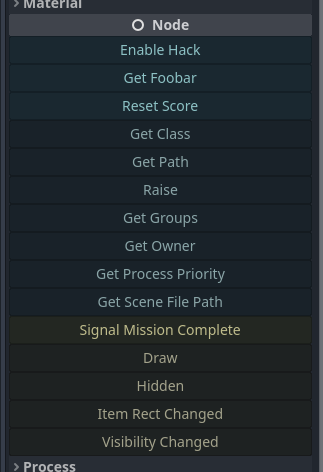
@tool au sommet de votre script._get_tool_buttons() -> Array ."my_method"my_methodmethod.bind(true, "ok" 1.0)func(): print("Hey!")func press_me(): print("You pressed me!")"my_signal"my_signal["my_signal", [true, "ok"]]{call=method.bind(true), text="My Method", tint=Color.RED}["my_method", method2.bind(1.0), "a_signal", {text="X", call=reset}] 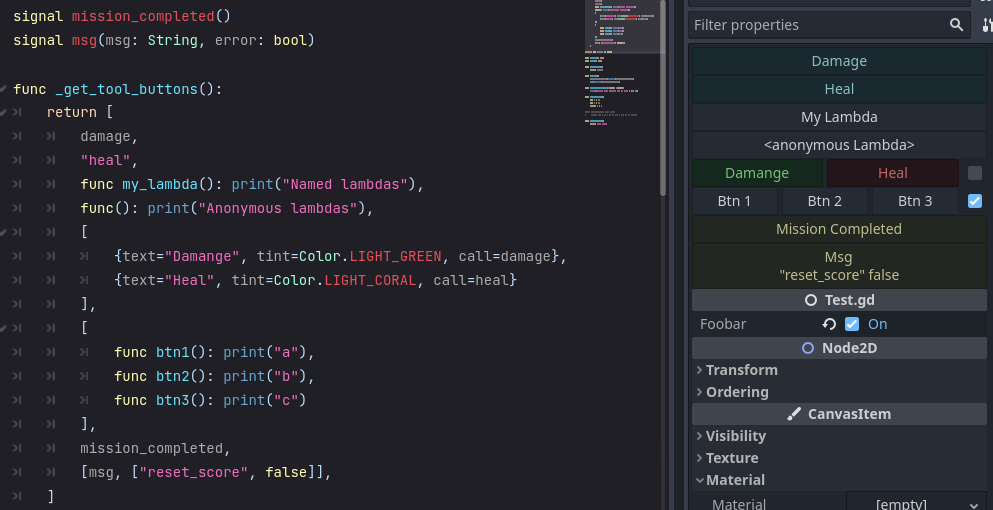
Pour spécifier des boutons qui affichent au-dessus de l'inspecteur, ajoutez un func _get_tool_buttons .
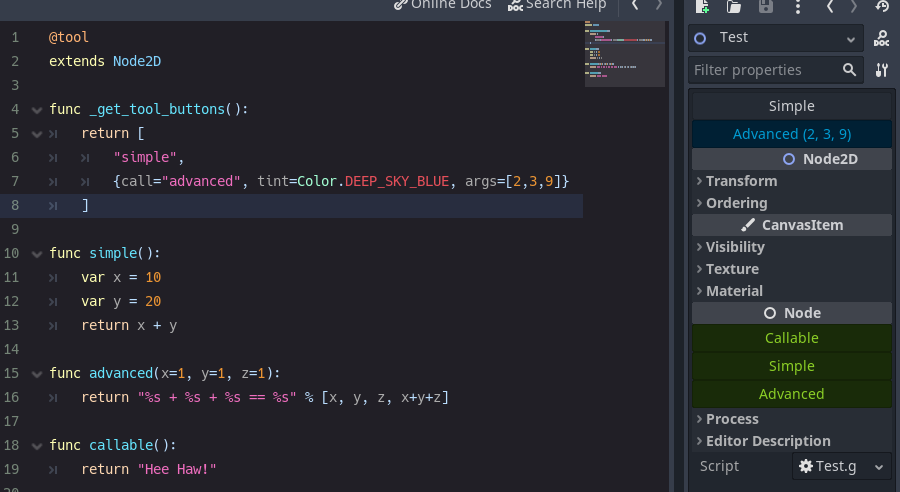
Avec Strings :
@tool
extends Node

func _get_tool_buttons() :
	return [ boost_score, remove_player ]

func boost_score() :
	Player.score += 100

func remove_player() :
	Player.queue_free()
et / ou Callable S
 # WARNING, some stuff won't work: If you get *"Cannot access member without instance"*: https://github.com/godotengine/godot/issues/56780
@tool
extends Node

func _get_tool_buttons() :
	return [
		func add_score() : score += 10 ,
		func reset_health() : health = 0
	]
et / ou Dictionarys
@tool
extends Node

signal reset()

func _get_tool_buttons() : return [
	" boost_score " ,
	{ call = " boost_score " , args = [ 100 ] , tint = Color.DEEP_SKY_BLUE } ,
	{ call = " emit_signal " , args = [ " reset " ] , text = " Reset " , tint = Color.TOMATO } ,
	{
		call = func() : print( " My Health: " , health),
		text = " Print Health " ,
		tint = func() : return Color(health * . 1 , 0.0 , 0.0 )
		lock = func() : return health == 100
	}
]

func boost_score(x = 10 ) :
	Player.score += x
call est obligatoire. Les autres sont facultatifs.
| clé | dessiner | défaut |
|---|---|---|
| appel | Méthode à appeler. | - |
| args | Tableau d'arguments à passer. (Bouton de souris sur les args.) | - |
| texte | Étiquette de bouton. | - |
| teinte | Couleur du bouton. | Couleur blanc |
| icône | Icône de bouton. | - |
| plat | Le bouton est un style plat. | FAUX |
| indice | Astuce Texte pour la souris. | - |
| imprimer | Imprimer la sortie de l'appel de la méthode? | vrai |
| aligner | Alignement du bouton. | BoxContainer.Alignment_Center |
| verrouillage | Bouton de désactivation? | FAUX |
| update_filesystem | Dit à Godot Editor de sauver le système de fichiers. | FAUX |
Pour que _get_tool_buttons travaille sur une Resource il doit être statique.
@tool
extends Resource
class_name MyResource

# STATIC
static func _get_tool_buttons() :
	return [ " my_button " ]

# LOCAL
export(String) var my_name : String = " "

func my_button() :
print(my_name)signal my_signal()
signal my_arg_signal(x, y)
func _get_tool_buttons() :
return [
my_signal,
[ my_arg_signal, [ true , " okay " ]]
] Vous pouvez avoir plusieurs boutons sur la même ligne.
Ils peuvent tous être appelés immédiatement (par défaut), ou séparés, sur la base d'une bascule.
 func _get_tool_buttons():
	return [
		[msg, msg.bind("yes"), msg.bind("no")],
	]

func msg(msg := "Default Message"):
	print("Got: ", msg)

func doit():
	pass
@SELECT_AND_EDIT::file_path , @EDIT_RESOURCE::file_path , @SELECT_FILE::file_path . 4.0.alpha2lock tint text icon d' call Callable : { text="Callable", call=func(): print("From Callable with love") }disabled pour lock





