godot 4.0 tool_button
Old Version

Editor -Tasten mit Eine Codezeile: Null -Codezeilen.@tool
Einfach installieren und einen beliebigen Knoten auswählen:
Weitere erweiterte Funktionen finden Sie unten.
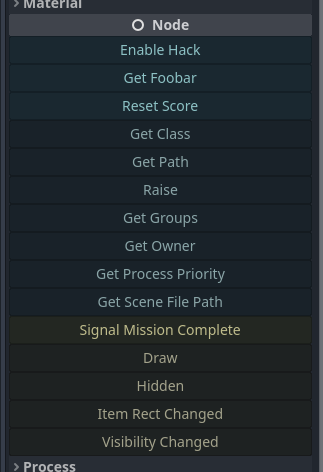
@tool zu Ihrem Skript hinzu._get_tool_buttons() -> Array -Methode hinzu."my_method"my_methodmethod.bind(true, "ok" 1.0)func(): print("Hey!")func press_me(): print("You pressed me!")"my_signal"my_signal["my_signal", [true, "ok"]]{call=method.bind(true), text="My Method", tint=Color.RED}["my_method", method2.bind(1.0), "a_signal", {text="X", call=reset}] 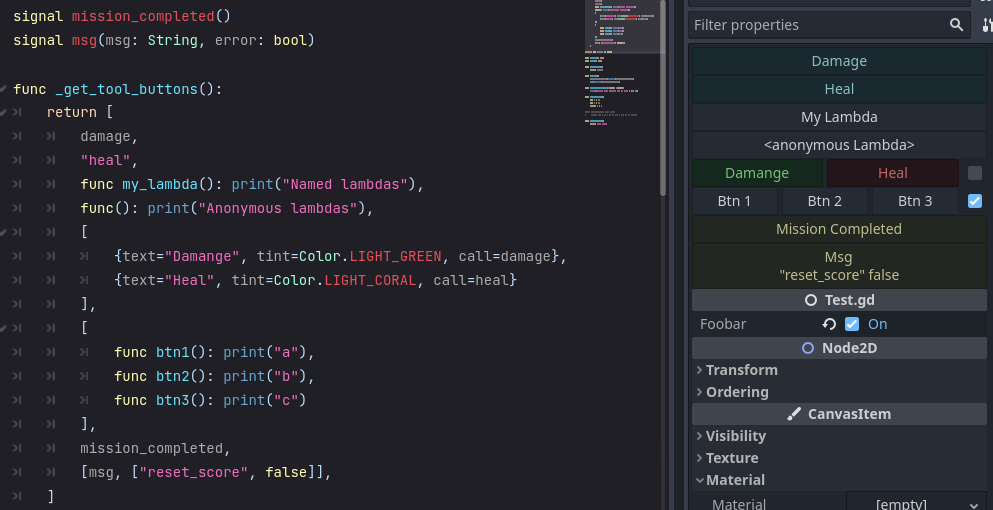
Um Schaltflächen anzugeben, die über dem Inspektor angezeigt werden, fügen Sie einen _get_tool_buttons func hinzu.
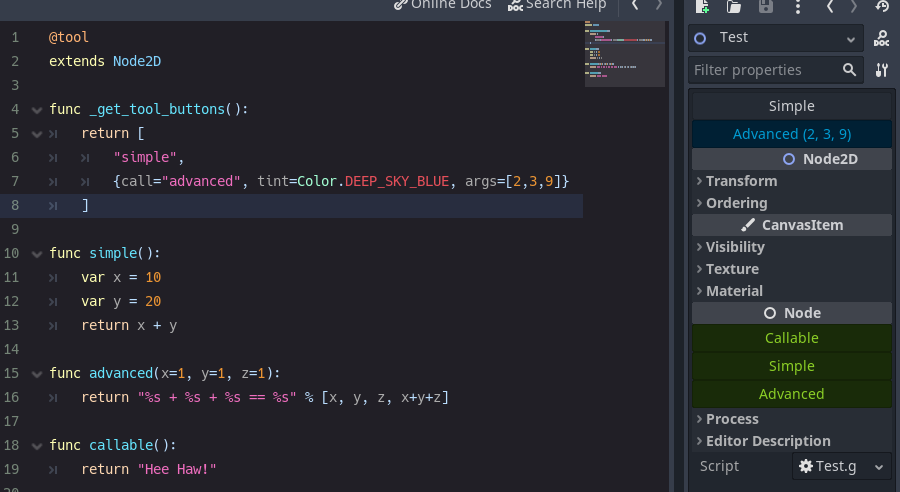
Mit Strings :
@tool
extends Node

func _get_tool_buttons() :
	return [ boost_score, remove_player ]

func boost_score() :
	Player.score += 100

func remove_player() :
	Player.queue_free()
und/oder Callable s
 # WARNING, some stuff won't work: If you get *"Cannot access member without instance"*: https://github.com/godotengine/godot/issues/56780
@tool
extends Node

func _get_tool_buttons() :
	return [
		func add_score() : score += 10 ,
		func reset_health() : health = 0
	]
und/oder Dictionarys
@tool
extends Node

signal reset()

func _get_tool_buttons() : return [
	" boost_score " ,
	{ call = " boost_score " , args = [ 100 ] , tint = Color.DEEP_SKY_BLUE } ,
	{ call = " emit_signal " , args = [ " reset " ] , text = " Reset " , tint = Color.TOMATO } ,
	{
		call = func() : print( " My Health: " , health),
		text = " Print Health " ,
		tint = func() : return Color(health * . 1 , 0.0 , 0.0 )
		lock = func() : return health == 100
	}
]

func boost_score(x = 10 ) :
	Player.score += x
call ist obligatorisch. Andere sind optional.
| Schlüssel | vor | Standard |
|---|---|---|
| Anruf | Methode zum Aufrufen. | - - |
| Args | Array von Argumenten zu bestehen. (Maus über Taste, um Argumente zu sehen.) | - - |
| Text | Knopfbezeichnung. | - - |
| Farbton | Knopffarbe. | Color.white |
| Symbol | Tastensymbol. | - - |
| Wohnung | Knopf ist flacher Stil. | FALSCH |
| Hinweis | Hinweis Text für die Maus. | - - |
| Druckausgabe des Methodenaufrufs? | WAHR | |
| ausrichten | Knopfausrichtung. | Boxcontainer.Alignment_Center |
| sperren | Taste deaktivieren? | FALSCH |
| Update_filesystem | Fordert Godot Editor an, das Dateisystem zu rescan. | FALSCH |
Damit _get_tool_buttons an einer Resource arbeiten muss, muss es statisch sein.
@tool
extends Resource
class_name MyResource

# STATIC
static func _get_tool_buttons() :
	return [ " my_button " ]

# LOCAL
export(String) var my_name : String = " "

func my_button() :
print(my_name)signal my_signal()
signal my_arg_signal(x, y)
func _get_tool_buttons() :
return [
my_signal,
[ my_arg_signal, [ true , " okay " ]]
] Sie können mehrere Tasten auf derselben Zeile haben.
Sie können alle auf einmal (Standard) oder separat auf dem Basis eines Umschusses aufgerufen werden.
 func _get_tool_buttons():
	return [
		[msg, msg.bind("yes"), msg.bind("no")],
	]

func msg(msg := "Default Message"):
	print("Got: ", msg)

func doit():
	pass
@SELECT_AND_EDIT::file_path , @EDIT_RESOURCE::file_path , @SELECT_FILE::file_path hinzugefügt. 4.0.alpha2Callable Support call text icon tint lock : { text="Callable", call=func(): print("From Callable with love") }lock disabled





