godot 4.0 tool_button
Old Version

Botones del editor con Una línea de código: Cero líneas de código.@tool
Simplemente instale y seleccione cualquier nodo:
Para funciones más avanzadas, lea a continuación.
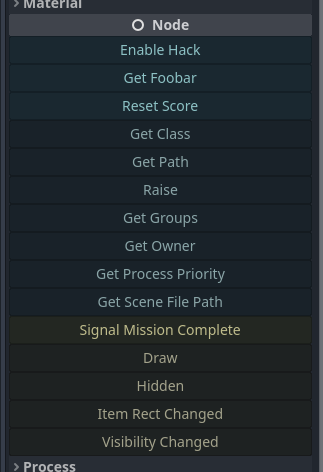
@tool a la parte superior de su guión._get_tool_buttons() -> Array ."my_method"my_methodmethod.bind(true, "ok" 1.0)func(): print("Hey!")func press_me(): print("You pressed me!")"my_signal"my_signal["my_signal", [true, "ok"]]{call=method.bind(true), text="My Method", tint=Color.RED}["my_method", method2.bind(1.0), "a_signal", {text="X", call=reset}] 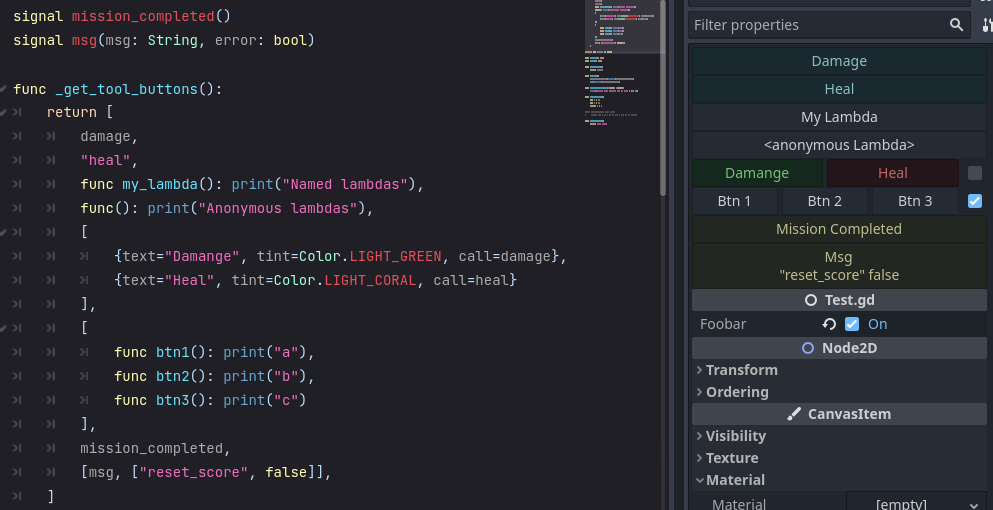
Para especificar botones que se muestren por encima del inspector, agregue un _get_tool_buttons func.
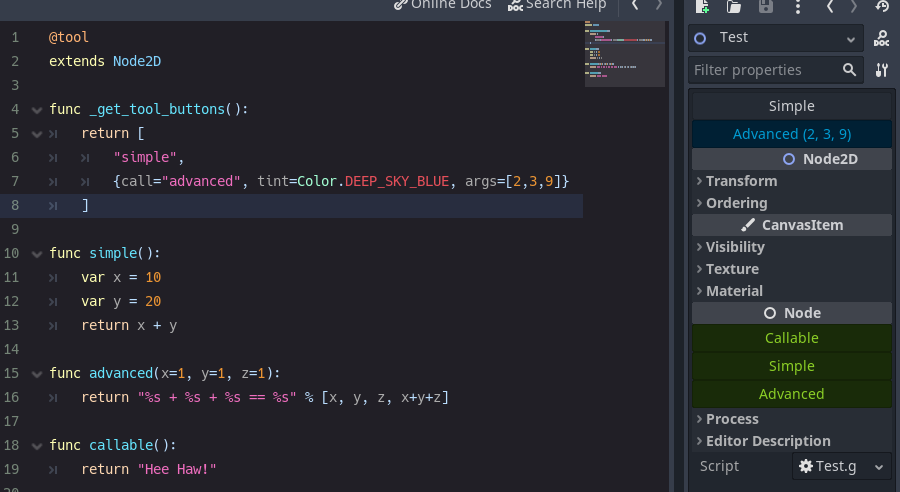
Con Strings :
@tool
extends Node

func _get_tool_buttons() :
	return [ boost_score, remove_player ]

func boost_score() :
	Player.score += 100

func remove_player() :
	Player.queue_free()
y/o Callable s
 # WARNING, some stuff won't work: If you get *"Cannot access member without instance"*: https://github.com/godotengine/godot/issues/56780
@tool
extends Node

func _get_tool_buttons() :
	return [
		func add_score() : score += 10 ,
		func reset_health() : health = 0
	]
y/o Dictionarys
@tool
extends Node

signal reset()

func _get_tool_buttons() : return [
	" boost_score " ,
	{ call = " boost_score " , args = [ 100 ] , tint = Color.DEEP_SKY_BLUE } ,
	{ call = " emit_signal " , args = [ " reset " ] , text = " Reset " , tint = Color.TOMATO } ,
	{
		call = func() : print( " My Health: " , health),
		text = " Print Health " ,
		tint = func() : return Color(health * . 1 , 0.0 , 0.0 )
		lock = func() : return health == 100
	}
]

func boost_score(x = 10 ) :
	Player.score += x
call es obligatoria. Otros son opcionales.
| llave | descomunal | por defecto |
|---|---|---|
| llamar | Método para llamar. | - |
| argumentos | Variedad de argumentos para pasar. (Botón sobre el mouse para ver los args). | - |
| texto | Etiqueta de botón. | - |
| tinte | Color del botón. | Color.white |
| icono | Icono del botón. | - |
| departamento | El botón es de estilo plano. | FALSO |
| pista | Sugerencia de texto para el mouse. | - |
| imprimir | Imprimir salida de la llamada de método? | verdadero |
| alinear | Alineación de botones. | BoxContainer.alignment_center |
| cerrar | ¿Deshabilitar el botón? | FALSO |
| update_filesystem | Le dice al editor de Godot que se repite el sistema de archivos. | FALSO |
Para que _get_tool_buttons trabaje en un Resource debe ser estático.
@tool
extends Resource
class_name MyResource

# STATIC
static func _get_tool_buttons() :
	return [ " my_button " ]

# LOCAL
export(String) var my_name : String = " "

func my_button() :
print(my_name)signal my_signal()
signal my_arg_signal(x, y)
func _get_tool_buttons() :
return [
my_signal,
[ my_arg_signal, [ true , " okay " ]]
] Puede tener varios botones en la misma línea.
Todos pueden llamarse de inmediato (predeterminado) o separados, según una palanca.
 func _get_tool_buttons():
	return [
		[msg, msg.bind("yes"), msg.bind("no")],
	]

func msg(msg := "Default Message"):
	print("Got: ", msg)

func doit():
	pass
@SELECT_AND_EDIT::file_path , @EDIT_RESOURCE::file_path , @SELECT_FILE::file_path . 4.0.alpha2lock text call tint soporte Callable icon : { text="Callable", call=func(): print("From Callable with love") }disabled para lock





