godot 4.0 tool_button
Old Version

編集者のボタンコードの1行: コードのゼロ行。@tool
単にインストールして、ノードを選択します。
より高度な機能については、以下をお読みください。
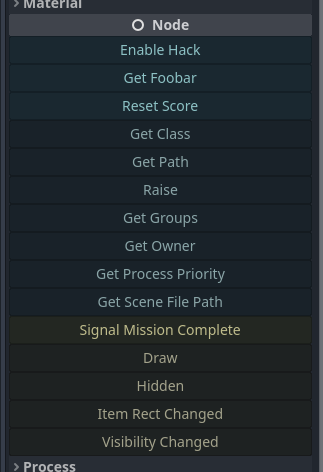
@toolを追加します。_get_tool_buttons() -> Arrayメソッドを追加します。"my_method"my_methodmethod.bind(true, "ok" 1.0)func(): print("Hey!")func press_me(): print("You pressed me!")"my_signal"my_signal["my_signal", [true, "ok"]]{call=method.bind(true), text="My Method", tint=Color.RED}["my_method", method2.bind(1.0), "a_signal", {text="X", call=reset}] 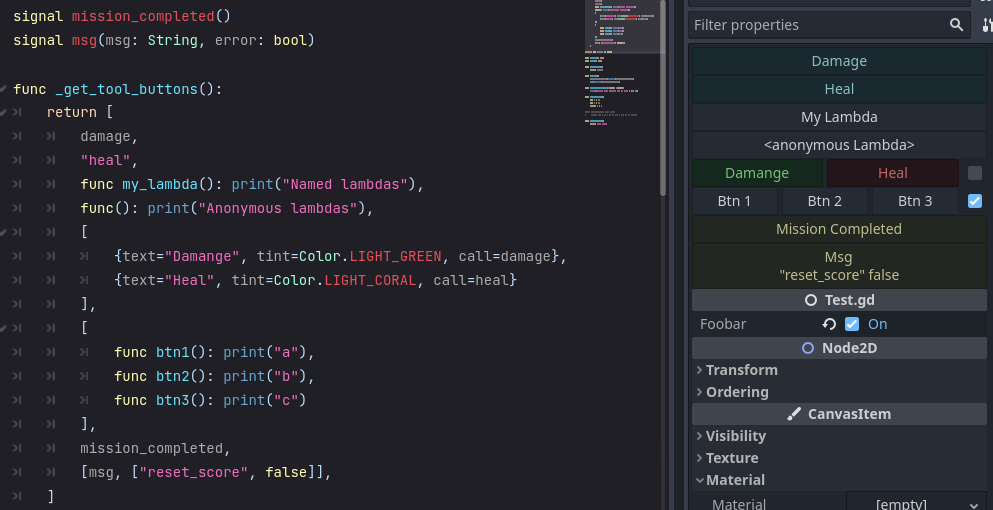
検査官の上に表示されるボタンを指定するには、 _get_tool_buttons funcを追加します。
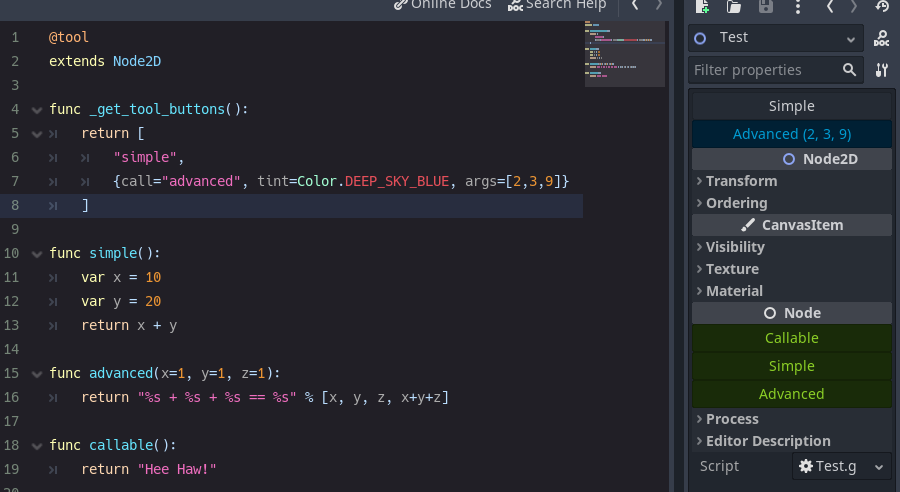
Strings付き:
@tool
extends Node

func _get_tool_buttons() :
	return [ boost_score, remove_player ]

func boost_score() :
	Player.score += 100

func remove_player() :
Player.queue_free()および/またはCallable s
 # WARNING, some stuff won't work: If you get *"Cannot access member without instance"*: https://github.com/godotengine/godot/issues/56780
@tool
extends Node

func _get_tool_buttons() :
	return [
		func add_score() : score += 10 ,
		func reset_health() : health = 0
]および/またはDictionarys
@tool
extends Node

signal reset()

func _get_tool_buttons() : return [
	" boost_score " ,
	{ call = " boost_score " , args = [ 100 ] , tint = Color.DEEP_SKY_BLUE } ,
	{ call = " emit_signal " , args = [ " reset " ] , text = " Reset " , tint = Color.TOMATO } ,
	{
		call = func() : print( " My Health: " , health),
		text = " Print Health " ,
		tint = func() : return Color(health * . 1 , 0.0 , 0.0 )
		lock = func() : return health == 100
	}
]

func boost_score(x = 10 ) :
Player.score += x call必須です。その他はオプションです。
| 鍵 | desc | デフォルト |
|---|---|---|
| 電話 | 呼び出す方法。 | - |
| args | 合格する引数の配列。 (ARGSを表示するためのマウスオーバーボタン。) | - |
| 文章 | ボタンラベル。 | - |
| 色合い | ボタンの色。 | Color.White |
| アイコン | ボタンアイコン。 | - |
| フラット | ボタンはフラットスタイルです。 | 間違い |
| ヒント | マウスオーバーのヒントテキスト。 | - |
| 印刷 | メソッドコールの出力を印刷しますか? | 真実 |
| 整列します | ボタンアライメント。 | boxcontainer.alignment_center |
| ロック | ボタンを無効にしますか? | 間違い |
| update_filesystem | Godot編集者にRescan File Systemを伝えます。 | 間違い |
_get_tool_buttons Resourceで動作するには、静的である必要があります。
@tool
extends Resource
class_name MyResource

# STATIC
static func _get_tool_buttons() :
	return [ " my_button " ]

# LOCAL
export(String) var my_name : String = " "

func my_button() :
print(my_name)signal my_signal()
signal my_arg_signal(x, y)
func _get_tool_buttons() :
return [
my_signal,
[ my_arg_signal, [ true , " okay " ]]
] 同じ行に複数のボタンを使用できます。
それらはすべて、トグルに基づいて、一度に(デフォルト)、または分離することができます。
 func _get_tool_buttons():
	return [
		[msg, msg.bind("yes"), msg.bind("no")],
	]

func msg(msg := "Default Message"):
	print("Got: ", msg)

func doit():
	pass
@SELECT_AND_EDIT::file_path 、 @EDIT_RESOURCE::file_path 、 @SELECT_FILE::file_pathを追加しました。 4.0.alpha2の更新Callableなサポート可能なcall text icon tint lock : { text="Callable", call=func(): print("From Callable with love") }lockためにdisabled変更されました





