prompt serve
1.0.0

언어 모델 프롬프트를 저장하고 제공합니다
prompt-serve 모든 대형 언어 모델 (LLM) 프롬프트 및 관련 설정/메타 데이터를 간단하고 버전 제어 방식으로 관리하는 데 도움이됩니다.
이 프로젝트는 프롬프트를 구조화 된 방식으로 저장하기위한 YAML 스키마와 GIT 저장소와의 상호 작용을 처리하는 작은 API 서버를 제공하므로 재사용 가능한 코드와 같은 프롬프트를 처리 할 수 있습니다.
프롬프트는 schema.yml에 제공된 스키마를 따릅니다.
프롬프트 저장소를 확인하여 실제로 확인하십시오.
 title : prompt-title-or-name
uuid : prompt-uuid
description : prompt-description
category : prompt-category
provider : model-provider
model : model-name
model_settings :
  temperature : 0.8
  top_k : 40
  top_p : 0.9
prompt : prompt-text
input_variables :
  - var1
  - var2
references :
  - https://example.com
  - https://example.com
associations :
  - prompt_uuid
  - prompt_uuid
packs :
  - pack-uuid
  - pack-uuid
tags :
  - tag
- tag Validate.py 유틸리티를 사용하여 프롬프트가 스키마를 충족하고 고유 한 UUID를 확인할 수 있습니다.
--create 인수를 지정하면 주어진 프롬프트가 스캔 한 세트에 고유하지 않은 경우 새로운 UUID가 제공됩니다. 또한 --gen-stats 통과하여 컬렉션의 프롬프트 유형에 대한 통계를 수집 할 수도 있습니다 (예 : STATS 출력은 다음 섹션 참조).
 usage: validate.py [-h] [-s SCHEMA] [-f FILE] [-d DIRECTORY] [-c] [-g]

Validate YAML files against the prompt-serve schema.

options:
  -h, --help            show this help message and exit
  -s SCHEMA, --schema SCHEMA
                        schema file to validate against
  -f FILE, --file FILE  single file to validate
  -d DIRECTORY, --directory DIRECTORY
                        directory to validate
  -c, --create          create new uuids if validation fails
  -g, --gen-stats       generate statistics from directory
예제 출력
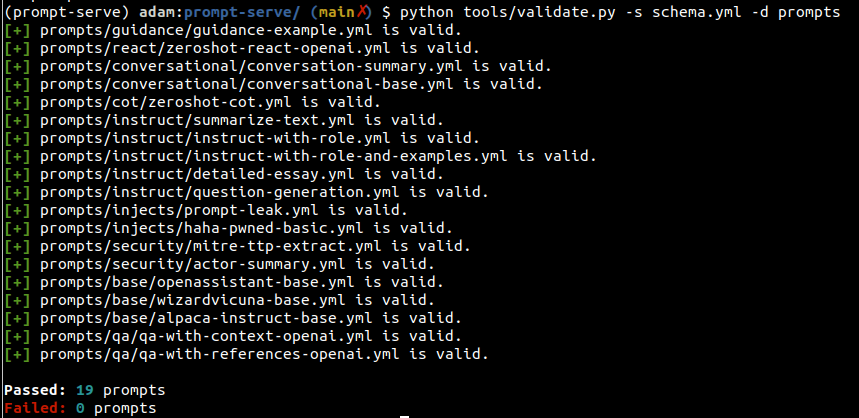
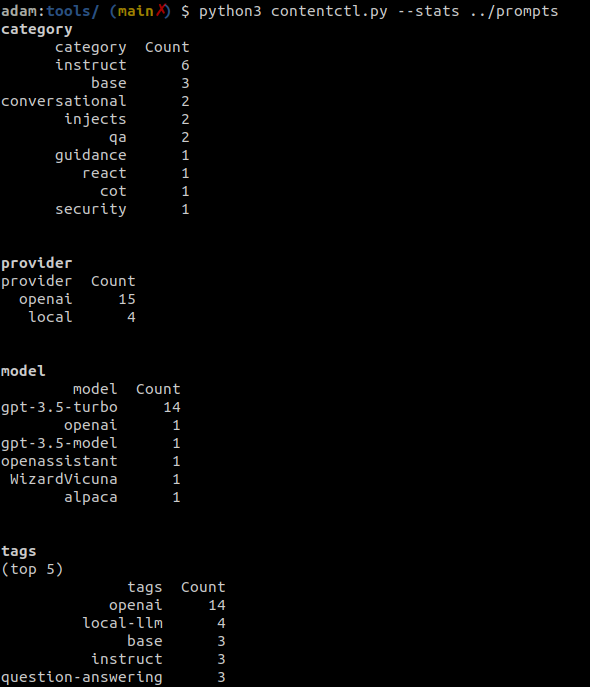
컨텐츠 제어 도구는 범주, 공급자, 모델 및 태그에 대한 정보를 포함하여 컬렉션의 모든 프롬프트에 대한 프롬프트 서비스 저장소 디렉토리 및 디스플레이 통계를 스캔하는 데 사용할 수 있습니다.
Validate.py를 실행할 때 통계를 선택적으로 수집 할 수도 있습니다.
예제 출력
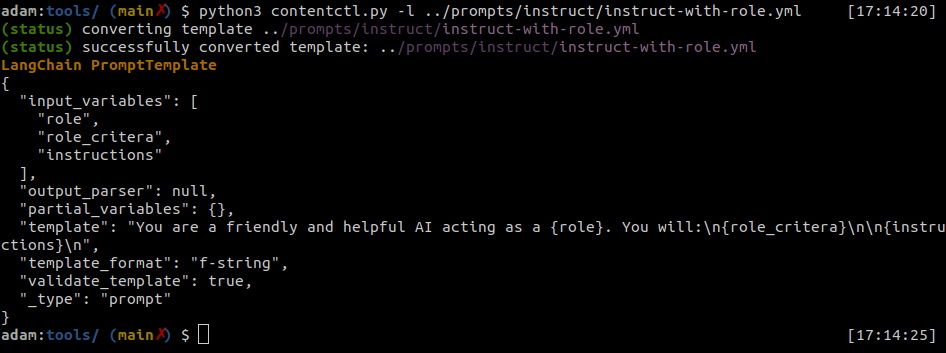
프롬프트 서비스 파일을 Langchain 프롬프트 템플릿으로 쉽게 변환 할 수 있습니다.
컨텐츠 제어 도구는 개별 프롬프트 서비스 파일을 Langchain 형식으로 변환 할 수 있습니다.
예제 출력
파이썬
 import yaml
from langhain import PromptTemplate

def convert ( path_to_ps_prompt ):
    with open ( path_to_ps_prompt , 'r' ) as fp :
        data = yaml . safe_load ( fp )
        prompt = data [ 'prompt' ]

        if 'input_vars' in data . keys ():
            input_vars = data [ 'input_vars' ]
            langchain_template = PromptTemplate ( template = prompt , input_variables = input_vars )
        else :
            langchain_template = PromptTemplate ( template = prompt , input_variables = [])

return langchain_template 컨텐츠 제어 도구를 사용하여 프롬프트 서비스 스키마와 함께 프롬프트를 대화식으로 생성 할 수 있습니다.
? 이것은 개념 증명 일 뿐이며 몇 가지 알려진 버그가 있습니다. 당신은 지금 당신 자신에게 그들을 만드는 것이 더 나을 것입니다.
 $ python create.py -n summary.yml
creating prompt file summary.yml ...
title (str): Summarize blog posts
description (str): Summarize a blog post with key takeaways
category (str): summarization
provider (str) : openai
model (str) : gpt-3.5-turbo
temperature (float) : 0.8
top_k (int) :
top_p (float) : 0.9
max_tokens (int) : 512
stream (bool) : false
presence_penalty (float) :
frequency_penalty (float) :
prompt (str): Summarize the blog post provided below with 3-5 key takeaways as bullet points: {blog_content}
references (seq) : https://github.com/deadbits/prompt-serve
associations (seq) :
packs (seq) :
tags (seq) :
 successfully wrote file summary.yml





