prompt serve
1.0.0

store and serve language model prompts
prompt-serve helps you manage all of your large language model (LLM) prompts and associated settings/metadata in a straightforward, version controlled manner.
This project provides a YAML schema for storing prompts in a structured manner and a small API server that handles interactions with a Git repository, so you can treat prompts more like re-usable code.
Prompts follow the schema provided in schema.yml.
Check out the prompts repository to see it in action.
title: prompt-title-or-name
uuid: prompt-uuid
description: prompt-description
category: prompt-category
provider: model-provider
model: model-name
model_settings:
  temperature: 0.8
  top_k: 40
  top_p: 0.9
prompt: prompt-text
input_variables:
  - var1
  - var2
references:
  - https://example.com
  - https://example.com
associations:
  - prompt_uuid
  - prompt_uuid
packs:
  - pack-uuid
  - pack-uuid
tags:
  - tag
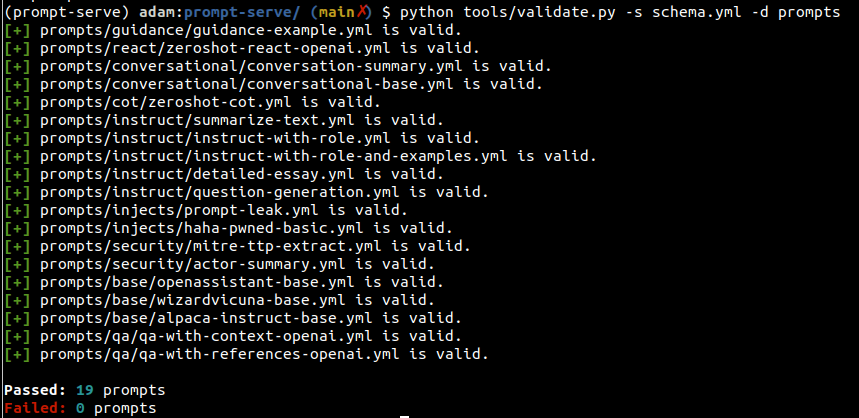
- tagYou can use the validate.py utility to verify prompts meet the schema and have unique UUIDs.
By specifying the --create argument, a new UUID will be provided if a given prompt isn't unique for your scanned set. You can also gather statistics on the types of prompts in your collection by passing --gen-stats (see the next section for example stats output).
usage: validate.py [-h] [-s SCHEMA] [-f FILE] [-d DIRECTORY] [-c] [-g]

Validate YAML files against the prompt-serve schema.

options:
  -h, --help            show this help message and exit
  -s SCHEMA, --schema SCHEMA
                        schema file to validate against
  -f FILE, --file FILE  single file to validate
  -d DIRECTORY, --directory DIRECTORY
                        directory to validate
  -c, --create          create new uuids if validation fails
  -g, --gen-stats       generate statistics from directory
Example output
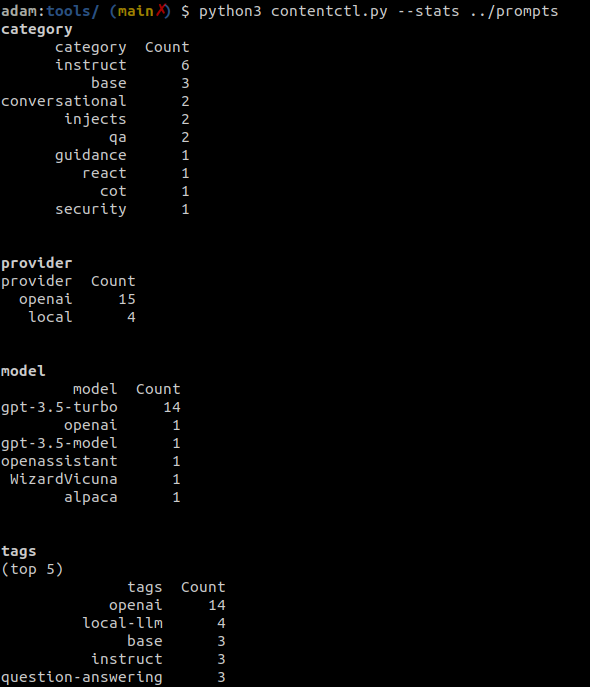
The content control tool can be used to scan a directory of prompt-serve repository and display statistics about all the prompts in the collection, including information on the category, provider, model, and tags.
Stats can also be optionally collected when running validate.py.
Example output
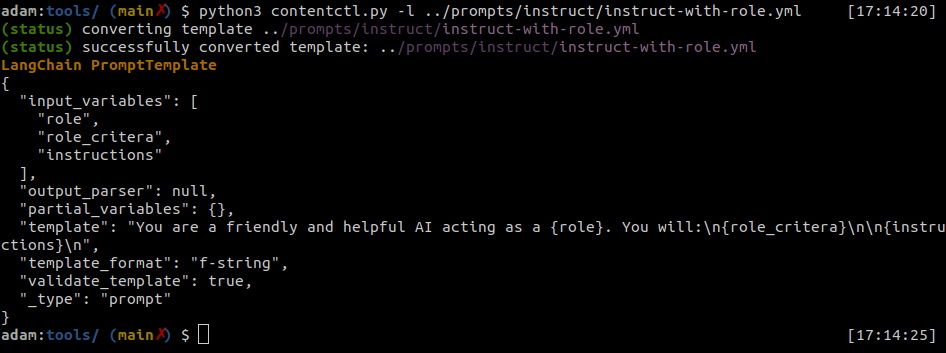
prompt-serve files can be easily converted to LangChain Prompt Templates.
The content control tool can convert individual prompt-serve files to langchain format.
Example output
Python
import yaml
from langhain import PromptTemplate

def convert(path_to_ps_prompt):
    with open(path_to_ps_prompt, 'r') as fp:
        data = yaml.safe_load(fp)
        prompt = data['prompt']

        if 'input_vars' in data.keys():
            input_vars = data['input_vars']
            langchain_template = PromptTemplate(template=prompt, input_variables=input_vars)
        else:
            langchain_template = PromptTemplate(template=prompt, input_variables=[])

return langchain_templateThe content control tool can be used to interactively create a prompt with the prompt-serve schema.
? This is just a proof of concept and has a few known bugs. You would be better served creating these on your own for now.
$ python create.py -n summary.yml
creating prompt file summary.yml ...
title (str): Summarize blog posts
description (str): Summarize a blog post with key takeaways
category (str): summarization
provider (str) : openai
model (str) : gpt-3.5-turbo
temperature (float) : 0.8
top_k (int) :
top_p (float) : 0.9
max_tokens (int) : 512
stream (bool) : false
presence_penalty (float) :
frequency_penalty (float) :
prompt (str): Summarize the blog post provided below with 3-5 key takeaways as bullet points: {blog_content}
references (seq) : https://github.com/deadbits/prompt-serve
associations (seq) :
packs (seq) :
tags (seq) :
 successfully wrote file summary.yml





