KOSmk4
1.0.0

Sistem operasi x86 monolitik/modular + ruang pengguna dengan penekanan pada pengembalian kembali dan memperluas OS arus utama lainnya (terutama Linux), sementara masih kompatibel dengan API/ABI.
KOSMK4 (rendisi ke-4 dari Seri Sistem Operasi KOS) adalah kernel buatan sendiri, monolitik, tetapi masih modular untuk mesin I386 dan x86_64 (termasuk mode kompatibilitas 32-bit), dan ditulis dalam C ++ (meskipun hanya menggunakan fungsi berlebih dan pengecualian; semua ABIS adalah C-Compatible.
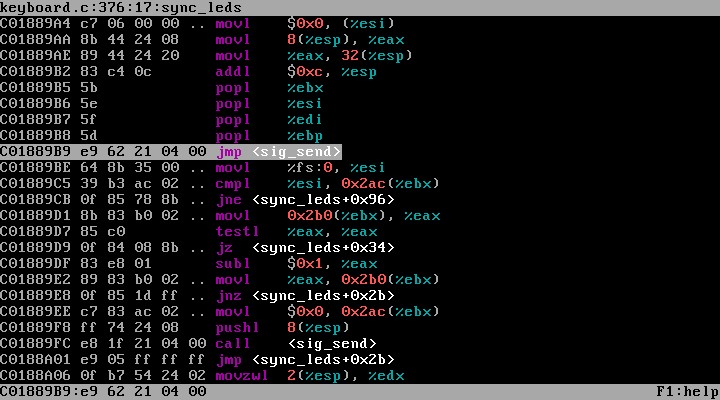
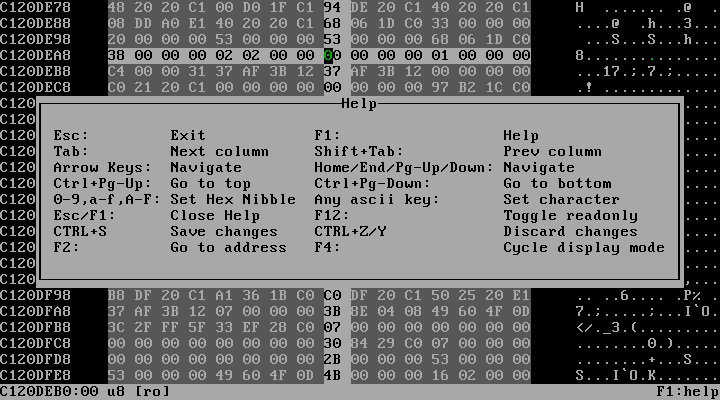
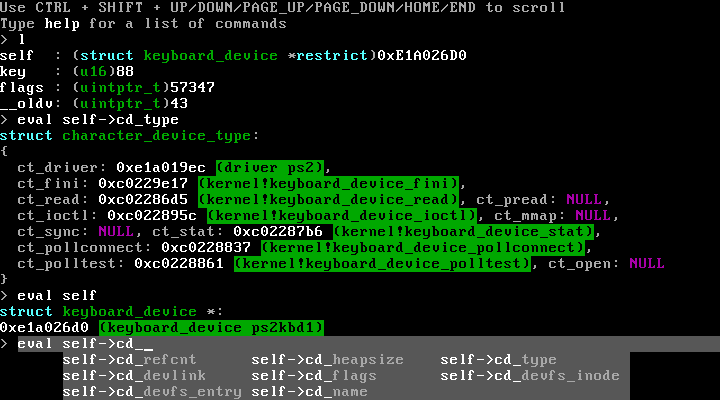
Ini dirancang dengan banyak trik di lengan bajunya untuk membantu selama debugging, seperti debugger builtin yang sepenuhnya interaktif yang memberi Anda kemampuan untuk menganalisis status sistem secara interaktif ketika ada yang salah, serta dukungan untuk berbagai bentuk debugging menggunakan GDB.
Secara umum, KO tidak dirancang untuk menemukan kembali roda (tidak ada roda persegi di sini), tetapi mencoba membuat tampilan dan gulungan roda metaforis tersebut sebaik mungkin. Artinya:
Perhatikan : KOS menggunakan submodul git (yang diperlukan untuk membangun KO), jadi jika Anda menggunakan fungsi ZIP unduh , Anda tidak akan berakhir dengan semua yang digunakan untuk membangun KOS. Jadi untuk mengkloning Kos secara keseluruhan, Anda harus mengkloning git ini melalui penggunaan:
git clone --recursive https://github.com/GrieferAtWork/KOSmk4deemon magic.dee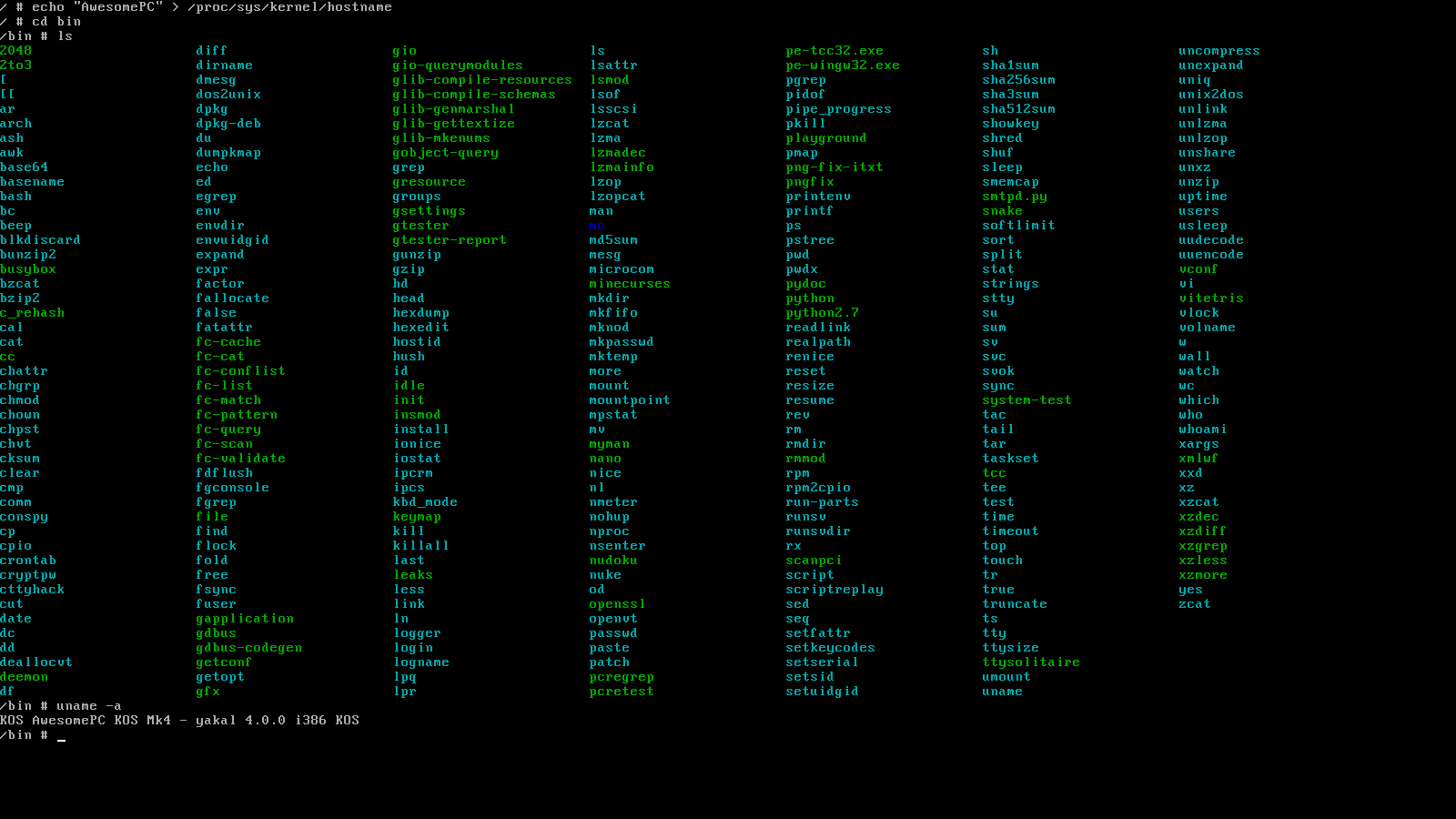
Semua aplikasi porting dapat diinstal ke gambar disk KOS Anda dengan menggunakan bash $PROJPATH/kos/misc/make_utility.sh i386 <UTILITY_NAME> (Lihat juga: mendapatkan shell)
catch (...)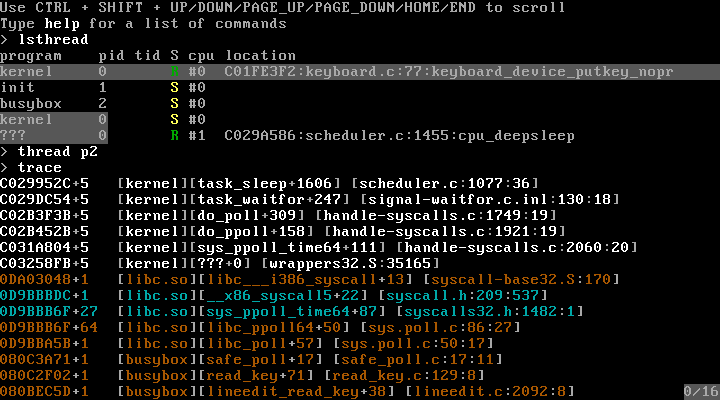
./binutils/deemon/deemon magic.dee --emulator=qemu --gdb=emulator./binutils/deemon/deemon magic.dee --emulator=bochs --gdb=emulator./binutils/deemon/deemon magic.dee --emulator=vbox --gdb=emulator/kos/src/kernel/modgdbserver ) untuk debugging emulator-independen dan real-hardwareboot=/dev/hda1/ )init=/bin/initrdfsbase , rdgsbase , wrfsbase , wrgsbase%fs / %gscmpxchg , cmpxchg8b , xaddcmovcc , cpuid , nop (multi-byte)sfence , lfence , mfencemovbe , sarx , shlx , shrx , rorxpopcnt , tzcnt , lzcnt , pext , pdep , bzhi , andnxbegin , xend , xabort , xtest (sa rtm di bawah)modrtm ) yang dapat digunakan untuk emulasi berbasis perangkat lunak dari memori transasional terbatas .modrtm untuk sementara waktu akan meniru kode ruang pengguna dalam kotak pasir kecil, dari mana ia akan mengumpulkan semua modifikasi yang dibuat untuk memori oleh program ruang pengguna, sebelum secara atom menerapkannya sekaligus (sehubungan dengan operasi RTM lainnya yang mungkin mencoba untuk memodifikasi daerah memori yang sama)/kos/include/kos/rtm.h#UD , KOS akan menganalisis instruksi kesalahanlibvm86 memungkinkan panggilan BIOS seperti mode nyata masih dibuat dari lingkungan 64-bit yang dikendalikan (menggunakan emulasi instruksi berbasis perangkat lunak, dikirim melalui emulator x86 buatan saya libemu86 )bash $PROJPATH/kos/misc/make_toolchain.sh x86_64-kos )fxsave / fxrstorinvlpg cross-core (TLB-shootdowns)hlt -Based Idling (artinya tidak ada siklus CPU saat tidak ada yang terjadi)struct sigfutex() berbasisvoid pit_interrupt() { ++time; yield(); } ), dan sebaliknya berdasarkan perangkat keras TSC (TimestampCounter)rdtsc , timer APIC saja, atau lubangtsc_deadline() yang dapat digunakan untuk menentukan nilai TSC setelah itu interupsi harus dipecat yang kemudian dapat digunakan untuk penjadwalanrdtsc , cukup tulis ke IA32_TSC_DEADLINE MSRif (NOW >= CURRENT_DEADLINE) DO_INTR(); else tsc_deadline(CURRENT_DEADLINE); , dengan demikian terus memperbarui nilai ulang APIC/pit sampai tenggat waktu yang sebenarnya telah kedaluwarsa(NOW - TIME_WHEN_THREAD_STARTED_WAITING) / NUM_RUNNING_THREADS , meaning that threads that spend most of their time waiting (ie interactive threads) automatically get a big performance boosttsc_deadline() diatur ke NOW + (NOW - TIME_WHEN_THREAD_STARTED_WAITING) / NUM_RUNNING_THREADSram=[{ "type": "ram", "start": 0x1234, "size": 0x4567 }] Opsi CommandLinelibjson )iopl() dan ioperm() (memungkinkan semua port 65536 dikendalikan berdasarkan per-utas)ioperm() tidak diimplementasikan seperti di Linux, yang melakukan memcpy() setiap kali utas didahului. Sebaliknya, KOS menggunakan pemetaan direktori halaman malas untuk memetakan ulang daerah memori TSS.IOBM saat beralih di antara berbagai utas, dan akan mengembalikan pemetaan setelah salah satu instruksi IO menyebabkan #PF .ioperm() keduanya minim, dan tidak meningkat jika ioport bernomor lebih besar digunakan (yang, sekali lagi: akan menjadi kasus di Linux).invpcid (dipilih menggunakan cpuid )invlpg (dipilih menggunakan cpuid )PGE (dipilih menggunakan cpuid )P32 (normal) dan paging PAE pada i386 (dipilih menggunakan cpuid )PAE.2MiB dan P32.4MiB halaman besar (dipilih menggunakan cpuid , secara otomatis memanfaatkan pemetaan memori IF memungkinkan untuk itu)PAE.XD (Execute-Disemable) (dipilih menggunakan cpuid )P64 (4-level) paging di x86_64P64.2MiB dan P64.1GiB halaman besar (kemudian dipilih menggunakan cpuid )P64.NX (No-Execute) (dipilih menggunakan cpuid )mmap() dengan dukungan untuk pemetaan file yang diinisial dan write-back malaslibemu86 )movl $SOME_ADDRESS, OFFSETOF_REGISTER_MAP_EIP sebagai alias untuk jmp SOME_ADDRESSmmap("/dev/urandom") , dan hasilnya adalah pemetaan memori di mana setiap bacaan, di mana pun tidak dibuat, akan mengembalikan nilai acak setiap kali dibuat.heap_alloc() : alokasi tumpukan mentah (perlu menentukan ukuran saat membebaskan memori)kmalloc()mman_map_kram() (setara kernel dari mmap() ) untuk mengalokasikan seluruh halamanslab_kmalloc() : Dukungan Allocator Slabkmalloc()realloc() -able (jadi krealloc() harus meniru sebagai malloc()+memcpy()+free() untuk slab)kmalloc() : hampir sama dengan malloc() , tetapi mengambil satu set bendera yang menggambarkan perilakunyakmalloc() melempar pengecualian ( E_BADALLOC ) saat alokasi gagalkmalloc_nx() mengembalikan NULL ketika ada yang salah ( nx berdiri untuk NoExcept )O_DOSPATH dan AT_DOSPATH untuk menentukan bahwa beberapa jalur yang diberikan harus ditafsirkan menggunakan semantik DOSfsmode(2) yang dapat memaksa/menonaktifkan DOSPATH -mode untuk seluruh prosesS_ISBLK() ) dan karakter ( S_ISCHR() ) -devices)/dev )/tmp )/proc/[pid]/... )/proc/self/proc/[pid]/exe/proc/[pid]/fd/[fdno]int 80hlcall $7, $0 (seperti yang disyaratkan oleh SYSV)lcall $7, $<sysno> alih -alih harus menggunakan %eaxsysentersyscallint 80h/kos/include/kos/ukern.h:userkern_syscall() )/kos/src/kernel/modsctrace dan /kos/src/libsctracecall __i386_syscall pada i386 dan syscall pada x86_64.free memori dalam inti yang berisi segala sesuatu yang hanya digunakan selama inisialisasi (misalnya titik masuk bootloader awal kernel, atau kode inisialisasi perangkat)if dan setiap penggunaan likely / unlikely dalam file sumber kernel apa pun melacak cabang mana yang diambil berapa kali berapa kalilikely / unlikely yang jelas -jelas salahdd ke beberapa perangkat penyimpanan yang dapat di -boot, dan membuatnya boot (atau dalam kasus emulator: pasang biner yang diratakan sebagai gambar disk mentah yang dapat di -boot))/kos/src/kernel/core/arch/i386/boot/_boot0.S/dev/mem , /dev/kmem , /dev/port/dev/null , /dev/zero , /dev/full/dev/random , /dev/urandom/dev/kmsg/dev/tty )off_t , pos_t )time_tsignal() , raise()pipe()fork() , exec()open() , openat()[p]read() , [p]write() , lseek()[f]realpath[at]()/kos/include )))SIGTTIN dan SIGTTOU )dup2(1, 0x7fff1234)e[0m )libcurses di Xterm-Mode (SA $PROJPATH/kos/misc/make_utility.sh i386 ncurses ) dan jalankan nanopipe() dan Terminal Canon Buffer, serta Soketreadelf -rW /lib/i386-linux-gnu/libc.so.6 ?libc.so saya. Jadi, saya menghitung 14 relokasi (tetapi saya masih memiliki semua fungsi yang sama, dengan hampir 100% kompatibilitas API, dan setidaknya 95% kompatibilitas Abi). Dan itu bahkan tidak menyebutkan semua ekstensi yang ditemukan di LIBC KOS, tetapi hilang dari GLIBC.strend() dengan cara yang benar-benar portabel (seperti dalam: tidak terikat dengan KOS)memcpy() dan teman<stdio.h> , <stdlib.h> , <malloc.h> , <string.h> , <uchar.h> , ...<format-printer.h> , <unicode.h> , <kos/futex.h> , ...' dan " melarikan diri).debug_info , .debug_line , .debug_... untuk ...__thread ) ELFR_386_JMP_SLOT )dlopen() , dlsym() , dlclose()RTLD_NEXTdlgethandle() )dlmodulename() )dlmodulefd() )fdlopen() )dllocksection() )dlmalloc() Doug Learam=[{ ... }, ...]struct regulerKEY_* dari <kos/keyboard.h> ) dan pengubah kunci ke dalam karakter unicode yang sesuai dengan tombol yang ditekan<libkeymap/keymap.h>/kos/src/misc/keymaps/*<regex.h> di libc.sosys_open(filename: "/lib64/libc.so", oflags: O_RDONLY|O_CLOEXEC)struct termios.eh_frame -basitas yang berbasis di tumpukan, baik di ruang pengguna, maupun di ruang kernel/kos/misc/libgen/cfi/compiler.dee:compileExpression()vio.c dan hw_illegal_instruction.c belum cukup)E_SEGFAULT , memungkinkan pengecualian ditangani dengan cara yang sama seperti akses dari alamat yang belum dipetakan.make_utility ) untuk menampilkan nama vendor/perangkat PCI./kos/include/* harus memeriksa apakah __CRT_HAVE_{name} didefinisikan<libmylibrary/...> dan harus selalu berisi file <libmylibrary/api.h> yang mendefinisikan konvensi panggilan umum, serta nama dlopen(3) untuk perpustakaan, serta opsi konfigurasi LIBMYLIBRARY_WANT_PROTOTYPES typedef int ( LIBMYLIBRARY_CC * PNAME_OF_EXPORTED_FUNCTION )( int x , int y );
#ifdef LIBMYLIBRARY_WANT_PROTOTYPES
LIBMYLIBRARY_DECL int LIBMYLIBRARY_CC name_of_exported_function ( int x , int y );
#endif /* LIBMYLIBRARY_WANT_PROTOTYPES *//kos/include/* harus dihasilkan secara otomatis menggunakan /kos/misc/magicgenerator/generate_headers.dee/kos/include/hybrid/* tidak boleh memiliki ketergantungan silang untuk file selain /kos/include/__std(cxx|inc).h dan /kos/include/compiler/*/kos/.clang-format yang disediakan tidak sempurna:/kos/include/hybrid/* . Kalau tidak, selalu periksa apakah ada builtin dengan __has_builtin() sebelumnya (jangan khawatir tentang GCC yang tidak menyediakan __has_builtin() ; header KOS dapat meniru makro itu untuk GCC)__builtin_va_list , __builtin_va(start|end|copy|arg)(...)__builtin_prefetch(addr)__builtin_choose_expr(cond, tt, ff)cond ? tt : ff ketika __NO_builtin_choose_expr didefinisikan)__builtin_offsetof(struct, field)__builtin_expect(expr, expected)__builtin_unreachable()__builtin_assume(expr)expr selalu benar (terutama berguna sebagai pengganti untuk assert() ketika Anda benar-benar ingin mendapatkan kode cepat, dan tidak peduli tentang ketidakstabilan; digunakan dengan hati-hati dan ingat bahwa itu mungkin hanya akan menjadi no-op. Pastikan bahwa expr tidak membawa efek samping, apa pun yang sering terjadi.__NO_builtin_assume jika itu hanya no-op__builtin_constant_p(expr) (dapat ditiru untuk selalu mengevaluasi ke false )__NO_builtin_constant_p jika tidak didukung__restrictrestrict kata kunci standar, banyak kompiler belum mendukungnya ke titik di mana lebih banyak kompiler secara native memahami __restrict daripada yang memahami restrict__restrict DI MANA SAJA dan biarkan header khawatir tentang bagaimana memberikan kata kunci itu__builtin_types_compatible_p(T1, T2) (dibatalkan untuk selalu kembali 0 )__NO_builtin_types_compatible_p jika tidak didukung<__stdinc.h> di beberapa titik, atau termasuk header lain yang secara tanpa syarat memasukkannya (header ini digunakan untuk melakukan semua pekerjaan untuk menciptakan dasar yang umum dan kompiler dari fitur yang tersedia)#ifdef __CC__ block ( CC standing C/C++-Compiler)/kos/include/[__]OFFSET_MYSTRUCT_MYFIELD and [__]SIZEOF_MYSTRUCT macros describing the absolute offsets of certain fields$PROJPATH/kos/src/_verify/[arch/(i386|...)/]assert_types.ctcc from inside of KOS after also having installed KOS system headers.MYOBJ_IOC_COMMAND ioctls from files in /kos/include/kos/ioctl/ Persyaratan:
$PATH , this will automatically be downloaded + configured + build by: bash $PROJPATH/kos/misc/make_toolchain.sh i386-kos Don't worry: the install location will still be contained within the KOS source tree. More specifically, the deemon executable will end up as $PROJPATH/binutils/deemon/deemon[.exe]$PROJPATH/binutils/i386-kos/bin/i686-kos-*[.exe]bash $PROJPATH/kos/misc/make_toolchain.sh i386-kos$PATH . otherwise, add the location to the enumerateQEmuInstallationLocations() function in $PROJPATH/kos/misc/magicemulator/qemu.dee )make (obviously...)wget (to download 3rd party packages, including binutils and gcc)mpfr , gmp , mpclib (needed for building gcc)patch (for patching 3rd party packages to better understand KOS)gdb (if you wish to debug KOS)mpfr / gmp / mpclib (as needed for building gcc), I had to do: apt-get install libmpc-devBuilding KOS (from $PROJPATH):
./binutils/deemon/deemon magic.dee --build-only --target=i386 --config=ODRunning KOS (from $PROJPATH):
./binutils/deemon/deemon magic.dee --run-only --target=i386 --config=ODBuilding+Running KOS (from $PROJPATH):
./binutils/deemon/deemon magic.dee --target=i386 --config=OD Be careful if you're using an outdated version of deemon . I (GrieferAtWork) am the BDFL for it, as well as KOS, and it already happened more than once that I fixed/added something in/to deemon because I needed it for use with the KOS toolchain. So if something's not working, try to re-build deemon for the $DEEMON_VERSION declared in kos/misc/make_toolchain.sh , and if that also isn't working, try using the most recent version of deemon. One or the other should be working, and if not, create an issue for it and I'll see if I can help.
Just like its predecessors, KOS mk4 uses busybox to provide you with the full user-space bash-like shell experience (Personally, I'm really only interested in the whole kernel-space side of hobby OS programming, alongside the design and implementation of user-space libraries). When it comes to front-ends (and yes: I'm calling a commandline a front-end; deal with it puts-on-sunglasses ), I loose all interest.
However, I made it as simple as ever for you to get going with an installation of busybox onto your KOS disk image:
 # Make sure that you've already set up the KOS toolchain
bash $PROJPATH /kos/misc/make_toolchain.sh i386-kos

# Make sure that you've built the entirety of KOS at least once (here: in no-optimize-debug mode)
deemon $PROJPATH /magic.dee --target=i386 --config=nOD --build-only

# Do the actual work of downloading, configuring & building busybox
bash $PROJPATH /kos/misc/make_utility.sh i386 busybox
Itu saja. That last command will download, build & install busybox into every i386 KOS disk image that it can find under $PROJPATH/bin/... , also meaning that if you choose to clear out $PROJPATH/bin (or have just build KOS for a specific configuration for the first time), you will have to ensure that magic.dee was run at least once for your intended configuration, followed by re-executing the make_utility.sh command.
The plan is to add more software to make_utility.sh in the future, so that you'll be able to install select third-party software with this easy-to-use method of building them.
If you have any suggestions for software (or even better: code snippets for use in make_utility.sh alongside any required patch files), feel free to send them to me and I might add them so that everyone can use them.
Like already mentioned in Ported Applications, building 3rd party programs/libraries for use with KOS is done by invoking the $PROJPATH/kos/misc/make_utility.sh script.
I'd also like to recommend that you dont run make_utility.sh as root. While I'm doing my best to get utilities to behave and not try to copy files into host system paths, given that these aren't my projects, I can't guaranty that some of them might still try to do this in certain situations. As such, by running make_utility.sh as a normal user, 3rd party configure+make scripts won't be able to modify/write files in host system paths.
However, building 3rd party programs sometimes requires additional utilities to be installed. In most cases, these utilities can be read from error messages, however here's a list of some that you'll be needing for quite a few of them:
autoconf + automake + libtool (for projects that don't come with a ready-made ./configure script, but instead the raw configure.ac )cmake (for cmake-based projects)gperf (currently only needed by fontconfig )perl (currently only needed by openssl ) I neither have the time nor will to make sure that any kind of build environment works.
So with that in mind, I can only recommend you'd use the same one I'm using:
If that's not to your liking, you can also try to mirror the environment used in .github/workflows/build-i386-kos-nOD.yml , which essentially just uses linux.
The magic.dee file found in $PROJROOT is the primary controller for doing anything with KOS (you can just think of it as my version of make )
If the file extension (and the use of deemon for starting) wasn't enough, it's a deemon script.
To help you understand how this script works to do what it does, here is a documentation about its options:
-1-v , --verbose-E , -S-E preprocessor output files-S assembler input files--run-only--build-only-fRebuild kernel in Visual Studio--format-error-messagesfile:line[:column]:... into what is accepted by Visual Studio's file(line[,column]) : ... format (allowing you to click such lines within build output)--install-sh$DESTDIR (see also Installing KOS)--deemon magic.dee -- init=/bin/system-test will run system-test after boot instead of /bin/init-n=N (Defaults to -n=<number-of-cores-on-your-machine> )N--emulator=NAME (Defaults to --emulator=qemu )NAME must be one of qemu , bochs or vbox--changed=FILENAMEFILENAME has changedFILE is interpreted relative to the PWD set when magic.dee got invoked--gdb=MODE (Defaults to not-given)MODE must be one ofserver : Use the builtin GDB server driveremulator : Use the emulators's builtin GDB stub (not supported by all emulators)tcp:localhost:1234 on your machine--emulator-started-pattern=TEXTTEXT to stdout when the emulator is started (needed for syncing with Visual Studio)--target=TARGET (Defaults to automatic detection; see below)TARGET (which must be one of i386 , x86_64 , ...)--config=CONFIG (Defaults to automatic detection; see below)OD and nOD , so there is a high chance that the other two configurations won't even build...--gen=FILEFILE instead of executing everythinglibc.so and libm.so as part of make_toolchain.shFILE is interpreted relative to the PWD set when magic.dee got invoked--gengroup=NAMENAME , as well as steps for dependencies of a group NAMEdeemon magic.dee --gengroup=libs.libc )--gengroup-of=FILE--gengroup=... , but instead of specifying the name of some group, only a source file is givenFILE , then forming a set of all of the groups of those files, before finally running all steps and dependencies of those groupsFILE is interpreted relative to the PWD set when magic.dee got invokedFILE should be passed as the file that is currently opened, allowing you to quickly build (only) the part of the system that you currently have opened.$PROJPATH/kos/misc/build/vsautoconfig.dee--regen=PATTERN--gen=... , but select files using a regular expression patternPATTERN doesn't get formatted according to the PWD set when magic.dee got invoked--driver=NAME[:NAME] , --driver=NAME,CMDLINENAME into the kernel during boot, where NAME is either the driver's filename within $PROJPATH/bin/$TARGET-kos-$CONFIG/os/drivers/ , or a filename within the host filesystem if it contains any slashesCMDLINE may be given, which is then passed to the driver during initializationdeemon magic.dee --driver=usb-storage:usb , deemon magic.dee --driver=usb:usb-storageusb is a dependency of usb-storage , and the initialization order is always:usbusb-storagedeemon magic.dee --driver=usb-storageusb driver is missing $PROJPATH/bin/$TARGET-kos expands to $TARGET-kos-$CONFIG .$PROJPATH/bin/$TARGET-kos/lib is set up as part of the library path used by things such as -lc flags.--target=$TARGET and --config=$CONFIG$PROJPATH/bin/$TARGET-kos/...$PROJPATH/bin/$TARGET-kos-$CONFIG/...$PROJPATH/kos/include/$TARGET_XARCH-kos/...$PROJPATH/kos/src/[...]/$TARGET_XARCH/...TARGET_XARCH = $TARGET == "x86_64" ? "i386" : $TARGET --target=... and --config=... options$PROJPATH/kos/.vs/ProjectSettings.json (which is automatically created and updated by Visual Studio to always reflect the currently selected build configuration) Many KOS system features can be configured before you start building KOS for real. For this purpose, you can create custom configurations (or use the one of the 4 default configurations). Configurations are created by you writing a new header file /kos/include/kos/config/configurations/myconfig.h . For more information on the contents of this file, see the associated README.md.
Files in this folder are interpreted as configurations, which can then be used with magic.dee to build KOS using your custom configuration.
deemon magic.dee --target=i386 --config=myconfig Additionally, custom configurations also appear in VS/VSC project files (though only once you re-generate them). For this, you can simply re-run make_toolchain.sh for any configuration, or directly execute the relevant script ( deemon kos/misc/config/files.dee ).
Build files, binary output, as well as disk images all exist on a per-configuration basis, meaning that after creating a new configuration, you will have to re-install 3rd party library into the new disk images, as well as allow KOS to be re-build from scratch (this is automatically done by magic.dee ).
As such, when executed, your custom config will produce files under the following paths:
/build/i386-kos-myconfig (temporary build files)/bin/i386-kos-myconfig (generated binaries, including your disk image)The following configurations are provided by default:
| Nama | Pretty name | Extra GCC commandline options |
|---|---|---|
nOD | DEBUG | -fstack-protector-strong |
nOnD | NDEBUG | -DNDEBUG |
OD | Optimize, DEBUG | -O2 -fstack-protector-strong |
OnD | Optimize, NDEBUG | -O3 -DNDEBUG |
To install (and eventually run) KOS on real hardware, the easiest way is to get a USB thumbdrive, format it as FAT32 (caution: make sure it doesn't get formatted as VFAT), and install GRUB or some other multiboot- or multiboot2-compliant bootloader onto it.
With that done, you can use the KOS build system to build everything you're going to need, as well as have it generate+execute some shell-scripts which can then be used to copy everything onto your USB thumbdrive:
 export TARGET= " i386 "
export CONFIG= " nOD "
export DESTDIR= " /path/to/kos/install "
make install-system
make install-busybox
If you don't want to use make , but execute the commands yourself, here is how installing works:
deemon magic.dee --install-sh --target=i386 --config=nOD > install.sh
bash kos/misc/make_utility.sh --install-sh i386 busybox >> install.sh
This process can later be repeated for any 3rd party utility you wish to install. At this point, install.sh should look like this:
 [...]
mkdir -p "$DESTDIR/os/drivers"
KOS_ROOT="${KOS_ROOT:-/cygdrive/e/c/kls/kos}"
cp "$KOS_ROOT/bin/i386-kos-nOD/os/drivers/tar" "$DESTDIR/os/drivers/tar"
mkdir -p "$DESTDIR/lib"
cp "$KOS_ROOT/bin/i386-kos-nOD/lib/libbios86.so" "$DESTDIR/lib/libbios86.so"
cp "$KOS_ROOT/bin/i386-kos-nOD/os/drivers/pe" "$DESTDIR/os/drivers/pe"
mkdir -p "$DESTDIR/bin"
cp "$KOS_ROOT/bin/i386-kos-nOD/bin/init" "$DESTDIR/bin/init"
cp "$KOS_ROOT/bin/i386-kos-nOD/os/drivers/procfs" "$DESTDIR/os/drivers/procfs"
[...]
ln -s "busybox" "$DESTDIR/bin/script"
ln -s "busybox" "$DESTDIR/bin/scriptreplay"
ln -s "busybox" "$DESTDIR/bin/setpriv"
ln -s "busybox" "$DESTDIR/bin/setsid"
ln -s "../bin/busybox" "$DESTDIR/sbin/swapon"
ln -s "../bin/busybox" "$DESTDIR/sbin/swapoff"
ln -s "../bin/busybox" "$DESTDIR/sbin/switch_root"
ln -s "busybox" "$DESTDIR/bin/taskset"
ln -s "busybox" "$DESTDIR/bin/umount"
ln -s "busybox" "$DESTDIR/bin/unshare"
ln -s "busybox" "$DESTDIR/bin/wall"
mkdir -p "$DESTDIR/etc"
ln -s "/proc/mounts" "$DESTDIR/etc/mtab"
Finally, you can execute this script like so (but make sure to replace /path/to/kos/install with where you mounted the USB thumbdrive on your host computer):
cat " install.sh " | DESTDIR= " /path/to/kos/install " bash Once this has been done, you should be able to boot KOS from within grub by loading it from /os/kernel.bin , whilst supplying it the necessary USB drivers as multiboot modules, so that it's able to detect the thumbdrive and mount it during booting.
Note that it's also possible to directly stream these build scripts into bash like so:
deemon magic.dee --install-sh --target=i386 --config=nOD | DESTDIR= " /path/to/kos/install " bash
bash kos/misc/make_utility.sh --recursive --install-sh i386 busybox | DESTDIR= " /path/to/kos/install " bash
bash kos/misc/make_utility.sh --recursive --install-sh i386 vitetris | DESTDIR= " /path/to/kos/install " bash
bash kos/misc/make_utility.sh --recursive --install-sh i386 nano | DESTDIR= " /path/to/kos/install " bash
...
That way, you only need a single commandline to install each component.
You will need to install the C/C++ extension (just search for C++ under extensions)
Afterwards, make sure that make_toolchain.sh has already been executed at least once, as it will generate required configuration files for VS code.
Finally, use the Open Folder function to open the /kos sub-folder.
Make sure that make_toolchain.sh has already been executed at least once, as it will generate required configuration files for Visual Studio. Once this has been done, you can use the Open Folder function under the file-tab ( CTRL+SHIFT+ALT+O ) to open the /kos sub-folder. - DONT OPEN THE ACTUAL ROOT FOLDER (see notes below).
Alternatively (because Open Folder tends to be extremely laggy), you can also run make vs-proj , and open the /.vs/kos.sln file it generated. While this method fixes all of the slow-downs that appear when using Open Folder , take note of the following caveats:
make vs-proj , any changes you made will be overwrittenmake vs-proj (After doing this, VS will detect this and ask you to re-load its project files. When prompted to, confirm this reload)F5 ), you will not actually be debugging KOS, but will be debugging deemon as it is executing /magic.dee (though while it does so, deemon will still launch qemu and KOS as expected). To properly debug KOS, you have to do the following:CTRL+ALT+A to open the "Command Window"alias d Debug.MIDebugLaunch /Executable:foo /OptionsFile:MIOptions.xmld , followed by ENTERCTRL+SHIFT+B ) before running d from the "Command Window". If you fail to do so and run d immediately, you will actually launch whatever configuration you had selected previously. I personally use Visual Studio 2017 Community Edition for this, as it actually has a fairly unknown feature Open Folder which allows for a hacky way to get full support for GDB debugging without having to pay an insane sum of up to $340 for VisualGDB (I'm doing this as a hobby; I don't have that kind of money; Jeez: I could barely scrape together $10 if that was the asking price)
I mean seriously: Even when you scoure the osdev wiki you'll come across references to VisualGDB and VisualKernel, so I really don't understand who wrote that recommendation. - I don't think any of us bare-metal, kernel-development enthusiats (especially newcomers who could use a real, and simple to use integrated debugging experience the most) would be willing to pay that much...
Omong-omong. - Even though practically no documentation on this feature of Visual Studio (of which you can get the Community Edition for free by the way) exists, I managed to get it working through trial and error.
And if you don't like Visual Studio (or aren't using Windows) I do know for a fact that Visual Studio Code also includes functionality for connecting to a GDB server/stub when you start diving into extensions
So here are your options:
tcp:localhost:1234 , and have qemu wait until something connects to it):deemon magic.dee --run-only --gdb=server --target=i386 --config=OD This one uses my own personal gdb server that gets loaded into the kernel as a driver. It offers out-of-the-box support for enumerating libraries, drivers, and running threads/processes (offering both multiprocess+ and QNonStop:1 functionality)deemon magic.dee --run-only --gdb=emulator --target=i386 --config=OD This one uses qemu's built-in gdb stub, which offers less functionality since it won't know how to enumerate threads created by the KOS scheduler, or list all of the libraries/drivers loaded into the kernel, meaning that tracebacks will only include source locations from the kernel core. This option is mainly meant for debugging things that happen before the GDB driver is loaded, or things that break the GDB stub driver itself (It's home-made and hacked together based on knowledge leared from observation, qemu's implementation, gdbserver, and bits and pieces of documentation from across the internet)$PROJPATH/kos folder and have all of this happen in 1 step when you press the debug buttongdb built for a generic i386 target and type target remote localhost:1234Catatan:
$PROJPATH , but open $PROJPATH/kos instead. - Opening the former will not work properly and Visual Studio may even crash after a while since (at least for me) it seems unable to coax with the thousands of source files apart of binutils and gcc. And despite all of the methods that (supposedly) exist to have Visual Studio ignore certain paths within your source tree, all of them only function to hide folders from the Solution Explorer (despite their documentation claiming to also hide them from the source code scanners). So my solution was to move everything that's actually interesting to me into the $PROJPATH/kos sub-folder and always open that one when programming.make_toolchain.sh at least once to ensure that it was able to generate the file $PROJPATH/kos/.vs/launch.vs.json (this has to be done dynamically since it must contain some absolute paths depending on where your $PROJPATH is located at) (for this purpose, it's likely to work even if make_toolchain.sh fails, since the creation of this file is one of the first things it does) The KOS build system is quite complex, as KOS system headers depend on CRT feature definition files which it will automatically generate/update as features are added to, or removed from the kernel or libc.
Some parts of the system headers and libraries are automatically generated. This normally happens as part of invoking deemon magic.dee , which will check if changes happened to the sources of such files. (You can easily tell that a file is auto-generated by checking if it starts with /* HASH CRC-32:... */ )
Note however that you should not attempt to manually modify automatically generated pieces of code. - Doing so will cause the build system to refuse to overwrite your changes so-as to never accidentally delete them without you realizing what happened.
The most notable feature of the KOS build system is the way that it generates libc headers, as well as sources, inline-substitutions, and a few other files.
For this, the KOS system header folder contains crt feature files. These files are literally huge headers with thousands of #define s for every publicly exported symbol (they can be found in /kos/include/i386-kos/crt-features/crt-kos[-kernel].h ).
Using this system, KOS system headers will automatically determine the features provided by the linked libc, and fill in the gaps, thus offering a much more complete API experience, regardless of what the underlying libraries actually offer.
Now assuming that some functionality is missing from linked libraries, this manifests itself by the automatic function substitution system kicking in and providing local definitions (aka. static/inline functions) for pretty much everything found in system headers (eg memcpy is immediately implemented as an inline/static function in /kos/include/libc/local/string/memcpy.h ).
With these substitutions in place, libraries and the kernel can still be built, however will result in below-optimal code being generated, simple due to the rediculous amount of redundancies.
For more information about the header substitution system, and how it makes it possible to use KOS's headers for toolchains other than KOS itself (requiring only minor, to no modifications at all), take a look at the section on Automatic System Headers.
KOS supports emulated execution via one of the following emulators:
deemon magic.deedeemon magic.dee --emulator=qemuenumerateQEmuInstallationLocations() in $PROJPATH/kos/misc/magicemulator/qemu.dee (by default this list contains $PATH )deemon magic.dee --emulator=bochsenumerateBochsInstallationLocations() in $PROJPATH/kos/misc/magicemulator/bochs.dee (by default this list contains $PATH )deemon magic.dee --emulator=vboxenumerateVirtualBoxInstallLocations() in $PROJPATH/kos/misc/magicemulator/vbox.dee (by default this list contains $PATH ) KOS uses various interpreter/intermediate compilers for centralizing the definition, substitution, aliasing, binding, and documentation of most system headers containing definitions of functions exported from libc. (A similar system also exists for defining and updating system calls)
This system is tightly interwoven with the CRT feature files described in the section Notes on building KOS, and will automatically provide and substitute definitions for not only C-standard headers, but also a variety of others.
This is done via a custom function definition protocol implemented by a deemon program found in $PROJPATH/kos/misc/magicgenerator/generate_headers.dee , which when run, will parse and link the definition files from $PROJPATH/kos/src/libc/magic/*.c to gain knowledge of what goes where, how everything looks like, what annotations may be applied to functions, how functions are implemented, and so on...
As the end result, KOS is able to provide definitions for many header functions while simultaniously exporting them from both libc (and sometimes the kernel) in such a way that the possibility of mistakes happening due to redundancy falls away (eg all function prototypes of memcpy() are annotated with ATTR_NONNULL((1, 2)) , and despite this specific annotation existing in possibly more than 20 places, any changes to it would only require a single modification of the tags in /kos/src/libc/magic/string.c ).
Additionally, when using KOS headers with a CRT other than KOS, this makes it possible to substitute KOS-specific extensions such as strend() by automatically providing a local implementation of the function though /kos/include/local/string/strend.h , where this variant of the function is implemented identically to the variant exported by KOS's libc, meaning that in the event of changes having to be made to its implementation, all that's required is another single alteration in /kos/src/libc/magic/string.c .
In the end, thanks to the feature definition files (which basically just needs to contain a list of all the symbols exported from the CRT against which the hosted binary is to-be linked), 90% of the usual work of having KOS headers be hosted by some new libc will only require the addition of a new crt-features file, as well as making use of it in /kos/include/__crt.h , making the KOS toolchain extremely configurable, as well as versatile and portable. (That is: once you understand how everything fits together)
Another useful feature of this lies in the fact that it allows any source file to force the use of local definitions of certain functions, preventing that source file from becoming dependent on being linked against libc (being able to do this is required to build a dynamic linker, which couldn't very well do its job of linking if it had to link itself first...).
For example, an application could force the headers to provide a local implementation of sprintf() :
 /* Load CRT features so we can modify them to our liking */
#include <__crt.h>

/* Delete sprintf() support from libc (`sprintf()' will now be
 * defined with a local implementation that invokes `vsprintf()') */
#undef __CRT_HAVE_sprintf

/* Delete vsprintf() support from libc (`vsprintf()' will now be
 * defined with a local implementation that invokes `format_vprintf()') */
#undef __CRT_HAVE_vsprintf

/* Delete format_vprintf() support from libc (`format_vprintf()' will
 * now be implemented entirely within this compilation unit, and no
 * longer be loaded from libc) */
#undef __CRT_HAVE_format_vprintf

/* The same procedure could now be repeated for all of the functions
 * which may be called by `format_vprintf()', until eventually there
 * won't be any trace left of the dependencies normally related to
 * `sprintf()' */

#include <stdio.h>

/* This application does not have a dependency on libc:`sprintf' */
int main () {
	char buf [ 64 ];
	sprintf ( buf , "foo = %d" , 42 );
	printf ( "%sn" , buf );
	return 0 ;
}
Note however, that some functions can't easily be substituted (eg open(2) ). As such, if a function appears in a header, but isn't provided by libc, nor has a local implementation, the function will simply not be defined (giving you a compile-time error, rather than having to wait for link-time).
Lastly, if there ever ends up being some gaping flaw in how KOS defines functions in headers, the fix will always be as simple as making a limited number of changes to the code generator scripts, instead of requiring millions of code locations to be updated, only to forget a hand full of them and have them lingering as dormant bugs to re-surface years in the future.
WARNING: NOTHING IN THE FOLLOWING SECTION IS LEGAL ADVICE, OR MAY BE CONSIDERED AS LEGALLY BINDING IN ANY SORT OF COURT! IT'S ONLY PURPOSE IS TO HELP CLARIFY HOW TO DEAL WITH CODE THAT IS LICENSED DIFFERENTLY!
Certain components of KOS, its (system-)headers, libraries, or some other component found as part of its source tree, as one is presented with in whatever form of distribution you may encouter it (KOS's source tree) in, may contain few parts that are not necessarily licensed under the ZLib license (the ZLib license being the primary license under which all of the new (as in: specifically written for the purpose of use with KOS) code falls)
One example for this would be the implementation of the libc function qsort() , as exported from the header <stdlib.h> , who's implementation has been lifted from Glibc (which is not licensed under ZLib, and as such requires derived code's direct (as in: static inclusion during linking, or automatic inline substitution during compilation, as opposed to dynamic linking at runtime) use in any derived software to also comply with its (Glibc's) license agreement)
For this purpose, note that the ZLib license is compatible with GPL (which is the license that applies to the aformentioned , meaning that use of KOS in its entirety in any product requires that product to comply with the requirements of both GPL, as well as ZLib.qsort() function)
For the purpose of using only parts of KOS (such as copy-pasting a piece of KOS-specific ( new ) code), it is usually sufficient to include a copy of the copyright notice that should be located at the top of the original source file, or can also be found in $PROJPATH/LICENSE , as well as include a reference (eg a link) to the original source (and git revision/commit id), and document the fact if changes have been made. However, once any code is included that is not part of the aformentioned KOS-specific ( new ) code (such code is plainly marked as such), you once again will have to comply to its specific copyright requirements as well.
Note that for this purpose, GPL was only mentioned as an example, but not as the rule, as other pieces of code may exist that use different licenses yet.
In practice this means that the KOS source tree, and its repository are required to remain open-source forever, thus complying with GPL, however other projects are allowed to lift KOS-specific code (and KOS-specific code only), and only have to comply with requirements stated by the ZLib license. (eg You could steal my pageframe allocator system and use it in a commercial kernel, so-long as you neither claim to have written it yourself, and as an extension: don't claim to have written everything in your project yourself, as well as take the blame when it does end up breaking for some reason at some point)
Another important distinction applies to GPL code that has been modified for the purpose of being made functional with KOS. Such code will always be marked as such and must be handled as falling under both the GPL, and the ZLib license (the original base code being GPL, and the changed made (ie an imaginary *.patch file) being ZLib), meaning that it (the end-product of the imaginary *.patch file), too, has to remain open-source, may not end up being used in commercial products, and any further changes made to it in the context of other projects will also have to be marked as such (in this case it sufficies to include all pre-exting copyright notices, before adding your own (GPL- and ZLib-compatible) license alongside a comment stating something something along the lines of Originally lifted from https://github.com/GrieferAtWork/KOSmk4/..., before changes were made to the original source material ) The exact changes are not required to be marked on a per-line basis, since the inclusion of a reference to the original source (alongside a git revision/commit id) would allow one to perform a diff between the two versions to determine changes made.





