PodfAI
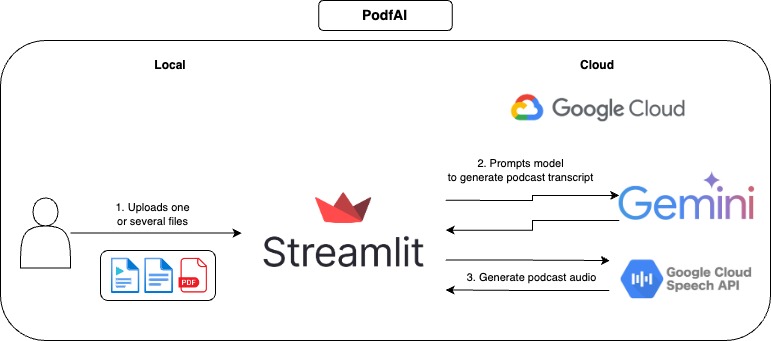
This APP allows the user to create content in the style of podcasts based on the provided files. Some examples would be providing a paper, lecture, project description, personal resume, or many others.
I also wrote a blog post to talk about this project, make sure to check "How to use generative AI to create podcast-style content from any input".
How it works
How to use
- Provide one or more files.
- Optionally, customize the voices of the guest and host, you can check out the voice samples here.
- Click on "Generate podcast" and wait a few moments.
- Play the audio, and feel free to follow along the textual transcript.
Examples
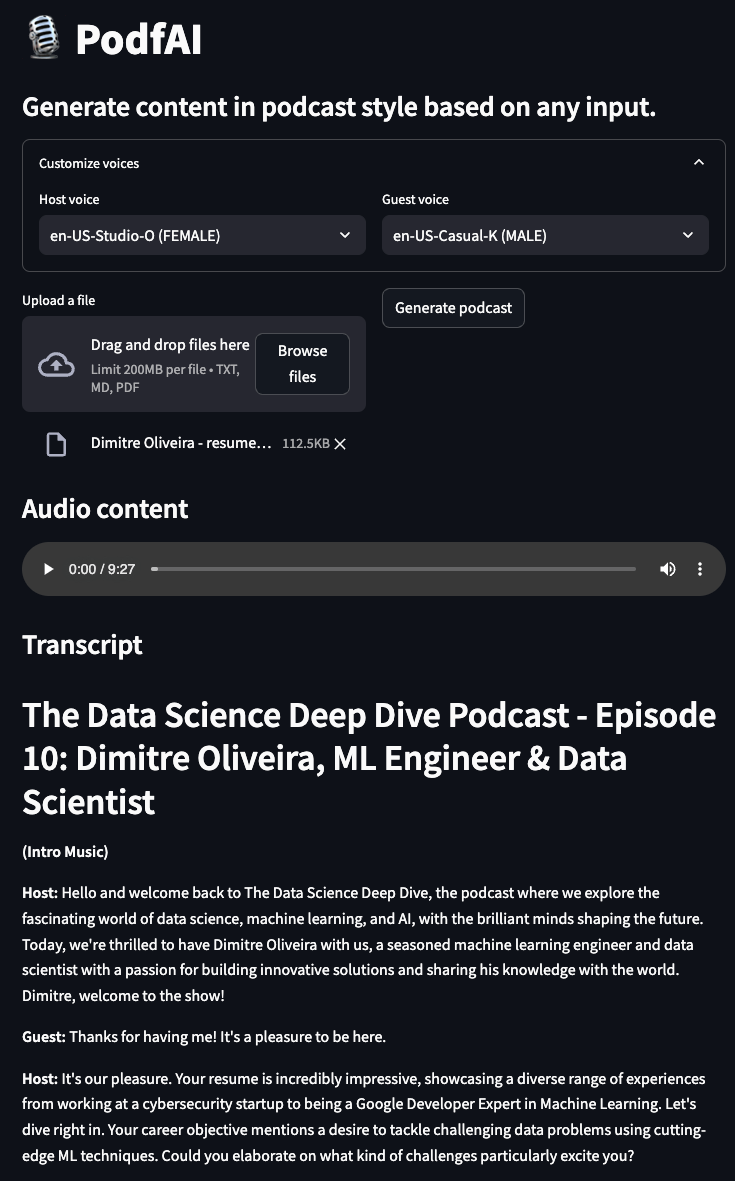
Podcast generate from my other project "AI beats"
podcast-ai_beast.mp4
Podcast generate from my other project "AI trailer"
podcast-ai_trailer.mp4
Podcast generate from Andrew Huberman's "Optimal Morning Routine" description
podcast-andrew_hubermans.mp4
Podcast generate by a personal resume
podcast-resume.mp4
Local usage
Setup
- Clone the GitHub repository
https://github.com/dimitreOliveira/PodfAI.git
cd PodfAI
- Create a new venv
python -m venv .venvs/podfai
- Activate the venv
source .venvs/podfai/bin/activate
- Install the requirements
Alternatively, you can also run using pip
pip install -r requirements
- Set up the Google API dependencies
- Follow this guide or this other one.
Running the APP
To start the APP, run the Make command below
Alternatively, you can also run using plain Python
Configs
Feel free to change the default configs to change the APP behavior or adjust to your needs.
vertex:
  project: {VERTEX_AI_PROJECT}
  location: {VERTEX_AI_LOCATION}
transcript:
  model_id: gemini-1.5-pro-002
  transcript_len: 5000
  max_output_tokens: 8192
  temperature: 1
  top_p: 0.95
  top_k: 32
- vertex
- project: Project name used by Vertex AI.
- location: Project location used by Vertex AI.
- transcript
- model_id: Model used to create the podcast transcript.
- transcript_len: Suggested transcript length.
- max_output_tokens: Maximum number of tokens generated by the model.
- temperature: Temperature controls the degree of randomness in token selection. Lower temperatures are good for prompts that expect a true or correct response, while higher temperatures can lead to more diverse or unexpected results. With a temperature of 0 the highest probability token is always selected
- top_p: Top-p changes how the model selects tokens for output. Tokens are selected from most probable to least until the sum of their probabilities equals the top-p value. For example, if tokens A, B, and C have a probability of .3, .2, and .1 and the top-p value is .5, then the model will select either A or B as the next token (using temperature)
- top_k: Top-k changes how the model selects tokens for output. A top-k of 1 means the selected token is the most probable among all tokens in the model’s vocabulary (also called greedy decoding), while a top-k of 3 means that the next token is selected from among the 3 most probable tokens (using temperature)
TODO
- Support voice cloning
- Support other languages
- Support other input types (images, videos, YouTube URLs)
- Add example notebook to run in Colab
- Reproduce workflow with open-source models
- Experiment with agentic workflows to improve the podcast transcript
References
- Google cloud - Text-to-Speech client libraries
- Setup Google Cloud TTS locally
- Google Cloud TTS Voice List
Contributing
If you are interested in contributing to this project, thanks a lot! Before creating your PR, make sure to lint your code, running the command below:
Acknowledgments
- Google Cloud credits are provided for this project. This project was possible thanks to the support of Google's ML Developer Programs team.
- This project was based on Google's NotebookLM, which, aside from the podcast-style content, has many other features, make sure to check it out.








