NCERT Books RAG System
This project implements a Retrieval-Augmented Generation (RAG) system for NCERT books using Ollama for text embedding and vector database, and Groq API for the language model response.
Features
- Uses Nomic text embedding model via Ollama for creating vector embeddings
- Stores embeddings in ChromaDB
- Utilizes Groq API with LLaMA 3 8B model for generating responses
- Provides a FastAPI backend and Streamlit frontend for user interaction
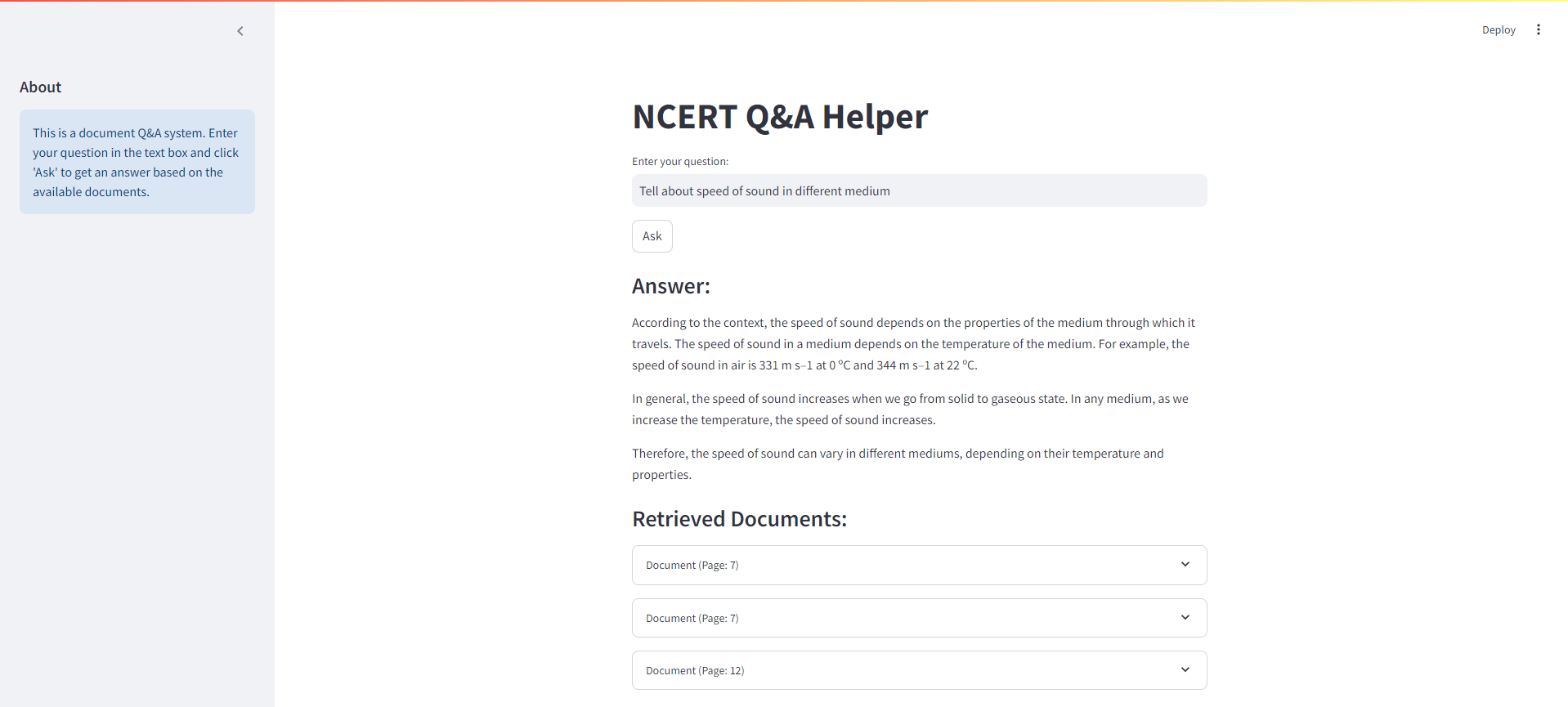
Streamlit Interface
Below is a screenshot of the Streamlit interface for our NCERT Books RAG system:
System Architecture
Here's an overview of the NCERT Books RAG system architecture:
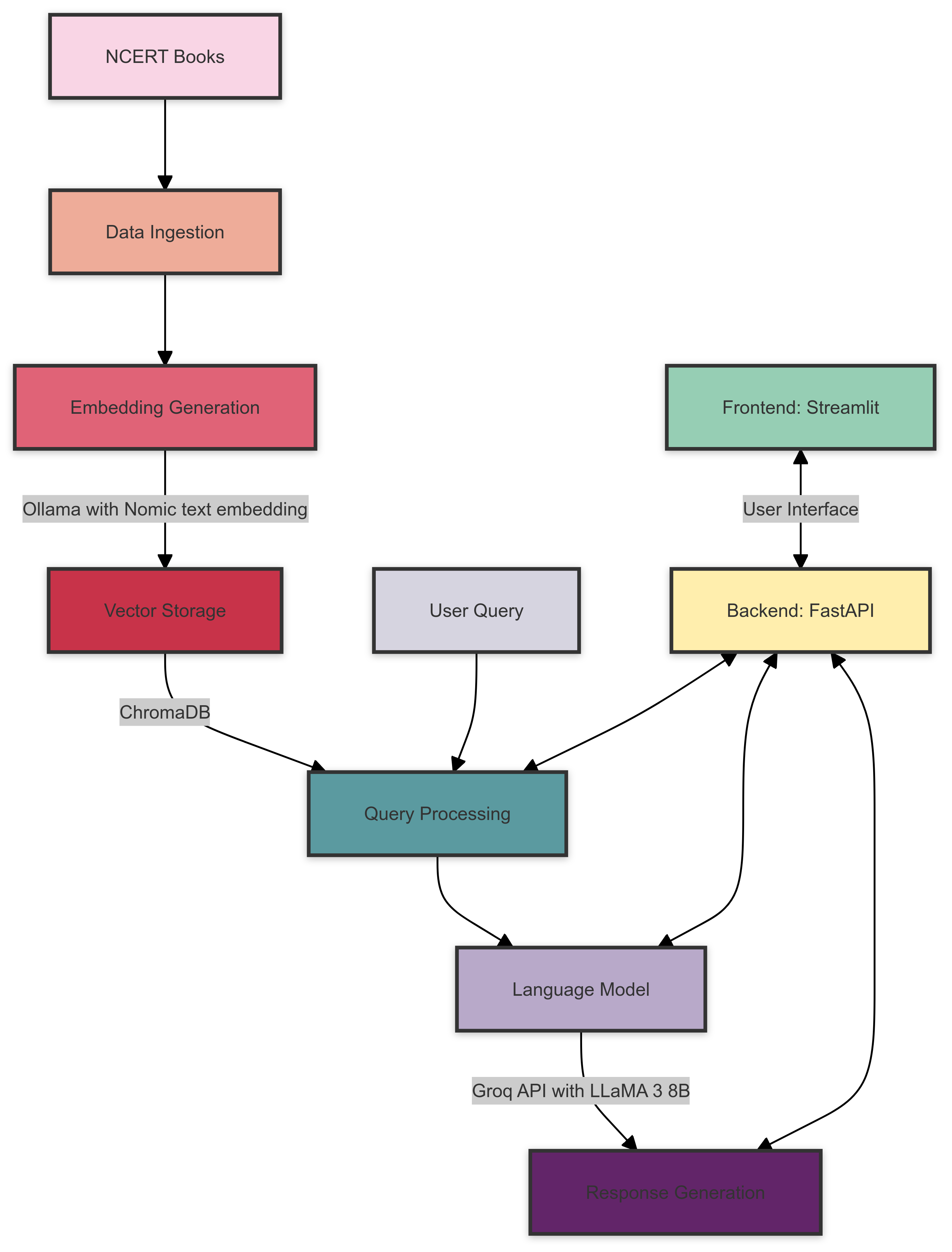
The system architecture consists of the following components:
- Data Ingestion: NCERT books are processed and prepared for embedding.
- Embedding Generation: Ollama with the Nomic text embedding model creates vector embeddings for the processed text.
- Vector Storage: ChromaDB stores the generated embeddings for efficient retrieval.
- Query Processing: User queries are processed and relevant embeddings are retrieved from ChromaDB.
- Language Model: Groq API with LLaMA 3 8B model generates responses based on the retrieved context and user query.
- Backend: FastAPI handles the communication between the frontend and the various system components.
- Frontend: Streamlit provides an interactive user interface for querying the system and displaying results.
Prerequisites
Before you begin, ensure you have met the following requirements:
- Python 3.7+
- Ollama installed and set up
- Groq API account and API key
Installation
-
Clone the repository:
git clone https://github.com/yourusername/ncert-rag-system.git
cd ncert-rag-system
-
Install the required dependencies:
pip install -r requirements.txt
-
Download and set up Ollama:
- Follow the instructions at Ollama's official website to install Ollama
- Download the Nomic text embedding model:
ollama pull nomic-embed-text
-
Set up your Groq API key:
- Create a
.env file in the project root
- Add your Groq API key:
GROQ_API_KEY=your_api_key_here
Usage
-
Start the FastAPI backend:
uvicorn main:app --reload
-
Launch the Streamlit UI:
streamlit run streamlit_app.py
-
Open your web browser and navigate to the Streamlit app URL (typically http://localhost:8501)
-
Use the interface to interact with the NCERT books RAG system
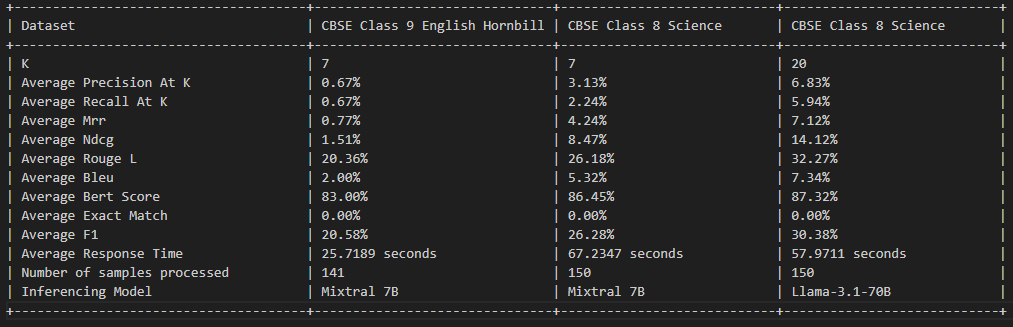
RAG Evaluation

License
This project is licensed under the MIT License - see the LICENSE file for details.
Contributing
Contributions are welcome! Please feel free to submit a Pull Request.

Acknowledgements
- Ollama for providing the embedding model
- Groq for their LLM API
- FastAPI and Streamlit for the backend and frontend frameworks

