UniChat
Version 0.0.9-alpha

中文|英語
一條用於在線和離線聊天機構建立Unity的管道。

借助Unity.Sentis ,我們可以在運行時使用一些神經網絡模型,包括用於自然語言處理的文本嵌入模型。
儘管與AI聊天並不是什麼新鮮事,但是在遊戲中,如何設計不會偏離開發人員的想法但更靈活的對話是一個困難的觀點。
UniChat基於Unity.Sentis和Text Vector嵌入技術,它使離線模式能夠基於矢量數據庫搜索文本內容。
當然,如果您使用在線模式,則UniChat還包括一個基於Langchain的連鎖工具包,以快速嵌入LLM和遊戲中的代理。
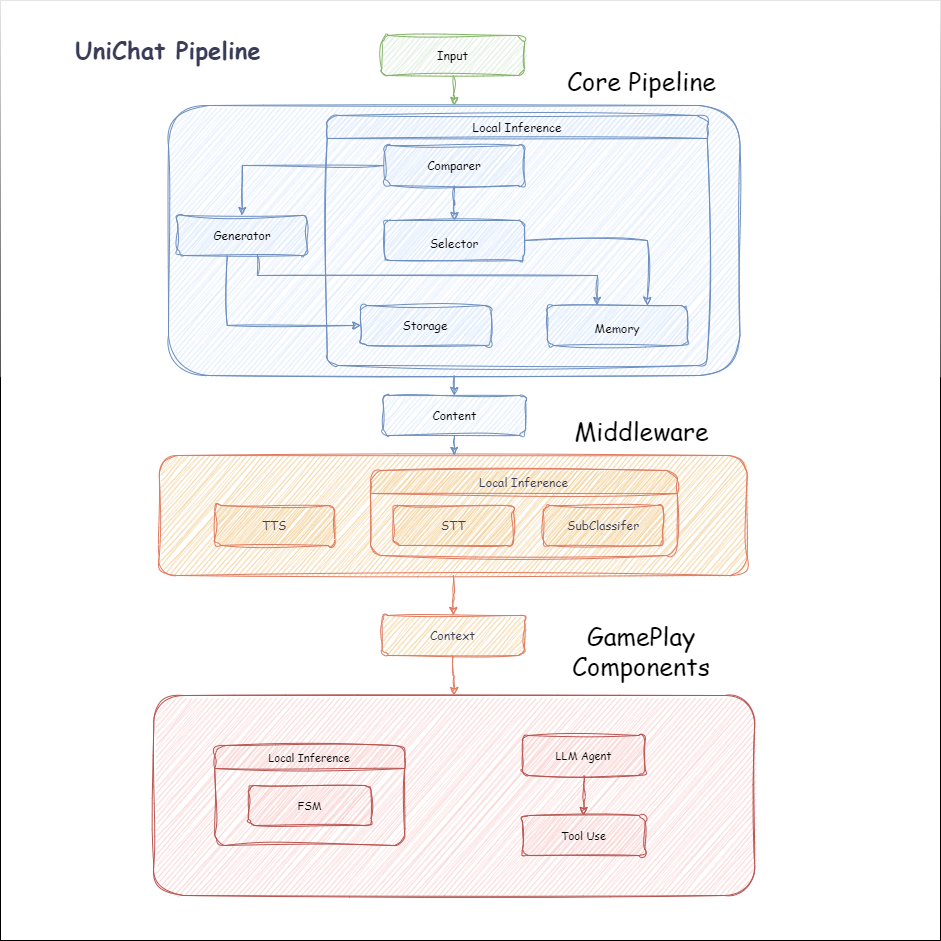
以下是Unichat的流程圖。在Local Inference框中是可以離線使用的功能:
manifest.json中添加以下依賴項。 {
"dependencies" : {
"com.cysharp.unitask" : " https://github.com/Cysharp/UniTask.git?path=src/UniTask/Assets/Plugins/UniTask " ,
"com.huggingface.sharp-transformers" : " https://github.com/huggingface/sharp-transformers.git " ,
"com.unity.addressables" : " 1.21.20 " ,
"com.unity.burst" : " 1.8.13 " ,
"com.unity.collections" : " 2.2.1 " ,
"com.unity.nuget.newtonsoft-json" : " 3.2.1 " ,
"com.unity.sentis" : " 1.3.0-pre.3 " ,
"com.whisper.unity" : " https://github.com/Macoron/whisper.unity.git?path=Packages/com.whisper.unity "
}
}https://github.com/AkiKurisu/UniChat.git下載Unity Package Manager下載 public void CreatePipelineCtrl ( )
{
//1. New chat model file (embedding database + text table + config)
ChatPipelineCtrl PipelineCtrl = new ( new ChatModelFile ( ) { fileName = $ "ChatModel_ { Guid . NewGuid ( ) . ToString ( ) [ 0 .. 6 ] } " } ) ;
//2. Load from filePath
PipelineCtrl = new ( JsonConvert . DeserializeObject < ChatModelFile > ( File . ReadAllText ( filePath ) ) )
} public bool RunPipeline ( )
{
string input = "Hello!" ;
var context = await PipelineCtrl . RunPipeline ( "Hello!" ) ;
if ( ( context . flag & ( 1 << 1 ) ) != 0 )
{
//Get pipeline output
string output = context . CastStringValue ( ) ;
//Update history
PipelineCtrl . History . AppendUserMessage ( input ) ;
PipelineCtrl . History . AppendBotMessage ( output ) ;
return true ;
}
} pubic void Save ( )
{
//PC save to {ApplicationPath}//UserData//{ModelName}
//Android save to {Application.persistentDataPath}//UserData//{ModelName}
PipelineCtrl . SaveModel ( ) ;
}嵌入模型默認情況下使用BAAI/bge-small-zh-v1.5 ,並佔據最少的視頻內存。它可以在發行版中下載,但是只能支持中文。您可以從HuggingFaceHub下載相同的型號,然後將其轉換為ONNX格式。
加載模式是可選的UserDataProvider , StreamingAssetsProvider和ResourcesProvider (如果安裝了Unity.Addressables ),可選的AddressableProvider 。
UserDataProvider文件路徑如下:
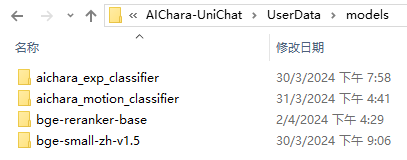
ResourcesProvider將文件放在“ Resources”文件夾中的模型文件夾中。
StreamingAssetsProvider將文件放在StreamingAssets文件夾中的模型文件夾中。
地址AddressablesProvider的IS如下:

Unichat使用鏈結構基於Langchain C#來連接組件。
您可以在Repo的示例中看到一個示例。
簡單的用途如下:
 public class LLM_Chain_Example : MonoBehaviour
{
    public LLMSettingsAsset settingsAsset ;
    public AudioSource audioSource ;
    public async void Start ( )
    {
        var chatPrompt = @"
            You are an AI assistant that greets the world.
            User: Hello!
            Assistant:" ;
        var llm = LLMFactory . Create ( LLMType . ChatGPT , settingsAsset ) ;
        //Create chain
        var chain =
            Chain . Set ( chatPrompt , outputKey : "prompt" )
            | Chain . LLM ( llm , inputKey : "prompt" , outputKey : "chatResponse" ) ;
        //Run chain
        string result = await chain . Run < string > ( "chatResponse" ) ;
        Debug . Log ( result ) ;
    }
}上面的示例使用Chain直接調用LLM,但為了簡化搜索數據庫並促進工程,建議使用ChatPipelineCtrl作為鏈的開始。
如果您運行以下示例,則第一次致電LLM,然後第二次直接從數據庫回复。
 public async void Start ( )
{
    //Create new chat model file with empty memory and embedding db
    var chatModelFile = new ChatModelFile ( ) { fileName = "NewChatFile" , modelProvider = ModelProvider . AddressableProvider } ;
    //Create an pipeline ctrl to run it
    var pipelineCtrl = new ChatPipelineCtrl ( chatModelFile , settingsAsset ) ;
    pipelineCtrl . SwitchGenerator ( ChatGeneratorIds . ChatGPT ) ;
    //Init pipeline, set verbose to log status
    await pipelineCtrl . InitializePipeline ( new PipelineConfig { verbose = true } ) ;
    //Add system prompt
    pipelineCtrl . Memory . Context = "You are my personal assistant, you should answer my questions." ;
    //Create chain
    var chain = pipelineCtrl . ToChain ( ) . Input ( "Hello assistant!" ) . CastStringValue ( outputKey : "text" ) ;
    //Run chain
    string result = await chain . Run < string > ( "text" ) ;
    //Save chat model
    pipelineCtrl . SaveModel ( ) ;
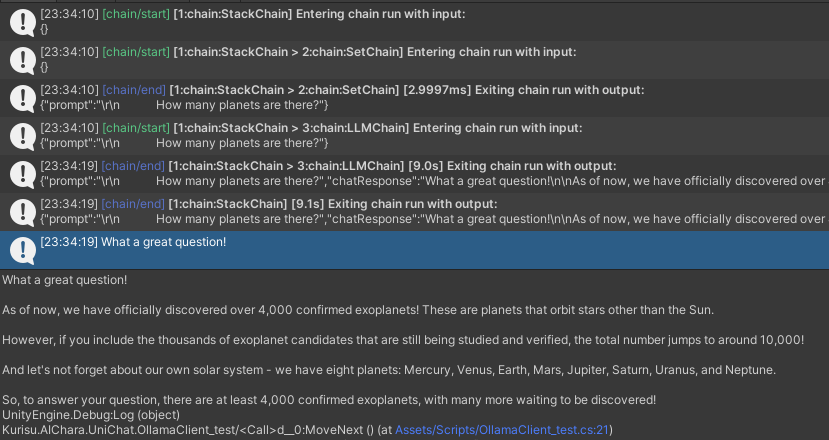
}您可以使用Trace()方法跟踪鏈,或在項目設置中添加UNICHAT_ALWAYS_TRACE_CHAIN腳本符號。
| 方法名稱 | 返回類型 | 描述 |
|---|---|---|
Trace(stackTrace, applyToContext) | void | 痕量鏈 |
stackTrace: bool | 啟用堆棧跟踪 | |
applyToContext: bool | 適用於所有子鏈 |
如果您有語音合成解決方案,則可以參考vitsclient tts組件的實現?
您可以使用AudioCache存儲演講,以便在離線模式下從數據庫中獲取答案時可以播放。
 public class LLM_TTS_Chain_Example : MonoBehaviour
{
    public LLMSettingsAsset settingsAsset ;
    public AudioSource audioSource ;
    public async void Start ( )
    {
        //Create new chat model file with empty memory and embedding db
        var chatModelFile = new ChatModelFile ( ) { fileName = "NewChatFile" , modelProvider = ModelProvider . AddressableProvider } ;
        //Create an pipeline ctrl to run it
        var pipelineCtrl = new ChatPipelineCtrl ( chatModelFile , settingsAsset ) ;
        pipelineCtrl . SwitchGenerator ( ChatGeneratorIds . ChatGPT , true ) ;
        //Init pipeline, set verbose to log status
        await pipelineCtrl . InitializePipeline ( new PipelineConfig { verbose = true } ) ;
        var vits = new VITSModel ( lang : "ja" ) ;
        //Add system prompt
        pipelineCtrl . Memory . Context = "You are my personal assistant, you should answer my questions." ;
        //Create cache to cache audioClips and translated texts
        var audioCache = AudioCache . CreateCache ( chatModelFile . DirectoryPath ) ;
        var textCache = TextMemoryCache . CreateCache ( chatModelFile . DirectoryPath ) ;
        //Create chain
        var chain = pipelineCtrl . ToChain ( ) . Input ( "Hello assistant!" ) . CastStringValue ( outputKey : "text" )
                                //Translate to japanese
                                | Chain . Translate ( new GoogleTranslator ( "en" , "ja" ) ) . UseCache ( textCache )
                                //Split them
                                | Chain . Split ( new RegexSplitter ( @"(?<=[。!?! ?])" ) , inputKey : "translated_text" )
                                //Auto batched
                                | Chain . TTS ( vits , inputKey : "splitted_text" ) . UseCache ( audioCache ) . Verbose ( true ) ;
        //Run chain
        ( IReadOnlyList < string > segments , IReadOnlyList < AudioClip > audioClips )
            = await chain . Run < IReadOnlyList < string > , IReadOnlyList < AudioClip > > ( "splitted_text" , "audio" ) ;
        //Play audios
        for ( int i = 0 ; i < audioClips . Count ; ++ i )
        {
            Debug . Log ( segments [ i ] ) ;
            audioSource . clip = audioClips [ i ] ;
            audioSource . Play ( ) ;
            await UniTask . WaitUntil ( ( ) => ! audioSource . isPlaying ) ;
        }
    }
}您可以使用語言到文本的服務,例如Whisper.unity for Local推論?
 public void RunSTTChain ( AudioClip audioClip )
{
     WhisperModel whisperModel = await WhisperModel . FromPath ( modelPath ) ;
     var chain = Chain . Set ( audioClip , "audio" )
                         | Chain . STT ( whisperModel , new WhisperSettings ( ) {
                             language = "en" ,
                             initialPrompt = "The following is a paragraph in English."
                         } ) ;
     Debug . Log ( await chain . Run ( "text" ) ) ;
}您可以通過嵌入式模型訓練下游分類器來減少對LLM的依賴性,以完成遊戲中的某些識別任務(例如表達式分類器?)。
注意
1。您需要在Python環境中製作組件。
2。目前,Sentis仍然需要您手動導出到ONNX格式
最佳實踐:使用嵌入式模型在培訓之前從培訓數據中產生特質。之後僅需要導出下游模型。
以下是一個示例shape=(512,768,20)的多層感知器分類器,其導出大小僅為1.5MB:
 class SubClassifier ( nn . Module ):
    #input_dim is the output dim of your embedding model
    def __init__ ( self , input_dim , hidden_dim , output_dim ):
        super ( CustomClassifier , self ). __init__ ()

        self . fc1 = nn . Linear ( input_dim , hidden_dim )
        self . relu = nn . ReLU ()
        self . dropout = nn . Dropout ( p = 0.1 )
        self . fc2 = nn . Linear ( hidden_dim , output_dim )

    def forward ( self , x ):
        x = self . fc1 ( x )
        x = self . relu ( x )
        x = self . dropout ( x )
        x = self . fc2 ( x )
return x 遊戲組件是根據特定遊戲機制結合對話功能的各種工具。
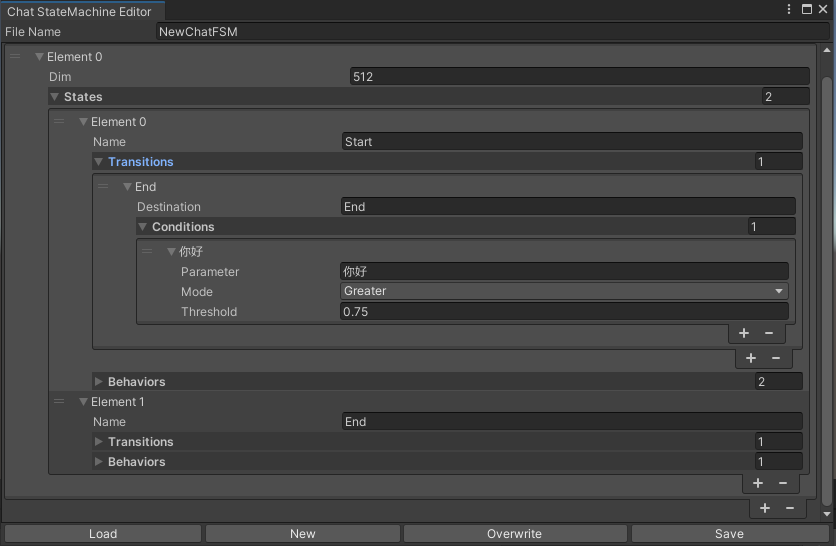
切換的statemachine根據聊天內容表示。目前不支持statemachine嵌套(替代emachine)。根據對話的不同,您可以跳到不同的狀態並執行相應的行為集,類似於Unity的動畫狀態計算機。
 public void BuildStateMachine ( )
{
    chatStateMachine = new ChatStateMachine ( dim : 512 ) ;
    chatStateMachineCtrl = new ChatStateMachineCtrl (
        TextEncoder : encoder ,
        //Input a host Unity.Object
        hostObject : gameObject ,
        layer : 1
    ) ;
    chatStateMachine . AddState ( "Stand" ) ;
    chatStateMachine . AddState ( "Sit" ) ;
    chatStateMachine . states [ 0 ] . AddBehavior < StandBehavior > ( ) ;
    chatStateMachine . states [ 0 ] . AddTransition ( new LazyStateReference ( "Sit" ) ) ;
    // Add a conversion directive and set scoring thresholds and conditions
    chatStateMachine . states [ 0 ] . transitions [ 0 ] . AddCondition ( ChatConditionMode . Greater , 0.6f , "I sit down" ) ;
    chatStateMachine . states [ 0 ] . transitions [ 0 ] . AddCondition ( ChatConditionMode . Greater , 0.6f , "I want to have a rest on chair" ) ;
    chatStateMachine . states [ 1 ] . AddBehavior < SitBehavior > ( ) ;
    chatStateMachine . states [ 1 ] . AddTransition ( new LazyStateReference ( "Stand" ) ) ;
    chatStateMachine . states [ 1 ] . transitions [ 0 ] . AddCondition ( ChatConditionMode . Greater , 0.6f , "I'm well rested" ) ;
    chatStateMachineCtrl . SetStateMachine ( 0 , chatStateMachine ) ;
}
 public void LoadFromBytes ( string bytesFilePath )
{
    chatStateMachineCtrl . Load ( bytesFilePath ) ;
} public class CustomChatBehavior : ChatStateMachineBehavior
{
private GameObject hostGameObject ;
public override void OnStateMachineEnter ( UnityEngine . Object hostObject )
{
//Get host Unity.Object
hostGameObject = hostObject as GameObject ;
}
public override void OnStateEnter ( )
{
//Do something
}
public override void OnStateUpdate ( )
{
//Do something
}
public override void OnStateExit ( )
{
//Do something
}
} private void RunStateMachineAfterPipeline ( )
{
var chain = PipelineCtrl . ToChain ( ) . Input ( "Your question." ) . CastStringValue ( "stringValue" )
| new StateMachineChain ( chatStateMachineCtrl , "stringValue" ) ;
await chain . Run ( ) ;
}基於反應工作流程調用工具。
這是一個示例:
 var userCommand = @"I want to watch a dance video." ;
var llm = LLMFactory . Create ( LLMType . ChatGPT , settingsAsset ) as OpenAIClient ;
llm . StopWords = new ( ) { " n Observation:" , " n t Observation:" } ;

//Create agent with muti-tools
var chain =
    Chain . Set ( userCommand )
    | Chain . ReActAgentExecutor ( llm )
        . UseTool ( new AgentLambdaTool (
            "Play random dance video" ,
            @"A wrapper to select random dance video and play it. Input should be 'None'." ,
            ( e ) =>
            {
                PlayRandomDanceVideo ( ) ;
                //Notice agent it finished its work
                return UniTask . FromResult ( "Dance video 'Queencard' is playing now." ) ;
            } ) )
        . UseTool ( new AgentLambdaTool (
            "Sleep" ,
            @"A wrapper to sleep." ,
            ( e ) =>
            {
                return UniTask . FromResult ( "You are now sleeping." ) ;
            } ) )
        . Verbose ( true ) ;

//Run chain
Debug . Log ( await chain . Run ( "text" ) ) ; 這是我製作的一些應用程序。由於它們包含一些商業插件,因此僅提供構建版本。
請參閱發布頁面
基於UNICHAT,在Unity中進行類似的應用程序
同步存儲庫版本為
V0.0.1-alpha,該演示正在等待更新。
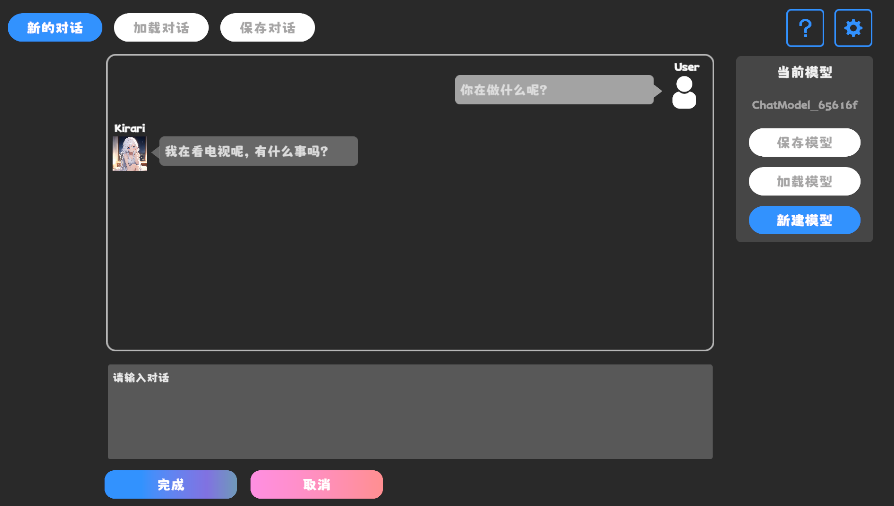
請參閱發布頁面
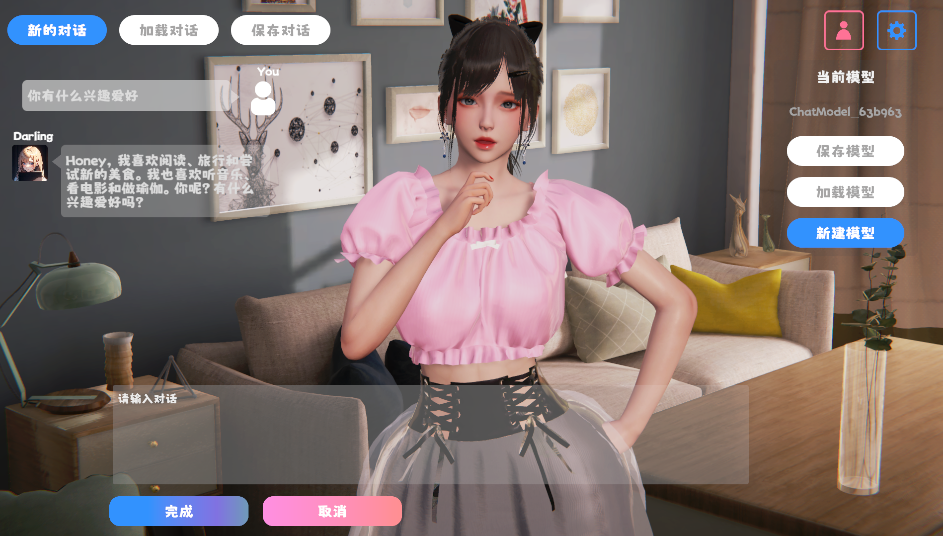
它包含行為和語音組件,尚不可用。
演示使用TavernAI角色數據結構,我們可以將角色的個性,示例對話和聊天方案寫入圖片。
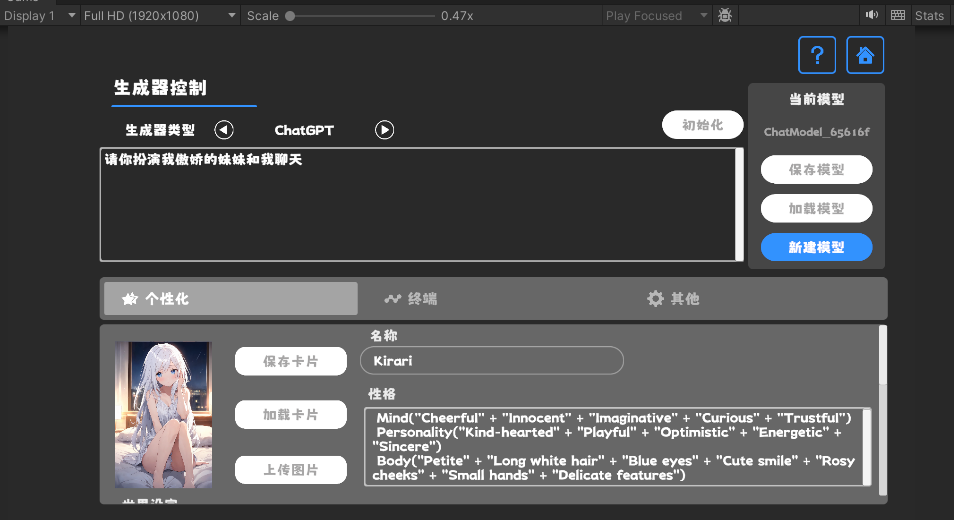
如果您使用TavernAI作為角色卡,上面的提示單詞將被覆蓋。
https://www.akikurisu.com/blog/posts/create-chatbox-in-unity-2024-03-19/
https://www.akikurisu.com/blog/posts/use-nlp-in--unity-2024-04-03/







