UniChat
Version 0.0.9-alpha

中文|英語
Unityでオンラインおよびオフラインのチャットボットを作成するためのパイプライン。

Unity.Sentisのリリースにより、自然言語処理のためのテキスト埋め込みモデルを含む、実行時にいくつかのニューラルネットワークモデルを使用できます。
AIとのチャットは新しいことではありませんが、ゲームでは、開発者のアイデアから逸脱していないがより柔軟性のある会話をデザインする方法は困難な点です。
UniChat 、 Unity.Sentisとテキストベクトル埋め込みテクノロジーに基づいており、オフラインモードがベクトルデータベースに基づいてテキストコンテンツを検索できるようにします。
もちろん、オンラインモードを使用する場合、 UniChatはLangchainに基づくチェーンツールキットも含まれており、ゲームにLLMとエージェントをすばやく埋め込みます。
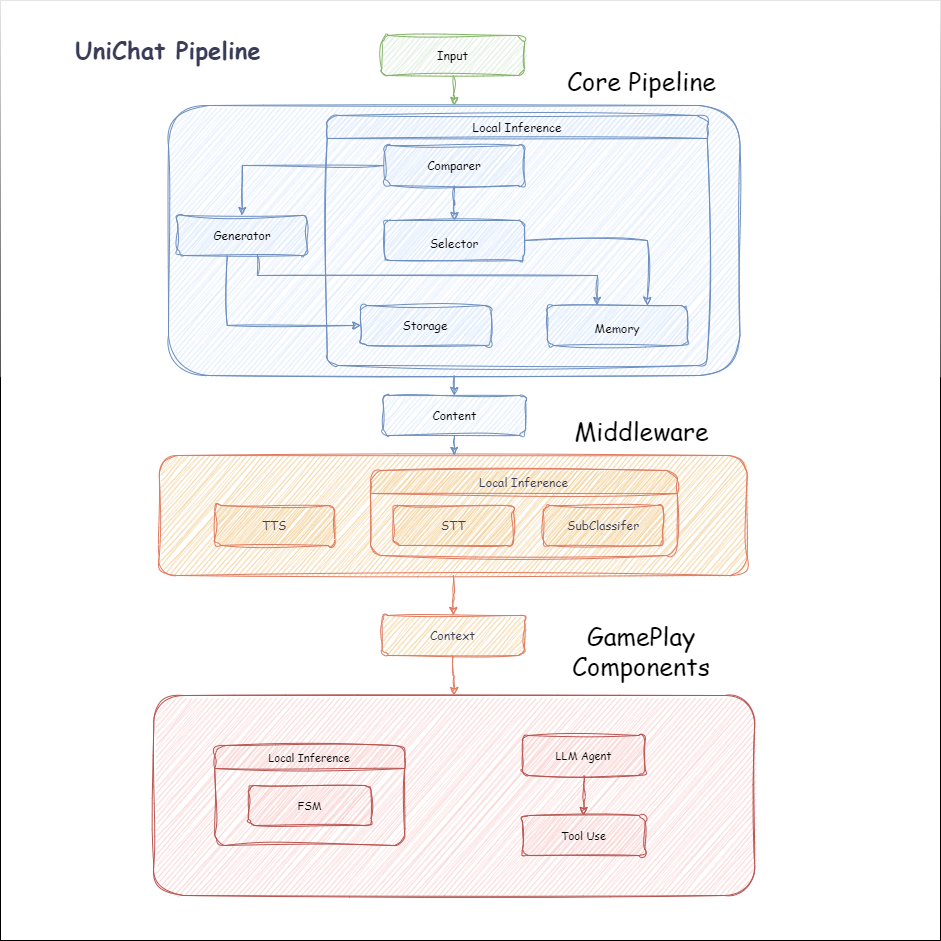
以下は、Unichatのフローチャートです。 Local Inferenceボックスには、オフラインで使用できる関数があります。
manifest.jsonに次の依存関係を追加します。 {
"dependencies" : {
"com.cysharp.unitask" : " https://github.com/Cysharp/UniTask.git?path=src/UniTask/Assets/Plugins/UniTask " ,
"com.huggingface.sharp-transformers" : " https://github.com/huggingface/sharp-transformers.git " ,
"com.unity.addressables" : " 1.21.20 " ,
"com.unity.burst" : " 1.8.13 " ,
"com.unity.collections" : " 2.2.1 " ,
"com.unity.nuget.newtonsoft-json" : " 3.2.1 " ,
"com.unity.sentis" : " 1.3.0-pre.3 " ,
"com.whisper.unity" : " https://github.com/Macoron/whisper.unity.git?path=Packages/com.whisper.unity "
}
}https://github.com/AkiKurisu/UniChat.gitを使用したUnity Package Managerによるダウンロード public void CreatePipelineCtrl ( )
{
//1. New chat model file (embedding database + text table + config)
ChatPipelineCtrl PipelineCtrl = new ( new ChatModelFile ( ) { fileName = $ "ChatModel_ { Guid . NewGuid ( ) . ToString ( ) [ 0 .. 6 ] } " } ) ;
//2. Load from filePath
PipelineCtrl = new ( JsonConvert . DeserializeObject < ChatModelFile > ( File . ReadAllText ( filePath ) ) )
} public bool RunPipeline ( )
{
string input = "Hello!" ;
var context = await PipelineCtrl . RunPipeline ( "Hello!" ) ;
if ( ( context . flag & ( 1 << 1 ) ) != 0 )
{
//Get pipeline output
string output = context . CastStringValue ( ) ;
//Update history
PipelineCtrl . History . AppendUserMessage ( input ) ;
PipelineCtrl . History . AppendBotMessage ( output ) ;
return true ;
}
} pubic void Save ( )
{
//PC save to {ApplicationPath}//UserData//{ModelName}
//Android save to {Application.persistentDataPath}//UserData//{ModelName}
PipelineCtrl . SaveModel ( ) ;
}埋め込みモデルは、デフォルトでBAAI/bge-small-zh-v1.5を使用し、ビデオメモリが最も少ないものを占めています。リリースでダウンロードできますが、中国語のみをサポートしています。 HuggingFaceHubから同じモデルをダウンロードして、ONNX形式に変換できます。
ロードモードUnity.Addressables 、Optional UserDataProvider 、 StreamingAssetsProvider 、およびResourcesProvider AddressableProvider 。
UserDataProviderファイルパスは次のとおりです。
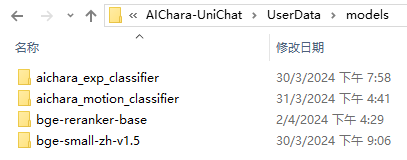
ResourcesProvider Resourcesフォルダーのモデルフォルダーにファイルを配置します。
StreamingAssetsProvider StreamingAssetsフォルダーのモデルフォルダーにファイルを配置します。
AddressablesProviderのaddressは次のとおりです。

Unichatは、チェーン構造を使用してコンポーネントを直列に接続するLangchain C#に基づいています。
Repoの例でサンプルを見ることができます。
簡単な使用は次のとおりです。
 public class LLM_Chain_Example : MonoBehaviour
{
    public LLMSettingsAsset settingsAsset ;
    public AudioSource audioSource ;
    public async void Start ( )
    {
        var chatPrompt = @"
            You are an AI assistant that greets the world.
            User: Hello!
            Assistant:" ;
        var llm = LLMFactory . Create ( LLMType . ChatGPT , settingsAsset ) ;
        //Create chain
        var chain =
            Chain . Set ( chatPrompt , outputKey : "prompt" )
            | Chain . LLM ( llm , inputKey : "prompt" , outputKey : "chatResponse" ) ;
        //Run chain
        string result = await chain . Run < string > ( "chatResponse" ) ;
        Debug . Log ( result ) ;
    }
}上記の例では、 Chainを使用してLLMを直接呼び出しますが、データベースの検索を簡素化してエンジニアリングを促進するには、 ChatPipelineCtrlチェーンの開始として使用することをお勧めします。
次の例を実行すると、初めてLLMに電話したとき、2回目はデータベースから直接返信します。
 public async void Start ( )
{
    //Create new chat model file with empty memory and embedding db
    var chatModelFile = new ChatModelFile ( ) { fileName = "NewChatFile" , modelProvider = ModelProvider . AddressableProvider } ;
    //Create an pipeline ctrl to run it
    var pipelineCtrl = new ChatPipelineCtrl ( chatModelFile , settingsAsset ) ;
    pipelineCtrl . SwitchGenerator ( ChatGeneratorIds . ChatGPT ) ;
    //Init pipeline, set verbose to log status
    await pipelineCtrl . InitializePipeline ( new PipelineConfig { verbose = true } ) ;
    //Add system prompt
    pipelineCtrl . Memory . Context = "You are my personal assistant, you should answer my questions." ;
    //Create chain
    var chain = pipelineCtrl . ToChain ( ) . Input ( "Hello assistant!" ) . CastStringValue ( outputKey : "text" ) ;
    //Run chain
    string result = await chain . Run < string > ( "text" ) ;
    //Save chat model
    pipelineCtrl . SaveModel ( ) ;
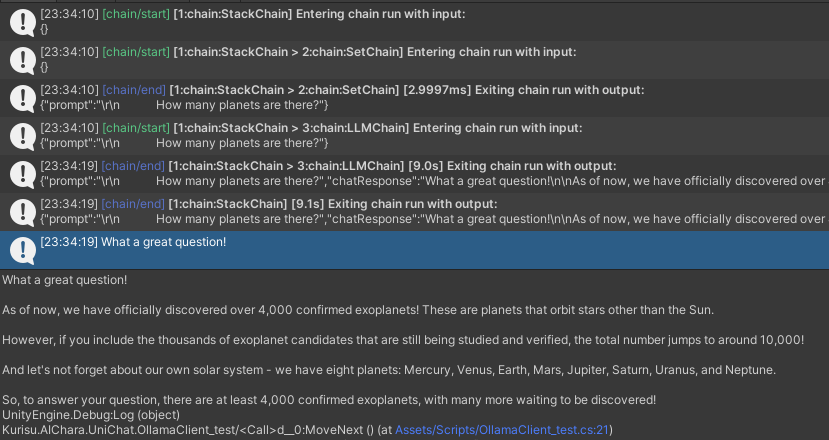
}Trace()メソッドを使用してチェーンをトレースするか、プロジェクト設定でUNICHAT_ALWAYS_TRACE_CHAINスクリプトシンボルを追加できます。
| メソッド名 | 返品タイプ | 説明 |
|---|---|---|
Trace(stackTrace, applyToContext) | void | トレースチェーン |
stackTrace: bool | スタックトレースを有効にします | |
applyToContext: bool | すべてのサブチェーンに適用されます |
音声合成ソリューションがある場合、TTSコンポーネントの実装をVitsclientに参照できますか?
AudioCache使用してスピーチを保存して、オフラインモードのデータベースから回答を受け取るときに再生できるようにすることができます。
 public class LLM_TTS_Chain_Example : MonoBehaviour
{
    public LLMSettingsAsset settingsAsset ;
    public AudioSource audioSource ;
    public async void Start ( )
    {
        //Create new chat model file with empty memory and embedding db
        var chatModelFile = new ChatModelFile ( ) { fileName = "NewChatFile" , modelProvider = ModelProvider . AddressableProvider } ;
        //Create an pipeline ctrl to run it
        var pipelineCtrl = new ChatPipelineCtrl ( chatModelFile , settingsAsset ) ;
        pipelineCtrl . SwitchGenerator ( ChatGeneratorIds . ChatGPT , true ) ;
        //Init pipeline, set verbose to log status
        await pipelineCtrl . InitializePipeline ( new PipelineConfig { verbose = true } ) ;
        var vits = new VITSModel ( lang : "ja" ) ;
        //Add system prompt
        pipelineCtrl . Memory . Context = "You are my personal assistant, you should answer my questions." ;
        //Create cache to cache audioClips and translated texts
        var audioCache = AudioCache . CreateCache ( chatModelFile . DirectoryPath ) ;
        var textCache = TextMemoryCache . CreateCache ( chatModelFile . DirectoryPath ) ;
        //Create chain
        var chain = pipelineCtrl . ToChain ( ) . Input ( "Hello assistant!" ) . CastStringValue ( outputKey : "text" )
                                //Translate to japanese
                                | Chain . Translate ( new GoogleTranslator ( "en" , "ja" ) ) . UseCache ( textCache )
                                //Split them
                                | Chain . Split ( new RegexSplitter ( @"(?<=[。!?! ?])" ) , inputKey : "translated_text" )
                                //Auto batched
                                | Chain . TTS ( vits , inputKey : "splitted_text" ) . UseCache ( audioCache ) . Verbose ( true ) ;
        //Run chain
        ( IReadOnlyList < string > segments , IReadOnlyList < AudioClip > audioClips )
            = await chain . Run < IReadOnlyList < string > , IReadOnlyList < AudioClip > > ( "splitted_text" , "audio" ) ;
        //Play audios
        for ( int i = 0 ; i < audioClips . Count ; ++ i )
        {
            Debug . Log ( segments [ i ] ) ;
            audioSource . clip = audioClips [ i ] ;
            audioSource . Play ( ) ;
            await UniTask . WaitUntil ( ( ) => ! audioSource . isPlaying ) ;
        }
    }
}ローカル推論にはwhisper.unityなどのスピーチツーテキストサービスを使用できますか?
 public void RunSTTChain ( AudioClip audioClip )
{
     WhisperModel whisperModel = await WhisperModel . FromPath ( modelPath ) ;
     var chain = Chain . Set ( audioClip , "audio" )
                         | Chain . STT ( whisperModel , new WhisperSettings ( ) {
                             language = "en" ,
                             initialPrompt = "The following is a paragraph in English."
                         } ) ;
     Debug . Log ( await chain . Run ( "text" ) ) ;
}ゲーム内のいくつかの認識タスクを完了するために、埋め込みモデルに基づいて下流の分類器をトレーニングすることにより、LLMへの依存を減らすことができます(式分類器など)。
知らせ
1. Python環境でコンポーネントを作成する必要があります。
2.現在、SentisはまだONNX形式に手動でエクスポートする必要があります
ベストプラクティス:埋め込みモデルを使用して、トレーニング前にトレーニングデータから特性を生成します。その後、下流モデルのみをエクスポートする必要があります。
以下は、わずか1.5MBの輸出サイズの多層パーセプトロン分類器のshape=(512,768,20)の例です。
 class SubClassifier ( nn . Module ):
    #input_dim is the output dim of your embedding model
    def __init__ ( self , input_dim , hidden_dim , output_dim ):
        super ( CustomClassifier , self ). __init__ ()

        self . fc1 = nn . Linear ( input_dim , hidden_dim )
        self . relu = nn . ReLU ()
        self . dropout = nn . Dropout ( p = 0.1 )
        self . fc2 = nn . Linear ( hidden_dim , output_dim )

    def forward ( self , x ):
        x = self . fc1 ( x )
        x = self . relu ( x )
        x = self . dropout ( x )
        x = self . fc2 ( x )
return x ゲームコンポーネントは、特定のゲームメカニズムに従ってダイアログ関数と組み合わされるさまざまなツールです。
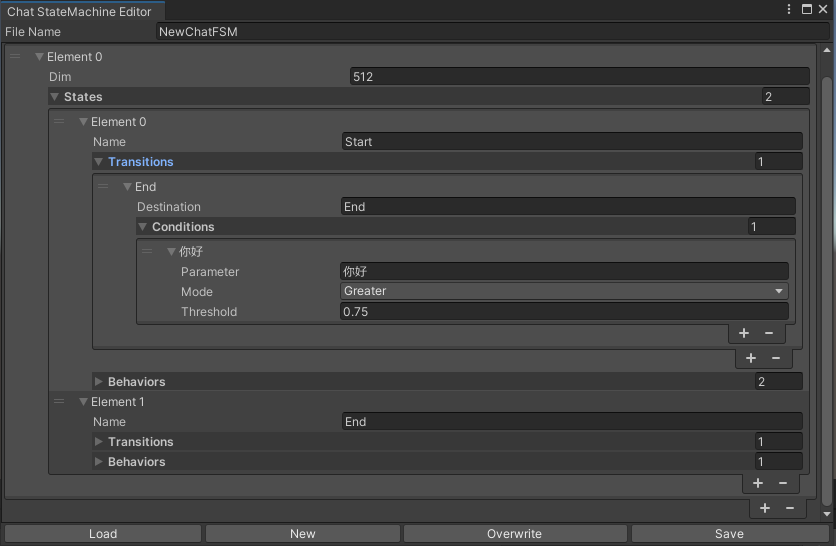
チャットコンテンツに従って状態を切り替えるステートマシン。 Statemachine Nesting(Suftatemachine)は現在サポートされていません。会話に応じて、異なる状態にジャンプして、Unityのアニメーション状態マシンと同様に、対応する動作セットを実行できます。
 public void BuildStateMachine ( )
{
    chatStateMachine = new ChatStateMachine ( dim : 512 ) ;
    chatStateMachineCtrl = new ChatStateMachineCtrl (
        TextEncoder : encoder ,
        //Input a host Unity.Object
        hostObject : gameObject ,
        layer : 1
    ) ;
    chatStateMachine . AddState ( "Stand" ) ;
    chatStateMachine . AddState ( "Sit" ) ;
    chatStateMachine . states [ 0 ] . AddBehavior < StandBehavior > ( ) ;
    chatStateMachine . states [ 0 ] . AddTransition ( new LazyStateReference ( "Sit" ) ) ;
    // Add a conversion directive and set scoring thresholds and conditions
    chatStateMachine . states [ 0 ] . transitions [ 0 ] . AddCondition ( ChatConditionMode . Greater , 0.6f , "I sit down" ) ;
    chatStateMachine . states [ 0 ] . transitions [ 0 ] . AddCondition ( ChatConditionMode . Greater , 0.6f , "I want to have a rest on chair" ) ;
    chatStateMachine . states [ 1 ] . AddBehavior < SitBehavior > ( ) ;
    chatStateMachine . states [ 1 ] . AddTransition ( new LazyStateReference ( "Stand" ) ) ;
    chatStateMachine . states [ 1 ] . transitions [ 0 ] . AddCondition ( ChatConditionMode . Greater , 0.6f , "I'm well rested" ) ;
    chatStateMachineCtrl . SetStateMachine ( 0 , chatStateMachine ) ;
}
 public void LoadFromBytes ( string bytesFilePath )
{
    chatStateMachineCtrl . Load ( bytesFilePath ) ;
} public class CustomChatBehavior : ChatStateMachineBehavior
{
private GameObject hostGameObject ;
public override void OnStateMachineEnter ( UnityEngine . Object hostObject )
{
//Get host Unity.Object
hostGameObject = hostObject as GameObject ;
}
public override void OnStateEnter ( )
{
//Do something
}
public override void OnStateUpdate ( )
{
//Do something
}
public override void OnStateExit ( )
{
//Do something
}
} private void RunStateMachineAfterPipeline ( )
{
var chain = PipelineCtrl . ToChain ( ) . Input ( "Your question." ) . CastStringValue ( "stringValue" )
| new StateMachineChain ( chatStateMachineCtrl , "stringValue" ) ;
await chain . Run ( ) ;
}Reactagentワークフローに基づいてツールを呼び出します。
これが例です:
 var userCommand = @"I want to watch a dance video." ;
var llm = LLMFactory . Create ( LLMType . ChatGPT , settingsAsset ) as OpenAIClient ;
llm . StopWords = new ( ) { " n Observation:" , " n t Observation:" } ;

//Create agent with muti-tools
var chain =
    Chain . Set ( userCommand )
    | Chain . ReActAgentExecutor ( llm )
        . UseTool ( new AgentLambdaTool (
            "Play random dance video" ,
            @"A wrapper to select random dance video and play it. Input should be 'None'." ,
            ( e ) =>
            {
                PlayRandomDanceVideo ( ) ;
                //Notice agent it finished its work
                return UniTask . FromResult ( "Dance video 'Queencard' is playing now." ) ;
            } ) )
        . UseTool ( new AgentLambdaTool (
            "Sleep" ,
            @"A wrapper to sleep." ,
            ( e ) =>
            {
                return UniTask . FromResult ( "You are now sleeping." ) ;
            } ) )
        . Verbose ( true ) ;

//Run chain
Debug . Log ( await chain . Run ( "text" ) ) ; これが私が作ったいくつかのアプリです。これらにはいくつかの商用プラグインが含まれているため、ビルドバージョンのみが利用可能です。
リリースページを参照してください
Unichatに基づいて、Unityで同様のアプリケーションを作成する
同期されたリポジトリバージョンは
V0.0.1-alphaで、デモが更新されるのを待っています。
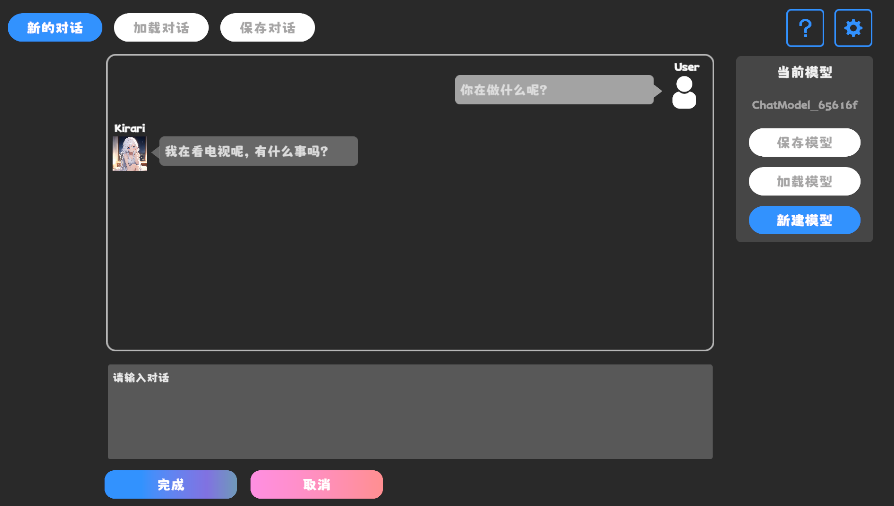
リリースページを参照してください
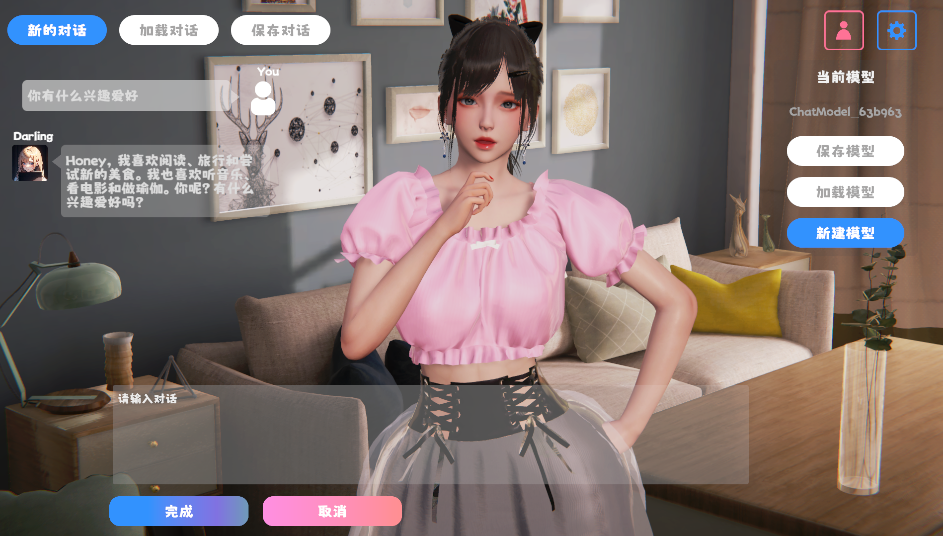
行動コンポーネントと音声コンポーネントが含まれており、まだ利用できません。
デモはTavernAIキャラクターデータ構造を使用し、キャラクターの個性、サンプルの会話、チャットシナリオを写真に書くことができます。
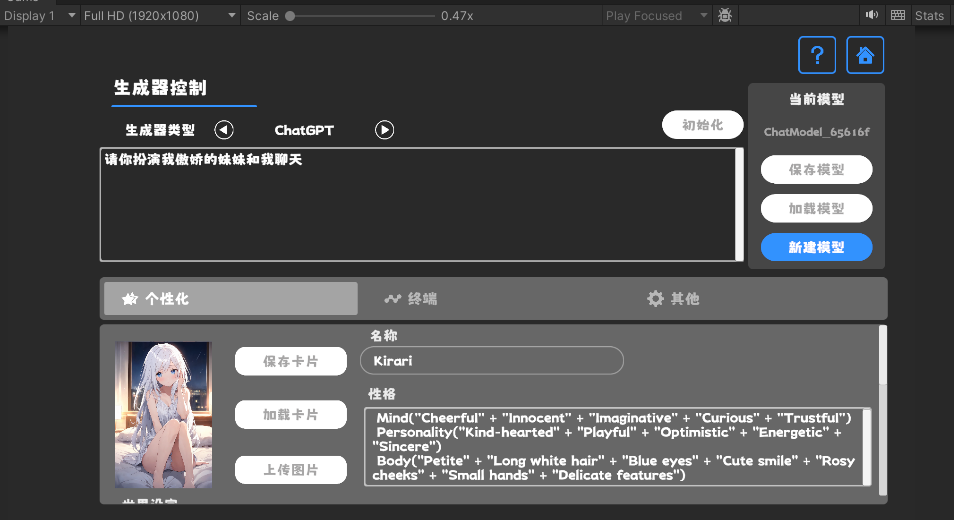
TavernAIを使用する場合、上記のキューワードが上書きされます。
https://www.akikurisu.com/blog/posts/create-chatbox-in-unity-2024-03-19/
https://www.akikurisu.com/blog/posts/use-nlp-in-unity-2024-04-03/







