UniChat
Version 0.0.9-alpha

中文 | 영어
Unity의 온라인 및 오프라인 채팅 보트를 만들기위한 파이프 라인.

Unity.Sentis 가 릴리스되면 런타임에서 자연어 처리를위한 텍스트 임베딩 모델을 포함하여 일부 신경망 모델을 사용할 수 있습니다.
AI와의 채팅은 새로운 것이 아니지만 게임에서는 개발자의 아이디어에서 벗어나지 않지만 더 유연한 대화를 디자인하는 방법은 어려운 점입니다.
UniChat Unity.Sentis 및 텍스트 벡터 임베딩 기술을 기반으로하며 오프라인 모드는 벡터 데이터베이스를 기반으로 텍스트 컨텐츠를 검색 할 수 있습니다.
물론 온라인 모드를 사용하는 경우 UniChat 에는 Langchain을 기반으로 한 체인 툴킷이 포함되어있어 게임에 LLM과 에이전트를 신속하게 포함시킵니다.
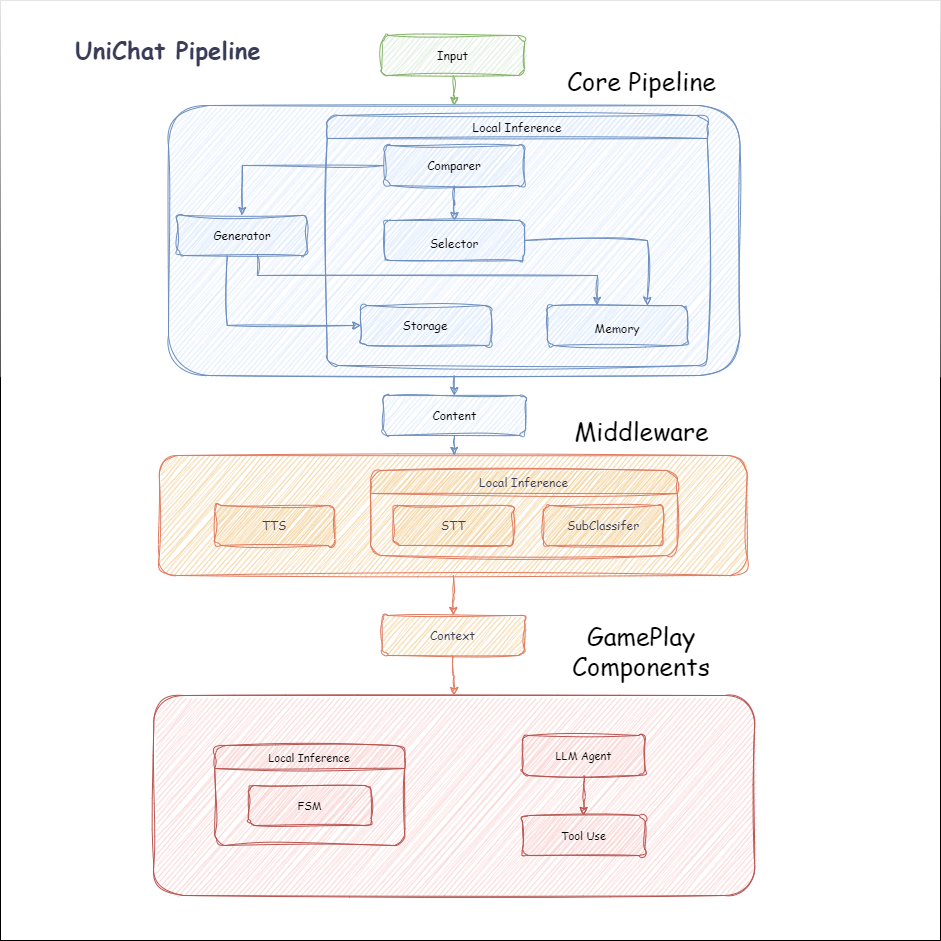
다음은 Unichat의 흐름도입니다. Local Inference 상자에는 오프라인으로 사용할 수있는 기능이 있습니다.
manifest.json 에 다음 종속성을 추가하십시오. {
"dependencies" : {
"com.cysharp.unitask" : " https://github.com/Cysharp/UniTask.git?path=src/UniTask/Assets/Plugins/UniTask " ,
"com.huggingface.sharp-transformers" : " https://github.com/huggingface/sharp-transformers.git " ,
"com.unity.addressables" : " 1.21.20 " ,
"com.unity.burst" : " 1.8.13 " ,
"com.unity.collections" : " 2.2.1 " ,
"com.unity.nuget.newtonsoft-json" : " 3.2.1 " ,
"com.unity.sentis" : " 1.3.0-pre.3 " ,
"com.whisper.unity" : " https://github.com/Macoron/whisper.unity.git?path=Packages/com.whisper.unity "
}
}https://github.com/AkiKurisu/UniChat.git 사용하여 Unity Package Manager 가 다운로드하십시오 public void CreatePipelineCtrl ( )
{
//1. New chat model file (embedding database + text table + config)
ChatPipelineCtrl PipelineCtrl = new ( new ChatModelFile ( ) { fileName = $ "ChatModel_ { Guid . NewGuid ( ) . ToString ( ) [ 0 .. 6 ] } " } ) ;
//2. Load from filePath
PipelineCtrl = new ( JsonConvert . DeserializeObject < ChatModelFile > ( File . ReadAllText ( filePath ) ) )
} public bool RunPipeline ( )
{
string input = "Hello!" ;
var context = await PipelineCtrl . RunPipeline ( "Hello!" ) ;
if ( ( context . flag & ( 1 << 1 ) ) != 0 )
{
//Get pipeline output
string output = context . CastStringValue ( ) ;
//Update history
PipelineCtrl . History . AppendUserMessage ( input ) ;
PipelineCtrl . History . AppendBotMessage ( output ) ;
return true ;
}
} pubic void Save ( )
{
//PC save to {ApplicationPath}//UserData//{ModelName}
//Android save to {Application.persistentDataPath}//UserData//{ModelName}
PipelineCtrl . SaveModel ( ) ;
} 임베딩 모델은 기본적으로 BAAI/bge-small-zh-v1.5 사용하며 최소한의 비디오 메모리를 차지합니다. 릴리스에서 다운로드 할 수 있지만 중국어 만 지원합니다. HuggingFaceHub 에서 동일한 모델을 다운로드하여 ONNX 형식으로 변환 할 수 있습니다.
로딩 모드는 옵션 인 UserDataProvider , StreamingAssetsProvider 및 ResourcesProvider ( Unity.Addressables , 선택 가능한 AddressableProvider 입니다.
UserDataProvider 파일 경로는 다음과 같습니다.
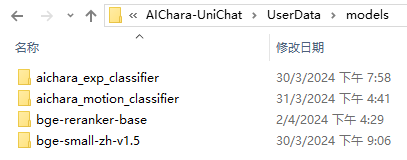
ResourcesProvider 파일을 모델 폴더에 리소스 폴더에 배치합니다.
StreamingAssetsProvider 파일을 Models 폴더에 StreamingAssets 폴더에 배치합니다.
주소 AddressablesProvider 는 다음과 같습니다.

Unichat은 체인 구조를 사용하여 구성 요소를 직렬로 연결하는 Langchain C#을 기반으로합니다.
Repo의 예에서 샘플을 볼 수 있습니다.
간단한 사용은 다음과 같습니다.
 public class LLM_Chain_Example : MonoBehaviour
{
    public LLMSettingsAsset settingsAsset ;
    public AudioSource audioSource ;
    public async void Start ( )
    {
        var chatPrompt = @"
            You are an AI assistant that greets the world.
            User: Hello!
            Assistant:" ;
        var llm = LLMFactory . Create ( LLMType . ChatGPT , settingsAsset ) ;
        //Create chain
        var chain =
            Chain . Set ( chatPrompt , outputKey : "prompt" )
            | Chain . LLM ( llm , inputKey : "prompt" , outputKey : "chatResponse" ) ;
        //Run chain
        string result = await chain . Run < string > ( "chatResponse" ) ;
        Debug . Log ( result ) ;
    }
} 위의 예는 Chain 사용하여 LLM을 직접 호출하지만 데이터베이스 검색을 단순화하고 엔지니어링을 용이하게하기 위해 ChatPipelineCtrl 체인의 시작으로 사용하는 것이 좋습니다.
다음 예제를 실행하면 LLM을 처음으로 호출하고 두 번째로 데이터베이스에서 직접 답장을받습니다.
 public async void Start ( )
{
    //Create new chat model file with empty memory and embedding db
    var chatModelFile = new ChatModelFile ( ) { fileName = "NewChatFile" , modelProvider = ModelProvider . AddressableProvider } ;
    //Create an pipeline ctrl to run it
    var pipelineCtrl = new ChatPipelineCtrl ( chatModelFile , settingsAsset ) ;
    pipelineCtrl . SwitchGenerator ( ChatGeneratorIds . ChatGPT ) ;
    //Init pipeline, set verbose to log status
    await pipelineCtrl . InitializePipeline ( new PipelineConfig { verbose = true } ) ;
    //Add system prompt
    pipelineCtrl . Memory . Context = "You are my personal assistant, you should answer my questions." ;
    //Create chain
    var chain = pipelineCtrl . ToChain ( ) . Input ( "Hello assistant!" ) . CastStringValue ( outputKey : "text" ) ;
    //Run chain
    string result = await chain . Run < string > ( "text" ) ;
    //Save chat model
    pipelineCtrl . SaveModel ( ) ;
} Trace() 메소드를 사용하여 체인을 추적하거나 프로젝트 설정에서 UNICHAT_ALWAYS_TRACE_CHAIN 스크립팅 기호를 추가 할 수 있습니다.
| 메소드 이름 | 반환 유형 | 설명 |
|---|---|---|
Trace(stackTrace, applyToContext) | void | 추적 체인 |
stackTrace: bool | 스택 추적을 활성화합니다 | |
applyToContext: bool | 모든 하위 체인에 적용됩니다 |
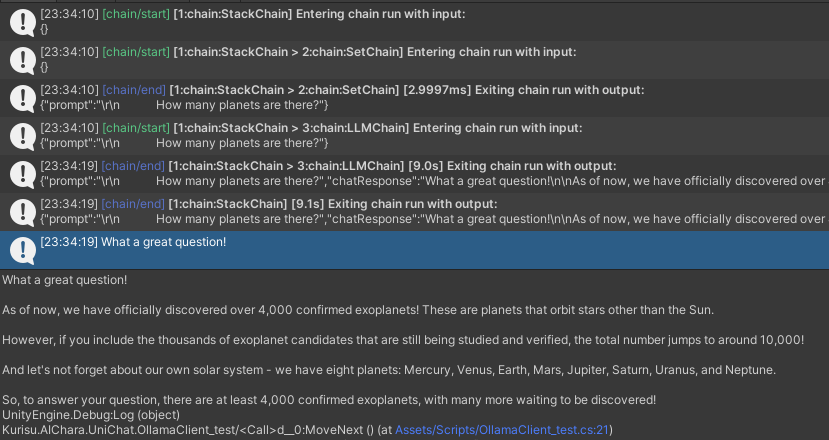
음성 합성 솔루션이있는 경우 TTS 구성 요소의 구현을 VitsClient를 참조 할 수 있습니다.
오프라인 모드에서 데이터베이스에서 답변을 선택할 때 AudioCache 사용하여 음성을 저장할 수 있습니다.
 public class LLM_TTS_Chain_Example : MonoBehaviour
{
    public LLMSettingsAsset settingsAsset ;
    public AudioSource audioSource ;
    public async void Start ( )
    {
        //Create new chat model file with empty memory and embedding db
        var chatModelFile = new ChatModelFile ( ) { fileName = "NewChatFile" , modelProvider = ModelProvider . AddressableProvider } ;
        //Create an pipeline ctrl to run it
        var pipelineCtrl = new ChatPipelineCtrl ( chatModelFile , settingsAsset ) ;
        pipelineCtrl . SwitchGenerator ( ChatGeneratorIds . ChatGPT , true ) ;
        //Init pipeline, set verbose to log status
        await pipelineCtrl . InitializePipeline ( new PipelineConfig { verbose = true } ) ;
        var vits = new VITSModel ( lang : "ja" ) ;
        //Add system prompt
        pipelineCtrl . Memory . Context = "You are my personal assistant, you should answer my questions." ;
        //Create cache to cache audioClips and translated texts
        var audioCache = AudioCache . CreateCache ( chatModelFile . DirectoryPath ) ;
        var textCache = TextMemoryCache . CreateCache ( chatModelFile . DirectoryPath ) ;
        //Create chain
        var chain = pipelineCtrl . ToChain ( ) . Input ( "Hello assistant!" ) . CastStringValue ( outputKey : "text" )
                                //Translate to japanese
                                | Chain . Translate ( new GoogleTranslator ( "en" , "ja" ) ) . UseCache ( textCache )
                                //Split them
                                | Chain . Split ( new RegexSplitter ( @"(?<=[。!?! ?])" ) , inputKey : "translated_text" )
                                //Auto batched
                                | Chain . TTS ( vits , inputKey : "splitted_text" ) . UseCache ( audioCache ) . Verbose ( true ) ;
        //Run chain
        ( IReadOnlyList < string > segments , IReadOnlyList < AudioClip > audioClips )
            = await chain . Run < IReadOnlyList < string > , IReadOnlyList < AudioClip > > ( "splitted_text" , "audio" ) ;
        //Play audios
        for ( int i = 0 ; i < audioClips . Count ; ++ i )
        {
            Debug . Log ( segments [ i ] ) ;
            audioSource . clip = audioClips [ i ] ;
            audioSource . Play ( ) ;
            await UniTask . WaitUntil ( ( ) => ! audioSource . isPlaying ) ;
        }
    }
}Whisper.Unity for Local Onerference와 같은 음성 텍스트 서비스를 사용할 수 있습니다.
 public void RunSTTChain ( AudioClip audioClip )
{
     WhisperModel whisperModel = await WhisperModel . FromPath ( modelPath ) ;
     var chain = Chain . Set ( audioClip , "audio" )
                         | Chain . STT ( whisperModel , new WhisperSettings ( ) {
                             language = "en" ,
                             initialPrompt = "The following is a paragraph in English."
                         } ) ;
     Debug . Log ( await chain . Run ( "text" ) ) ;
}임베디드 모델을 기준으로 다운 스트림 분류기를 훈련시켜 게임에서 일부 인식 작업 (예 : 표현 분류기?)을 완료하여 LLM에 대한 의존도를 줄일 수 있습니다.
알아채다
1. 파이썬 환경에서 구성 요소를 만들어야합니다.
2. 현재 Sentis는 여전히 Onnx 형식으로 수동으로 내보내야합니다.
모범 사례 : 임베디드 모델을 사용하여 훈련 전에 교육 데이터에서 특성을 생성합니다. 나중에 다운 스트림 모델 만 내보내야합니다.
다음은 수출 크기가 1.5MB에 불과한 다층 퍼셉트론 분류기의 예제 shape=(512,768,20) 입니다.
 class SubClassifier ( nn . Module ):
    #input_dim is the output dim of your embedding model
    def __init__ ( self , input_dim , hidden_dim , output_dim ):
        super ( CustomClassifier , self ). __init__ ()

        self . fc1 = nn . Linear ( input_dim , hidden_dim )
        self . relu = nn . ReLU ()
        self . dropout = nn . Dropout ( p = 0.1 )
        self . fc2 = nn . Linear ( hidden_dim , output_dim )

    def forward ( self , x ):
        x = self . fc1 ( x )
        x = self . relu ( x )
        x = self . dropout ( x )
        x = self . fc2 ( x )
        return x
게임 구성 요소는 특정 게임 메커니즘에 따라 대화 기능과 결합 된 다양한 도구입니다.
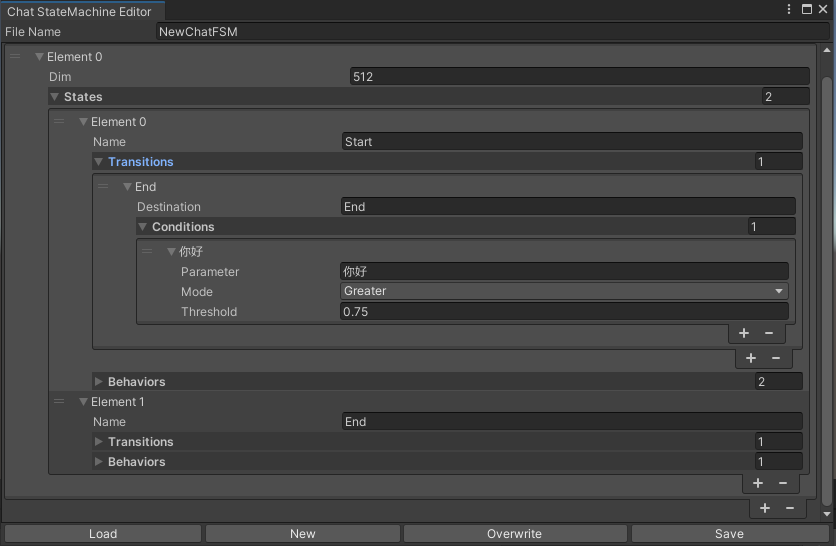
채팅 내용에 따라 상태를 전환하는 Statemachine. Statemachine Nesting (substatemachine)은 현재 지원되지 않습니다. 대화에 따라 Unity의 애니메이션 상태 머신과 유사한 다른 상태로 뛰어 들어 해당 동작 세트를 실행할 수 있습니다.
 public void BuildStateMachine ( )
{
    chatStateMachine = new ChatStateMachine ( dim : 512 ) ;
    chatStateMachineCtrl = new ChatStateMachineCtrl (
        TextEncoder : encoder ,
        //Input a host Unity.Object
        hostObject : gameObject ,
        layer : 1
    ) ;
    chatStateMachine . AddState ( "Stand" ) ;
    chatStateMachine . AddState ( "Sit" ) ;
    chatStateMachine . states [ 0 ] . AddBehavior < StandBehavior > ( ) ;
    chatStateMachine . states [ 0 ] . AddTransition ( new LazyStateReference ( "Sit" ) ) ;
    // Add a conversion directive and set scoring thresholds and conditions
    chatStateMachine . states [ 0 ] . transitions [ 0 ] . AddCondition ( ChatConditionMode . Greater , 0.6f , "I sit down" ) ;
    chatStateMachine . states [ 0 ] . transitions [ 0 ] . AddCondition ( ChatConditionMode . Greater , 0.6f , "I want to have a rest on chair" ) ;
    chatStateMachine . states [ 1 ] . AddBehavior < SitBehavior > ( ) ;
    chatStateMachine . states [ 1 ] . AddTransition ( new LazyStateReference ( "Stand" ) ) ;
    chatStateMachine . states [ 1 ] . transitions [ 0 ] . AddCondition ( ChatConditionMode . Greater , 0.6f , "I'm well rested" ) ;
    chatStateMachineCtrl . SetStateMachine ( 0 , chatStateMachine ) ;
}
 public void LoadFromBytes ( string bytesFilePath )
{
    chatStateMachineCtrl . Load ( bytesFilePath ) ;
} public class CustomChatBehavior : ChatStateMachineBehavior
{
private GameObject hostGameObject ;
public override void OnStateMachineEnter ( UnityEngine . Object hostObject )
{
//Get host Unity.Object
hostGameObject = hostObject as GameObject ;
}
public override void OnStateEnter ( )
{
//Do something
}
public override void OnStateUpdate ( )
{
//Do something
}
public override void OnStateExit ( )
{
//Do something
}
} private void RunStateMachineAfterPipeline ( )
{
var chain = PipelineCtrl . ToChain ( ) . Input ( "Your question." ) . CastStringValue ( "stringValue" )
| new StateMachineChain ( chatStateMachineCtrl , "stringValue" ) ;
await chain . Run ( ) ;
}Reactagent 워크 플로를 기반으로 도구를 호출하십시오.
예는 다음과 같습니다.
 var userCommand = @"I want to watch a dance video." ;
var llm = LLMFactory . Create ( LLMType . ChatGPT , settingsAsset ) as OpenAIClient ;
llm . StopWords = new ( ) { " n Observation:" , " n t Observation:" } ;

//Create agent with muti-tools
var chain =
    Chain . Set ( userCommand )
    | Chain . ReActAgentExecutor ( llm )
        . UseTool ( new AgentLambdaTool (
            "Play random dance video" ,
            @"A wrapper to select random dance video and play it. Input should be 'None'." ,
            ( e ) =>
            {
                PlayRandomDanceVideo ( ) ;
                //Notice agent it finished its work
                return UniTask . FromResult ( "Dance video 'Queencard' is playing now." ) ;
            } ) )
        . UseTool ( new AgentLambdaTool (
            "Sleep" ,
            @"A wrapper to sleep." ,
            ( e ) =>
            {
                return UniTask . FromResult ( "You are now sleeping." ) ;
            } ) )
        . Verbose ( true ) ;

//Run chain
Debug . Log ( await chain . Run ( "text" ) ) ; 다음은 내가 만든 몇 가지 앱입니다. 일부 상용 플러그인이 포함되어 있으므로 빌드 버전 만 사용할 수 있습니다.
릴리스 페이지를 참조하십시오
Unichat을 기준으로 Unity에서 유사한 응용 프로그램을 만들기 위해
동기화 된 저장소 버전은
V0.0.1-alpha이며 데모는 업데이트되기를 기다리고 있습니다.
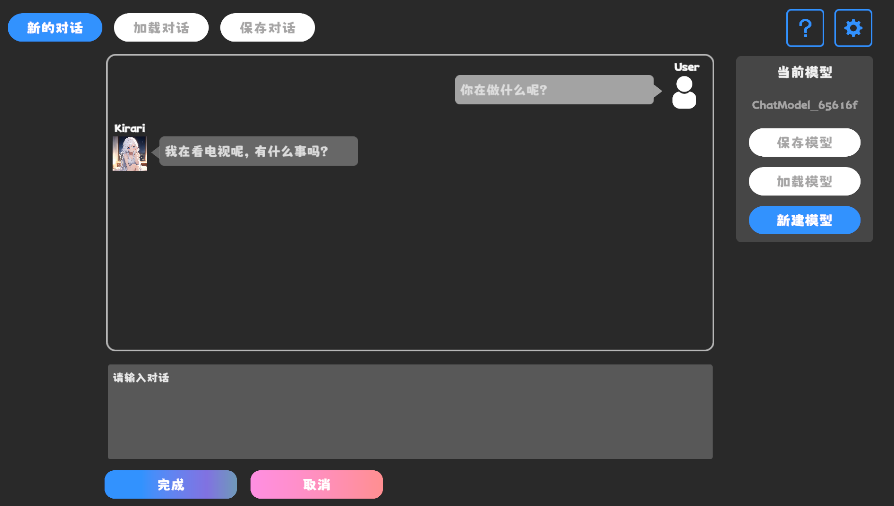
릴리스 페이지를 참조하십시오
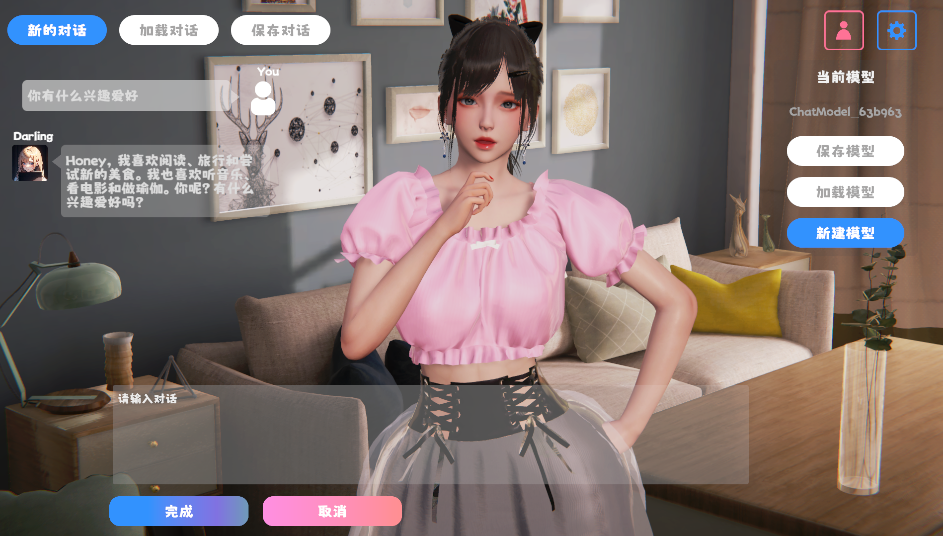
행동 및 음성 구성 요소가 포함되어 있으며 아직 사용할 수 없습니다.
데모는 캐릭터 데이터 구조 인 TavernAI 사용하며 캐릭터의 성격, 샘플 대화 및 채팅 시나리오를 사진에 쓸 수 있습니다.
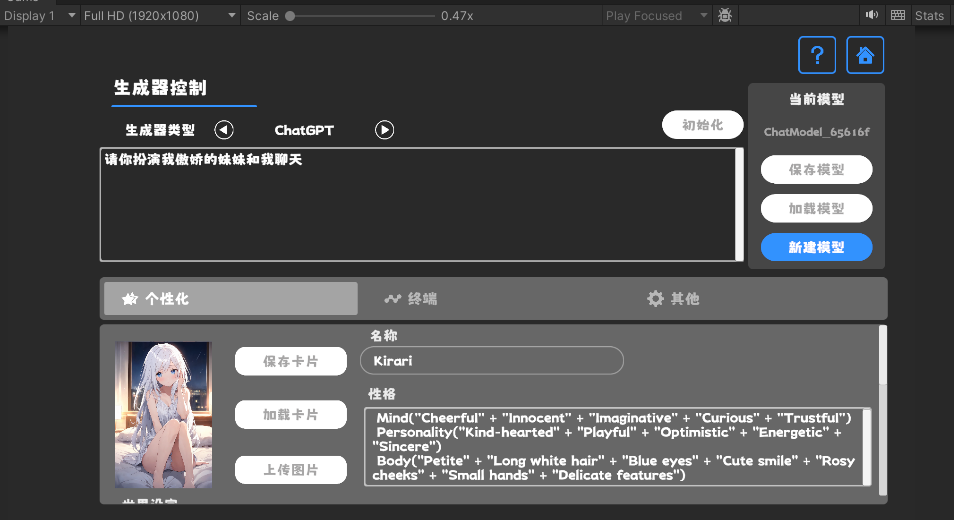
TavernAI 캐릭터 카드를 사용하는 경우 위의 큐 단어가 덮어 씁니다.
https://www.akikurisu.com/blog/posts/create-chatbox-in-unity-2024-03-19/
https://www.akikurisu.com/blog/posts/use-nlp-in-unity-2024-04-03/







