UniChat
Version 0.0.9-alpha

中文 | Inglês
Um pipeline para criar bate-papo on-line e offline em unidade.

Com o lançamento do Unity.Sentis , podemos usar alguns modelos de rede neural em tempo de execução, incluindo o modelo de incorporação de texto para processamento de linguagem natural.
Embora conversar com a IA não seja novidade, nos jogos, como projetar uma conversa que não se desvie das idéias do desenvolvedor, mas é mais flexível, é um ponto difícil.
UniChat é baseado na tecnologia de incorporação de Unity.Sentis e vetor de texto, que permite que o modo offline pesquise conteúdo de texto com base nos bancos de dados de vetores.
Obviamente, se você usar o modo on -line, UniChat também inclui um kit de ferramentas de cadeia baseado em Langchain para incorporar rapidamente o LLM e o agente no jogo.
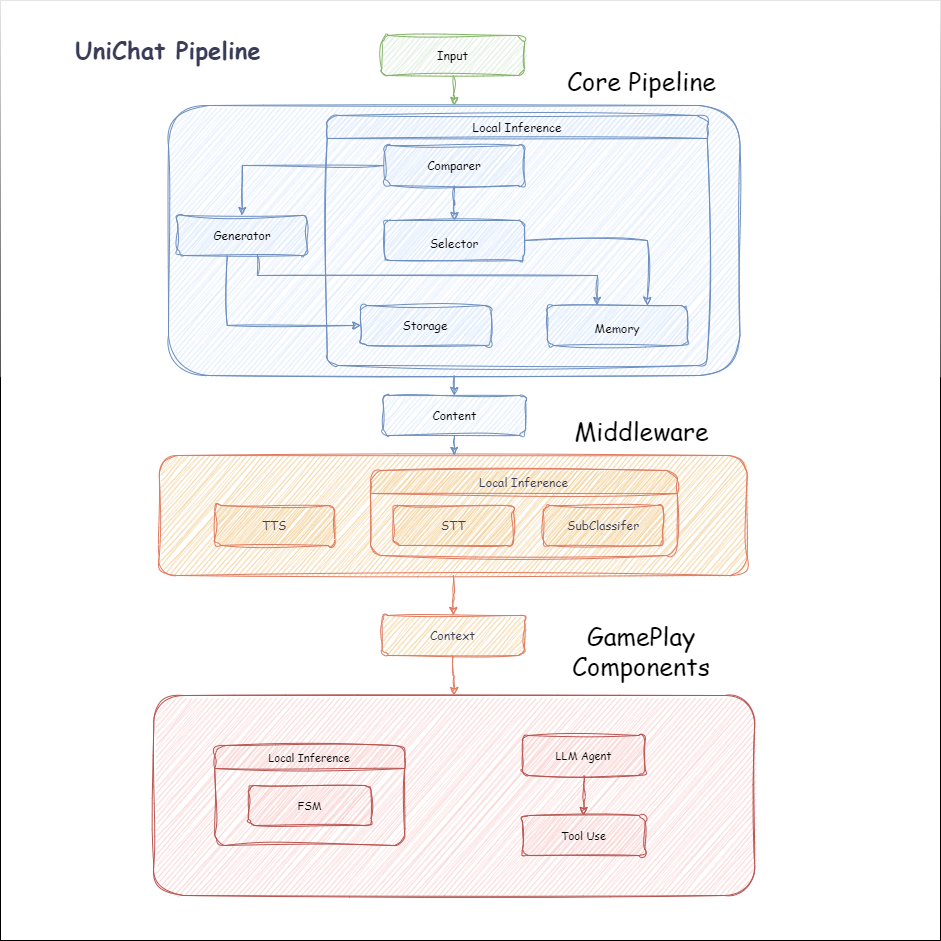
A seguir, é apresentado o fluxograma de Unichat. Na caixa Local Inference estão as funções que podem ser usadas offline:
manifest.json : {
"dependencies" : {
"com.cysharp.unitask" : " https://github.com/Cysharp/UniTask.git?path=src/UniTask/Assets/Plugins/UniTask " ,
"com.huggingface.sharp-transformers" : " https://github.com/huggingface/sharp-transformers.git " ,
"com.unity.addressables" : " 1.21.20 " ,
"com.unity.burst" : " 1.8.13 " ,
"com.unity.collections" : " 2.2.1 " ,
"com.unity.nuget.newtonsoft-json" : " 3.2.1 " ,
"com.unity.sentis" : " 1.3.0-pre.3 " ,
"com.whisper.unity" : " https://github.com/Macoron/whisper.unity.git?path=Packages/com.whisper.unity "
}
}Unity Package Manager usando o git url https://github.com/AkiKurisu/UniChat.git public void CreatePipelineCtrl ( )
{
//1. New chat model file (embedding database + text table + config)
ChatPipelineCtrl PipelineCtrl = new ( new ChatModelFile ( ) { fileName = $ "ChatModel_ { Guid . NewGuid ( ) . ToString ( ) [ 0 .. 6 ] } " } ) ;
//2. Load from filePath
PipelineCtrl = new ( JsonConvert . DeserializeObject < ChatModelFile > ( File . ReadAllText ( filePath ) ) )
} public bool RunPipeline ( )
{
string input = "Hello!" ;
var context = await PipelineCtrl . RunPipeline ( "Hello!" ) ;
if ( ( context . flag & ( 1 << 1 ) ) != 0 )
{
//Get pipeline output
string output = context . CastStringValue ( ) ;
//Update history
PipelineCtrl . History . AppendUserMessage ( input ) ;
PipelineCtrl . History . AppendBotMessage ( output ) ;
return true ;
}
} pubic void Save ( )
{
//PC save to {ApplicationPath}//UserData//{ModelName}
//Android save to {Application.persistentDataPath}//UserData//{ModelName}
PipelineCtrl . SaveModel ( ) ;
} O modelo de incorporação é usado BAAI/bge-small-zh-v1.5 por padrão e ocupa a menor memória de vídeo. Ele pode ser baixado no lançamento, no entanto, suporta apenas chinês. Você pode baixar o mesmo modelo de HuggingFaceHub e convertê -lo em formato ONNX.
O modo de carregamento é opcional UserDataProvider , StreamingAssetsProvider e ResourcesProvider , se instalado Unity.Addressables , opcional AddressableProvider .
O caminho do arquivo UserDataProvider é o seguinte:
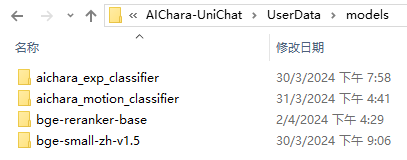
ResourcesProvider coloque os arquivos na pasta Modelos na pasta Recursos.
StreamingAssetsProvider Coloque os arquivos na pasta Modelos na pasta Streamingassets.
Endereço AddressablesProvider é o seguinte:

O Unichat é baseado no Langchain C# usando uma estrutura de corrente para conectar componentes em série.
Você pode ver uma amostra no exemplo do repo.
O uso simples é o seguinte:
 public class LLM_Chain_Example : MonoBehaviour
{
    public LLMSettingsAsset settingsAsset ;
    public AudioSource audioSource ;
    public async void Start ( )
    {
        var chatPrompt = @"
            You are an AI assistant that greets the world.
            User: Hello!
            Assistant:" ;
        var llm = LLMFactory . Create ( LLMType . ChatGPT , settingsAsset ) ;
        //Create chain
        var chain =
            Chain . Set ( chatPrompt , outputKey : "prompt" )
            | Chain . LLM ( llm , inputKey : "prompt" , outputKey : "chatResponse" ) ;
        //Run chain
        string result = await chain . Run < string > ( "chatResponse" ) ;
        Debug . Log ( result ) ;
    }
} O exemplo acima usa Chain para chamar LLM diretamente, mas para simplificar a pesquisa no banco de dados e facilitar a engenharia, é recomendável usar ChatPipelineCtrl como o início da cadeia.
Se você executar o exemplo a seguir, a primeira vez que você ligar para o LLM e a segunda vez que responderá diretamente do banco de dados.
 public async void Start ( )
{
    //Create new chat model file with empty memory and embedding db
    var chatModelFile = new ChatModelFile ( ) { fileName = "NewChatFile" , modelProvider = ModelProvider . AddressableProvider } ;
    //Create an pipeline ctrl to run it
    var pipelineCtrl = new ChatPipelineCtrl ( chatModelFile , settingsAsset ) ;
    pipelineCtrl . SwitchGenerator ( ChatGeneratorIds . ChatGPT ) ;
    //Init pipeline, set verbose to log status
    await pipelineCtrl . InitializePipeline ( new PipelineConfig { verbose = true } ) ;
    //Add system prompt
    pipelineCtrl . Memory . Context = "You are my personal assistant, you should answer my questions." ;
    //Create chain
    var chain = pipelineCtrl . ToChain ( ) . Input ( "Hello assistant!" ) . CastStringValue ( outputKey : "text" ) ;
    //Run chain
    string result = await chain . Run < string > ( "text" ) ;
    //Save chat model
    pipelineCtrl . SaveModel ( ) ;
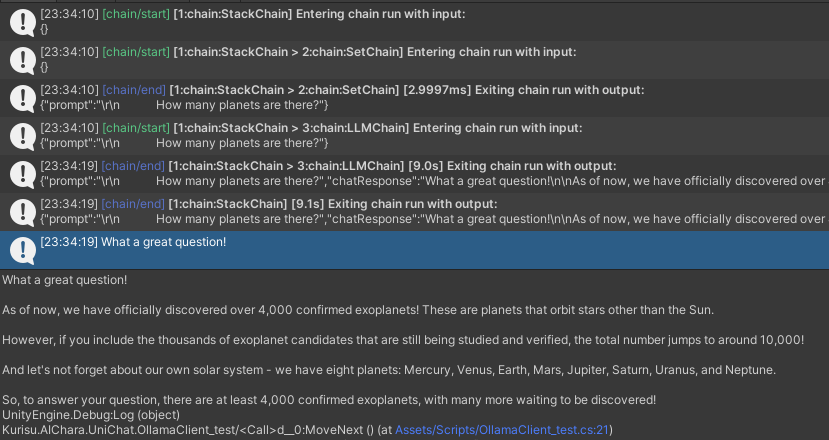
} Você pode rastrear a cadeia usando o método Trace() ou adicionar símbolo de script UNICHAT_ALWAYS_TRACE_CHAIN nas configurações do projeto.
| Nome do método | Tipo de retorno | Descrição |
|---|---|---|
Trace(stackTrace, applyToContext) | void | Cadeia de traços |
stackTrace: bool | Ativa o rastreamento da pilha | |
applyToContext: bool | Aplica -se a todos |
Se você tiver uma solução de síntese de fala, pode se referir ao VitsClient para a implementação de um componente TTS?.
Você pode usar AudioCache para armazenar a fala para que ele possa ser reproduzido quando você pegar uma resposta no banco de dados no modo offline.
 public class LLM_TTS_Chain_Example : MonoBehaviour
{
    public LLMSettingsAsset settingsAsset ;
    public AudioSource audioSource ;
    public async void Start ( )
    {
        //Create new chat model file with empty memory and embedding db
        var chatModelFile = new ChatModelFile ( ) { fileName = "NewChatFile" , modelProvider = ModelProvider . AddressableProvider } ;
        //Create an pipeline ctrl to run it
        var pipelineCtrl = new ChatPipelineCtrl ( chatModelFile , settingsAsset ) ;
        pipelineCtrl . SwitchGenerator ( ChatGeneratorIds . ChatGPT , true ) ;
        //Init pipeline, set verbose to log status
        await pipelineCtrl . InitializePipeline ( new PipelineConfig { verbose = true } ) ;
        var vits = new VITSModel ( lang : "ja" ) ;
        //Add system prompt
        pipelineCtrl . Memory . Context = "You are my personal assistant, you should answer my questions." ;
        //Create cache to cache audioClips and translated texts
        var audioCache = AudioCache . CreateCache ( chatModelFile . DirectoryPath ) ;
        var textCache = TextMemoryCache . CreateCache ( chatModelFile . DirectoryPath ) ;
        //Create chain
        var chain = pipelineCtrl . ToChain ( ) . Input ( "Hello assistant!" ) . CastStringValue ( outputKey : "text" )
                                //Translate to japanese
                                | Chain . Translate ( new GoogleTranslator ( "en" , "ja" ) ) . UseCache ( textCache )
                                //Split them
                                | Chain . Split ( new RegexSplitter ( @"(?<=[。!?! ?])" ) , inputKey : "translated_text" )
                                //Auto batched
                                | Chain . TTS ( vits , inputKey : "splitted_text" ) . UseCache ( audioCache ) . Verbose ( true ) ;
        //Run chain
        ( IReadOnlyList < string > segments , IReadOnlyList < AudioClip > audioClips )
            = await chain . Run < IReadOnlyList < string > , IReadOnlyList < AudioClip > > ( "splitted_text" , "audio" ) ;
        //Play audios
        for ( int i = 0 ; i < audioClips . Count ; ++ i )
        {
            Debug . Log ( segments [ i ] ) ;
            audioSource . clip = audioClips [ i ] ;
            audioSource . Play ( ) ;
            await UniTask . WaitUntil ( ( ) => ! audioSource . isPlaying ) ;
        }
    }
}Você pode usar um serviço de fala a texto, como o Whisper.Unity for Local Inference?.
 public void RunSTTChain ( AudioClip audioClip )
{
     WhisperModel whisperModel = await WhisperModel . FromPath ( modelPath ) ;
     var chain = Chain . Set ( audioClip , "audio" )
                         | Chain . STT ( whisperModel , new WhisperSettings ( ) {
                             language = "en" ,
                             initialPrompt = "The following is a paragraph in English."
                         } ) ;
     Debug . Log ( await chain . Run ( "text" ) ) ;
}Você pode reduzir a dependência do LLM treinando um classificador a jusante com base no modelo incorporado para concluir algumas tarefas de reconhecimento no jogo (como o classificador de expressão?).
Perceber
1. Você precisa fazer o componente em um ambiente Python.
2. Atualmente, o Sentis ainda exige que você exporte manualmente para o formato ONNX
Prática recomendada: use um modelo incorporado para gerar características a partir de seus dados de treinamento antes do treinamento. Somente o modelo a jusante precisa ser exportado posteriormente.
A seguir, é apresentado um exemplo shape=(512,768,20) de um classificador perceptron de várias camadas com um tamanho de exportação de apenas 1,5 MB:
 class SubClassifier ( nn . Module ):
    #input_dim is the output dim of your embedding model
    def __init__ ( self , input_dim , hidden_dim , output_dim ):
        super ( CustomClassifier , self ). __init__ ()

        self . fc1 = nn . Linear ( input_dim , hidden_dim )
        self . relu = nn . ReLU ()
        self . dropout = nn . Dropout ( p = 0.1 )
        self . fc2 = nn . Linear ( hidden_dim , output_dim )

    def forward ( self , x ):
        x = self . fc1 ( x )
        x = self . relu ( x )
        x = self . dropout ( x )
        x = self . fc2 ( x )
return x Os componentes do jogo são várias ferramentas combinadas com a função de diálogo de acordo com o mecanismo de jogo específico.
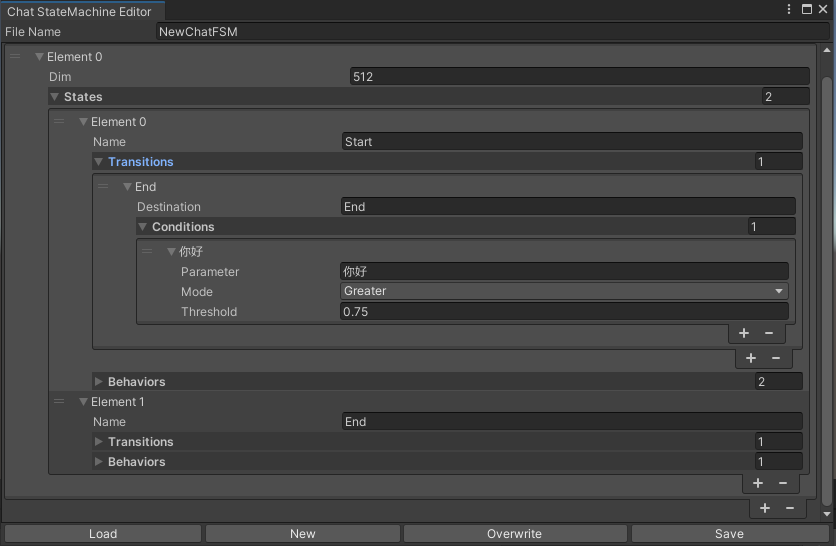
Uma Statemachine que muda de Estado de acordo com o conteúdo do bate -papo. O Nestemachine Nesting (Substatemachine) não é atualmente suportado. Dependendo da conversa, você pode pular para diferentes estados e executar o conjunto de comportamentos correspondentes, semelhante à máquina de estado animada da Unity.
 public void BuildStateMachine ( )
{
    chatStateMachine = new ChatStateMachine ( dim : 512 ) ;
    chatStateMachineCtrl = new ChatStateMachineCtrl (
        TextEncoder : encoder ,
        //Input a host Unity.Object
        hostObject : gameObject ,
        layer : 1
    ) ;
    chatStateMachine . AddState ( "Stand" ) ;
    chatStateMachine . AddState ( "Sit" ) ;
    chatStateMachine . states [ 0 ] . AddBehavior < StandBehavior > ( ) ;
    chatStateMachine . states [ 0 ] . AddTransition ( new LazyStateReference ( "Sit" ) ) ;
    // Add a conversion directive and set scoring thresholds and conditions
    chatStateMachine . states [ 0 ] . transitions [ 0 ] . AddCondition ( ChatConditionMode . Greater , 0.6f , "I sit down" ) ;
    chatStateMachine . states [ 0 ] . transitions [ 0 ] . AddCondition ( ChatConditionMode . Greater , 0.6f , "I want to have a rest on chair" ) ;
    chatStateMachine . states [ 1 ] . AddBehavior < SitBehavior > ( ) ;
    chatStateMachine . states [ 1 ] . AddTransition ( new LazyStateReference ( "Stand" ) ) ;
    chatStateMachine . states [ 1 ] . transitions [ 0 ] . AddCondition ( ChatConditionMode . Greater , 0.6f , "I'm well rested" ) ;
    chatStateMachineCtrl . SetStateMachine ( 0 , chatStateMachine ) ;
}
 public void LoadFromBytes ( string bytesFilePath )
{
    chatStateMachineCtrl . Load ( bytesFilePath ) ;
} public class CustomChatBehavior : ChatStateMachineBehavior
{
private GameObject hostGameObject ;
public override void OnStateMachineEnter ( UnityEngine . Object hostObject )
{
//Get host Unity.Object
hostGameObject = hostObject as GameObject ;
}
public override void OnStateEnter ( )
{
//Do something
}
public override void OnStateUpdate ( )
{
//Do something
}
public override void OnStateExit ( )
{
//Do something
}
} private void RunStateMachineAfterPipeline ( )
{
var chain = PipelineCtrl . ToChain ( ) . Input ( "Your question." ) . CastStringValue ( "stringValue" )
| new StateMachineChain ( chatStateMachineCtrl , "stringValue" ) ;
await chain . Run ( ) ;
}Invoque as ferramentas com base no fluxo de trabalho reactagente.
Aqui está um exemplo:
 var userCommand = @"I want to watch a dance video." ;
var llm = LLMFactory . Create ( LLMType . ChatGPT , settingsAsset ) as OpenAIClient ;
llm . StopWords = new ( ) { " n Observation:" , " n t Observation:" } ;

//Create agent with muti-tools
var chain =
    Chain . Set ( userCommand )
    | Chain . ReActAgentExecutor ( llm )
        . UseTool ( new AgentLambdaTool (
            "Play random dance video" ,
            @"A wrapper to select random dance video and play it. Input should be 'None'." ,
            ( e ) =>
            {
                PlayRandomDanceVideo ( ) ;
                //Notice agent it finished its work
                return UniTask . FromResult ( "Dance video 'Queencard' is playing now." ) ;
            } ) )
        . UseTool ( new AgentLambdaTool (
            "Sleep" ,
            @"A wrapper to sleep." ,
            ( e ) =>
            {
                return UniTask . FromResult ( "You are now sleeping." ) ;
            } ) )
        . Verbose ( true ) ;

//Run chain
Debug . Log ( await chain . Run ( "text" ) ) ; Aqui estão alguns aplicativos que fiz. Como eles incluem alguns plugins comerciais, apenas as versões de construção estão disponíveis.
Veja a página de lançamento
Baseado no Unichat para fazer uma aplicação semelhante na unidade
A versão do repositório sincronizado é
V0.0.1-alpha, a demonstração está esperando para ser atualizada.
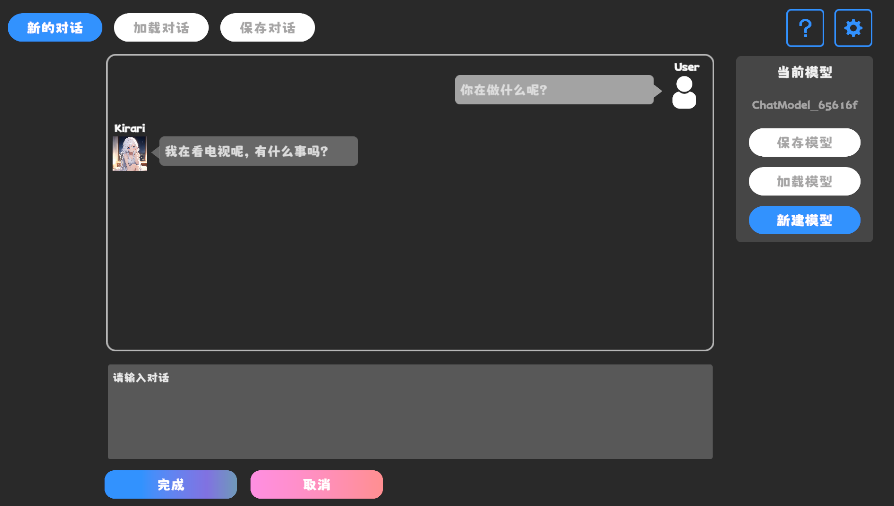
Veja a página de lançamento
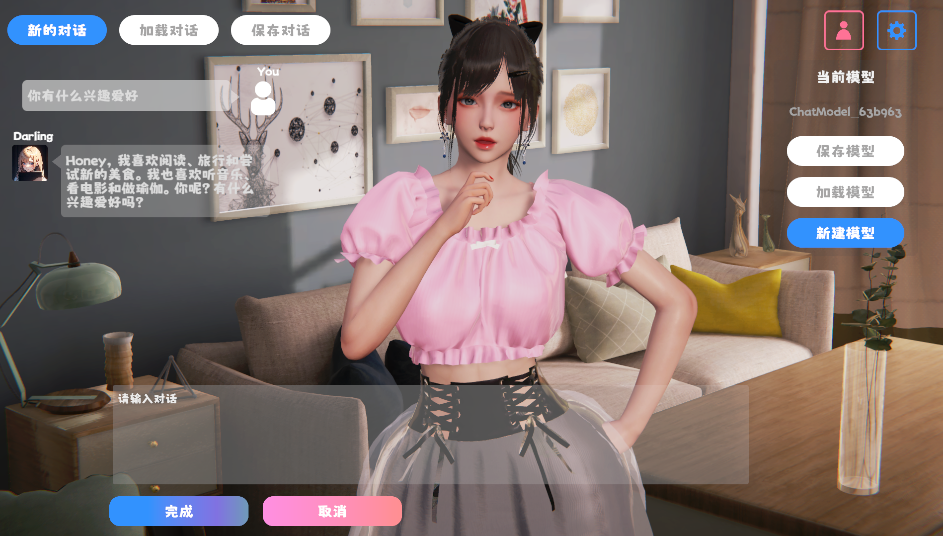
Ele contém componentes comportamentais e de voz e ainda não está disponível.
A demonstração usa TavernAI a estrutura de dados de caracteres, e podemos escrever a personalidade do personagem, amostrar conversas e cenários de bate -papo em imagens.
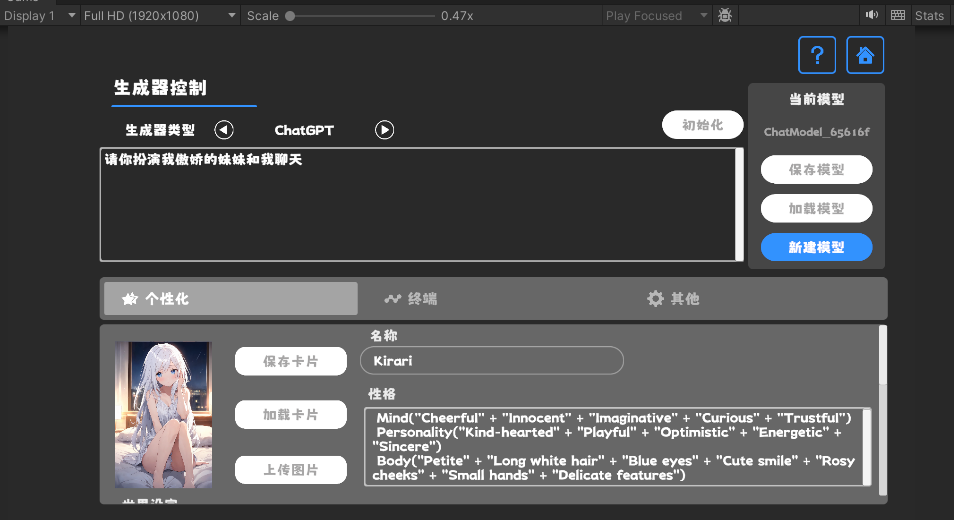
Se você usar uma placa de personagem TavernAI , a palavra sugestão acima será substituída.
https://www.akikurisu.com/blog/posts/create-chatbox-in-unity-2024-03-19/
https://www.akikurisu.com/blog/posts/use-nlp-in-unity-2024-04-03/







