UniChat
Version 0.0.9-alpha

中文 | Inglés
Una tubería para crear el botón de chat en línea y fuera de línea en Unity.

Con el lanzamiento de Unity.Sentis , podemos usar algunos modelos de redes neuronales en tiempo de ejecución, incluido el modelo de incrustación de texto para el procesamiento del lenguaje natural.
Aunque chatear con IA no es nada nuevo, en los juegos, cómo diseñar una conversación que no se desvíe de las ideas del desarrollador pero que sea más flexible es un punto difícil.
UniChat se basa en Unity.Sentis y text vector de tecnología de incrustación, que permite que el modo fuera de línea busque contenido de texto basado en bases de datos vectoriales.
Por supuesto, si usa el modo en línea, UniChat también incluye un kit de herramientas en cadena basado en Langchain para incrustar rápidamente LLM y agente en el juego.
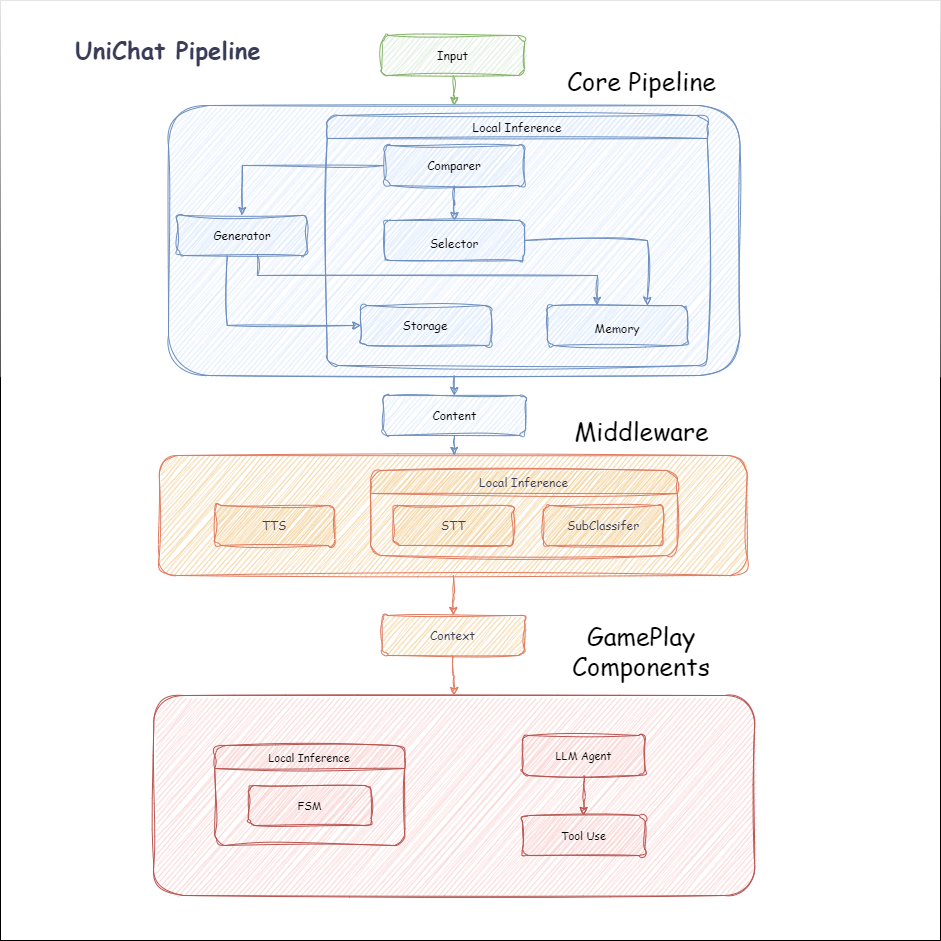
El siguiente es el diagrama de flujo de Unichat. En el cuadro Local Inference están las funciones que se pueden usar fuera de línea:
manifest.json : {
"dependencies" : {
"com.cysharp.unitask" : " https://github.com/Cysharp/UniTask.git?path=src/UniTask/Assets/Plugins/UniTask " ,
"com.huggingface.sharp-transformers" : " https://github.com/huggingface/sharp-transformers.git " ,
"com.unity.addressables" : " 1.21.20 " ,
"com.unity.burst" : " 1.8.13 " ,
"com.unity.collections" : " 2.2.1 " ,
"com.unity.nuget.newtonsoft-json" : " 3.2.1 " ,
"com.unity.sentis" : " 1.3.0-pre.3 " ,
"com.whisper.unity" : " https://github.com/Macoron/whisper.unity.git?path=Packages/com.whisper.unity "
}
}Unity Package Manager usando Git URL https://github.com/AkiKurisu/UniChat.git public void CreatePipelineCtrl ( )
{
//1. New chat model file (embedding database + text table + config)
ChatPipelineCtrl PipelineCtrl = new ( new ChatModelFile ( ) { fileName = $ "ChatModel_ { Guid . NewGuid ( ) . ToString ( ) [ 0 .. 6 ] } " } ) ;
//2. Load from filePath
PipelineCtrl = new ( JsonConvert . DeserializeObject < ChatModelFile > ( File . ReadAllText ( filePath ) ) )
} public bool RunPipeline ( )
{
string input = "Hello!" ;
var context = await PipelineCtrl . RunPipeline ( "Hello!" ) ;
if ( ( context . flag & ( 1 << 1 ) ) != 0 )
{
//Get pipeline output
string output = context . CastStringValue ( ) ;
//Update history
PipelineCtrl . History . AppendUserMessage ( input ) ;
PipelineCtrl . History . AppendBotMessage ( output ) ;
return true ;
}
} pubic void Save ( )
{
//PC save to {ApplicationPath}//UserData//{ModelName}
//Android save to {Application.persistentDataPath}//UserData//{ModelName}
PipelineCtrl . SaveModel ( ) ;
} El modelo de incrustación se usa BAAI/bge-small-zh-v1.5 de forma predeterminada y ocupa la menor memoria de video. Se puede descargar en el lanzamiento, sin embargo, solo admite el chino. Puede descargar el mismo modelo de HuggingFaceHub y convertirlo en formato ONNX.
El modo de carga es Opcional UserDataProvider , StreamingAssetsProvider y ResourcesProvider , si está instalado Unity.Addressables , Opcional AddressableProvider .
La ruta del archivo UserDataProvider es la siguiente:
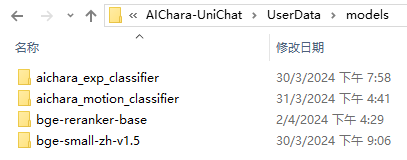
ResourcesProvider coloca los archivos en la carpeta de modelos en la carpeta de recursos.
StreamingAssetsProvider Coloque los archivos en la carpeta de modelos en la carpeta StreamingAssets.
Dirección AddressablesProvider de IS como sigue:

Unichat se basa en Langchain C# utilizando una estructura de cadena para conectar componentes en serie.
Puede ver una muestra en el ejemplo de Repo.
El uso simple es el siguiente:
 public class LLM_Chain_Example : MonoBehaviour
{
    public LLMSettingsAsset settingsAsset ;
    public AudioSource audioSource ;
    public async void Start ( )
    {
        var chatPrompt = @"
            You are an AI assistant that greets the world.
            User: Hello!
            Assistant:" ;
        var llm = LLMFactory . Create ( LLMType . ChatGPT , settingsAsset ) ;
        //Create chain
        var chain =
            Chain . Set ( chatPrompt , outputKey : "prompt" )
            | Chain . LLM ( llm , inputKey : "prompt" , outputKey : "chatResponse" ) ;
        //Run chain
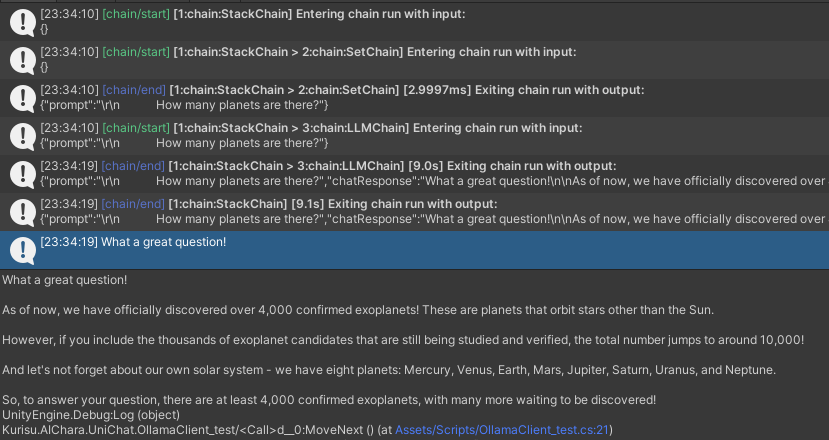
        string result = await chain . Run < string > ( "chatResponse" ) ;
        Debug . Log ( result ) ;
    }
} El ejemplo anterior utiliza Chain para llamar a LLM directamente, pero para simplificar la búsqueda de la base de datos y facilitar la ingeniería, se recomienda usar ChatPipelineCtrl como el comienzo de la cadena.
Si ejecuta el siguiente ejemplo, la primera vez que llama a LLM y la segunda vez que responde directamente desde la base de datos.
 public async void Start ( )
{
    //Create new chat model file with empty memory and embedding db
    var chatModelFile = new ChatModelFile ( ) { fileName = "NewChatFile" , modelProvider = ModelProvider . AddressableProvider } ;
    //Create an pipeline ctrl to run it
    var pipelineCtrl = new ChatPipelineCtrl ( chatModelFile , settingsAsset ) ;
    pipelineCtrl . SwitchGenerator ( ChatGeneratorIds . ChatGPT ) ;
    //Init pipeline, set verbose to log status
    await pipelineCtrl . InitializePipeline ( new PipelineConfig { verbose = true } ) ;
    //Add system prompt
    pipelineCtrl . Memory . Context = "You are my personal assistant, you should answer my questions." ;
    //Create chain
    var chain = pipelineCtrl . ToChain ( ) . Input ( "Hello assistant!" ) . CastStringValue ( outputKey : "text" ) ;
    //Run chain
    string result = await chain . Run < string > ( "text" ) ;
    //Save chat model
    pipelineCtrl . SaveModel ( ) ;
} Puede rastrear la cadena utilizando el método Trace() o agregar UNICHAT_ALWAYS_TRACE_CHAIN SCRIPTINGTING en la configuración del proyecto.
| Nombre del método | Tipo de retorno | Descripción |
|---|---|---|
Trace(stackTrace, applyToContext) | void | Cadena de rastreo |
stackTrace: bool | Habilita el rastreo de pila | |
applyToContext: bool | Se aplica a todas las subcalinas |
Si tiene una solución de síntesis de habla, puede consultar a VITSClient la implementación de un componente TTS?
Puede usar AudioCache para almacenar el discurso para que se pueda reproducir cuando recoge una respuesta de la base de datos en modo fuera de línea.
 public class LLM_TTS_Chain_Example : MonoBehaviour
{
    public LLMSettingsAsset settingsAsset ;
    public AudioSource audioSource ;
    public async void Start ( )
    {
        //Create new chat model file with empty memory and embedding db
        var chatModelFile = new ChatModelFile ( ) { fileName = "NewChatFile" , modelProvider = ModelProvider . AddressableProvider } ;
        //Create an pipeline ctrl to run it
        var pipelineCtrl = new ChatPipelineCtrl ( chatModelFile , settingsAsset ) ;
        pipelineCtrl . SwitchGenerator ( ChatGeneratorIds . ChatGPT , true ) ;
        //Init pipeline, set verbose to log status
        await pipelineCtrl . InitializePipeline ( new PipelineConfig { verbose = true } ) ;
        var vits = new VITSModel ( lang : "ja" ) ;
        //Add system prompt
        pipelineCtrl . Memory . Context = "You are my personal assistant, you should answer my questions." ;
        //Create cache to cache audioClips and translated texts
        var audioCache = AudioCache . CreateCache ( chatModelFile . DirectoryPath ) ;
        var textCache = TextMemoryCache . CreateCache ( chatModelFile . DirectoryPath ) ;
        //Create chain
        var chain = pipelineCtrl . ToChain ( ) . Input ( "Hello assistant!" ) . CastStringValue ( outputKey : "text" )
                                //Translate to japanese
                                | Chain . Translate ( new GoogleTranslator ( "en" , "ja" ) ) . UseCache ( textCache )
                                //Split them
                                | Chain . Split ( new RegexSplitter ( @"(?<=[。!?! ?])" ) , inputKey : "translated_text" )
                                //Auto batched
                                | Chain . TTS ( vits , inputKey : "splitted_text" ) . UseCache ( audioCache ) . Verbose ( true ) ;
        //Run chain
        ( IReadOnlyList < string > segments , IReadOnlyList < AudioClip > audioClips )
            = await chain . Run < IReadOnlyList < string > , IReadOnlyList < AudioClip > > ( "splitted_text" , "audio" ) ;
        //Play audios
        for ( int i = 0 ; i < audioClips . Count ; ++ i )
        {
            Debug . Log ( segments [ i ] ) ;
            audioSource . clip = audioClips [ i ] ;
            audioSource . Play ( ) ;
            await UniTask . WaitUntil ( ( ) => ! audioSource . isPlaying ) ;
        }
    }
}Puede usar un servicio de voz a texto como Whisper. ¿Unidades para la inferencia local?
 public void RunSTTChain ( AudioClip audioClip )
{
     WhisperModel whisperModel = await WhisperModel . FromPath ( modelPath ) ;
     var chain = Chain . Set ( audioClip , "audio" )
                         | Chain . STT ( whisperModel , new WhisperSettings ( ) {
                             language = "en" ,
                             initialPrompt = "The following is a paragraph in English."
                         } ) ;
     Debug . Log ( await chain . Run ( "text" ) ) ;
}Puede reducir la dependencia de LLM entrenando a un clasificador aguas abajo sobre la base del modelo integrado para completar algunas tareas de reconocimiento en el juego (como el clasificador de expresión?).
Aviso
1. Necesita hacer el componente en un entorno de Python.
2. Actualmente, Sentis todavía requiere que exportes manualmente al formato ONNX
Mejor práctica: use un modelo integrado para generar rasgos a partir de sus datos de entrenamiento antes del entrenamiento. Solo el modelo posterior debe exportarse después.
El siguiente es una shape=(512,768,20) de un clasificador de perceptrón de múltiples capas con un tamaño de exportación de solo 1.5MB:
 class SubClassifier ( nn . Module ):
    #input_dim is the output dim of your embedding model
    def __init__ ( self , input_dim , hidden_dim , output_dim ):
        super ( CustomClassifier , self ). __init__ ()

        self . fc1 = nn . Linear ( input_dim , hidden_dim )
        self . relu = nn . ReLU ()
        self . dropout = nn . Dropout ( p = 0.1 )
        self . fc2 = nn . Linear ( hidden_dim , output_dim )

    def forward ( self , x ):
        x = self . fc1 ( x )
        x = self . relu ( x )
        x = self . dropout ( x )
        x = self . fc2 ( x )
return x Los componentes del juego son varias herramientas que se combinan con la función de diálogo de acuerdo con el mecanismo de juego específico.
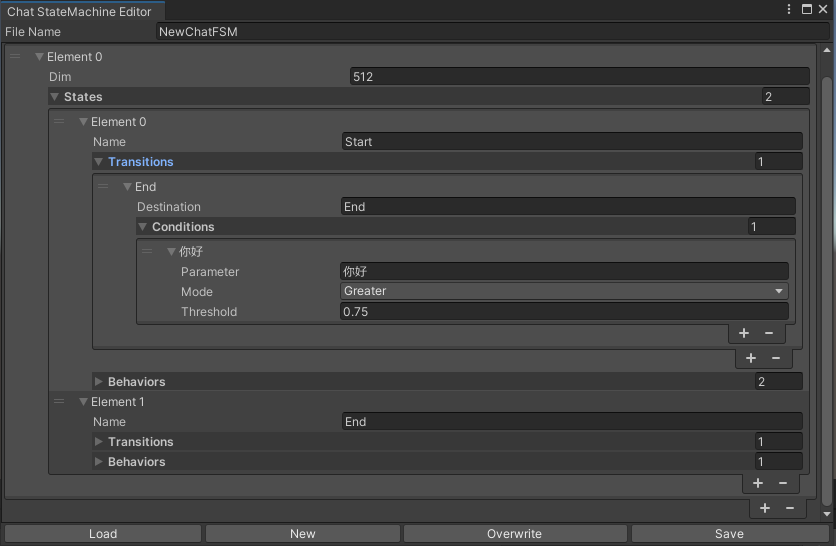
Una StateMachine que cambia establece según el contenido de chat. La anidación de Statemachine (Sustatemachine) no es compatible actualmente. Dependiendo de la conversación, puede saltar a diferentes estados y ejecutar el conjunto correspondiente de comportamientos, similar a la máquina de estado animado de Unity.
 public void BuildStateMachine ( )
{
    chatStateMachine = new ChatStateMachine ( dim : 512 ) ;
    chatStateMachineCtrl = new ChatStateMachineCtrl (
        TextEncoder : encoder ,
        //Input a host Unity.Object
        hostObject : gameObject ,
        layer : 1
    ) ;
    chatStateMachine . AddState ( "Stand" ) ;
    chatStateMachine . AddState ( "Sit" ) ;
    chatStateMachine . states [ 0 ] . AddBehavior < StandBehavior > ( ) ;
    chatStateMachine . states [ 0 ] . AddTransition ( new LazyStateReference ( "Sit" ) ) ;
    // Add a conversion directive and set scoring thresholds and conditions
    chatStateMachine . states [ 0 ] . transitions [ 0 ] . AddCondition ( ChatConditionMode . Greater , 0.6f , "I sit down" ) ;
    chatStateMachine . states [ 0 ] . transitions [ 0 ] . AddCondition ( ChatConditionMode . Greater , 0.6f , "I want to have a rest on chair" ) ;
    chatStateMachine . states [ 1 ] . AddBehavior < SitBehavior > ( ) ;
    chatStateMachine . states [ 1 ] . AddTransition ( new LazyStateReference ( "Stand" ) ) ;
    chatStateMachine . states [ 1 ] . transitions [ 0 ] . AddCondition ( ChatConditionMode . Greater , 0.6f , "I'm well rested" ) ;
    chatStateMachineCtrl . SetStateMachine ( 0 , chatStateMachine ) ;
}
 public void LoadFromBytes ( string bytesFilePath )
{
    chatStateMachineCtrl . Load ( bytesFilePath ) ;
} public class CustomChatBehavior : ChatStateMachineBehavior
{
private GameObject hostGameObject ;
public override void OnStateMachineEnter ( UnityEngine . Object hostObject )
{
//Get host Unity.Object
hostGameObject = hostObject as GameObject ;
}
public override void OnStateEnter ( )
{
//Do something
}
public override void OnStateUpdate ( )
{
//Do something
}
public override void OnStateExit ( )
{
//Do something
}
} private void RunStateMachineAfterPipeline ( )
{
var chain = PipelineCtrl . ToChain ( ) . Input ( "Your question." ) . CastStringValue ( "stringValue" )
| new StateMachineChain ( chatStateMachineCtrl , "stringValue" ) ;
await chain . Run ( ) ;
}Invocar herramientas basadas en el flujo de trabajo reactagente.
Aquí hay un ejemplo:
 var userCommand = @"I want to watch a dance video." ;
var llm = LLMFactory . Create ( LLMType . ChatGPT , settingsAsset ) as OpenAIClient ;
llm . StopWords = new ( ) { " n Observation:" , " n t Observation:" } ;

//Create agent with muti-tools
var chain =
    Chain . Set ( userCommand )
    | Chain . ReActAgentExecutor ( llm )
        . UseTool ( new AgentLambdaTool (
            "Play random dance video" ,
            @"A wrapper to select random dance video and play it. Input should be 'None'." ,
            ( e ) =>
            {
                PlayRandomDanceVideo ( ) ;
                //Notice agent it finished its work
                return UniTask . FromResult ( "Dance video 'Queencard' is playing now." ) ;
            } ) )
        . UseTool ( new AgentLambdaTool (
            "Sleep" ,
            @"A wrapper to sleep." ,
            ( e ) =>
            {
                return UniTask . FromResult ( "You are now sleeping." ) ;
            } ) )
        . Verbose ( true ) ;

//Run chain
Debug . Log ( await chain . Run ( "text" ) ) ; Aquí hay algunas aplicaciones que he hecho. Como incluyen algunos complementos comerciales, solo hay versiones de compilación disponibles.
Ver página de lanzamiento
Basado en unichat para hacer una aplicación similar en Unity
La versión del repositorio sincronizado es
V0.0.1-alpha, la demostración está esperando ser actualizada.
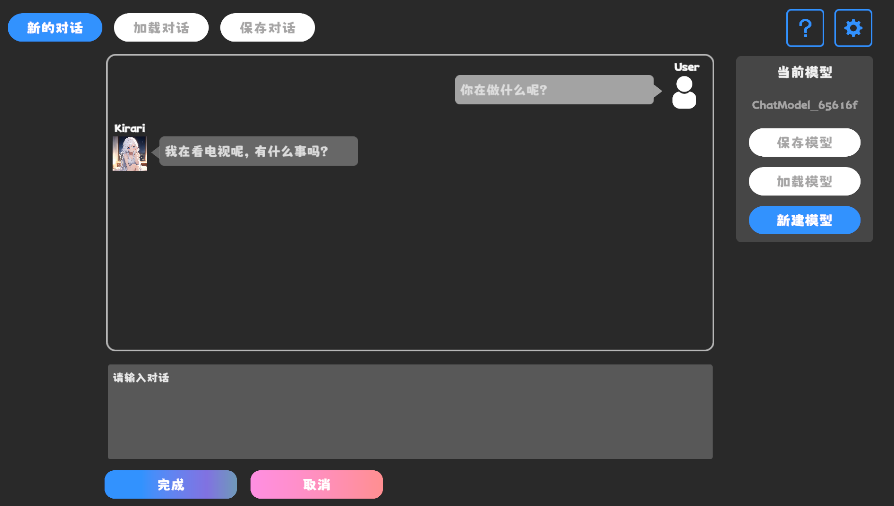
Ver página de lanzamiento
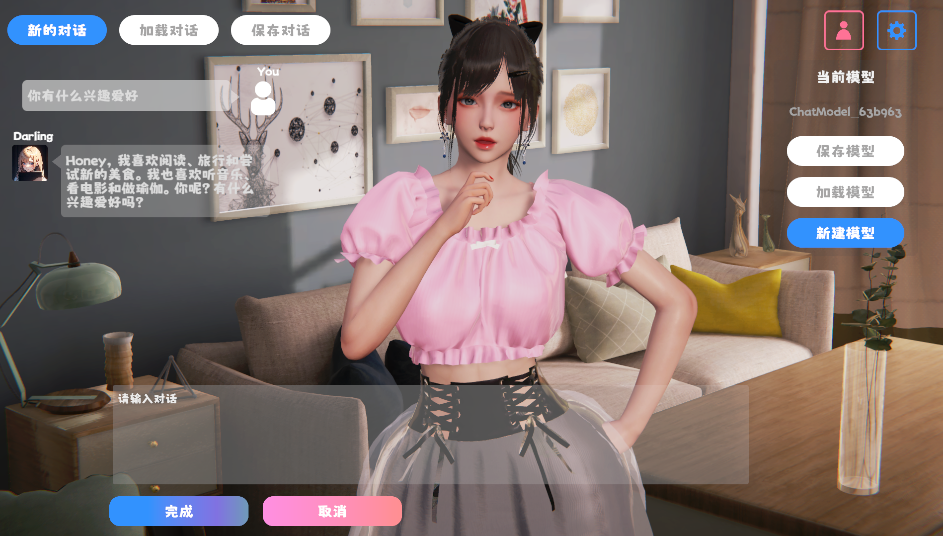
Contiene componentes de comportamiento y voz y aún no está disponible.
La demostración usa TavernAI la estructura de datos del personaje, y podemos escribir la personalidad del personaje, las conversaciones de muestra y los escenarios de chat en imágenes.
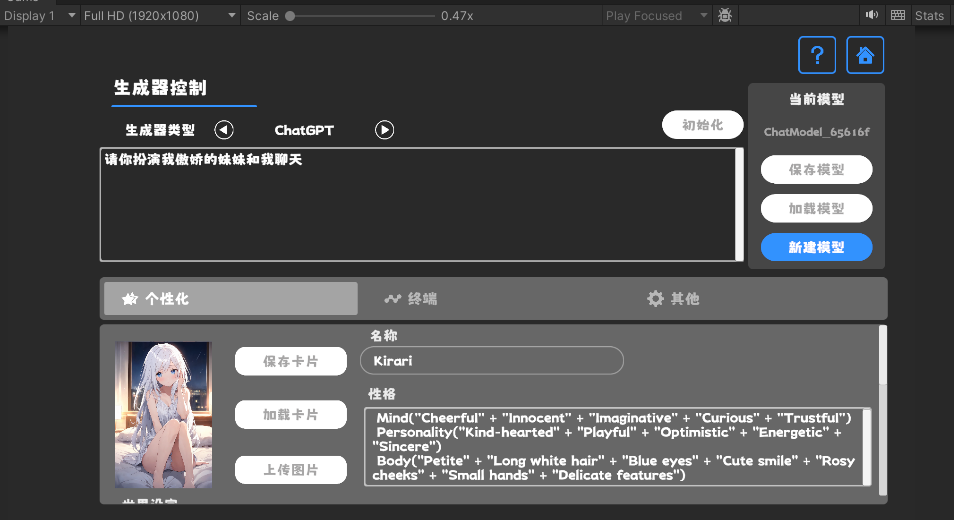
Si usa la tarjeta de caracteres TavernAI , la palabra de referencia anterior se sobrescribe.
https://www.akikurisu.com/blog/posts/create-chatbox-in-unity-2024-03-19/
https://www.akikurisu.com/blog/posts/use-nlp-in-unity-2024-04-03/







